
从一个prismWpfMVVM的例子中学到的
整个程序如下,从博客园一个作者看到的例子,但是对这个例子做了点修改。我觉得这个更符合MVVM模式。这个用到了prism框架,在项目中要引用Microsoft.Practices.Prism.dll
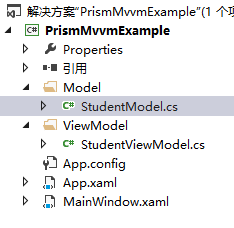
按照程序开发顺序记录如下步骤:
一、先设计界面,这样才知道有哪些Model。
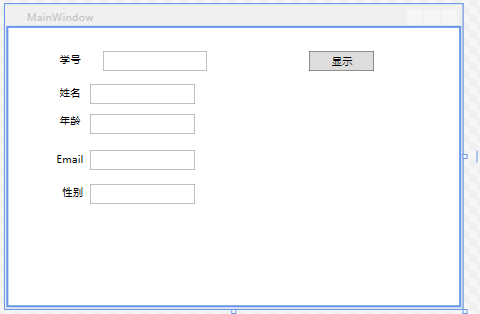
相应的xaml代码如下:
 <Window x:Class="PrismMvvmExample.MainWindow"

 xmlns="http://schemas.microsoft.com/winfx/2006/xaml/presentation"

 xmlns:x="http://schemas.microsoft.com/winfx/2006/xaml"

 Title="MainWindow" Height="" Width="">

 <Grid>

 <Label Content="学号" Height="" HorizontalAlignment="Left" Margin="54,23,0,0" Name="labelStudentId" VerticalAlignment="Top" />

 <TextBox Text="{Binding Student.StudentId}" IsReadOnly="True" Height="" HorizontalAlignment="Right" Margin="0,27,289,0" Name="textBoxStudentId" VerticalAlignment="Top" Width="" />

 <Label Content="姓名" Height="" HorizontalAlignment="Left" Margin="54,61,0,0" Name="labelStudentName" VerticalAlignment="Top" />

 <TextBox Text="{Binding Student.StudentName}" IsReadOnly="True" Height="" HorizontalAlignment="Left" Margin="94,65,0,0" Name="textBoxStudentName" VerticalAlignment="Top" Width="" />

 <Label Content="年龄" Height="" HorizontalAlignment="Left" Margin="54,94,0,0" Name="labelStudentAge" VerticalAlignment="Top" />

 <TextBox Text="{Binding Student.StudentAge}" IsReadOnly="True" Height="" HorizontalAlignment="Left" Margin="94,99,0,0" Name="textBoxStudentAge" VerticalAlignment="Top" Width="" />

 <Label Content="Email" Height="" HorizontalAlignment="Left" Margin="50,138,0,0" Name="labelStudentEmail" VerticalAlignment="Top" />

 <TextBox Text="{Binding Student.StudentEmail}" IsReadOnly="True" Height="" HorizontalAlignment="Left" Margin="94,141,0,0" Name="textBoxStudentEmail" VerticalAlignment="Top" Width="" />

 <Label Content="性别" Height="" HorizontalAlignment="Left" Margin="57,176,0,0" Name="labelStudentSex" VerticalAlignment="Top" />

 <TextBox Text="{Binding Student.StudentSex}" IsReadOnly="True" Height="" HorizontalAlignment="Left" Margin="94,180,0,0" Name="textBoxStudentSex" VerticalAlignment="Top" Width="" />

 <Button Command="{Binding ShowCommand}" Content="显示" Height="" HorizontalAlignment="Left" Margin="345,27,0,0" Name="buttonShow" VerticalAlignment="Top" Width="" />

 </Grid>

 </Window>
二、然后就是从UI界面抽象出Model。
StudentModel.cs:
public class StudentModel
{
/// <summary>
/// 学号
/// </summary>
public int StudentId
{
get;
set;
} /// <summary>
/// 姓名
/// </summary>
public string StudentName
{
get;
set;
} /// <summary>
/// 年龄
/// </summary>
public int StudentAge
{
get;
set;
} /// <summary>
/// </summary>
public string StudentEmail
{
get;
set; } /// <summary>
/// 性别
/// </summary>
public string StudentSex
{
get;
set;
}
}
三、接下来就是ViewModel了。
StudentViewModel.cs:
 public class StudentViewModel:NotificationObject

 {

 public DelegateCommand ShowCommand { get; set; }

 public StudentViewModel()

 {

 ShowCommand = new DelegateCommand(new Action(ShowStudentInfo));

 }

 private StudentModel student;

 public StudentModel Student

 {

 get { return student; }

 set

 {

 student = value;

 this.RaisePropertyChanged("Student");//Student这个StudentModel类的对象改变

 }

 }

 public StudentModel StudentTemp { get; set; }

 private void LoadData()

 {

 StudentTemp = new StudentModel();

 StudentTemp.StudentId = ;

 StudentTemp.StudentName = "tina";

 StudentTemp.StudentAge = ;

 StudentTemp.StudentEmail = "aa@qq.com";

 StudentTemp.StudentSex = "大帅哥姐";

 }

 private void ShowStudentInfo()

 {

 #region --正确的方式--

 //this.Student = StudentTemp;

 this.LoadData();

 //要对象改变,那么也要用一个对象赋值给它,让他改变,即用对象改变对象

 this.Student = StudentTemp;

 #endregion

 #region --无效的方式,程序只认为改变成员,并没有改变对象--

 //Student = new StudentModel();

 //Student.StudentId = 1;

 //Student.StudentName = "tina";

 //Student.StudentAge = 20;

 //Student.StudentEmail = "aa@qq.com";

 //Student.StudentSex = "大帅哥姐";

 #endregion

 }

 }
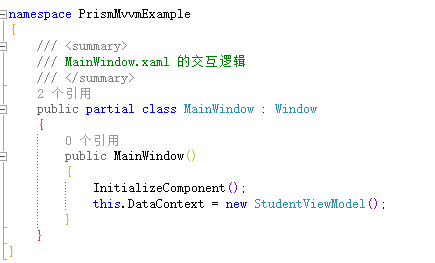
最后就是把ViewModel和View关联起来:
MainWindow.xaml.cs:
从一个prismWpfMVVM的例子中学到的的更多相关文章
- 用一个简单的例子来理解python高阶函数
============================ 用一个简单的例子来理解python高阶函数 ============================ 最近在用mailx发送邮件, 写法大致如 ...
- Spring-Context之一:一个简单的例子
很久之前就想系统的学习和掌握Spring框架,但是拖了很久都没有行动.现在趁着在外出差杂事不多,就花时间来由浅入深的研究下Spring框架.Spring框架这几年来已经发展成为一个巨无霸产品.从最初的 ...
- 高仿“点触验证码”做的一个静态Html例子
先上源码: <html> <head> <title>TouClick - Designed By MrChu</title> <meta htt ...
- 关于apriori算法的一个简单的例子
apriori算法是关联规则挖掘中很基础也很经典的一个算法,我认为很多教程出现大堆的公式不是很适合一个初学者理解.因此,本文列举一个简单的例子来演示下apriori算法的整个步骤. 下面这个表格是代表 ...
- 一个UWSGI的例子
摘要:uwsgi执行顺序:启动master进程,执行python脚本的公共代码(import同一层).然后生成worker进程,uwsgi.post_fork_hook=init_functions, ...
- 扩展Python模块系列(二)----一个简单的例子
本节使用一个简单的例子引出Python C/C++ API的详细使用方法.针对的是CPython的解释器. 目标:创建一个Python内建模块test,提供一个功能函数distance, 计算空间中两 ...
- fitnesse - 一个简单的例子(slim)
fitnesse - 一个简单的例子(slim) 2017-09-30 目录1 编写测试代码(Fixture code)2 编写wiki page并运行 2.1 新建wikiPage 2.2 运行 ...
- Struts2的配置和一个简单的例子
Struts2的配置和一个简单的例子 笔记仓库:https://github.com/nnngu/LearningNotes 简介 这篇文章主要讲如何在 IntelliJ IDEA 中使用 Strut ...
- 一个简单的例子搞懂ES6之Promise
ES5中实现异步的常见方式不外乎以下几种: 1. 回调函数 2. 事件驱动 2. 自定义事件(根本上原理同事件驱动相同) 而ES6中的Promise的出现就使得异步变得非常简单.promise中的异步 ...
随机推荐
- (转)protobuf-----Mac 机器安装
转自: https://blog.csdn.net/u014534808/article/details/80203018 安装之旅 1. 下载protobufprotobuf下载页面 在此页面选择合 ...
- c结构体指针使用
#include <stdio.h> #include<stdlib.h> #include<string.h> typedef struct _Date { un ...
- MySQL sql_mode 说明(及处理一起sql_mode引发的问题)
转自:https://segmentfault.com/a/1190000005936172 1. MySQL 莫名变成了 Strict SQL Mode 最近测试组那边反应数据库部分写入失败,app ...
- vue-router如何参数传递
1.我们用<router-link>标签中的to属性进行传参,需要您注意的是这里的to要进行一个绑定,写成:to 先来看一下这种传参方法的基本语法: <router-link :to ...
- jQuery实现的文字逐行向上间歇滚动效果示例
<!doctype html> <html> <head> <meta charset="utf-8"> <title> ...
- 一个切图仔的 JS 笔记
1,常用数据操作 Math.round(mum,2);num.toFixed(2);两位数 Math.floor(); 返回不大于的最大整数 Math.ceil(); 则是不小于他的最小整数 Math ...
- Astyle 快速入门,常用指令
--style=java -n -p -c !E astyle是一个命令行工具,命令语法很简单: astyle [options] < original > Beauti ...
- “瑞士军刀”Netcat使用方法总结
前言 最近在做渗透测试的时候遇到了端口监听和shell的反弹问题,在这个过程中自己对Netcat这一款神器有了新的认识,现将一些Netcat的用法做一个小总结,希望对各位有帮助! Netcat简介 N ...
- 小程序开发之wepy框架
ps 本教程使用wepy 1.7+以上的版本 wepy-让小程序支持组件化开发的框架 鹅厂出品,用于开发自家产品的框架还是很良心的,框架设计思路上参照vue,但不是全部照搬,这点要注意. 对微信小程序 ...
- 初识OpenCV-Python - 005: 识别视频中的蓝色
此次主要学习了如何将BGR转成HSV,主要用到cv2.cvtColor()和cv2.inRange()函数来识别视频中的蓝色物体. code: import cv2import numpy as np ...