
查看mysql数据库版本方法总结
当你接手某个mysql数据库管理时,首先你需要查看维护的mysql数据库版本;当开发人员问你mysql数据库版本时,而恰好你又遗忘了,那么此时也需要去查看mysql数据库的版本..............。下文总结一下Linux平台下查看mysql数据库的方法.个人觉得总结的比较全面了。
方法1:登录数据库时,你可以看到对应mysql数据库的版本信息,如下所示:
[root@DB-Server ~]# mysql -u root -p
Enter password:
Welcome to the MySQL monitor. Commands end with ; or \g.
Your MySQL connection id is 3
Server version: 5.6.19 MySQL Community Server (GPL)
Copyright (c) 2000, 2014, Oracle and/or its affiliates. All rights reserved.
Oracle is a registered trademark of Oracle Corporation and/or its
affiliates. Other names may be trademarks of their respective
owners.
Type 'help;' or '\h' for help. Type '\c' to clear the current input statement.
mysql>

方法二:使用系统函数查看mysql数据库版本。
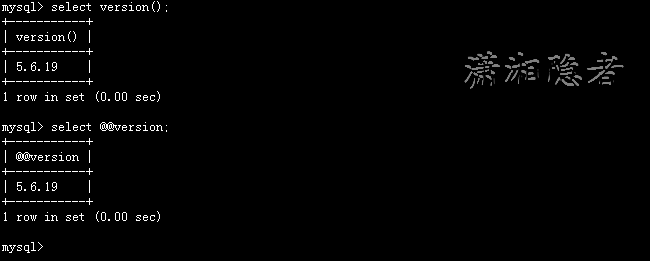
mysql> select version();
+-----------+
| version() |
+-----------+
| 5.6.19 |
+-----------+
1 row in set (0.00 sec)
mysql> select @@version;
+-----------+
| @@version |
+-----------+
| 5.6.19 |
+-----------+
1 row in set (0.00 sec)
mysql>

方法3:使用status命令查看,如下所示,查看Server version后内容。
mysql> status
--------------
mysql Ver 14.14 Distrib 5.6.19, for Linux (x86_64) using EditLine wrapper
Connection id: 3
Current database:
Current user: root@localhost
SSL: Not in use
Current pager: stdout
Using outfile: ''
Using delimiter: ;
Server version: 5.6.19 MySQL Community Server (GPL)
Protocol version: 10
Connection: Localhost via UNIX socket
Server characterset: latin1
Db characterset: latin1
Client characterset: utf8
Conn. characterset: utf8
UNIX socket: /var/lib/mysql/mysql.sock
Uptime: 2 hours 33 min 14 sec
Threads: 1 Questions: 22 Slow queries: 0 Opens: 67 Flush tables: 1 Open tables: 60 Queries per second avg: 0.002
--------------

方法4:使用mysql -V命令查看
[root@DB-Server ~]# mysql -V
mysql Ver 14.14 Distrib 5.6.19, for Linux (x86_64) using EditLine wrapper
[root@DB-Server ~]# mysql --version
mysql Ver 14.14 Distrib 5.6.19, for Linux (x86_64) using EditLine wrapper
方法5:在mysql --help命令内容中查找
[root@DB-Server ~]# mysql --help | grep Distrib
mysql Ver 14.14 Distrib 5.6.19, for Linux (x86_64) using EditLine wrapper
方法6:通过rpm命令查看安装包得知mysql数据库版本
[root@DB-Server ~]# rpm -qa | grep -i mysql
MySQL-client-5.6.19-1.rhel5
MySQL-server-5.6.19-1.rhel5
[root@DB-Server ~]#
方法7:SHOW VARIABLES 命令查看
mysql> SHOW VARIABLES LIKE "%version%";
+-------------------------+------------------------------+
| Variable_name | Value |
+-------------------------+------------------------------+
| innodb_version | 5.6.19 |
| protocol_version | 10 |
| slave_type_conversions | |
| version | 5.6.19 |
| version_comment | MySQL Community Server (GPL) |
| version_compile_machine | x86_64 |
| version_compile_os | Linux |
+-------------------------+------------------------------+
7 rows in set (0.00 sec)
mysql>
方法8: mysqladmin -uroot -p -hlocalhost version 命令查看mysql数据库版本。其实这个方法也可以归为方法1
[root@DB-Server ~]# mysqladmin -uroot -p -hlocalhost version;
Enter password:
mysqladmin Ver 8.42 Distrib 5.6.19, for Linux on x86_64
Copyright (c) 2000, 2014, Oracle and/or its affiliates. All rights reserved.
Oracle is a registered trademark of Oracle Corporation and/or its
affiliates. Other names may be trademarks of their respective
owners.
Server version 5.6.19
Protocol version 10
Connection Localhost via UNIX socket
UNIX socket /var/lib/mysql/mysql.sock
Uptime: 2 hours 57 min 53 sec
Threads: 1 Questions: 42 Slow queries: 0 Opens: 67 Flush tables: 1 Open tables: 60 Queries per second avg: 0.003
参考资料:
http://dev.mysql.com/doc/refman/5.0/en/installation-version.html
http://www.cnblogs.com/end/archive/2011/10/18/2216461.html
查看mysql数据库版本方法总结的更多相关文章
- 三种查看MySQL数据库版本的方法
https://blog.csdn.net/hj7jay/article/details/51921504 1.使用-V参数 首先我们想到的肯定就是查看版本号的参数命令,参数为-V(大写字母)或者-- ...
- 查看Mysql数据库版本
一.使用终端 1.参数为-V(大写字母)或者--version 使用方法: D:\mysql\bin>mysql -V 或者 D:\mysql\bin>mysql --version
- 用Navicat Premium快速查看mysql数据库版本信息
在出现的界面输入命令 select version();
- CentOS6.8下MySQL数据库版本信息查看
方法1:使用mysql -v命令查看: [root@yeebian mysql]# mysql -V mysql Ver 14.14 Distrib 5.1.73, for redhat-linux- ...
- Centos下查看mysql的版本
判断是否安装了mysql 输入 whereis mysql 如果安装了会显示mysql的安装所在路径 方法1:使用mysql -v命令查看: 1 2 3 4 [root@yeebian mysql ...
- 如何查看MySQL数据库的版本
如何查看MySQL数据库的版本 一.总结 一句话总结: SQL语句:select version(); 命令行:mysql -V 或 mysql --version 二.三种方法查看MySQL数据库的 ...
- Linux下重启mysql数据库的方法
原文地址:Linux下重启mysql数据库的方法作者:于士博的视频教程 方法一: 命令: [root@localhost /]# /etc/init.d/mysql start|stop|rest ...
- C#访问MySQL数据库的方法
C#访问MySQL数据库的方法 (1)首先需要下载C#访问MySQL数据库的ADO.NET驱动程序 下载地址为: http://dev.mysql.com/downloads/connector/ne ...
- SQL命令查看Mysql数据库大小
SQL命令查看Mysql数据库大小的方法. 要想知道每个数据库的大小的话,步骤如下:1.进入information_schema 数据库(存放了其他的数据库的信息)use information_sc ...
随机推荐
- Why is HttpContext.Current null after await?
今天在对项目代码进行异步化改进的时候,遇到一个奇怪的问题(莫笑,以前没遇过),正如标题一样,HttpContext.Current 在 await 异步执行之后,就会变为 null. 演示代码: pu ...
- 最详细的网站改版SEO优化指南:如何让排名不降反升
我知道,网站改版很是让人头疼.首先,这个过程需要很长时间还有大量工作要做,并且通常结果不会如你的预期.其次,改版确实有破坏之前为 SEO 所做努力的风险. 但不要因为通常网站改版带来排名下降就认为这是 ...
- 关于table的一些记录
HTML有10个表格相关标签 <caption> 表格的大标题,该标记可以出现在<table> 之间的任意位置.它对于搜索引擎的机器人记录信息十分重要.参数有align.val ...
- 深入seajs源码系列二
模块类和状态类 参照上文的demo,我们结合源码分析在简单的API调用的背后,到底使用了什么技巧来实现各个模块的依赖加载以及模块API的导出. 首先定义了一个Module类,对应与一个模块 funct ...
- Oracle库Delete删除千万以上普通堆表数据的方法
需求:Oracle数据库delete删除普通堆表千万条历史记录. 直接删除的影响: 1.可能由于undo表空间不足从而导致最终删除失败的问题: 2.可能导致undo表空间过度使用,影响到其他用户正常操 ...
- AppCan学习笔记----关闭页面listview动态加载数据
AppCan页面关闭 AppCan 的页面是由两个HTML组成,如果要完全关闭的话需要在主HTML eg.index.html中关闭,关闭方法:appcan.window.close(-1); 管道 ...
- Lucene教程
一:简单的示例 1.1:生成索引 1.1.1:Field.Store和Field.Index 1.1.2:为数字生成索引 1.1.3:为索引加权 1.1.4:为日期生成索引 1.2:查询 1.2.1: ...
- java枚举类型学习
用的不多,但用的时候仅仅简单的使用,不太明白原理,今天就系统的学一下枚举.参考:java编程思想. Update: 枚举可以当做数据字典来存储,通常只要一个字段即instance本身,toString ...
- [Java 进阶]Java中的国际化
背景知识 现代软件开发,往往做出的应用程序不止给一个国家的人去使用.不同国家的人往往存在语言文字不通的问题.由此产生了国际化(internationalization).多语言(multi-langu ...
- authorization与URL授权
利用Web.config中的authorization标签设置授权属于URL授权. 使用 URL 授权 通过 URL 授权,您可以显式允许或拒绝某个用户名或角色对特定目录的访问权限.为此,请在该目录的 ...