
SpringSecurity 默认表单登录页展示流程源码
SpringSecurity 默认表单登录页展示流程源码
本篇主要讲解 SpringSecurity提供的默认表单登录页 它是如何展示的的流程,
涉及
1.FilterSecurityInterceptor,
2.ExceptionTranslationFilter ,
3.DefaultLoginPageGeneratingFilter 过滤器,
并且简单介绍了 AccessDecisionManager 投票机制
1.准备工作(体验SpringSecurity默认表单认证)
1.1 创建SpringSecurity项目
先通过IDEA 创建一个SpringBoot项目 并且依赖SpringSecurity,Web依赖
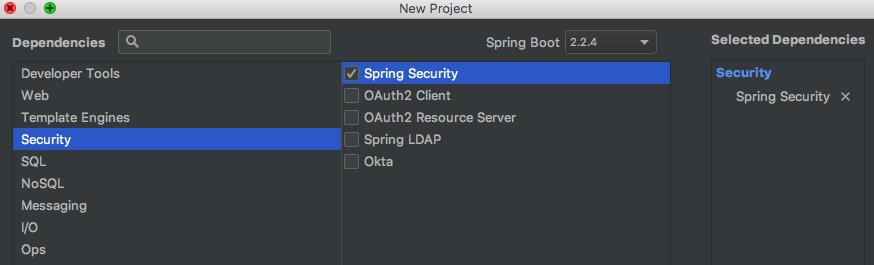
此时pom.xml会自动添加
<dependency>

        <groupId>org.springframework.boot</groupId>

        <artifactId>spring-boot-starter-security</artifactId>

</dependency>
1.2 提供一个接口
@RestController

public class HelloController {

@RequestMapping("/hello")

public String hello() {

    return "Hello SpringSecurity";

  }

}
1.3 启动项目
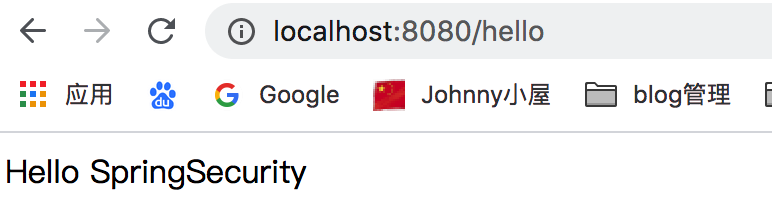
直接访问 提供的接口
http://localhost:8080/hello
会发现浏览器被直接重定向到了 /login 并且显示如下默认的表单登录页
http://localhost:8080/login

1.4 登录
在启动项目的时候 控制台会打印一个 seuciryt password : xxx
Using generated security password: f520875f-ea2b-4b5d-9b0c-f30c0c17b90b
直接登录
用户名:user 密码 :f520875f-ea2b-4b5d-9b0c-f30c0c17b90b
登录成功并且 浏览器又会重定向到 刚刚访问的接口
2.springSecurityFilterchain 过滤器链
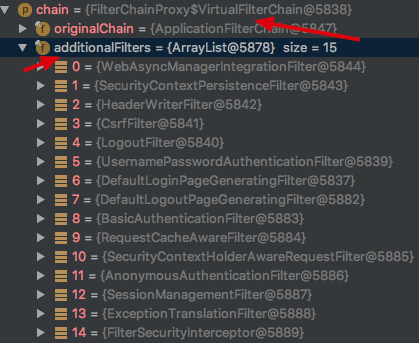
如果你看过我另一篇关于SpringSecurity初始化源码的博客,那么你一定知道当SpringSecurity项目启动完成后会初始化一个 springSecurityFilterchain 它内部 additionalFilters属性初始化了很多Filter 如下
所有的请求都会经过这一系列的过滤器 Spring Security就是通过这些过滤器 来进行认证授权等
3.FilterSecurityInterceptor (它会判断这次请求能否通过)
FilterSecurityInterceptor是过滤器链中最后一个过滤器,主要用于判断请求能否通过,内部通过AccessDecisionManager 进行投票判断
当我们未登录访问
http://localhost:8080/hello
请求会被 FilterSecurityInterceptor 拦截
public void doFilter(ServletRequest request, ServletResponse response,

		FilterChain chain) throws IOException, ServletException {

	FilterInvocation fi = new FilterInvocation(request, response, chain);

	invoke(fi);

}
重点看invoke方法
public void invoke(FilterInvocation fi) throws IOException, ServletException {

	if ((fi.getRequest() != null)

			&& (fi.getRequest().getAttribute(FILTER_APPLIED) != null)

			&& observeOncePerRequest) {

		// filter already applied to this request and user wants us to observe

		// once-per-request handling, so don't re-do security checking

		fi.getChain().doFilter(fi.getRequest(), fi.getResponse());

	}

	else {

		// first time this request being called, so perform security checking

		if (fi.getRequest() != null && observeOncePerRequest) {

			fi.getRequest().setAttribute(FILTER_APPLIED, Boolean.TRUE);

		}

		InterceptorStatusToken token = super.beforeInvocation(fi);

		try {

			fi.getChain().doFilter(fi.getRequest(), fi.getResponse());

		}

		finally {

			super.finallyInvocation(token);

		}

		super.afterInvocation(token, null);

	}

}
源码中有这样一句,其实就是判断当前用户是否能够访问指定的接口,可以则执行 fi.getChain().doFilter 调用访问的接口
否则 内部会抛出异常
InterceptorStatusToken token = super.beforeInvocation(fi);
beforeInvocation 方法内部是通过 accessDecisionManager 去做决定的
Spring Security已经内置了几个基于投票的AccessDecisionManager包括(AffirmativeBased ,ConsensusBased ,UnanimousBased)当然如果需要你也可以实现自己的AccessDecisionManager
使用这种方式,一系列的AccessDecisionVoter将会被AccessDecisionManager用来对Authentication是否有权访问受保护对象进行投票,然后再根据投票结果来决定是否要抛出AccessDeniedException
this.accessDecisionManager.decide(authenticated, object, attributes);
AffirmativeBased的 decide的实现如下
public void decide(Authentication authentication, Object object, Collection<ConfigAttribute> configAttributes) throws AccessDeniedException {

    int deny = 0;

    Iterator var5 = this.getDecisionVoters().iterator();

    while(var5.hasNext()) {

        AccessDecisionVoter voter = (AccessDecisionVoter)var5.next();

        int result = voter.vote(authentication, object, configAttributes);

        if (this.logger.isDebugEnabled()) {

            this.logger.debug("Voter: " + voter + ", returned: " + result);

        }

        switch(result) {

        case -1:

            ++deny;

            break;

        case 1:

            return;

        }

    }

    if (deny > 0) {

        throw new AccessDeniedException(this.messages.getMessage("AbstractAccessDecisionManager.accessDenied", "Access is denied"));

    } else {

        this.checkAllowIfAllAbstainDecisions();

    }

}
AffirmativeBased的逻辑是这样的:
   (1)只要有AccessDecisionVoter的投票为ACCESS_GRANTED则同意用户进行访问;

   (2)如果全部弃权也表示通过;

   (3)如果没有一个人投赞成票,但是有人投反对票,则将抛出AccessDeniedException。
当我们第一次访问的时候
http://localhost:8080/hello的时候
返回 result = -1 会抛出 AccessDeniedException 拒绝访问异常
4.ExceptionTranslationFilter (捕获AccessDeniedException异常)
该过滤器它会接收到FilterSecurityInterceptor抛出的 AccessDeniedException异常)并且进行捕获,然后发送重定向到/login请求
源码如下:
public void doFilter(ServletRequest req, ServletResponse res, FilterChain chain)

		throws IOException, ServletException {

	HttpServletRequest request = (HttpServletRequest) req;

	HttpServletResponse response = (HttpServletResponse) res;

	try {

		chain.doFilter(request, response);

		logger.debug("Chain processed normally");

	}

	catch (IOException ex) {

		throw ex;

	}

	catch (Exception ex) {

		// Try to extract a SpringSecurityException from the stacktrace

		Throwable[] causeChain = throwableAnalyzer.determineCauseChain(ex);

		RuntimeException ase = (AuthenticationException) throwableAnalyzer

				.getFirstThrowableOfType(AuthenticationException.class, causeChain);

		if (ase == null) {

			ase = (AccessDeniedException) throwableAnalyzer.getFirstThrowableOfType(

					AccessDeniedException.class, causeChain);

		}

		if (ase != null) {

			if (response.isCommitted()) {

				throw new ServletException("Unable to handle the Spring Security Exception because the response is already committed.", ex);

			}

			handleSpringSecurityException(request, response, chain, ase);

		}

		else {

			// Rethrow ServletExceptions and RuntimeExceptions as-is

			if (ex instanceof ServletException) {

				throw (ServletException) ex;

			}

			else if (ex instanceof RuntimeException) {

				throw (RuntimeException) ex;

			}

			// Wrap other Exceptions. This shouldn't actually happen

			// as we've already covered all the possibilities for doFilter

			throw new RuntimeException(ex);

		}

	}

}
当获取异常后 调用
handleSpringSecurityException(request, response, chain, ase);
handleSpringSecurityException 源码如下:
private void handleSpringSecurityException(HttpServletRequest request,

		HttpServletResponse response, FilterChain chain, RuntimeException exception)

		throws IOException, ServletException {

	if (exception instanceof AuthenticationException) {

		logger.debug(

				"Authentication exception occurred; redirecting to authentication entry point",

				exception);

		sendStartAuthentication(request, response, chain,

				(AuthenticationException) exception);

	}

	else if (exception instanceof AccessDeniedException) {

		Authentication authentication = SecurityContextHolder.getContext().getAuthentication();

		if (authenticationTrustResolver.isAnonymous(authentication) || authenticationTrustResolver.isRememberMe(authentication)) {

			logger.debug(

					"Access is denied (user is " + (authenticationTrustResolver.isAnonymous(authentication) ? "anonymous" : "not fully authenticated") + "); redirecting to authentication entry point",

					exception);

			sendStartAuthentication(

					request,

					response,

					chain,

					new InsufficientAuthenticationException(

						messages.getMessage(

							"ExceptionTranslationFilter.insufficientAuthentication",

							"Full authentication is required to access this resource")));

		}

		else {

			logger.debug(

					"Access is denied (user is not anonymous); delegating to AccessDeniedHandler",

					exception);

			accessDeniedHandler.handle(request, response,

					(AccessDeniedException) exception);

		}

	}

}
先判断获取的异常是否是AccessDeniedException 再判断是否是匿名用户,如果是则调用 sendStartAuthentication 重定向到登录页面
重定向登录页面之前会保存当前访问的路径,这就是为什么我们访问 /hello接口后 再登录成功后又会跳转到 /hello接口,因为在重定向到/login接口前 这里进行了保存 requestCache.saveRequest(request, response);
protected void sendStartAuthentication(HttpServletRequest request,

		HttpServletResponse response, FilterChain chain,

		AuthenticationException reason) throws ServletException, IOException {

	// SEC-112: Clear the SecurityContextHolder's Authentication, as the

	// existing Authentication is no longer considered valid

	SecurityContextHolder.getContext().setAuthentication(null);

	requestCache.saveRequest(request, response);

	logger.debug("Calling Authentication entry point.");

	authenticationEntryPoint.commence(request, response, reason);

}
authenticationEntryPoint.commence(request, response, reason);方法内部
调用LoginUrlAuthenticationEntryPoint 的 commence方法
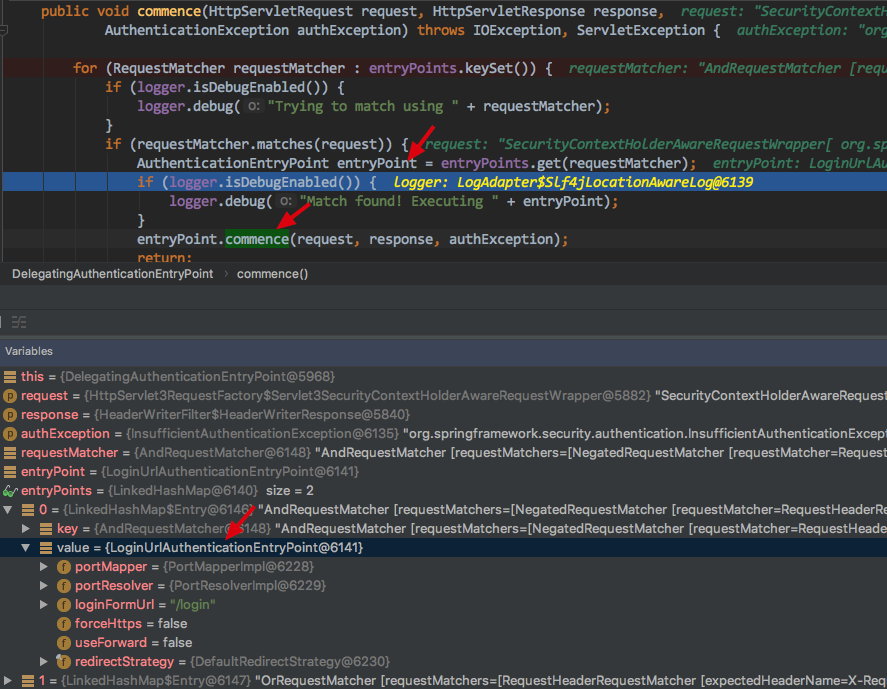
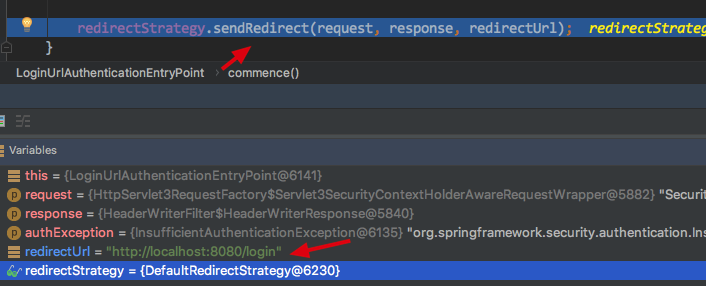
LoginUrlAuthenticationEntryPoint 的commence方法内部有 构造重定向URL的方法
redirectUrl = buildRedirectUrlToLoginPage(request, response, authException);

protected String buildRedirectUrlToLoginPage(HttpServletRequest request,

		HttpServletResponse response, AuthenticationException authException) {

	String loginForm = determineUrlToUseForThisRequest(request, response,

			authException);

protected String determineUrlToUseForThisRequest(HttpServletRequest request,

		HttpServletResponse response, AuthenticationException exception) {

	return getLoginFormUrl();

}
最终会获取到需要重定向的URL /login

然后sendRedirect 既会重定向到 /login 请求
5.DefaultLoginPageGeneratingFilter (会捕获重定向的/login 请求)
DefaultLoginPageGeneratingFilter是过滤器链中的一个用于捕获/login请求,并且渲染出一个默认表单页面
public void doFilter(ServletRequest req, ServletResponse res, FilterChain chain)

		throws IOException, ServletException {

	HttpServletRequest request = (HttpServletRequest) req;

	HttpServletResponse response = (HttpServletResponse) res;

	boolean loginError = isErrorPage(request);

	boolean logoutSuccess = isLogoutSuccess(request);

	if (isLoginUrlRequest(request) || loginError || logoutSuccess) {

		String loginPageHtml = generateLoginPageHtml(request, loginError,

				logoutSuccess);

		response.setContentType("text/html;charset=UTF-8");

		response.setContentLength(loginPageHtml.getBytes(StandardCharsets.UTF_8).length);

		response.getWriter().write(loginPageHtml);

		return;

	}

	chain.doFilter(request, response);

}
isLoginUrlRequest 判断请求是否是 loginPageUrl
private boolean isLoginUrlRequest(HttpServletRequest request) {

	return matches(request, loginPageUrl);

}
因为我们没有配置所以 默认的 loginPageUrl = /login

验证通过请求路径 能匹配 loginPageUrl
String loginPageHtml = generateLoginPageHtml(request, loginError,

				logoutSuccess);
generateLoginPageHtml 绘制默认的HTML 页面,到此我们默认的登录页面怎么来的就解释清楚了
private String generateLoginPageHtml(HttpServletRequest request, boolean loginError,

		boolean logoutSuccess) {

	String errorMsg = "Invalid credentials";

	if (loginError) {

		HttpSession session = request.getSession(false);

		if (session != null) {

			AuthenticationException ex = (AuthenticationException) session

					.getAttribute(WebAttributes.AUTHENTICATION_EXCEPTION);

			errorMsg = ex != null ? ex.getMessage() : "Invalid credentials";

		}

	}

	StringBuilder sb = new StringBuilder();

	sb.append("<!DOCTYPE html>\n"

			+ "<html lang=\"en\">\n"

			+ "  <head>\n"

			+ "    <meta charset=\"utf-8\">\n"

			+ "    <meta name=\"viewport\" content=\"width=device-width, initial-scale=1, shrink-to-fit=no\">\n"

			+ "    <meta name=\"description\" content=\"\">\n"

			+ "    <meta name=\"author\" content=\"\">\n"

			+ "    <title>Please sign in</title>\n"

			+ "    <link href=\"https://maxcdn.bootstrapcdn.com/bootstrap/4.0.0-beta/css/bootstrap.min.css\" rel=\"stylesheet\" integrity=\"sha384-/Y6pD6FV/Vv2HJnA6t+vslU6fwYXjCFtcEpHbNJ0lyAFsXTsjBbfaDjzALeQsN6M\" crossorigin=\"anonymous\">\n"

			+ "    <link href=\"https://getbootstrap.com/docs/4.0/examples/signin/signin.css\" rel=\"stylesheet\" crossorigin=\"anonymous\"/>\n"

			+ "  </head>\n"

			+ "  <body>\n"

			+ "     <div class=\"container\">\n");

	String contextPath = request.getContextPath();

	if (this.formLoginEnabled) {

		sb.append("      <form class=\"form-signin\" method=\"post\" action=\"" + contextPath + this.authenticationUrl + "\">\n"

				+ "        <h2 class=\"form-signin-heading\">Please sign in</h2>\n"

				+ createError(loginError, errorMsg)

				+ createLogoutSuccess(logoutSuccess)

				+ "        <p>\n"

				+ "          <label for=\"username\" class=\"sr-only\">Username</label>\n"

				+ "          <input type=\"text\" id=\"username\" name=\"" + this.usernameParameter + "\" class=\"form-control\" placeholder=\"Username\" required autofocus>\n"

				+ "        </p>\n"

				+ "        <p>\n"

				+ "          <label for=\"password\" class=\"sr-only\">Password</label>\n"

				+ "          <input type=\"password\" id=\"password\" name=\"" + this.passwordParameter + "\" class=\"form-control\" placeholder=\"Password\" required>\n"

				+ "        </p>\n"

				+ createRememberMe(this.rememberMeParameter)

				+ renderHiddenInputs(request)

				+ "        <button class=\"btn btn-lg btn-primary btn-block\" type=\"submit\">Sign in</button>\n"

				+ "      </form>\n");

	}

	if (openIdEnabled) {

		sb.append("      <form name=\"oidf\" class=\"form-signin\" method=\"post\" action=\"" + contextPath + this.openIDauthenticationUrl + "\">\n"

				+ "        <h2 class=\"form-signin-heading\">Login with OpenID Identity</h2>\n"

				+ createError(loginError, errorMsg)

				+ createLogoutSuccess(logoutSuccess)

				+ "        <p>\n"

				+ "          <label for=\"username\" class=\"sr-only\">Identity</label>\n"

				+ "          <input type=\"text\" id=\"username\" name=\"" + this.openIDusernameParameter + "\" class=\"form-control\" placeholder=\"Username\" required autofocus>\n"

				+ "        </p>\n"

				+ createRememberMe(this.openIDrememberMeParameter)

				+ renderHiddenInputs(request)

				+ "        <button class=\"btn btn-lg btn-primary btn-block\" type=\"submit\">Sign in</button>\n"

				+ "      </form>\n");

	}

	if (oauth2LoginEnabled) {

		sb.append("<h2 class=\"form-signin-heading\">Login with OAuth 2.0</h2>");

		sb.append(createError(loginError, errorMsg));

		sb.append(createLogoutSuccess(logoutSuccess));

		sb.append("<table class=\"table table-striped\">\n");

		for (Map.Entry<String, String> clientAuthenticationUrlToClientName : oauth2AuthenticationUrlToClientName.entrySet()) {

			sb.append(" <tr><td>");

			String url = clientAuthenticationUrlToClientName.getKey();

			sb.append("<a href=\"").append(contextPath).append(url).append("\">");

			String clientName = HtmlUtils.htmlEscape(clientAuthenticationUrlToClientName.getValue());

			sb.append(clientName);

			sb.append("</a>");

			sb.append("</td></tr>\n");

		}

		sb.append("</table>\n");

	}

	if (this.saml2LoginEnabled) {

		sb.append("<h2 class=\"form-signin-heading\">Login with SAML 2.0</h2>");

		sb.append(createError(loginError, errorMsg));

		sb.append(createLogoutSuccess(logoutSuccess));

		sb.append("<table class=\"table table-striped\">\n");

		for (Map.Entry<String, String> relyingPartyUrlToName : saml2AuthenticationUrlToProviderName.entrySet()) {

			sb.append(" <tr><td>");

			String url = relyingPartyUrlToName.getKey();

			sb.append("<a href=\"").append(contextPath).append(url).append("\">");

			String partyName = HtmlUtils.htmlEscape(relyingPartyUrlToName.getValue());

			sb.append(partyName);

			sb.append("</a>");

			sb.append("</td></tr>\n");

		}

		sb.append("</table>\n");

	}

	sb.append("</div>\n");

	sb.append("</body></html>");

	return sb.toString();

}
至此 SpringSecurity 默认表单登录页展示流程源码部分已经全部讲解完毕,会渲染出下面的页面,但是一定要有网的情况,否则样式可能会变化
6.总结
本篇主要讲解 SpringSecurity提供的默认表单登录页 它是如何展示的的流程,包括涉及这一流程中相关的 3个过滤器
1.FilterSecurityInterceptor,
2.ExceptionTranslationFilter ,
3.DefaultLoginPageGeneratingFilter 过滤器,
并且简单介绍了一下 AccessDecisionManager 它主要进行投票来判断该用户是否能够访问相应的 资源
AccessDecisionManager 投票机制我也没有深究 后续我会详细深入一下再展开
个人博客地址: https://www.askajohnny.com 欢迎访问!
本文由博客一文多发平台 OpenWrite 发布!
SpringSecurity 默认表单登录页展示流程源码的更多相关文章
- SpringSecurity 自定义表单登录
SpringSecurity 自定义表单登录 本篇主要讲解 在SpringSecurity中 如何 自定义表单登录 , SpringSecurity默认提供了一个表单登录,但是实际项目里肯定无法使用的 ...
- spring security 之自定义表单登录源码跟踪
上一节我们跟踪了security的默认登录页的源码,可以参考这里:https://www.cnblogs.com/process-h/p/15522267.html 这节我们来看看如何自定义单表认 ...
- SpringSecurity实战记录(一)开胃菜:基于内存的表单登录小Demo搭建
Ps:本次搭建基于Maven管理工具的版本,Gradle版本可以通过gradle init --type pom命令在pom.xml路径下转化为Gradle版本(如下图) (1)构建工具IDEA In ...
- SpringBoot集成Spring Security(4)——自定义表单登录
通过前面三篇文章,你应该大致了解了 Spring Security 的流程.你应该发现了,真正的 login 请求是由 Spring Security 帮我们处理的,那么我们如何实现自定义表单登录呢, ...
- Spring Security 表单登录
1. 简介 本文将重点介绍使用Spring Security登录. 本文将构建在之前简单的Spring MVC示例之上,因为这是设置Web应用程序和登录机制的必不可少的. 2. Maven 依赖 要将 ...
- 10款精美的HTML5表单登录联系和搜索表单
1.HTML5/CSS3仿Facebook登录表单 这款纯CSS3发光登录表单更是绚丽多彩.今天我们要分享一款仿Facebook的登录表单,无论从外观还是功能上说,这款登录表单还是挺接近Faceboo ...
- 【从零开始学BPM,Day2】默认表单开发
[课程主题]主题:5天,一起从零开始学习BPM[课程形式]1.为期5天的短任务学习2.每天观看一个视频,视频学习时间自由安排. [第二天课程] Step 1 软件下载:H3 BPM10.0全开放免费下 ...
- VC POST表单——登录验证新浪邮箱
1.本机环境: Windows XP SP3.ADSL 2.开发工具: WildPackets OmniPeek V5.1.4 Visual C++ 6.0 IE6.0 FlexEdit V2.3.1 ...
- Android逆向破解表单登录程序
Android逆向破解表单登录程序 Android开发 ADT: android studio(as) 程序界面如下,登录成功时弹出通知登录成功,登录失败时弹出通知登录失败. 布局代码 <?xm ...
随机推荐
- P1005 等边字符三角形
题目描述 给定一个字符串,用它构造一个底边长5个字符,高3个字符的等腰字符三角形. 三角形的形状见样例输出. 输入格式 无. 输出格式 输出样例输出中所描述的等腰字符三角形. 样例输入 无. 样例输出 ...
- linux kdb 内核调试器
许多读者可能奇怪为什么内核没有建立更多高级的调试特性在里面.答案, 非常简单, 是 Linus 不相信交互式的调试器. 他担心它们会导致不好的修改, 这些修改给问题打了补丁 而不是找到问题的真正原因. ...
- 1024程序员节!(JAVA Code)
点我:传送门 程序员节快乐~ 水水题 A import java.util.*; import java.io.*; public class Main { public static void m ...
- 轮播图模块(vue)
轮播图模块(vue) 通过属性方式传值 值为一个数组.每一项含有imgUrl(图片地址).link(跳转链接),link为可选属性 <template> <div class=&qu ...
- MYSQL 查询日期最大的那条记录
首先把官网示例拿出来: 连接查询比子查询性能更好 3.6.4 The Rows Holding the Group-wise Maximum of a Certain Column Task: For ...
- Struts2和Spring集成
Spring是一个流行的Web框架,它提供易于集成与很多常见的网络任务.所以,问题是,为什么我们需要Spring,当我们有Struts2?Spring是超过一个MVC框架 - 它提供了许多其它好用的东 ...
- unity3D 自定义公告牌
前言 有时候我们希望公告牌跟随镜头旋转永远平行面向屏幕,同时跟随镜头缩放缩放大小不变(镜头远离物体,正常物体视觉效果变小,但公告牌视觉大小比例不变),或者跟随镜头缩放变化,本文记录C#脚本的两种实现方 ...
- nginx部署vue跨域proxy方式
server { listen 80; charset utf-8; #server_name localhost; server_name you_h5_name; ###VUE项目H5域名 err ...
- iptables 添加80端口规则
iptables -t filter -A INPUT -p tcp -s 10.0.0.0/24 -j DROP 在filter表的input链做规则丢弃10.0.0.0网段的ip包iptables ...
- 【题解】Uoj#30 Tourist(广义圆方树+树上全家桶)
[题解]Uoj#30 Tourist(广义圆方树+树上全家桶) 名字听起来很霸气其实算法很简单.... 仙人掌上的普通圆方树是普及题,但是广义圆方树虽然很直观但是有很多地方值得深思 说一下算法的流程: ...