
qt MessageBOX 消息
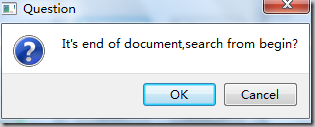
void MessageBox::slotQuestion()

{

	switch(QMessageBox::question(this,"Question",tr("It's end of document,search from begin?"),

		QMessageBox::Ok|QMessageBox::Cancel,QMessageBox::Ok))

	{

	case QMessageBox::Ok:

		label->setText(" Question button / Ok ");

		break;

	case QMessageBox::Cancel:

		label->setText(" Question button / Cancel ");

		break;

	default:

		break;

	}

	return;

}

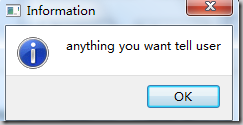
void MessageBox::slotInformation()

{

	QMessageBox::information(this,"Information",tr("anything you want tell user"));

	return;

}

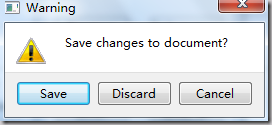
void MessageBox::slotWarning()

{

	switch(QMessageBox::warning(this,"Warning",tr("Save changes to document?"),

		QMessageBox::Save|QMessageBox::Discard|QMessageBox::Cancel,QMessageBox::Save))

	{

	case QMessageBox::Save:

		label->setText(" Warning button / Save ");

		break;

	case QMessageBox::Discard:

		label->setText(" Warning button / Discard ");

		break;

	case QMessageBox::Cancel:

		label->setText(" Warning button / Cancel ");

		break;

	default:

		break;

	}

	return;

}

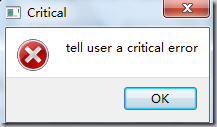
void MessageBox::slotCritical()

{

	QMessageBox::critical(this,"Critical",tr("tell user a critical error"));

	label->setText(" Critical MessageBox ");

	return;

}

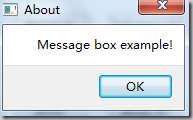
void MessageBox::slotAbout()

{

	QMessageBox::about(this,"About",tr("Message box example!"));

	label->setText(" About MessageBox ");

	return;

}

void MessageBox::slotAboutQt()

{

	QMessageBox::aboutQt(this,"About Qt");

	label->setText(" About Qt MessageBox ");

	return;

}

void MessageBox::slotCustom()

{

	QMessageBox customMsgBox;

	customMsgBox.setWindowTitle("Custom message box");

	QPushButton *lockButton = customMsgBox.addButton(tr("Lock"),QMessageBox::ActionRole);

	QPushButton *unlockButton = customMsgBox.addButton(tr("Unlock"),QMessageBox::ActionRole);

	QPushButton *cancelButton = customMsgBox.addButton(QMessageBox::Cancel);

	customMsgBox.setIconPixmap(QPixmap(":/images/linuxredhat.png"));

	customMsgBox.setText(tr("This is a custom message box"));

	customMsgBox.exec();

	if(customMsgBox.clickedButton() == lockButton)

		label->setText(" Custom MessageBox / Lock ");

	if(customMsgBox.clickedButton() == unlockButton)

		label->setText(" Custom MessageBox / Unlock ");

	if(customMsgBox.clickedButton() == cancelButton)

		label->setText(" Custom MessageBox / Cancel ");

	return;

}
main.cpp
#include "messagebox.h"

#include <QtGui/QApplication>

int main(int argc, char *argv[])

{

	QApplication a(argc, argv);

	MessageBox *w=new MessageBox;

	w->show();

	return a.exec();

}
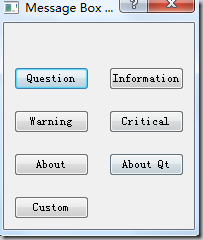
效果图:
qt MessageBOX 消息的更多相关文章
- paip.c++ qt messagebox用法
paip.c++ qt messagebox用法 作者Attilax , EMAIL:1466519819@qq.com 来源:attilax的专栏 地址:http://blog.csdn.net ...
- C# MessageBox 消息对话框
在程序中,我们经常使用消息对话框给用户一定的信息提示,如在操作过程中遇到错误或程序异常,经常会使用这种方式给用于以提示.在C#中,MessageBox消息对话框位于System.Windows.For ...
- C#中的MessageBox消息对话框
关键字:C# MessageBox 消息对话框 在程序中,我们经常使用消息对话框给用户一定的信息提示,如在操作过程中遇到错误或程序异常,经常会使用这种方式给用于以提示.在C#中,MessageBox消 ...
- WPF 实现带蒙版的 MessageBox 消息提示框
WPF 实现带蒙版的 MessageBox 消息提示框 WPF 实现带蒙版的 MessageBox 消息提示框 作者:WPFDevelopersOrg 原文链接: https://github.com ...
- Ext.MessageBox消息框
Ext JS消息提示框主要包括:alert.confirm.prompt.show 1.Ext.MessageBox.alert() 调用格式: alert( String title, String ...
- [转载]ExtJs4 笔记(6) Ext.MessageBox 消息对话框
作者:李盼(Lipan) 出处:[Lipan] (http://www.cnblogs.com/lipan/)版权声明:本文的版权归作者与博客园共有.转载时须注明本文的详细链接,否则作者将保留追究其法 ...
- ExtJs4 笔记(6) Ext.MessageBox 消息对话框
本篇演示消息对话框的用法,ExtJs封装了可能用到的各类消息框,并支持自定义的配置. 如下是用到的html: [html] <h1>各种消息框</h1> <div id= ...
- windows程序设计 MessageBox消息框
MessageBox函数 int WINAPI MessageBoxW( HWND hWnd,//窗口句柄 LPCWSTR lpText,//消息框主体显示的字符串 LPCWSTR lpCaption ...
- 【转】QT CEF3 消息循环处理
初次写博客,可能有点乱, 按照自己的实际经历谈一下CEF3钟遇到的一些坑,希望对以后的小伙有些帮助. 先说一下经历,当初第一次接触CEF3的时候,没做特殊处理,直接将cef3封装成控件,嵌入到QT程序 ...
随机推荐
- 洛谷 P3975 / loj 2102 [TJOI2015] 弦论 题解【后缀自动机】【拓扑排序】
后缀自动机入门. 题目描述 为了提高智商,ZJY 开始学习弦论. 这一天,她在<String theory>中看到了这样一道问题:对于一个给定的长度为 \(n\) 的字符串,求出它的第 \ ...
- 使用Jmeter进行http接口性能测试(转载)
在进行网页或应用程序后台接口开发时,一般要及时测试开发的接口能否正确接收和返回数据,对于单次测试,Postman插件是个不错的Http请求模拟工具. 但是Postman只能模拟单客户端的单次请求,而对 ...
- ORC Files
ORC 全称是Optimized Row Columnar,意思是优化的RC file,优化行列式. ORC 文件格式提供了一个很高效的方式来存储hive数据.它旨在克服其他hive文件格式的限制.当 ...
- TR-069_Amendment-4:附录G.穿越NAT网关的连接请求方式
注意:这种机制只适用于RFC 3489[21]中定义的经典STUN,RFC 5389引入后,这个机制已经过时.这个机制不是设计用于RFC 5389中定义的STUN.IPv6部署要么不使用NAT,要么以 ...
- ionic3 cordova 调取软键盘
应用场景,因为兼容ios,安卓问题,不能直接调用激活软键盘方法.只有在点击按钮时让input框自动获取焦点,激活软键盘.然后把input框定位在键盘上方,软键盘激活可以监听到键盘高度. 先下载keyb ...
- easyUI----纵向合并单元格
使用Easyui-DataGrid过程用.做统计/报表等时经常会使用到合并单元格,原生态Easyui-DataGrid没有合并单元格的属性或方法. 解决方案: 代码一 onLoadSuccess: f ...
- [转]asp:ScriptManager
概述 ScriptManager 控件管理用于 Microsoft ASP.NET AJAX 页面的客户端脚本.默认情况下,ScriptManager 控件将 Microsoft AJAX 库的脚本与 ...
- JAVA学习2:Eclipse集成Maven
我的环境: Eclipse:eclipse-jee-juno-SR2-win32 Maven:Maven3.0.5 1.Help->Eclipse Marketplace 2.选中要安装的插件, ...
- springmvc4 相关注解的详细讲解
首先我是一个初学springmvc,抱着去加深印象的目的去整理相关springmvc4的相关注解,同时也希望给需要相关查阅的读者带来帮助. 1.@ControllerController控制器是通过服 ...
- MySql的内置函数
MySQL的内置函数不但可以在SELECT查询语句中应用,同样也可以在INSERT.UPDATE和DELECT等语句中应用.例如,在INSERT添加语句中,应用日期时间函数获取系统的当前时间,并且将其 ...