
qt MessageBOX 消息
void MessageBox::slotQuestion()

{

	switch(QMessageBox::question(this,"Question",tr("It's end of document,search from begin?"),

		QMessageBox::Ok|QMessageBox::Cancel,QMessageBox::Ok))

	{

	case QMessageBox::Ok:

		label->setText(" Question button / Ok ");

		break;

	case QMessageBox::Cancel:

		label->setText(" Question button / Cancel ");

		break;

	default:

		break;

	}

	return;

}

void MessageBox::slotInformation()

{

	QMessageBox::information(this,"Information",tr("anything you want tell user"));

	return;

}

void MessageBox::slotWarning()

{

	switch(QMessageBox::warning(this,"Warning",tr("Save changes to document?"),

		QMessageBox::Save|QMessageBox::Discard|QMessageBox::Cancel,QMessageBox::Save))

	{

	case QMessageBox::Save:

		label->setText(" Warning button / Save ");

		break;

	case QMessageBox::Discard:

		label->setText(" Warning button / Discard ");

		break;

	case QMessageBox::Cancel:

		label->setText(" Warning button / Cancel ");

		break;

	default:

		break;

	}

	return;

}

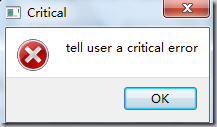
void MessageBox::slotCritical()

{

	QMessageBox::critical(this,"Critical",tr("tell user a critical error"));

	label->setText(" Critical MessageBox ");

	return;

}

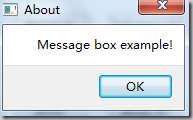
void MessageBox::slotAbout()

{

	QMessageBox::about(this,"About",tr("Message box example!"));

	label->setText(" About MessageBox ");

	return;

}

void MessageBox::slotAboutQt()

{

	QMessageBox::aboutQt(this,"About Qt");

	label->setText(" About Qt MessageBox ");

	return;

}

void MessageBox::slotCustom()

{

	QMessageBox customMsgBox;

	customMsgBox.setWindowTitle("Custom message box");

	QPushButton *lockButton = customMsgBox.addButton(tr("Lock"),QMessageBox::ActionRole);

	QPushButton *unlockButton = customMsgBox.addButton(tr("Unlock"),QMessageBox::ActionRole);

	QPushButton *cancelButton = customMsgBox.addButton(QMessageBox::Cancel);

	customMsgBox.setIconPixmap(QPixmap(":/images/linuxredhat.png"));

	customMsgBox.setText(tr("This is a custom message box"));

	customMsgBox.exec();

	if(customMsgBox.clickedButton() == lockButton)

		label->setText(" Custom MessageBox / Lock ");

	if(customMsgBox.clickedButton() == unlockButton)

		label->setText(" Custom MessageBox / Unlock ");

	if(customMsgBox.clickedButton() == cancelButton)

		label->setText(" Custom MessageBox / Cancel ");

	return;

}
main.cpp
#include "messagebox.h"

#include <QtGui/QApplication>

int main(int argc, char *argv[])

{

	QApplication a(argc, argv);

	MessageBox *w=new MessageBox;

	w->show();

	return a.exec();

}
效果图:
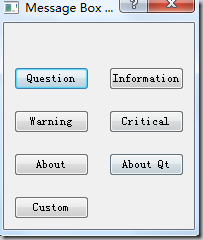
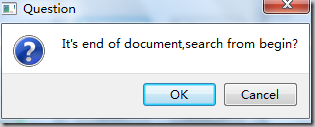
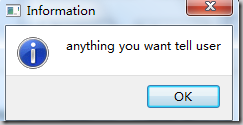
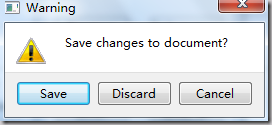
qt MessageBOX 消息的更多相关文章
- paip.c++ qt messagebox用法
paip.c++ qt messagebox用法 作者Attilax , EMAIL:1466519819@qq.com 来源:attilax的专栏 地址:http://blog.csdn.net ...
- C# MessageBox 消息对话框
在程序中,我们经常使用消息对话框给用户一定的信息提示,如在操作过程中遇到错误或程序异常,经常会使用这种方式给用于以提示.在C#中,MessageBox消息对话框位于System.Windows.For ...
- C#中的MessageBox消息对话框
关键字:C# MessageBox 消息对话框 在程序中,我们经常使用消息对话框给用户一定的信息提示,如在操作过程中遇到错误或程序异常,经常会使用这种方式给用于以提示.在C#中,MessageBox消 ...
- WPF 实现带蒙版的 MessageBox 消息提示框
WPF 实现带蒙版的 MessageBox 消息提示框 WPF 实现带蒙版的 MessageBox 消息提示框 作者:WPFDevelopersOrg 原文链接: https://github.com ...
- Ext.MessageBox消息框
Ext JS消息提示框主要包括:alert.confirm.prompt.show 1.Ext.MessageBox.alert() 调用格式: alert( String title, String ...
- [转载]ExtJs4 笔记(6) Ext.MessageBox 消息对话框
作者:李盼(Lipan) 出处:[Lipan] (http://www.cnblogs.com/lipan/)版权声明:本文的版权归作者与博客园共有.转载时须注明本文的详细链接,否则作者将保留追究其法 ...
- ExtJs4 笔记(6) Ext.MessageBox 消息对话框
本篇演示消息对话框的用法,ExtJs封装了可能用到的各类消息框,并支持自定义的配置. 如下是用到的html: [html] <h1>各种消息框</h1> <div id= ...
- windows程序设计 MessageBox消息框
MessageBox函数 int WINAPI MessageBoxW( HWND hWnd,//窗口句柄 LPCWSTR lpText,//消息框主体显示的字符串 LPCWSTR lpCaption ...
- 【转】QT CEF3 消息循环处理
初次写博客,可能有点乱, 按照自己的实际经历谈一下CEF3钟遇到的一些坑,希望对以后的小伙有些帮助. 先说一下经历,当初第一次接触CEF3的时候,没做特殊处理,直接将cef3封装成控件,嵌入到QT程序 ...
随机推荐
- centos 7 设置开机启动服务
2018-12-25 Centos7下添加开机自启动脚本和服务的方法 以docker 服务为例 1.centos7自带命令设置 systemctl enable docker.service 2.设置 ...
- python定义的一个简单的shell函数的代码
把写代码过程中经常用到的一些代码段做个记录,如下代码段是关于python定义的一个简单的shell函数的代码. pipe = subprocess.Popen(cmd, stdout=subproce ...
- idea 修改jar包源码的编码
项目中有些老的jar不是utf8打包的,中文显示乱码 打开的文件上直接右键, 修改只读jar的源码 自己写的文件可以在右下角修改编码,只读文件就要用上面的方法了
- 3dsmax2017卸载/安装失败/如何彻底卸载清除干净3dsmax2017注册表和文件的方法
3dsmax2017提示安装未完成,某些产品无法安装该怎样解决呢?一些朋友在win7或者win10系统下安装3dsmax2017失败提示3dsmax2017安装未完成,某些产品无法安装,也有时候想重新 ...
- 《C++ Primer(第五版)》知识巩固
运行平台:ubuntu 12.04/GCC 4.8.0 第二章:基本内置类型 1.decltype类型指示符 当我们从表达式的类型来推断要定义的类型时,可以使用decltype()来解析:declty ...
- orcale 之 存储过程
之前我们学习过 PL/SQL, 那么当我们的工作中我们通过 PL/SQL 做很多的事情,那么有一个问题,在每次的座同样一件事的时候是不是都需要重新通过 PL/SQL 去完成呢?可不可以只写一次然后,在 ...
- SpringMVC的json交互
一.注解说明 1.@RequestBody 作用:@RequestBody注解用于读取http请求的内容(字符串),通过springmvc提供的HttpMessageConverter接口将读到的内 ...
- POj2387——Til the Cows Come Home——————【最短路】
A - Til the Cows Come Home Time Limit:1000MS Memory Limit:65536KB 64bit IO Format:%I64d & ...
- RabbitMQ小节
一.RabbitMQ简介 RabbitQM是一款应用程序对应用程序的通讯方法,基于AMQP协议,用Erlang语言开发,因而安装环境配置之前需要首先安装Erlang语言环境.通过客户端发送消息到队列消 ...
- [转]Entity Framework Refresh context?
本文转自:http://stackoverflow.com/questions/20270599/entity-framework-refresh-context If you want to rel ...