
使用postman对elasticsearch接口调用
post 新增

get 查询

put更新

post http://127.0.0.1:9200/index4/type1

{"node":0}

{

    "_index": "index4",

    "_type": "type1",

    "_id": "W_WMOHYBA6aNNN1EWEI0",

    "_version": 1,

    "result": "created",

    "_shards": {

        "total": 2,

        "successful": 1,

        "failed": 0

    },

    "_seq_no": 0,

    "_primary_term": 1

}

查询:

http://127.0.0.1:9200/index4/type1/_search

{

    "took": 2,

    "timed_out": false,

    "_shards": {

        "total": 1,

        "successful": 1,

        "skipped": 0,

        "failed": 0

    },

    "hits": {

        "total": {

            "value": 2,

            "relation": "eq"

        },

        "max_score": 1.0,

        "hits": [

            {

                "_index": "index4",

                "_type": "type1",

                "_id": "W_WMOHYBA6aNNN1EWEI0",

                "_score": 1.0,

                "_source": {

                    "node": 0

                }

            },

            {

                "_index": "index4",

                "_type": "type1",

                "_id": "XPWROHYBA6aNNN1EL0Ig",

                "_score": 1.0,

                "_source": {

                    "node": 0,

                    "age": 3

                }

            }

        ]

    }

}
刚学有点懵懵的....
之前安装了es的ik分词器,继续试试...
IK分词效果有两种,一种是ik_max_word(最大分词)和ik_smart(最小分词)

post http://127.0.0.1:9200/_analyze

请求参数

{

"analyzer":"ik_smart",

"text":"中国abc"

}

返回

{

    "tokens": [

        {

            "token": "中国abc",

            "start_offset": 0,

            "end_offset": 5,

            "type": "CN_WORD",

            "position": 0

        }

    ]

}

如果是最细力度划分:

请求

{

"analyzer":"ik_max_word",

"text":"中国abc"

}

返回:
如果有些词我们不想拆看怎么办,配置自己的分词配置:
打开ik/config/IKAnalyzer.cfg.xml
<?xml version="1.0" encoding="UTF-8"?>

<!DOCTYPE properties SYSTEM "http://java.sun.com/dtd/properties.dtd">

<properties>

	<comment>IK Analyzer 扩展配置</comment>

	<!--用户可以在这里配置自己的扩展字典 -->

	<entry key="ext_dict">player3.dic</entry>

	 <!--用户可以在这里配置自己的扩展停止词字典-->

	<entry key="ext_stopwords"></entry>

	<!--用户可以在这里配置远程扩展字典 -->

	<!-- <entry key="remote_ext_dict">words_location</entry> -->

	<!--用户可以在这里配置远程扩展停止词字典-->

	<!-- <entry key="remote_ext_stopwords">words_location</entry> -->

</properties>
新建player3.dic文件,写入自己的分词配置
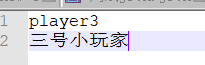
重启es项目
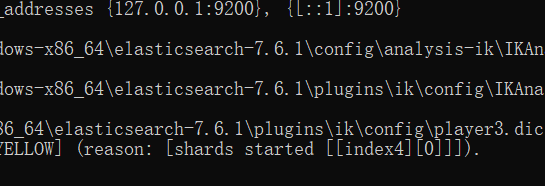
加载自己的配置文件
{

"analyzer":"ik_smart",

"text":"我非常喜欢三号小玩家他的网民player3是我喜欢的类型"

}
{

    "tokens": [

        {

            "token": "我",

            "start_offset": 0,

            "end_offset": 1,

            "type": "CN_CHAR",

            "position": 0

        },

        {

            "token": "非常",

            "start_offset": 1,

            "end_offset": 3,

            "type": "CN_WORD",

            "position": 1

        },

        {

            "token": "喜欢",

            "start_offset": 3,

            "end_offset": 5,

            "type": "CN_WORD",

            "position": 2

        },

        {

            "token": "三号小玩家",

            "start_offset": 5,

            "end_offset": 10,

            "type": "CN_WORD",

            "position": 3

        },

        {

            "token": "他",

            "start_offset": 10,

            "end_offset": 11,

            "type": "CN_CHAR",

            "position": 4

        },

        {

            "token": "的",

            "start_offset": 11,

            "end_offset": 12,

            "type": "CN_CHAR",

            "position": 5

        },

        {

            "token": "网民",

            "start_offset": 12,

            "end_offset": 14,

            "type": "CN_WORD",

            "position": 6

        },

        {

            "token": "player3",

            "start_offset": 14,

            "end_offset": 21,

            "type": "CN_WORD",

            "position": 7

        },

        {

            "token": "是",

            "start_offset": 21,

            "end_offset": 22,

            "type": "CN_CHAR",

            "position": 8

        },

        {

            "token": "我",

            "start_offset": 22,

            "end_offset": 23,

            "type": "CN_CHAR",

            "position": 9

        },

        {

            "token": "喜欢",

            "start_offset": 23,

            "end_offset": 25,

            "type": "CN_WORD",

            "position": 10

        },

        {

            "token": "的",

            "start_offset": 25,

            "end_offset": 26,

            "type": "CN_CHAR",

            "position": 11

        },

        {

            "token": "类型",

            "start_offset": 26,

            "end_offset": 28,

            "type": "CN_WORD",

            "position": 12

        }

    ]

}
ok啦
使用postman对elasticsearch接口调用的更多相关文章
- php 客户端调用elasticsearch接口
1.php调用elasticsearch接口[参考资料:https://www.cnblogs.com/php0916/articles/6587340.html] /data/www/syhuo.n ...
- 如何使用Postman快速简单的调用快递物流平台快递鸟API接口
前沿 快递鸟是一家聚合类的第三方快递物流平台,目前该平台提供的产品主要以API为主.由于API不能直观的看到产品效果,需要进行API对接联调成功后才能真实的看到产品的实际效果.但是如果一上来就写代码进 ...
- node.js 接口调用示例
测试用例git地址(node.js部分):https://github.com/wuyongxian20/node-api.git 项目架构如下: controllers: 文件夹下为接口文件 log ...
- 干掉 Postman?测试接口直接生成API文档,ApiPost真香!
实不相瞒我的收藏夹里躺着很多优质的开发工具,我有个爱好平时遇到感兴趣的开发工具都会记录下来,然后有时间在慢慢研究.前几天刚给同事分享一款非常好用的API文档工具,真的被惊艳到了,粉丝朋友们也感受一下吧 ...
- 《C#微信开发系列(3)-获取接口调用凭据》
3.0获取接口调用凭据 ①接口说明 access_token是公众号的全局唯一票据,公众号调用各接口时都需使用access_token.开发者需要进行妥善保存.access_token的存储至少要保留 ...
- asp.net mvc短信接口调用——阿里大于API开发心得
互联网上有许多公司提供短信接口服务,诸如网易云信.阿里大于等等.我在自己项目里需要使用到短信服务起到通知作用,实际开发周期三天,完成配置.开发和使用,总的说,阿里大于提供的接口易于开发,非常的方便,短 ...
- PHP 使用 curl_* 系列函数和 curl_multi_* 系列函数进行多接口调用时的性能对比
在页面中调用的服务较多时,使用并行方式,即使用 curl_multi_* 系列函数耗时要小于 curl_* 系列函数. 测试环境 操作系统:Windows x64 Server:Apache PHP: ...
- Spring AOP在函数接口调用性能分析及其日志处理方面的应用
面向切面编程可以实现在不修改原来代码的情况下,增加我们所需的业务处理逻辑,比如:添加日志.本文AOP实例是基于Aspect Around注解实现的,我们需要在调用API函数的时候,统计函数调用的具体信 ...
- 基于JAVA的全国天气预报接口调用示例
step1:选择本文所示例的接口"全国天气预报接口" url:https://www.juhe.cn/docs/api/id/39/aid/87step2:每个接口都需要传入一个参 ...
随机推荐
- redis编译安装、哨兵、集群
编译安装 #下载源代码解压 wget https://download.redis.io/releases/redis-5.0.13.tar.gz -P /home/ tar -xvf /home/r ...
- Apache Dubbo理解和应用
官网:https://dubbo.apache.org/ slogan:高性能.轻量级的开源Java RPC框架 提供了六大核心能力:面向接口代理的高性能RPC调用,智能容错和负载均衡,服务自动注册和 ...
- SSM框架项目的mvc拦截器
为了防止用户在不登录的情况下通过并接请求直接访问系统,我们需要通过session和拦截器来防止这样的情况. 拦截器的配置: 为拦截器建立一个包:interceptor,并在包里建立 LoginInte ...
- 2020.4.6--UCF Local Programming Contest 2017的正式赛
Problem A : Electric Bill 题目大意:进行电量分级制收费,1000kwh及以下一档收费,1000kwh以上按另一档收费,给出每个人的电量总额,问每人应支付多少钱. 思路:基础i ...
- Java(25)常见异常整理
作者:季沐测试笔记 原文地址:https://www.cnblogs.com/testero/p/15228418.html 博客主页:https://www.cnblogs.com/testero ...
- 【UE4 C++】简单获取名称、状态、时间、帧数、路径与FPaths
基于UKismetSystemLibrary 获取各类名称 // Returns the actual object name. UFUNCTION(BlueprintPure, Category = ...
- SpringCloud-初见
目录 前言 微服务概述 微服务与微服务架构 微服务优缺点 微服务技术栈 为什么选择SpringCloud作为微服务架构 SpringCloud入门 SpringCloud和SpringBoot的关系 ...
- 安装pytorch后import torch显示no module named 'torch'
问题描述:在pycharm终端里通过pip指令安装pytorch,显示成功安装但是python程序和终端都无法使用pytorch,显示no module named 'torch'. 起因:电脑里有多 ...
- [no code][scrum meeting] Alpha 15
项目 内容 会议时间 2020-04-23 会议主题 OCR紧急会议 会议时长 45min 参会人员 PM + OCR组(赵涛,黎正宇) 项目 内容 会议时间 2020-04-24 会议主题 全体测试 ...
- Prometheus基于文件的服务发现
Prometheus基于文件的服务发现 一.基于文件的服务发现 1.prometheus.yml 配置文件的写法 2.file_sd 目录下的文件 3.配置结果 二.注意事项 三.参考链接 一.基于文 ...