
Linux-ELK日志收集
1.ELK简介
ELK是三个开源软件的缩写,分别表示:Elasticsearch , Logstash, Kibana , 它们都是开源软件。新增了一个FileBeat,它是一个轻量级的日志收集处理工具(Agent),Filebeat占用资源少,适合于在各个服务器上搜集日志后传输给Logstash,官方也推荐此工具。
Elasticsearch是个开源分布式搜索引擎,提供搜集、分析、存储数据三大功能。它的特点有:分布式,零配置,自动发现,索引自动分片,索引副本机制,restful风格接口,多数据源,自动搜索负载等。
Logstash 主要是用来日志的搜集、分析、过滤日志的工具,支持大量的数据获取方式。一般工作方式为c/s架构,client端安装在需要收集日志的主机上,server端负责将收到的各节点日志进行过滤、修改等操作在一并发往elasticsearch上去。
Kibana 也是一个开源和免费的工具,Kibana可以为 Logstash 和 ElasticSearch 提供的日志分析友好的 Web 界面,可以帮助汇总、分析和搜索重要数据日志。
Filebeat隶属于Beats。目前Beats包含四种工具:
1.Packetbeat(搜集网络流量数据)
2.Topbeat(搜集系统、进程和文件系统级别的 CPU 和内存使用情况等数据)
3.Filebeat(搜集文件数据)
4.Winlogbeat(搜集 Windows 事件日志数据)
2.elk架构
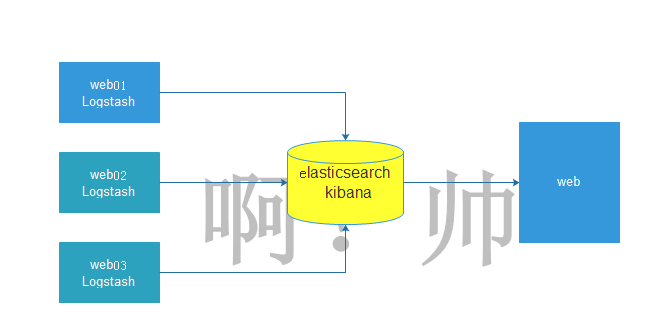
3.环境准备
| 名称 | IP |
|---|---|
| es01 | 10.0.0.267 |
| es02 | 10.0.0.268 |
| web01 | 10.0.0.269 |
4.搭建elk
4.1关闭防火墙和selinux
systemctl stop firewalld

systemctl disable firewalld

sed -i 's/=enforcing/=disabled/g' /etc/selinux/config

setenforce 0
4.2配置yum源
[root@es01-10.0.0.237 ~]# cd /etc/yum.repos.d/

[root@es01-10.0.0.237 ~]# wget http://mirrors.aliyun.com/repo/Centos-7.repo
4.3在es01和es02上,安装jdk
[root@es01-10.0.0.237 /elk_soft]# yum install java-1.8.0-openjdk -y
4.4在es01和es02上,上传软件到指定目录,进入目录安装elasticsearch
[root@es01-10.0.0.237 ~]# cd /elk_soft/

[root@es01-10.0.0.237 /elk_soft]# ls

elasticsearch-6.4.1.rpm  kibana-6.4.1-x86_64.rpm  logstash-6.4.1.rpm

[root@es01-10.0.0.237 /elk_soft]# yum localinstall elasticsearch-6.4.1.rpm -y
4.5在es01和es02上,修改elasticsearch配置文件
[root@es02-10.0.0.238 /elk_soft]# vim /etc/elasticsearch/elasticsearch.yml

cluster.name: my-cluster        #集群名称

node.name: es02                 #节点名称

path.data: /var/lib/elasticsearch     #存放数据的目录(如果修改将目录的属组属主改为elasticearch)

path.logs: /var/log/elasticsearch     #日志目录(如果修改将目录的属组属主改为elasticearch)

network.host: 10.0.0.238        #本机IP地址

http.port: 9200                 #默认端口

discovery.zen.ping.unicast.hosts: ["10.0.0.237", "10.0.0.238"]       #集群中每个node的IP地址

#在配置文件倒数第二行加入,如果不添加是不能发现别的主机,只能发现自己

http.cors.enabled: true

http.cors.allow-origin: "*"
4.6启动elasticearch服务
[root@es01-10.0.0.237 /elk_soft]# systemctl start elasticsearch.service

[root@es01-10.0.0.237 /elk_soft]# systemctl enable elasticsearch.service

[root@es01-10.0.0.237 /elk_soft]# netstat -lntup

Active Internet connections (only servers)

Proto Recv-Q Send-Q Local Address           Foreign Address         State       PID/Program name

tcp        0      0 0.0.0.0:22              0.0.0.0:*               LISTEN      6141/sshd

tcp        0      0 127.0.0.1:25            0.0.0.0:*               LISTEN      6222/master

tcp6       0      0 10.0.0.237:9200         :::*                    LISTEN      8998/java

tcp6       0      0 10.0.0.237:9300         :::*                    LISTEN      8998/java
4.7测试
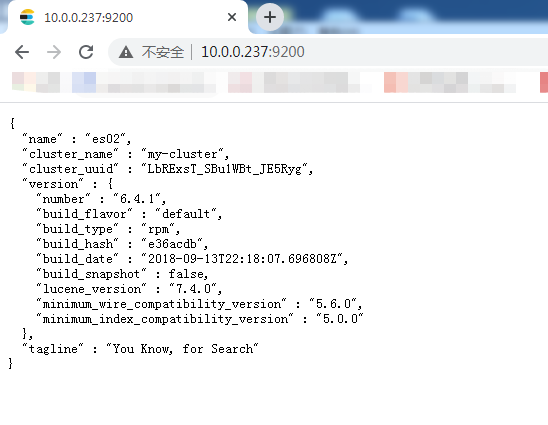
5.安装head插件来管理集群
5.1在es01上安装head插件,配置epel源
wget http://mirrors.aliyun.com/repo/epel-7.repo
5.2安装nodejs,npm,openssl,screen
[root@es01-10.0.0.237 ~]# yum install nodejs npm openssl screen -y
5.3查看版本信息
[root@es01-10.0.0.237 ~]# node -v

v6.17.1

[root@es01-10.0.0.237 ~]# npm -v

3.10.10
5.4安装cnpm
[root@es01-10.0.0.237 ~]# npm install -g cnpm --registry=https://registry.npm.taobao.org
5.5安装Git工具,把elasticearch-head下面的文件克隆到本地
[root@es01-10.0.0.237 ~]# yum install git -y

[root@es01-10.0.0.237 ~]# cd /opt/

[root@es01-10.0.0.237 /opt]# git clone git://github.com/mobz/elasticsearch-head.git

[root@es01-10.0.0.237 /opt]# cd elasticsearch-head/

[root@es01-10.0.0.237 /opt/elasticsearch-head]# ls

crx                elasticsearch-head.sublime-project  index.html    plugin-descriptor.properties  _site

Dockerfile         Gruntfile.js                        LICENCE       proxy                         src

Dockerfile-alpine  grunt_fileSets.js                   package.json  README.textile                test

[root@es01-10.0.0.237 /opt/elasticsearch-head]# cnmp install

[root@es01-10.0.0.237 /opt/elasticsearch-head]# screen -S es-head   #切屏指令

[root@es01-10.0.0.237 /opt/elasticsearch-head]# cnpm run start

> elasticsearch-head@0.0.0 start /opt/elasticsearch-head

> grunt server

Running "connect:server" (connect) task

Waiting forever...

Started connect web server on http://localhost:9100

###Ctrl+A+D  #切换快捷键  后台运行程序
5.6如果正常启动,开启的端口是9100,可以在浏览器中输入http://10.0.0.237:9100访问,如下图所示:
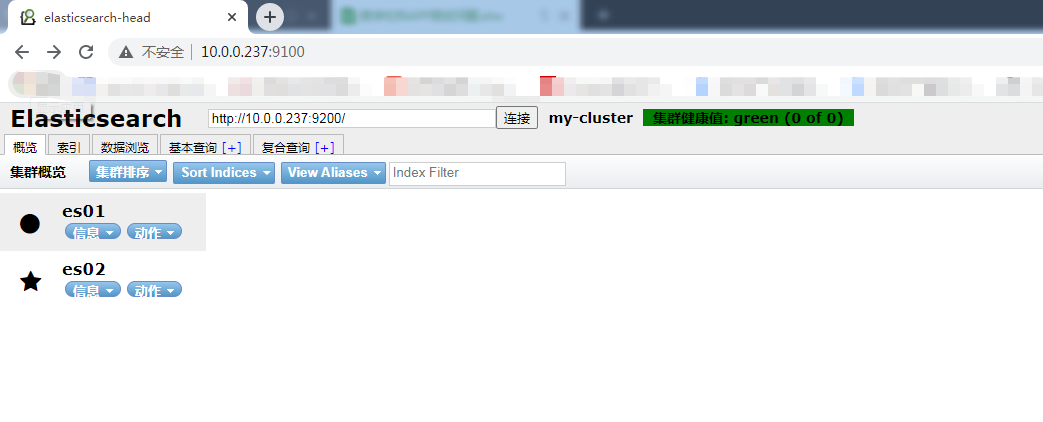
5.7集群的三种健康状态
绿色:表示集群健康
黄色:表示亚健康状态,勉强可以运行
红色:表示已经很危险,有可能数据已经丢失
6.elasticearch数据库操作
6.1查入三条数据
curl -XPUT '10.0.0.237:9200/megacorp/employee/1?pretty' -H 'Content-Type: application/json' -d'

    {

        "first_name" : "Li",

        "last_name": "si",

        "age" : 28,

        "about" : "I love cat", "interests": [ "swimming" ]

    }

'

curl -XPUT '10.0.0.237:9200/megacorp/employee/2?pretty' -H 'Content-Type: application/json' -d'

    {

        "first_name" : "Zhang",

        "last_name": "san",

        "age" : 22,

        "about" : "I love dog", "interests": [ "swimming" ]

    }

    '

curl -XPUT '10.0.0.237:9200/megacorp/employee/3?pretty' -H 'Content-Type: application/json' -d'

    {

        "first_name" : "Wang",

        "last_name": "wu",

        "age" : 30,

        "about" : "I love beautiful girl", "interests": [ "swimming" ]

    }

    '
6.2数据插入成功后可以通过数据浏览来查看
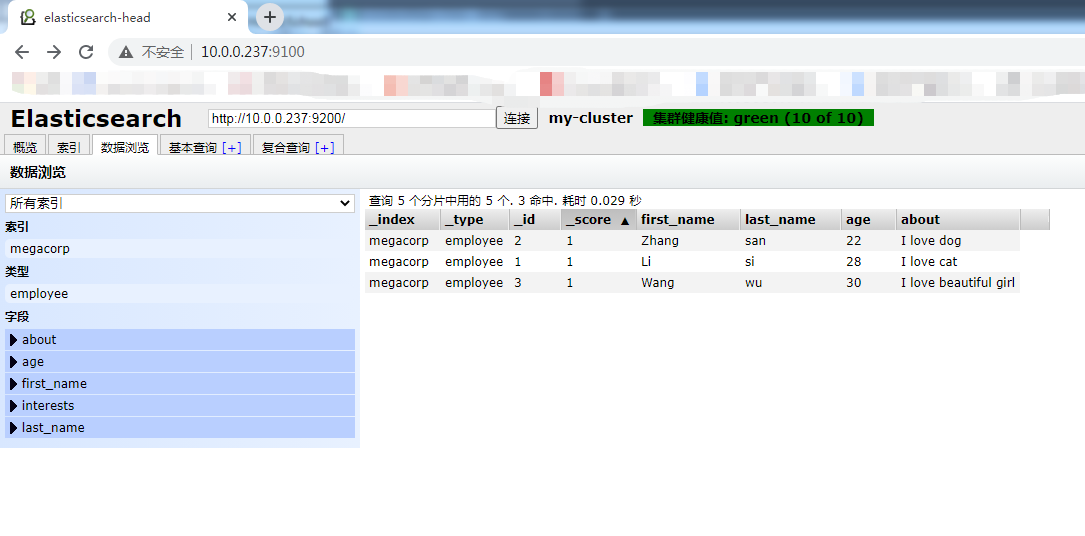
6.3索引介绍
| es数据库 | mysql数据库 |
|---|---|
| index(索引) | database(数据库) |
| type (类型) | tables(数据库中的表) |
| id (id号) | 对应表中的字段 |
6.4如何查询一条数据
[root@es01-10.0.0.237 /opt/elasticsearch-head]# curl -XGET '10.0.0.237:9200/megacorp/employee/1?pretty'

{

  "_index" : "megacorp",

  "_type" : "employee",

  "_id" : "1",

  "_version" : 1,

  "found" : true,

  "_source" : {

    "first_name" : "Li",

    "last_name" : "si",

    "age" : 28,

    "about" : "I love cat",

    "interests" : [

      "swimming"

    ]

  }

}
6.5如何删除一条数据
[root@es01-10.0.0.237 /opt/elasticsearch-head]#  curl -XDELETE '10.0.0.237:9200/megacorp/employee/1?pretty'

{

  "_index" : "megacorp",

  "_type" : "employee",

  "_id" : "1",

  "_version" : 2,

  "result" : "deleted",

  "_shards" : {

    "total" : 2,

    "successful" : 2,

    "failed" : 0

  },

  "_seq_no" : 1,

  "_primary_term" : 1

}
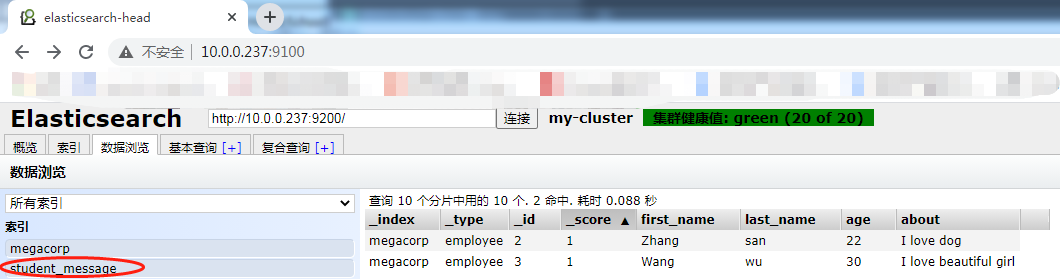
6.6如何创建索引
[root@es01-10.0.0.237 /opt/elasticsearch-head]# curl -XPUT '10.0.0.237:9200/student_message?pretty'

{

  "acknowledged" : true,

  "shards_acknowledged" : true,

  "index" : "student_message"

}
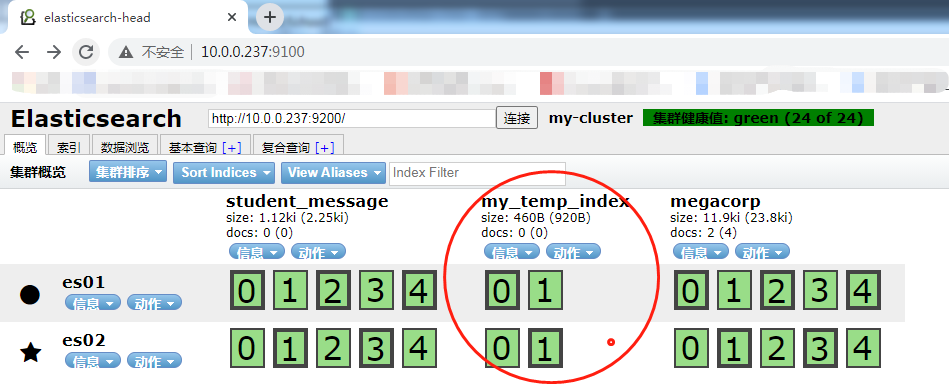
6.7创建一个索引为my_temp_index,分片为2,副本为1
curl -XPUT '10.0.0.237:9200/my_temp_index?pretty' -H 'Content-Type: application/json' -d' {

"settings": {

        "number_of_shards" : 2,

        "number_of_replicas" : 1

    }

}

'
7.kibana安装配置
7.1在es01上安装kibana
[root@es01-10.0.0.237 /elk_soft]# yum localinstall kibana-6.4.1-x86_64.rpm -y
7.2修改配置文件
[root@es01-10.0.0.237 /elk_soft]# vim /etc/kibana/kibana.yml

server.port: 5601                    #服务监听端口

server.host: "10.0.0.237"            #服务IP地址

elasticsearch.url: "http://10.0.0.237:9200"         #elasticsearch的地址

elasticsearch.pingTimeout: 30000000

logging.dest: stdout      #如果指定日志存储路径,需要修改文件的所有者及所属组
7.3开启kibana服务,并设置开机自启
[root@es01-10.0.0.237 /elk_soft]# systemctl start kibana.service

[root@es01-10.0.0.237 /elk_soft]# systemctl enable kibana.service

[root@es01-10.0.0.237 /elk_soft]# ss -lnt

State      Recv-Q Send-Q             Local Address:Port                            Peer Address:Port

LISTEN     0      128                            *:9100                                       *:*

LISTEN     0      128                            *:22                                         *:*

LISTEN     0      100                    127.0.0.1:25                                         *:*

LISTEN     0      128                   10.0.0.237:5601                                       *:*
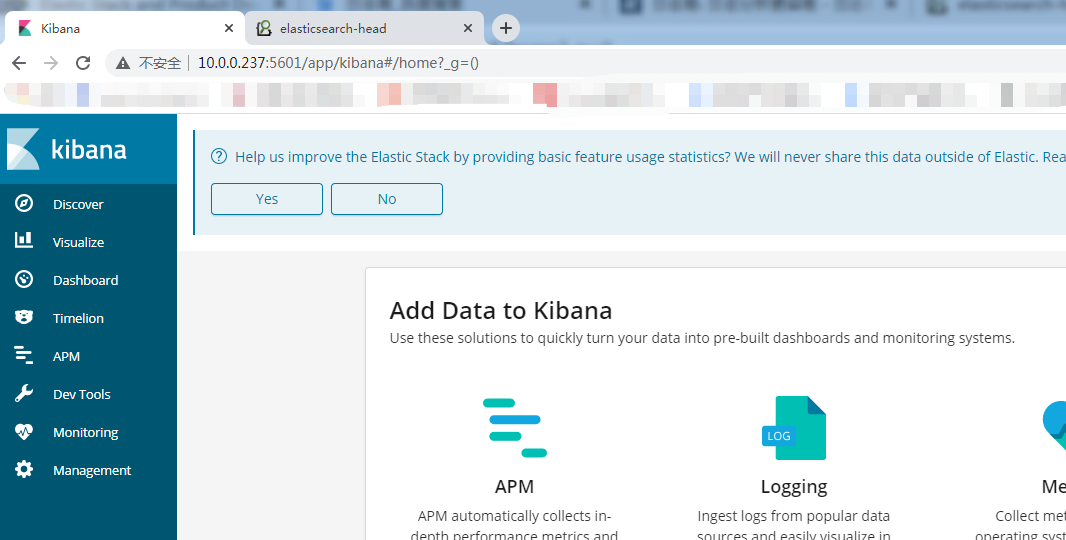
7.4访问测试
8.在web01上安装nginx+logstash
8.1配置nginx的yum源,安装nginx
[root@web01-10.0.0.239 /etc/yum.repos.d]# vim /etc/yum.repos.d/nginx.repo

[nginx]

name=nginx repo

baseurl=http://nginx.org/packages/centos/7/$basearch/

gpgcheck=0

enabled=1

[root@web01-10.0.0.239 ~]# yum install nginx -y
8.2修改nginx配置文件
[root@web01-10.0.0.239 ~]# vim /etc/nginx/conf.d/elk.conf

server {

      listen 80;

      server_name elk.test.com;

      location / {

          proxy_pass      http://10.0.0.237:5601;

          proxy_set_header Host   $host;

          proxy_set_header X-Real-IP      $remote_addr;

          proxy_set_header X-Forwarded-For $proxy_add_x_forwarded_for;

      }

#      access_log  /var/log/nginx/elk_access.log main;

}
8.3修改nginx.conf配置文件,增加nginx手机json格式的日志文件
[root@web01-10.0.0.239 ~]#  vim /etc/nginx/nginx.conf

log_format access_json '{"@timestamp":"$time_iso8601",'

        '"host":"$server_addr",'

        '"clientip":"$remote_addr",'

        '"size":$body_bytes_sent,'

        '"responsetime":$request_time,'

        '"upstreamtime":"$upstream_response_time",'

        '"upstreamhost":"$upstream_addr",'

        '"http_host":"$host",'

        '"url":"$uri",'

        '"domain":"$host",'

        '"xff":"$http_x_forwarded_for",'

        '"referer":"$http_referer",'

        '"status":"$status"}';

    access_log  /var/log/nginx/   access_json;
8.4启动nginx
[root@web01-10.0.0.239 ~]# systemctl start nginx

[root@web01-10.0.0.239 ~]# systemctl enable nginx
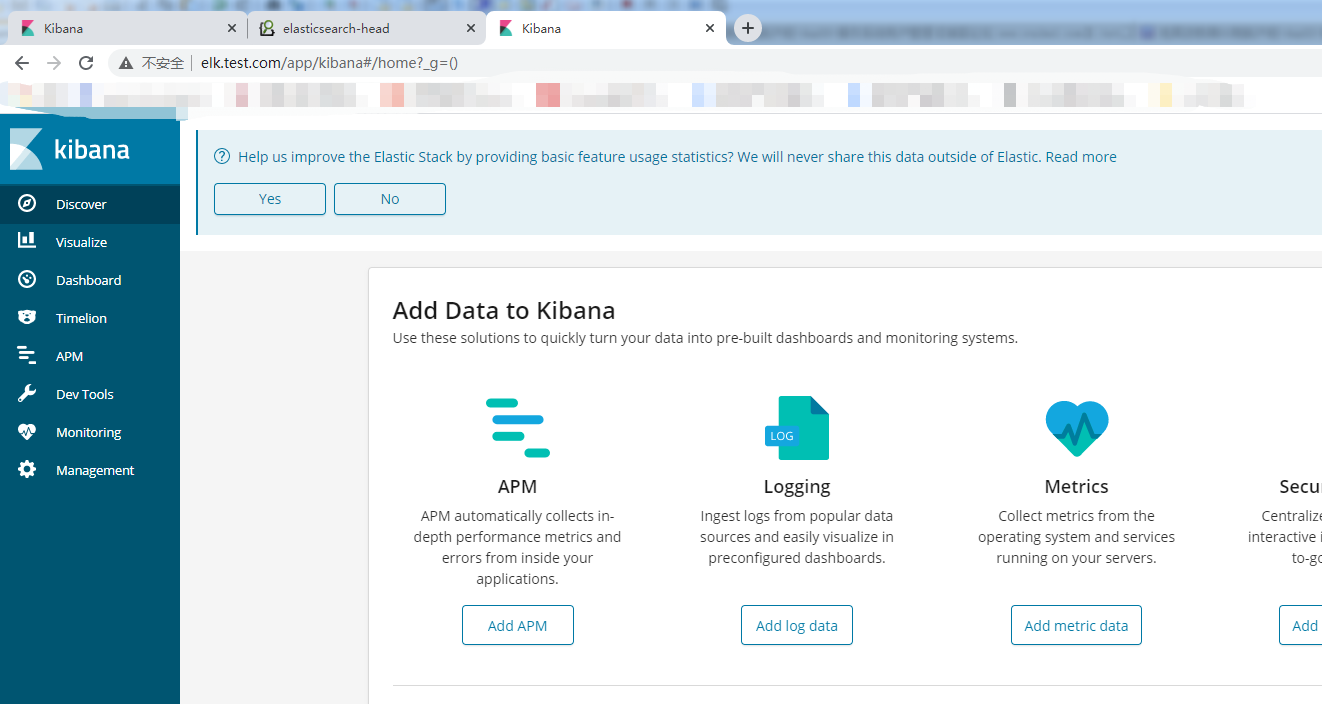
8.5修改本地解析文件进行测试
10.0.0.239 elk.tast.com
8.6安装jdk
[root@web01-10.0.0.239 /elk_soft]# yum install java-1.8.0-openjdk -y
8.7安装logstash
[root@web01-10.0.0.239 /elk_soft]# ls

filebeat-6.4.1-x86_64.rpm  logstash-6.4.1.rpm
8.8修改logstash配置文件
[root@web01-10.0.0.239 /elk_soft]# vim /etc/logstash/logstash.yml

path.data: /var/lib/logstash  #数据存放目录(如需修改记得修改属主属组)

http.host: "10.0.0.239"      #http的IP地址

http.port: 9600              #监听端口

path.logs: /var/log/logstash   #日志存放目录(如需修改记得修改属主属组)
8.9在/etc/logstash/conf.d/下新增nginx_access.conf文件
[root@web01-10.0.0.239 ~]# vim /etc/logstash/conf.d/nginx_access.conf

input {

  file {

    path => "/var/log/nginx/access_json.log"

    start_position => "end"

    type => "nginx_access"

    codec => json

  }

}

output {

    elasticsearch {

      hosts => ["10.0.0.237:9200"]

      index => "nginx_access-%{+YYYY.MM.dd}"

   }

}
9.0启动logstash,并设置开机自启
[root@web01-10.0.0.239 /etc/logstash]# sudo /usr/share/logstash/bin/system-install /etc/logstash/startup.options systemd

Using provided startup.options file: /etc/logstash/startup.options

Manually creating startup for specified platform: systemd

Successfully created system startup script for Logstash

[root@web01-10.0.0.239 /etc/logstash]# systemctl start logstash

[root@web01-10.0.0.239 /etc/logstash]# systemctl enable logstash
9.1如果elasticearch没收集到nginx日志,重启一下elasticearch服务
[root@es01-10.0.0.237 /elk_soft]# systemctl restart elasticsearch.service
9.2.kibana平台展示所收到的日志信息
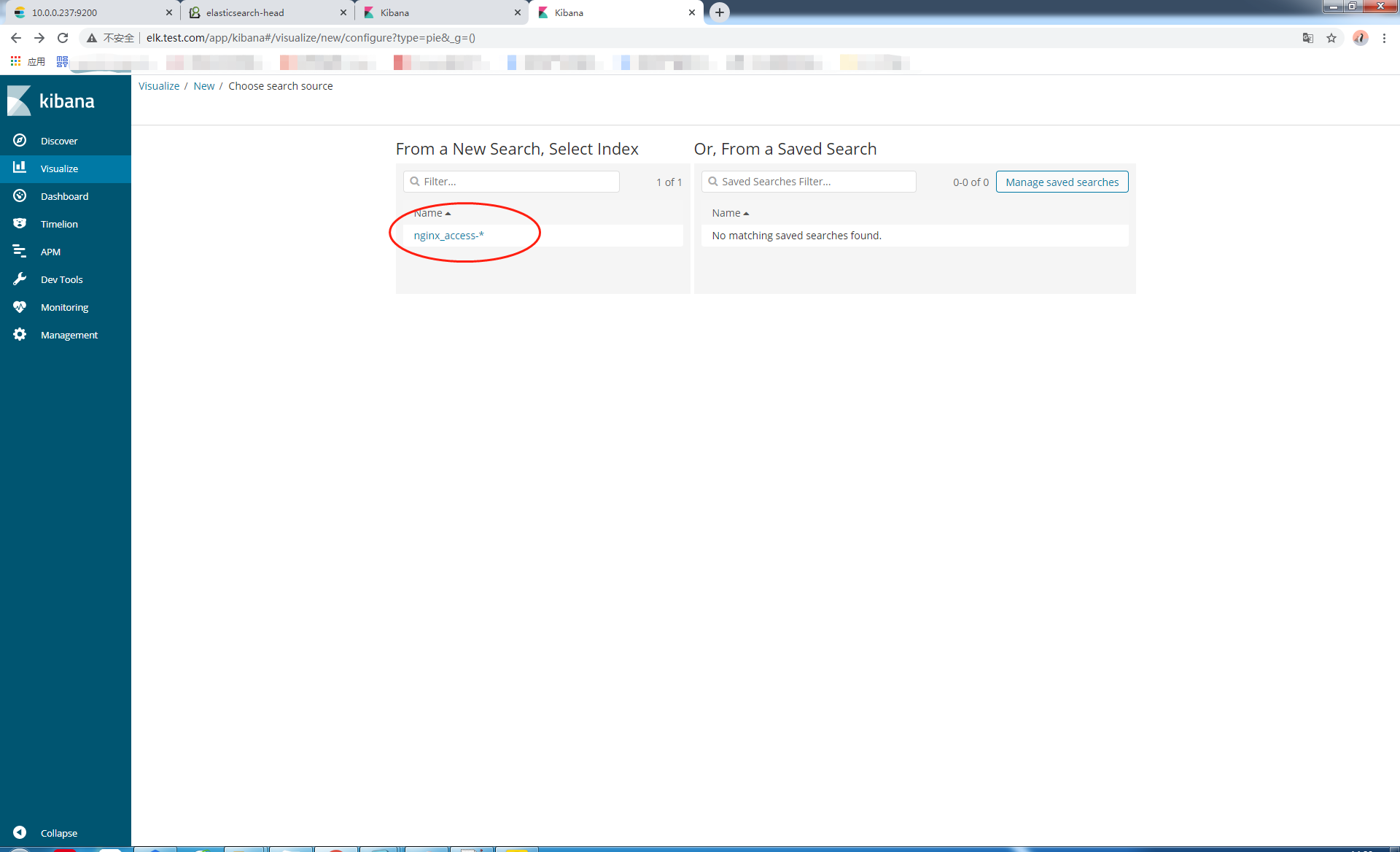
9.2.1首先添加一个索引模式
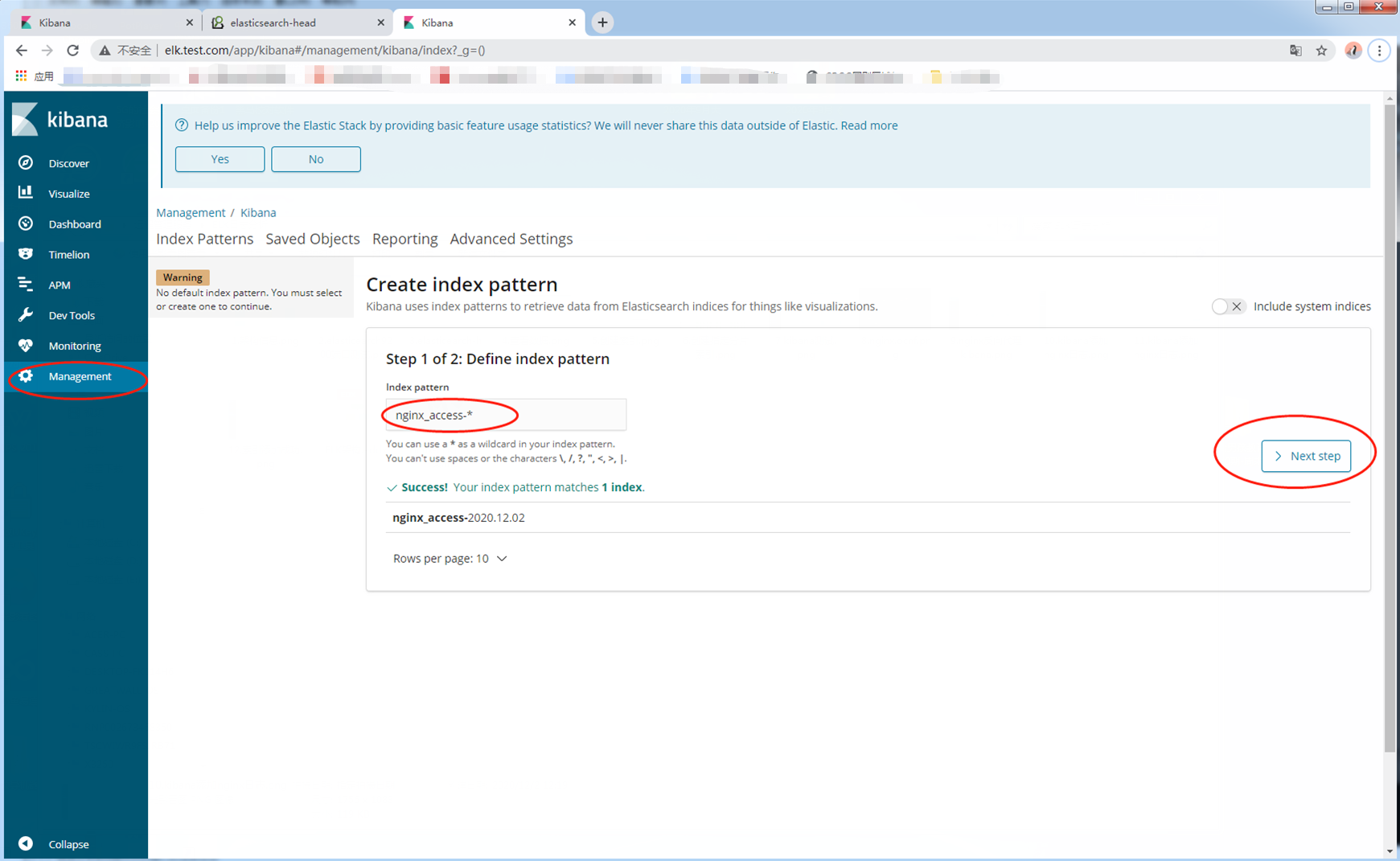
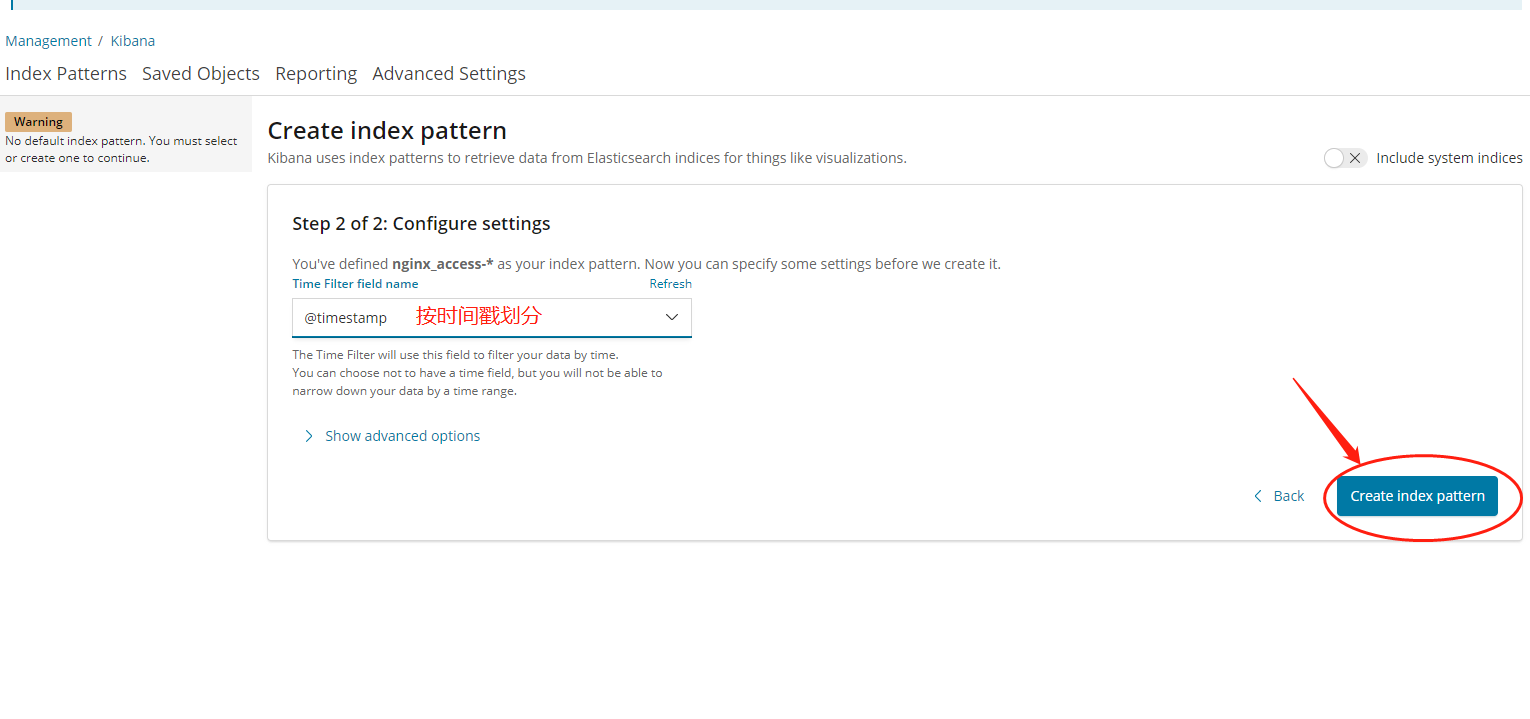
9.2.2添加成功
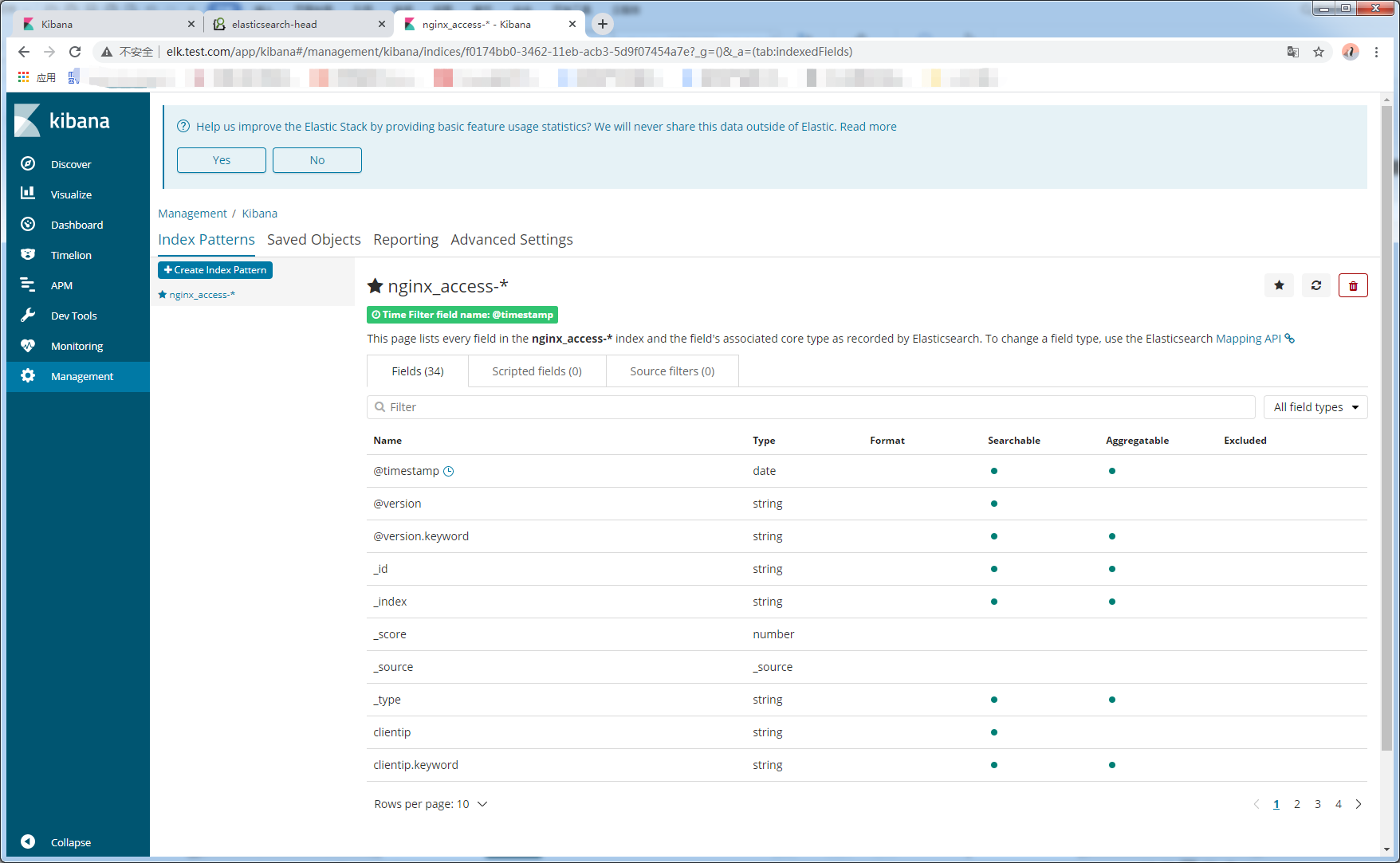
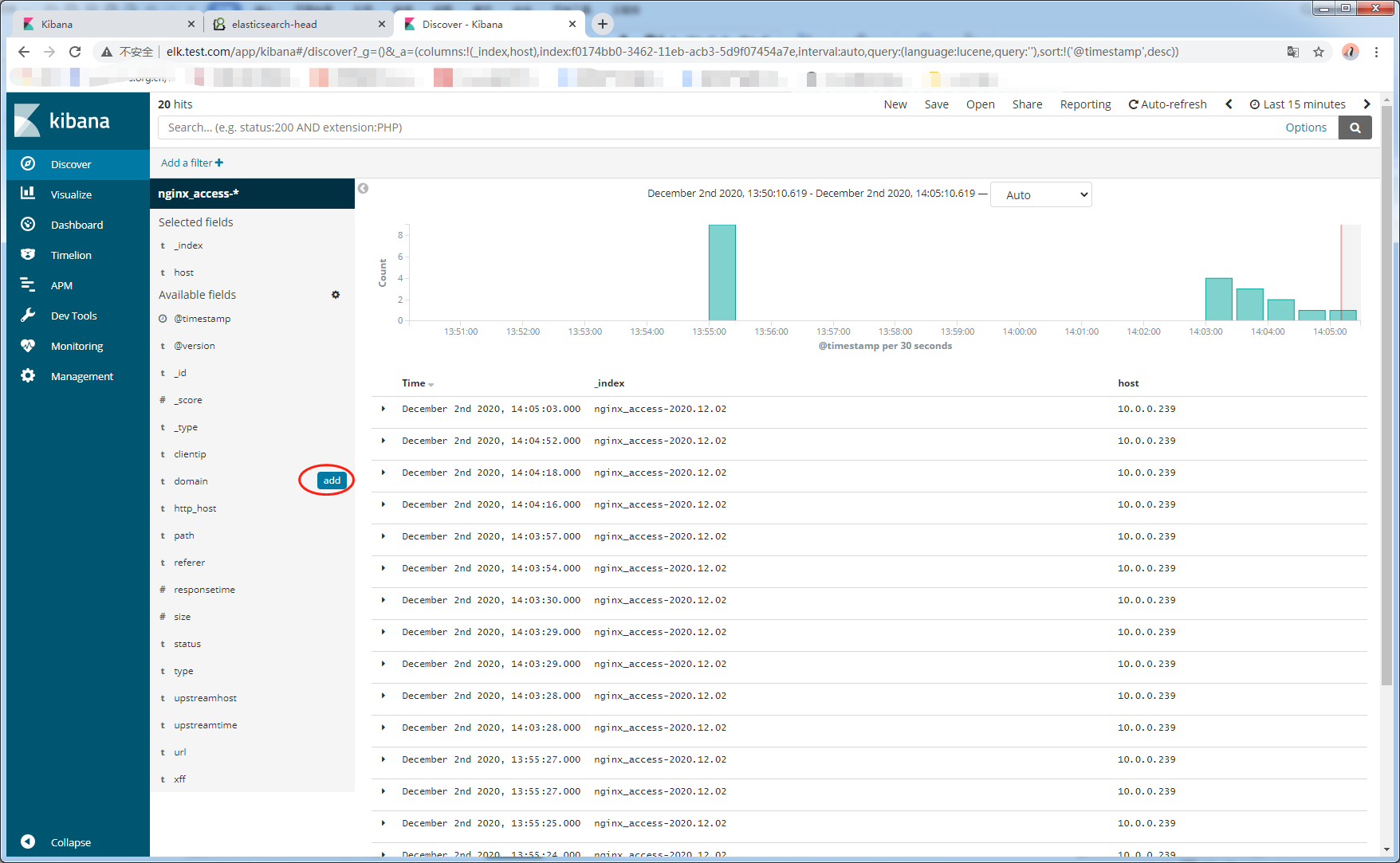
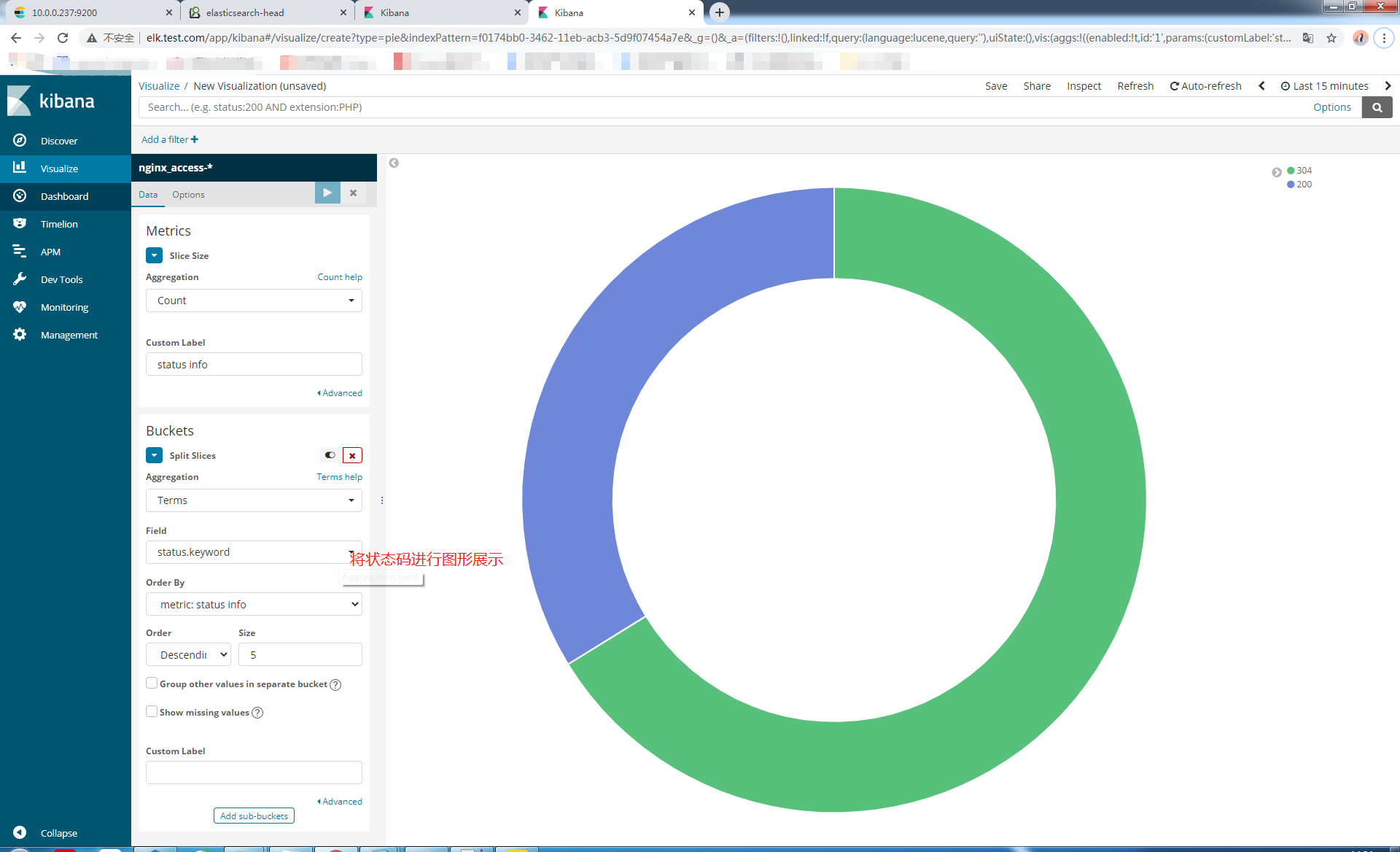
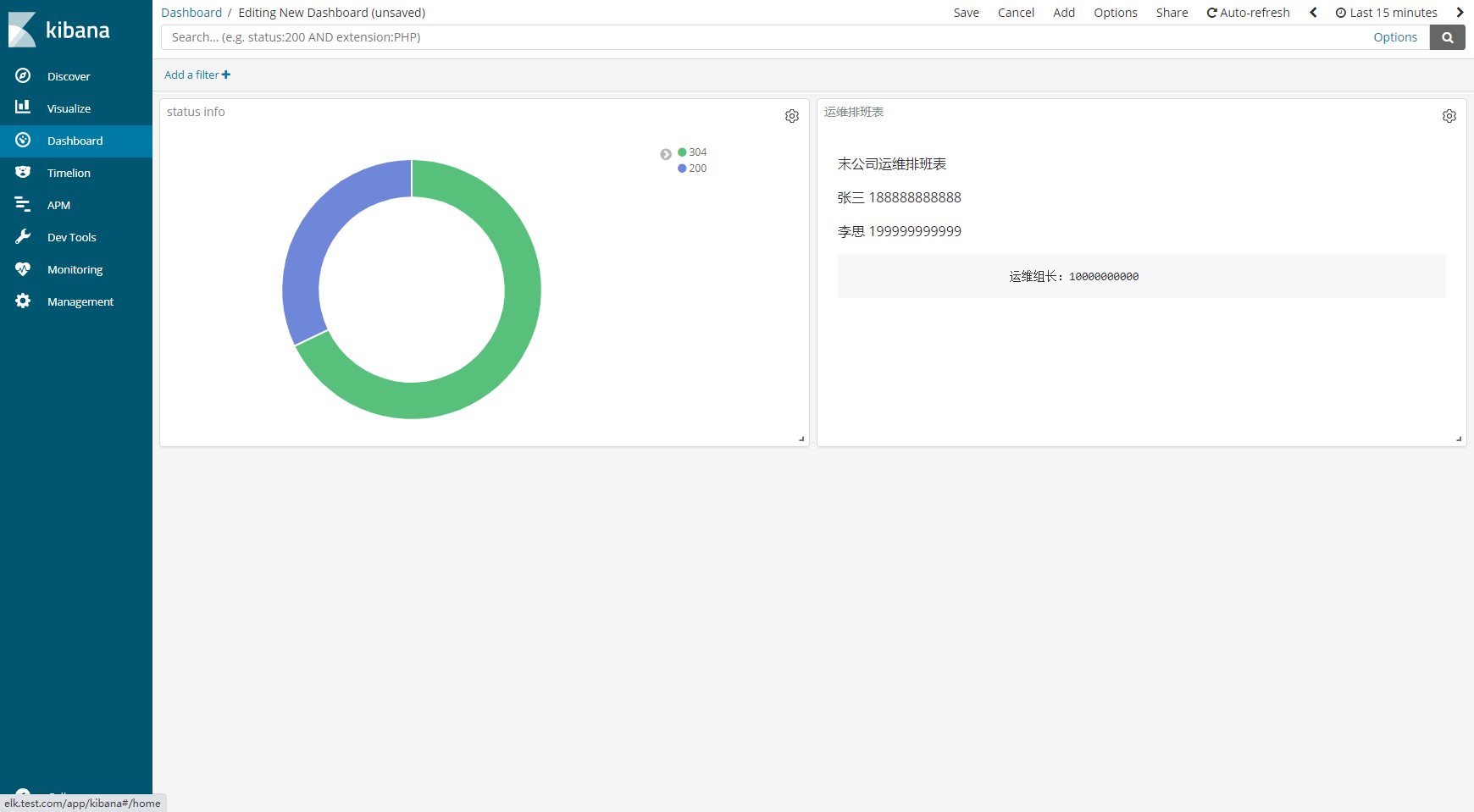
9.2.3添加一个饼状图

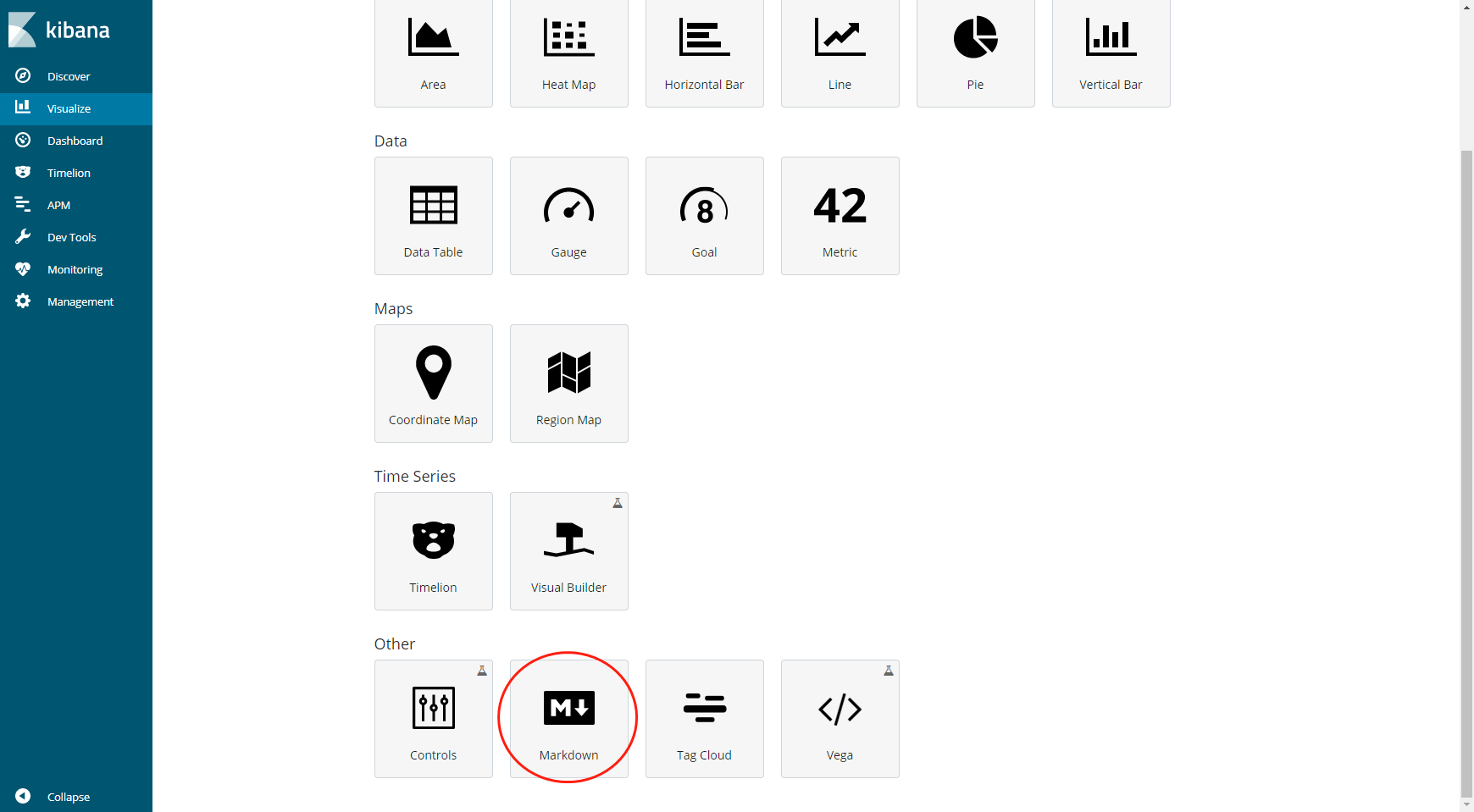
9.2.4创建排班表
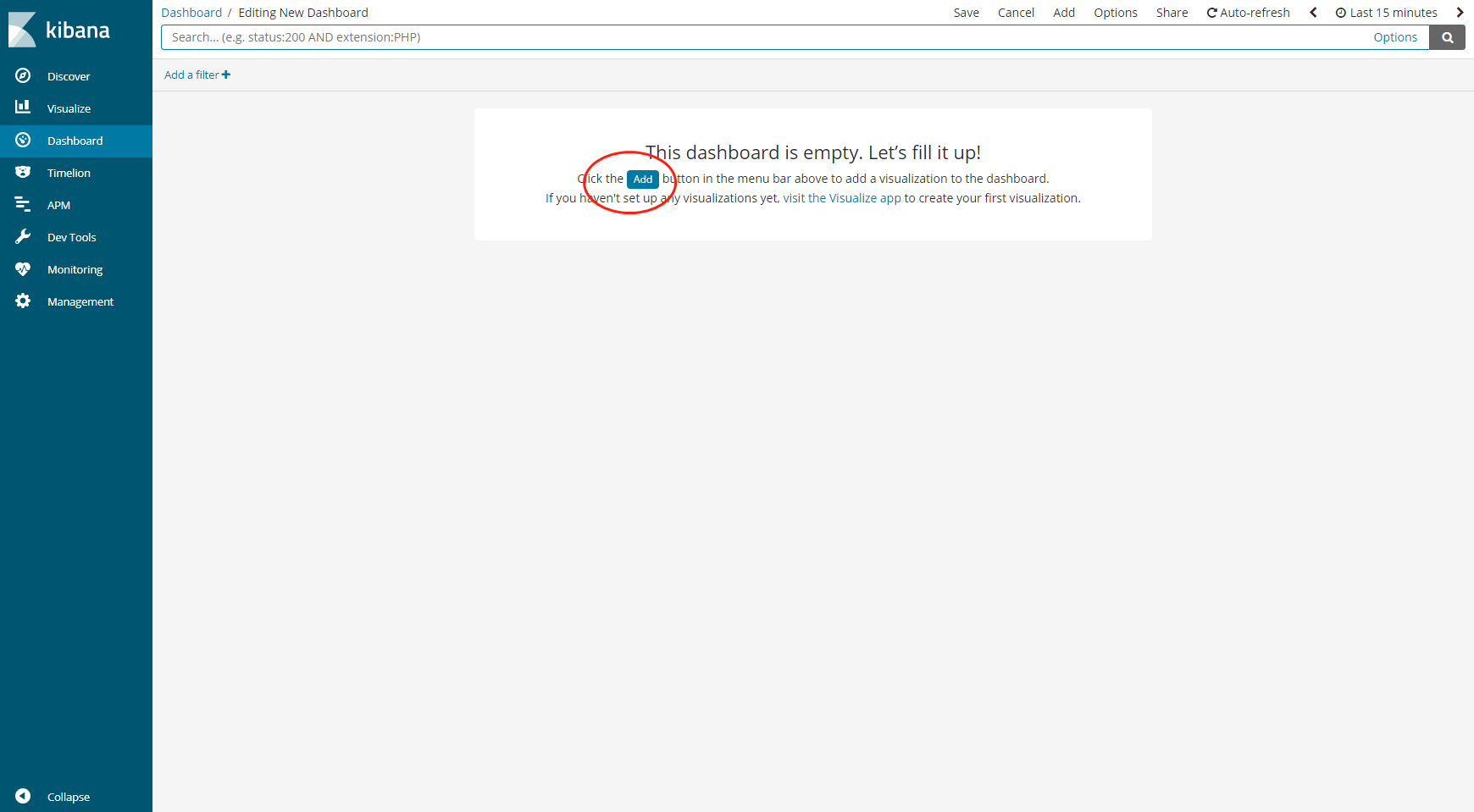
9.2.5通过dashboard进行详细展示
9.通过rdis安装部署新的架构

9.1停掉web01上的logstash服务
[root@web01-10.0.0.239 ~]# systemctl stop logstash.service
9.2在web01上安装filebeat
[root@web01-10.0.0.239 /elk_soft]# yum localinstall filebeat-6.4.1-x86_64.rpm -y
9.3修改filebeat配置文件
 24   enabled: true

 27   paths:

 28     - /var/log/nginx/access_json.log

##配置文件最后添加

  output.redis:

   hosts: ["10.0.0.237"]    #数据要发给的主机

   port: 6379               #Redis的端口

   key: "nginx-log"         #日志类型

   db: 0                    #两端要一样

   timeout: 5               #超时时间5秒
9.4启动filebeat服务
[root@web01-10.0.0.239 ~]# systemctl start filebeat.service

[root@web01-10.0.0.239 ~]# systemctl enable filebeat.service
9.5在es01上安装Redis
[root@es01-10.0.0.237 ~]# yum install redis -y
9.6修改Redis配置文件
[root@es01-10.0.0.237 ~]# vim /etc/redis.conf

  61 bind 10.0.0.237       #redis本机ip地址

  port 6379                #redis默认端口

  128 daemonize yes        #开启守护进程
9.7启动Redis
[root@es01-10.0.0.237 ~]# systemctl start redis

[root@es01-10.0.0.237 ~]# systemctl enable redis

[root@es01-10.0.0.237 ~]# redis-cli -h 10.0.0.237

10.0.0.237:6379>
9.8检查Redis是否取到日志
10.0.0.237:6379> keys *

1) "nginx-log"

10.0.0.237:6379> info keyspace

# Keyspace

db0:keys=1,expires=0,avg_ttl=0
9.8在es01上安装logstash
[root@es01-10.0.0.237 /elk_soft]# yum localinstall logstash-6.4.1.rpm -y
10修改logstash的配置文件
http.host: "10.0.0.237"      #http的IP地址

http.port: 9600              #监听端口
11在/etc/logstash/conf.d/下新增redis_input.conf文件
[root@es01-10.0.0.237 /etc/logstash/conf.d]# vim redis_input.conf

input {

  redis {

        host => "10.0.0.237"

        port => "6379"

        db => "0"

        data_type => "list"

        key => "nginx-log"

   }

}

output {

    stdout { codec => rubydebug }

    elasticsearch {

        hosts => ["10.0.0.237:9200"]

        index => "nginx-redis-%{+YYYY.MM.dd}"

  }

}
12启动logstash
[root@es01-10.0.0.237 /etc/logstash/conf.d]# /usr/share/logstash/bin/system-install /etc/logstash/startup.options systemd

[root@es01-10.0.0.237 /etc/logstash/conf.d]# systemctl start logstash

[root@es01-10.0.0.237 /etc/logstash/conf.d]# systemctl enable logstash
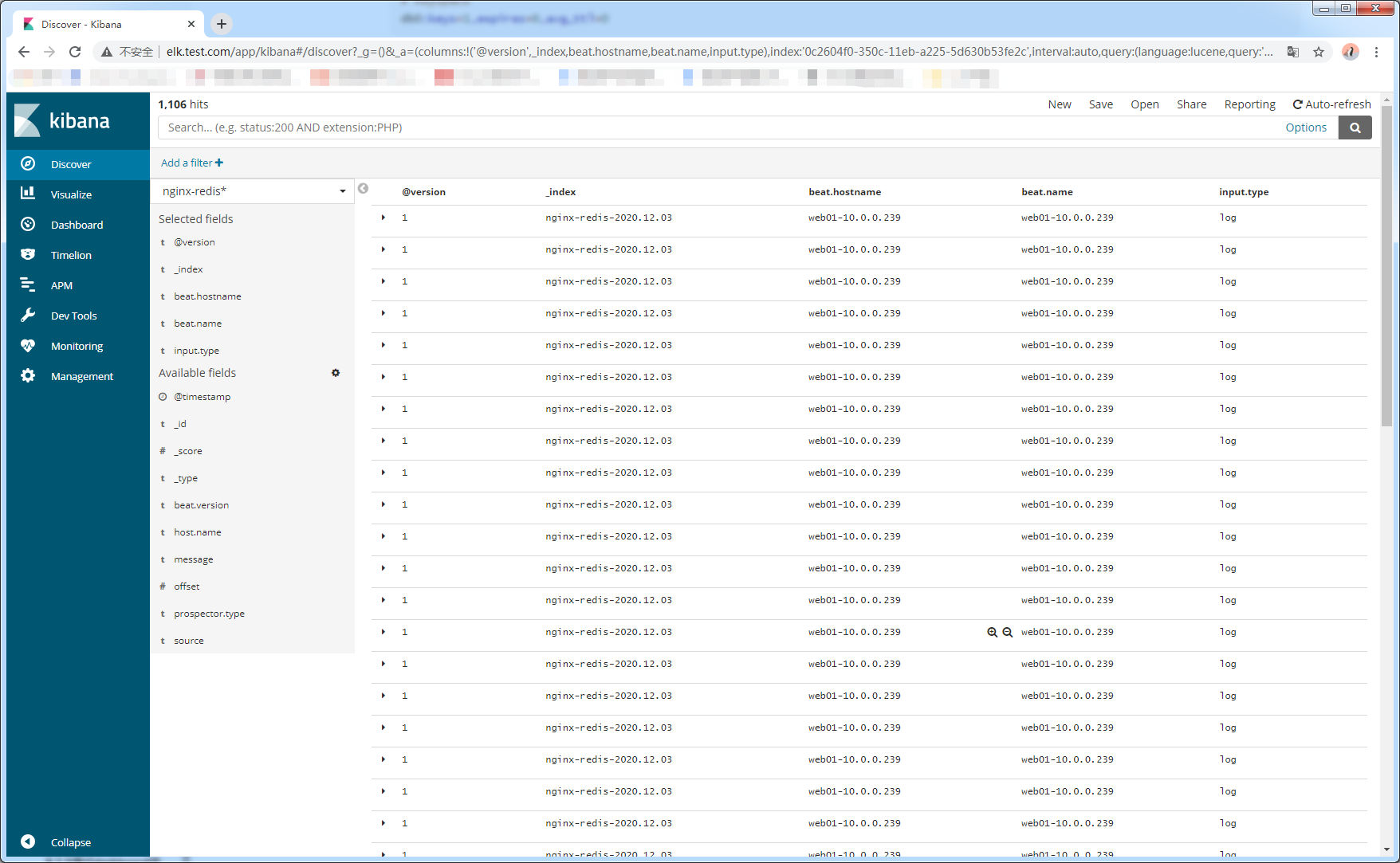
13kibana展示
Linux-ELK日志收集的更多相关文章
- SpringBoot使用ELK日志收集
本文介绍SpringBoot应用配合ELK进行日志收集. 1.有关ELK 1.1 简介 在之前写过一篇文章介绍ELK日志收集方案,感兴趣的可以去看一看,点击这里-----> <ELK日志分 ...
- FILEBEAT+ELK日志收集平台搭建流程
filebeat+elk日志收集平台搭建流程 1. 整体简介: 模式:单机 平台:Linux - centos - 7 ELK:elasticsearch.logstash.kiban ...
- springboot 集成 elk 日志收集功能
Lilishop 技术栈 官方公众号 & 开源不易,如有帮助请点Star 介绍 官网:https://pickmall.cn Lilishop 是一款Java开发,基于SpringBoot研发 ...
- Linux下单机部署ELK日志收集、分析环境
一.ELK简介 ELK是elastic 公司旗下三款产品ElasticSearch .Logstash .Kibana的首字母组合,主要用于日志收集.分析与报表展示. ELK Stack包含:Elas ...
- ELK 日志收集系统
传统系统日志收集的问题 在传统项目中,如果在生产环境中,有多台不同的服务器集群,如果生产环境需要通过日志定位项目的Bug的话,需要在每台节点上使用传统的命令方式查询,这样效率非常底下. 通常,日志被分 ...
- ELK日志收集分析系统配置
ELK是日志收益与分析的利器. 1.elasticsearch集群搭建 略 2.logstash日志收集 我这里的实现分如下2步,中间用redis队列做缓冲,可以有效的避免es压力过大: 1.n个ag ...
- ELK日志收集平台部署
需求背景 由于公司的后台服务有三台,每当后台服务运行异常,需要看日志排查错误的时候,都必须开启3个ssh窗口进行查看,研发们觉得很不方便,于是便有了统一日志收集与查看的需求. 这里,我用ELK集群,通 ...
- elk 日志收集 filebeat 集群搭建 php业务服务日志 nginx日志 json 7.12版本 ELK 解决方案
难的不是技术,难的是业务.熟悉业务流程才是最难的. 其实搜索进来的每一个人的需求不一样,希望你能从我的这篇文章里面收获到. 建议还是看官方文档,更全面一些. 一.背景 1,收集nginx acces ...
- Linux 搭建ELK日志收集系统
在搭建ELK之前,首先要安装Redis和JDK,安装Redis请参考上一篇文章. 首先安装JDK及配置环境变量 1.解压安装包到/usr/local/java目录下[root@VM_0_9_cento ...
- ELK日志收集系统搭建
架构图 ELK 架构图:其中es 是集群,logstash 是单节点(猜想除非使用nginx对log4j的网络输出分发),kibana是单机(用不着做成集群). 1.拓扑图 2.logstash ...
随机推荐
- 常用加密算法学习总结之数字证书与TLS/SSL
数字证书 对于一个安全的通信,应该有以下特征: 完整性:消息在传输过程中未被篡改 身份验证:确认消息发送者的身份 不可否认:消息的发送者无法否认自己发送了信息 显然,数字签名和消息认证码是不符合要求的 ...
- windows怎么访问linux的samba共享目录
windows怎么访问linux的samba共享目录 听语音 原创 | 浏览:6976 | 更新:2018-07-31 13:20 | 标签:LINUX WINDOWS 1 2 3 4 5 6 7 分 ...
- nginx 日志管理配置详解
nginx的日志管理 log_format main '$remote_addr - $remote_user [$time_local] "$request" ' '$statu ...
- Linux 仿真终端:SecureCRT 常用配置
SecureCRT 有两类配置选项,分别是会话选项和全局选项. 会话选项:修改配置只针对当前会话有效 全局选项:修改配置对所有会话有效 一般会先选择全局选项修改全局配置,然后选择会话选项单独修改个别会 ...
- S7 Linux用户管理及用户信息查询命令
7.1 useradd:创建用户 7.2-5 usermod 7.6 passwd:修改用户密码 7.7-9 chage.chpasswd.su 7.10-11 visudo.sudo 7.12-7. ...
- pytest + allure
参考allure官网: https://docs.qameta.io/allure/#_pytest 1.使用命令pip install pytest-allure安装 注意:我遇到的一个现象,用命令 ...
- C# 移除字符串头尾指定字符
1 private void button1_Click(object sender, EventArgs e) 2 {//去掉字符串头尾指定字符 3 string MyInfo= "--中 ...
- TVM性能评估分析(六)
TVM性能评估分析(六) Figure 1. The workflow of development PC, compile, deploy to the device, test, then mo ...
- 3D-LaneNet:端到端三维多车道检测ICCV2019
3D-LaneNet:端到端三维多车道检测ICCV2019 3D-LaneNet: End-to-End 3D Multiple Lane Detection 论文链接: http://openacc ...
- 自定义 DataLoader
自定义 DataLoader 如 数据输入 一文所介绍,OneFlow 支持两种数据加载方式:直接使用 NumPy 数据或者使用 DataLoader 及其相关算子. 在大型工业场景下,数据加载容易成 ...