
【Azure 事件中心】azure-spring-cloud-stream-binder-eventhubs客户端组件问题, 实践消息非顺序可达
问题描述
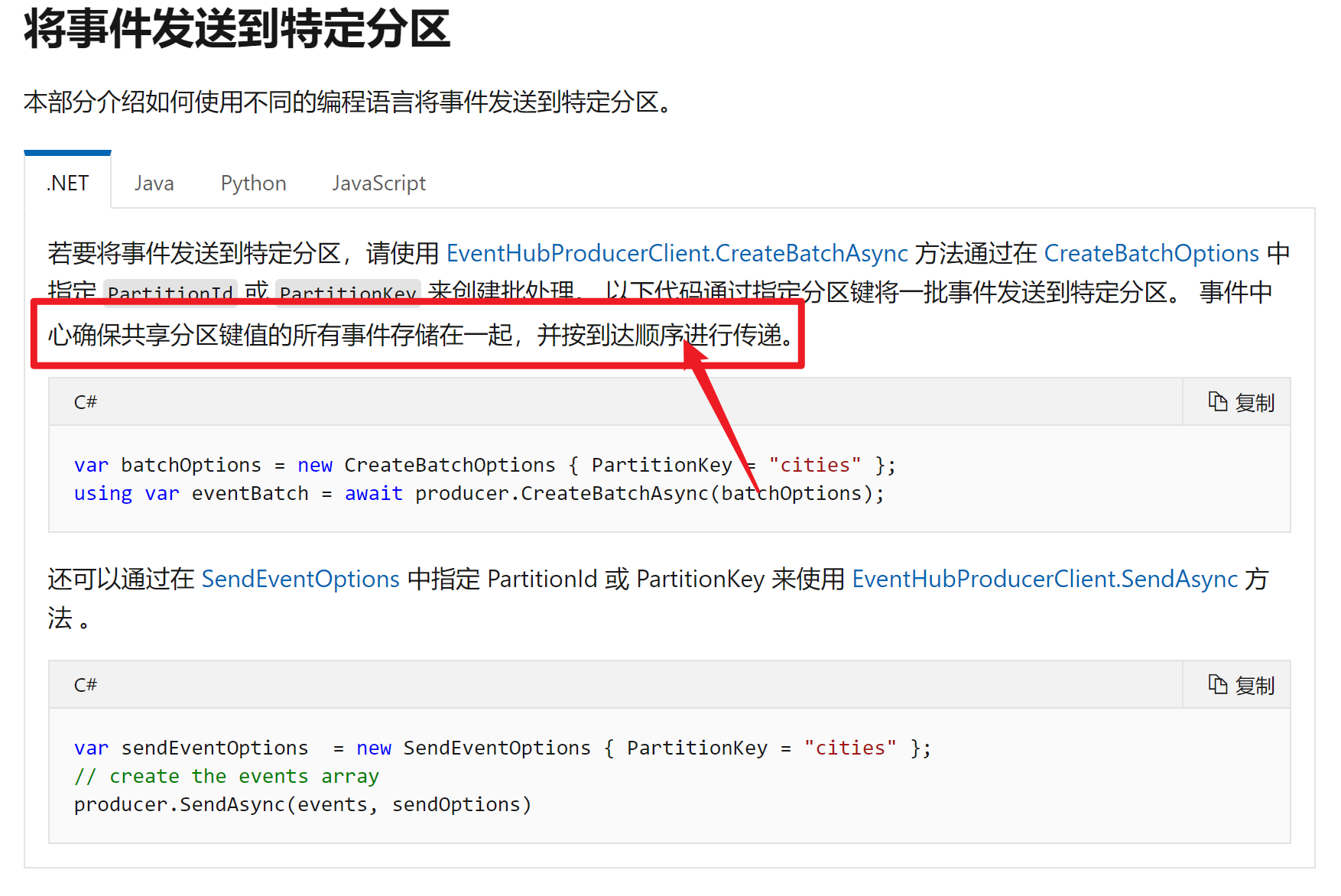
查阅了Azure的官方文档( 将事件发送到特定分区: https://docs.azure.cn/zh-cn/event-hubs/event-hubs-availability-and-consistency?tabs=java#send-events-to-a-specific-partition),在工程里引用组件“azure-spring-cloud-stream-binder-eventhubs”来连接EventHub发送和消费消息事件。在发送端一个For循环中发送带顺序号的消息,编号从0开始,并且在消息的header中指定了 "Partition Key",相同PartitionKey的消息会被发送到相同的Partition,来保证这些消息的顺序。
但是在消费端的工程中消费这些消息时,看到打印到日志中的结果并不是从0递增的。所以想知道是发送端在发送时就已经乱序发送了?还是消息到达EventHub后乱序保存了?还是消费端的消费方式的问题,导致打印出的结果是乱序的?
下面是发送端的代码:
public void testPushMessages(int mcount, String partitionKey) {

String message = "Message ";

for (int i=0; i <mcount; i++) {

source.output().send(MessageBuilder.withPayload(partitionKey + mcount + i).setHeaderIfAbsent(AzureHeaders.PARTITION_KEY,partitionKey).build());

    }

}
下面是消费端代码:
@StreamListener(Sink.INPUT)

public void onEvent(String message, @Header(AzureHeaders.CHECKPOINTER) Checkpointer checkpointer,

                    @Header(AzureHeaders.RAW_PARTITION_ID) String rawPartitionId,

                    @Header(AzureHeaders.PARTITION_KEY) String partitionKey) {

    checkpointer.success()

            .doOnSuccess(s -> log.info("Message '{}' successfully check pointed.rawPartitionId={},partitionKey={}", message, rawPartitionId, partitionKey))

            .doOnError(s -> log.error("Checkpoint message got exception."))

            .subscribe();
下面是打印的日志
......,"data":"Message 'testKey4testMessage1' successfully check pointed.rawPartitionId=1,partition<*****>","xcptn":""}

......,"data":"Message 'testKey5testMessage29' successfully check pointed.rawPartitionId=1,partition<*****>","xcptn":""}

......,"data":"Message 'testKey5testMessage27' successfully check pointed.rawPartitionId=1,partition<*****>","xcptn":""}

......,"data":"Message 'testKey5testMessage26' successfully check pointed.rawPartitionId=1,partition<*****>","xcptn":""}

......,"data":"Message 'testKey5testMessage25' successfully check pointed.rawPartitionId=1,partition<*****>","xcptn":""}

......,"data":"Message 'testKey5testMessage28' successfully check pointed.rawPartitionId=1,partition<*****>","xcptn":""}

......,"data":"Message 'testKey5testMessage14' successfully check pointed.rawPartitionId=1,partition<*****>","xcptn":""}

......,"data":"Message 'testKey5testMessage13' successfully check pointed.rawPartitionId=1,partition<*****>","xcptn":""}

......,"data":"Message 'testKey5testMessage15' successfully check pointed.rawPartitionId=1,partition<*****>","xcptn":""}

......,"data":"Message 'testKey5testMessage5' successfully check pointed.rawPartitionId=1,partition<*****>","xcptn":""}

......,"data":"Message 'testKey5testMessage7' successfully check pointed.rawPartitionId=1,partition<*****>","xcptn":""}

......,"data":"Message 'testKey5testMessage20' successfully check pointed.rawPartitionId=1,partition<*****>","xcptn":""}

......,"data":"Message 'testKey5testMessage19' successfully check pointed.rawPartitionId=1,partition<*****>","xcptn":""}

......,"data":"Message 'testKey5testMessage18' successfully check pointed.rawPartitionId=1,partition<*****>","xcptn":""}

......,"data":"Message 'testKey5testMessage0' successfully check pointed.rawPartitionId=1,partition<*****>","xcptn":""}

......,"data":"Message 'testKey5testMessage9' successfully check pointed.rawPartitionId=1,partition<*****>","xcptn":""}

......,"data":"Message 'testKey5testMessage12' successfully check pointed.rawPartitionId=1,partition<*****>","xcptn":""}

......,"data":"Message 'testKey5testMessage8' successfully check pointed.rawPartitionId=1,partition<*****>","xcptn":""}
从日志中可以看到,消息确实都被发送到了同一个分区(rawPartitionId=1),但是从消息体的序号上看,是乱序的
问题分析
这个是和这个配置相关的fixedDelay,指定默认轮询器的固定延迟,是一个周期性触发器,之前代码会根据这个轮询器进行发送和接受消息的。使用Send发送的方法,现在最新的SDK 不使用这个方法,所以需要使用新的sdk 发送数据测试一下。
新sdk 参考文档您可以参考一下:https://github.com/Azure/azure-sdk-for-java/tree/master/sdk/spring/azure-spring-boot-samples/azure-spring-cloud-sample-eventhubs-binder
SDK版本为
<dependency>

    <groupId>com.azure.spring</groupId>

    <artifactId>azure-spring-cloud-stream-binder-eventhubs</artifactId>

    <version>2.4.0</version>

</dependency>
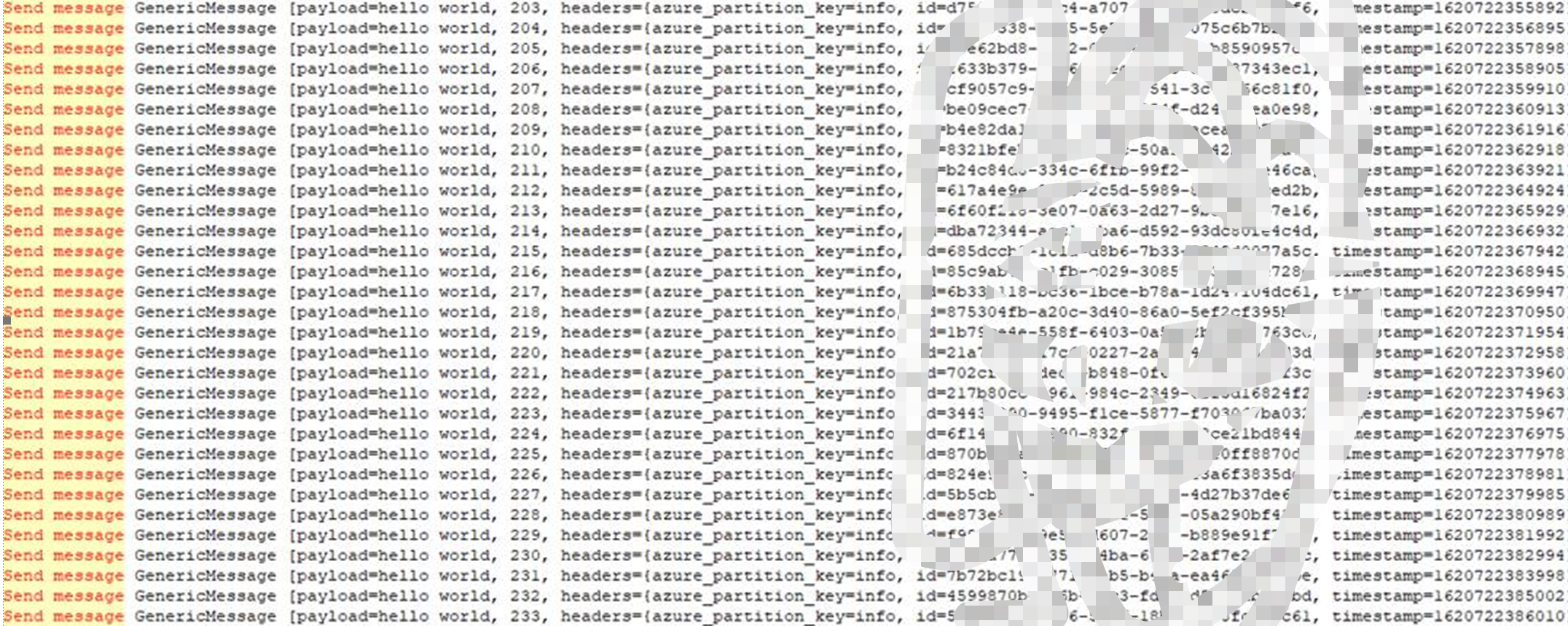
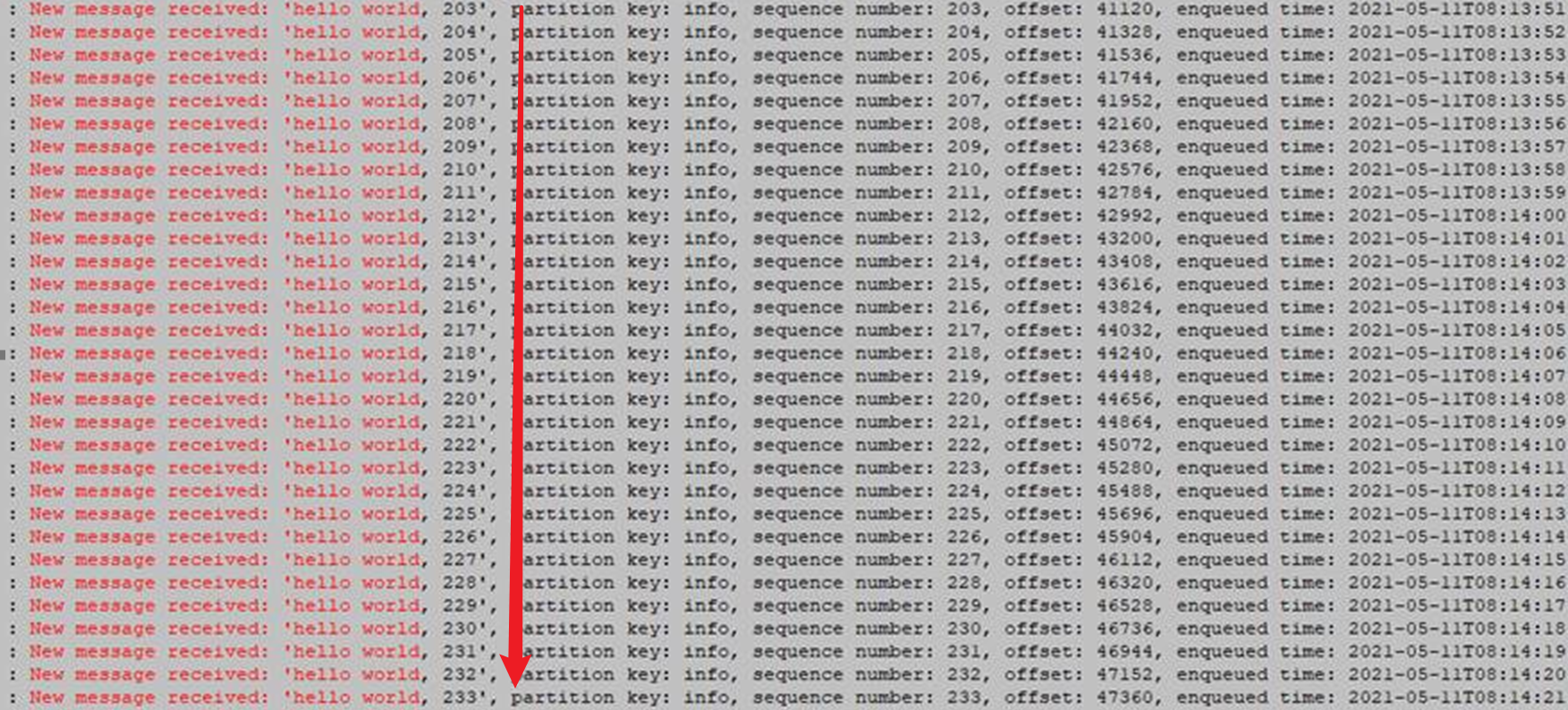
在参考官网的示例后,使用Supplier方法发送消息,代替Send。经过多次测试,指定partitionkey 之后,发送消息是顺序发送的,消费的时候也是按照顺序消费的,下面是测试的代码和结果
发送端的代码
// Copyright (c) Microsoft Corporation. All rights reserved.

// Licensed under the MIT License.

package com.azure.spring.sample.eventhubs.binder;

import com.azure.spring.integration.core.EventHubHeaders;

import org.slf4j.Logger;

import org.slf4j.LoggerFactory;

import org.springframework.context.annotation.Bean;

import org.springframework.context.annotation.Configuration;

import org.springframework.context.annotation.Profile;

import org.springframework.messaging.Message;

import org.springframework.messaging.support.MessageBuilder;

import java.util.function.Supplier;

import static com.azure.spring.integration.core.EventHubHeaders.SEQUENCE_NUMBER;

@Configuration

public class EventProducerConfiguration {

    private static final Logger LOGGER = LoggerFactory.getLogger(EventProducerConfiguration.class);

    private int i = 0;

    @Bean

    public Supplier<Message<String>> supply() {

        return () -> {

            //LOGGER.info("Sending message, sequence " + i);

            String partitionKey="info";

            LOGGER.info("Send message " + MessageBuilder.withPayload("hello world, "+i).setHeaderIfAbsent(EventHubHeaders.PARTITION_KEY, partitionKey).build());

            return MessageBuilder.withPayload("hello world, "+ i++).

                    setHeaderIfAbsent(EventHubHeaders.PARTITION_KEY, partitionKey).build();

        };

    }

}
接收端的代码
package com.ywt.demoEventhub;

import com.azure.spring.integration.core.EventHubHeaders;

import com.azure.spring.integration.core.api.reactor.Checkpointer;

import org.slf4j.Logger;

import org.slf4j.LoggerFactory;

import org.springframework.boot.SpringApplication;

import org.springframework.boot.autoconfigure.SpringBootApplication;

import org.springframework.context.annotation.Bean;

import org.springframework.context.annotation.Configuration;

import org.springframework.integration.annotation.ServiceActivator;

import org.springframework.messaging.Message;

import java.util.function.Consumer;

import static com.azure.spring.integration.core.AzureHeaders.CHECKPOINTER;

@Configuration

public class EventConsume {

    private static final Logger LOGGER = LoggerFactory.getLogger(EventConsume.class);

    @Bean

    public Consumer<Message<String>> consume() {

        return message -> {

            Checkpointer checkpointer = (Checkpointer) message.getHeaders().get(CHECKPOINTER);

            LOGGER.info("New message received: '{}', partition key: {}, sequence number: {}, offset: {}, enqueued time: {}",

                    message.getPayload(),

                    message.getHeaders().get(EventHubHeaders.PARTITION_KEY),

                    message.getHeaders().get(EventHubHeaders.SEQUENCE_NUMBER),

                    message.getHeaders().get(EventHubHeaders.OFFSET),

                    message.getHeaders().get(EventHubHeaders.ENQUEUED_TIME)

            );

            checkpointer.success()

                    .doOnSuccess(success -> LOGGER.info("Message '{}' successfully checkpointed number '{}' ", message.getPayload(), message.getHeaders().get(EventHubHeaders.CHECKPOINTER)))

                    .doOnError(error -> LOGGER.error("Exception found", error))

                    .subscribe();

        };

    }

}
发送消息的日志
消费消息的日志
参考资料
Azure Spring Cloud Stream Binder for Event Hub Code Sample shared library for Java:https://github.com/Azure/azure-sdk-for-java/tree/master/sdk/spring/azure-spring-boot-samples/azure-spring-cloud-sample-eventhubs-binder
How to create a Spring Cloud Stream Binder application with Azure Event Hubs - Add sample code to implement basic event hub functionality : https://docs.microsoft.com/en-us/azure/developer/java/spring-framework/configure-spring-cloud-stream-binder-java-app-azure-event-hub#add-sample-code-to-implement-basic-event-hub-functionality
[END]
【Azure 事件中心】azure-spring-cloud-stream-binder-eventhubs客户端组件问题, 实践消息非顺序可达的更多相关文章
- 整合Spring Cloud Stream Binder与GCP Pubsub进行消息发送与接收
我最新最全的文章都在南瓜慢说 www.pkslow.com,欢迎大家来喝茶! 1 前言 之前的文章<整合Spring Cloud Stream Binder与RabbitMQ进行消息发送与接收& ...
- 整合Spring Cloud Stream Binder与RabbitMQ进行消息发送与接收
我最新最全的文章都在南瓜慢说 www.pkslow.com,欢迎大家来喝茶! 1 前言 Spring Cloud Stream专门用于事件驱动的微服务系统,使用消息中间件来收发信息.使用Spring ...
- 【进阶技术】一篇文章搞掂:Spring Cloud Stream
本文总结自官方文档http://cloud.spring.io/spring-cloud-static/spring-cloud-stream/2.1.0.RC3/single/spring-clou ...
- 官方文档中文版!Spring Cloud Stream 快速入门
本文内容翻译自官方文档,spring-cloud-stream docs,对 Spring Cloud Stream的应用入门介绍. 一.Spring Cloud Stream 简介 官方定义 Spr ...
- Kafka及Spring Cloud Stream
安装 下载kafka http://mirrors.hust.edu.cn/apache/kafka/2.0.0/kafka_2.11-2.0.0.tgz kafka最为重要三个配置依次为:broke ...
- 消息驱动式微服务:Spring Cloud Stream & RabbitMQ
1. 概述 在本文中,我们将向您介绍Spring Cloud Stream,这是一个用于构建消息驱动的微服务应用程序的框架,这些应用程序由一个常见的消息传递代理(如RabbitMQ.Apache Ka ...
- Spring Cloud Stream 进行服务之间的通讯
Spring Cloud Stream Srping cloud Bus的底层实现就是Spring Cloud Stream,Spring Cloud Stream的目的是用于构建基于消息驱动(或事件 ...
- 【Azure 事件中心】为应用程序网关(Application Gateway with WAF) 配置诊断日志,发送到事件中心
问题描述 在Application Gateway中,开启WAF(Web application firewall)后,现在需要把访问的日志输出到第三方分析代码中进行分析,如何来获取WAF的诊断日志呢 ...
- 【事件中心 Azure Event Hub】在Linux环境中(Ubuntu)安装Logstash的简易步骤及配置连接到Event Hub
在文章([事件中心 Azure Event Hub]使用Logstash消费EventHub中的event时遇见的几种异常(TimeoutException, ReceiverDisconnected ...
随机推荐
- linux 在某个路径下,查找某个文件
find /cephfs/netdisk/ -name "*.sql"
- 算法、数据结构、与设计模式等在游戏开发中的运用 (一):单例设计(Singleton Design)
算法.数据结构.与设计模式等在游戏开发中的运用 (一):单例设计(Singleton Design) 作者: Compasslg 李涵威 1. 什么是单例设计(Singleton Design) 在学 ...
- 5- MySQL数据库SELECT查询操作
复习: 数据类型: 数值型:整数(int,tinyint,smallint,bigint,mediumint) 浮点型(float ,double,decimal) 字符型:char(固定长度) ,v ...
- php变量的命名规则
php变量的命名规则 1.变量以美元符号$开头.如$name,$age: 2.美元符号$后面的第一个字符不可以是数字: 3.除了下划线_外,变量不允许出现任何空格或者标点符号: 4.PHP变量名是区分 ...
- 「编程羽录」上线,程序员必备的这些技能你能get到嘛?
大家好,我是小羽. 好久不见,给大家带来个好消息,小羽的全新专题「编程羽录」系列正式上新,主要是介绍一些关于面试题和经验总结的文章. 会为大家提供一些技术栈之外,程序员还需要的其他方面硬核知识,做到全 ...
- Windows下反(反)调试技术汇总
反调试技术,恶意代码用它识别是否被调试,或者让调试器失效.恶意代码编写者意识到分析人员经常使用调试器来观察恶意代码的操作,因此他们使用反调试技术尽可能地延长恶意代码的分析时间.为了阻止调试器的分析,当 ...
- 数据链路层协议(Ethernet、IEEE802.3、PPP、HDLC)
目录 数据链路层协议 Ethernet以太网协议 以太网数据帧的封装 IEEE802.3协议 PPP协议 HDLC协议 数据链路层协议 首先Ethernet.IEEE802.3.PPP和HDLC都是数 ...
- Windows核心编程 第23章 结束处理程序
第2 3章 结束处理程序 SEH(结构化异常处理) 使用 S E H的好处就是当你编写程序时,只需要关注程序要完成的任务. 如果在运行时发生什么错误,系统会发现并将发生的问题通知你.利用S E H,你 ...
- 【python】Leetcode每日一题-丑数2
[python]Leetcode每日一题-丑数2 [题目描述] 给你一个整数 n ,请你找出并返回第 n 个 丑数 . 丑数 就是只包含质因数 2.3 和/或 5 的正整数. 示例1: 输入:n = ...
- 老Python带你从浅入深探究List
列表 Python中的列表(list)是最常用的数据类型之一. Python中的列表可以存储任意类型的数据,这与其他语言中的数组(array)不同. 被存入列表中的内容可称之为元素(element)或 ...