
Spring系列之集成Druid连接池及监控配置
前言
前一篇文章我们熟悉了HikariCP连接池,也了解到它的性能很高,今天我们讲一下另一款比较受欢迎的连接池:Druid,这是阿里开源的一款数据库连接池,它官网上声称:为监控而生!他可以实现页面监控,看到SQL的执行次数、时间和慢SQL信息,也可以对数据库密码信息进行加密,也可以对监控结果进行日志的记录,以及可以实现对敏感操作实现开关,杜绝SQL注入,下面我们详细讲一下它如何与Spring集成,并且顺便了解一下它的监控的配置。
文章要点:
- Spring集成Druid
- 监控Filters配置(stat、wall、config、log)
- HiKariCP和Druid该如何选择
如何集成Druid
1、增加相关依赖
<dependency>

			<groupId>org.springframework.boot</groupId>

			<artifactId>spring-boot-starter-actuator</artifactId>

		</dependency>

		<dependency>

			<groupId>org.springframework.boot</groupId>

			<artifactId>spring-boot-starter-web</artifactId>

		</dependency>

		<dependency>

			<groupId>mysql</groupId>

			<artifactId>mysql-connector-java</artifactId>

			<scope>runtime</scope>

		</dependency>

		<dependency>

			<groupId>org.projectlombok</groupId>

			<artifactId>lombok</artifactId>

			<optional>true</optional>

		</dependency>

		<dependency>

			<groupId>org.springframework.boot</groupId>

			<artifactId>spring-boot-starter-test</artifactId>

			<scope>test</scope>

		</dependency>

		<dependency>

			<groupId>org.springframework.boot</groupId>

			<artifactId>spring-boot-starter-data-jdbc</artifactId>

		</dependency>

		<dependency>

			<groupId>org.mybatis.spring.boot</groupId>

			<artifactId>mybatis-spring-boot-starter</artifactId>

			<version>2.2.0</version>

		</dependency>

		<dependency>

			<groupId>com.alibaba</groupId>

			<artifactId>druid-spring-boot-starter</artifactId>

			<version>1.2.6</version>

		</dependency>
2、配置DataSource
@Configuration

public class DataSourceConfiguration {

    @ConfigurationProperties(prefix = "spring.datasource.druid")

    @Bean

    public DataSource dataSource(){

        return new DruidDataSource();

    }

}
3、配置项参数application.properties
# 或spring.datasource.url

spring.datasource.druid.url=jdbc:mysql://localhost:3306/chenrui

# 或spring.datasource.username

spring.datasource.druid.username=root

# 或spring.datasource.password

spring.datasource.druid.password=root

#初始化时建立物理连接的个数。初始化发生在显示调用init方法,或者第一次getConnection时

spring.datasource.druid.initial-size=5

#最大连接池数量

spring.datasource.druid.max-active=20

#最小连接池数量

spring.datasource.druid.min-idle=5

#获取连接时最大等待时间,单位毫秒。配置了maxWait之后,缺省启用公平锁,并发效率会有所下降,如果需要可以通过配置useUnfairLock属性为true使用非公平锁

spring.datasource.druid.max-wait=500

#是否缓存preparedStatement,也就是PSCache。PSCache对支持游标的数据库性能提升巨大,比如说oracle。在mysql下建议关闭。

spring.datasource.druid.pool-prepared-statements=false

#要启用PSCache,必须配置大于0,当大于0时,poolPreparedStatements自动触发修改为true。在Druid中,不会存在Oracle下PSCache占用内存过多的问题,可以把这个数值配置大一些,比如说100

spring.datasource.druid.max-pool-prepared-statement-per-connection-size=-1

#用来检测连接是否有效的sql,要求是一个查询语句,常用select 'x'。如果validationQuery为null,testOnBorrow、testOnReturn、testWhileIdle都不会起作用。

spring.datasource.druid.validation-query=select 'x'

#单位:秒,检测连接是否有效的超时时间。底层调用jdbc Statement对象的void setQueryTimeout(int seconds)方法

spring.datasource.druid.validation-query-timeout=1

#申请连接时执行validationQuery检测连接是否有效,做了这个配置会降低性能。

spring.datasource.druid.test-on-borrow=true

#归还连接时执行validationQuery检测连接是否有效,做了这个配置会降低性能。

spring.datasource.druid.test-on-return=true

#建议配置为true,不影响性能,并且保证安全性。申请连接的时候检测,如果空闲时间大于timeBetweenEvictionRunsMillis,执行validationQuery检测连接是否有效

spring.datasource.druid.test-while-idle=true

#有两个含义:默认1分钟

#1) Destroy线程会检测连接的间隔时间,如果连接空闲时间大于等于minEvictableIdleTimeMillis则关闭物理连接。

#2) testWhileIdle的判断依据,详细看testWhileIdle属性的说明

spring.datasource.druid.time-between-eviction-runs-millis=60000

# 连接保持空闲而不被驱逐的最小时间

spring.datasource.druid.min-evictable-idle-time-millis=600000

# 连接保持空闲而不被驱逐的最大时间

spring.datasource.druid.max-evictable-idle-time-millis=900000

#配置多个英文逗号分隔

spring.datasource.druid.filters=stat,wall

# WebStatFilter配置

# 是否启用StatFilter默认值false

spring.datasource.druid.web-stat-filter.enabled=true

# 匹配的url

spring.datasource.druid.web-stat-filter.url-pattern=/*

# 排除一些不必要的url,比如.js,/jslib/等等

spring.datasource.druid.web-stat-filter.exclusions=*.js,*.gif,*.jpg,*.bmp,*.png,*.css,*.ico,/druid/*

# 你可以关闭session统计功能

spring.datasource.druid.web-stat-filter.session-stat-enable=true

# 默认sessionStatMaxCount是1000个,你也可以按需要进行配置

spring.datasource.druid.web-stat-filter.session-stat-max-count=1000

# 使得druid能够知道当前的session的用户是谁

spring.datasource.druid.web-stat-filter.principal-session-name=cross

# 如果你的user信息保存在cookie中,你可以配置principalCookieName,使得druid知道当前的user是谁

spring.datasource.druid.web-stat-filter.principal-cookie-name=aniu

# 配置profileEnable能够监控单个url调用的sql列表

spring.datasource.druid.web-stat-filter.profile-enable=

# 配置_StatViewServlet配置,用于展示Druid的统计信息

#是否启用StatViewServlet(监控页面)默认值为false(考虑到安全问题默认并未启动,如需启用建议设置密码或白名单以保障安全)

spring.datasource.druid.stat-view-servlet.enabled=true

spring.datasource.druid.stat-view-servlet.url-pattern=/druid/*

#允许清空统计数据

spring.datasource.druid.stat-view-servlet.reset-enable=true

#监控页面登陆的用户名

spring.datasource.druid.stat-view-servlet.login-username=root

# 登陆监控页面所需的密码

spring.datasource.druid.stat-view-servlet.login-password=1234

# deny优先于allow,如果在deny列表中,就算在allow列表中,也会被拒绝。

# 如果allow没有配置或者为空,则允许所有访问

#允许的IP

# spring.datasource.druid.stat-view-servlet.allow=

#拒绝的IP

#spring.datasource.druid.stat-view-servlet.deny=127.0.0.1

#指定xml文件所在的位置

mybatis.mapper-locations=classpath:mapper/*Mapper.xml

#开启数据库字段和类属性的映射支持驼峰

mybatis.configuration.map-underscore-to-camel-case=true
4、代码相关
数据库脚本
create table user_info

(

    id        bigint unsigned auto_increment

        primary key,

    user_id   int          not null comment '用户id',

    user_name varchar(64)  not null comment '真实姓名',

    email     varchar(30)  not null comment '用户邮箱',

    nick_name varchar(45)  null comment '昵称',

    status    tinyint      not null comment '用户状态,1-正常,2-注销,3-冻结',

    address   varchar(128) null

)

    comment '用户基本信息';
初始化数据
INSERT INTO chenrui.user_info (id, user_id, user_name, email, nick_name, status, address) VALUES (1, 80001, '张三丰', 'xxx@126.com', '三哥', 1, '武当山');

INSERT INTO chenrui.user_info (id, user_id, user_name, email, nick_name, status, address) VALUES (2, 80002, '张无忌', 'yyy@126.com', '', 1, null);
mapper.xml文件编写
<?xml version="1.0" encoding="UTF-8"?>

<!DOCTYPE mapper

        PUBLIC "-//mybatis.org//DTD Mapper 3.0//EN"

        "http://mybatis.org/dtd/mybatis-3-mapper.dtd">

<mapper namespace="com.example.springdataSourcedruid.dao.UserInfoDAO">

    <select id="findAllUser" resultType="com.example.springdataSourcedruid.entity.UserInfo">

        select * from user_info

    </select>

    <select id="getUserById" resultType="com.example.springdataSourcedruid.entity.UserInfo">

        select * from user_info where id = #{id}

    </select>

    <select id="getUserByIdEqualOne" resultType="com.example.springdataSourcedruid.entity.UserInfo">

        select * from user_info where id =1

    </select>

    <select id="getUserByIdEqualTwo" resultType="com.example.springdataSourcedruid.entity.UserInfo">

        select * from user_info where id =2

    </select>

</mapper>
编写DAO接口
public interface UserInfoDAO {

    List<UserInfo> findAllUser();

    UserInfo getUserById(@Param("id") int id);

    UserInfo getUserByIdEqualOne();

    UserInfo getUserByIdEqualTwo();

}
测试controller
@RestController

@Slf4j

public class UserInfoController {

    @Resource

    private UserInfoDAO userInfoDAO;

    @GetMapping(path = "/all")

    public List<UserInfo> getAllUser(){

        return userInfoDAO.findAllUser();

    }

    @GetMapping(path = "/getUser/{id}")

    public UserInfo getById(@PathVariable int id){

        return userInfoDAO.getUserById(id);

    }

    @GetMapping(path = "/getUser/one")

    public UserInfo getById1(){

        return userInfoDAO.getUserByIdEqualOne();

    }

    @GetMapping(path = "/getUser/two")

    public UserInfo getById2(){

        return userInfoDAO.getUserByIdEqualTwo();

    }

}
启动类
@SpringBootApplication

@MapperScan(basePackages = "com.example.springdataSourcedruid.dao")

public class SpringDataSourceDruidApplication {

	public static void main(String[] args) {

		SpringApplication.run(SpringDataSourceDruidApplication.class, args);

	}

}
5、启动验证
访问:http://127.0.0.1:8080/druid/ ,弹出登陆界面,用户和密码对应我们的配置文件中设置的用户名和密码
登陆进去可以看到里面有很多监控,这里我们只看我们本次所关心的,数据源,SQL监控,URL监控,其他的可以自行研究。
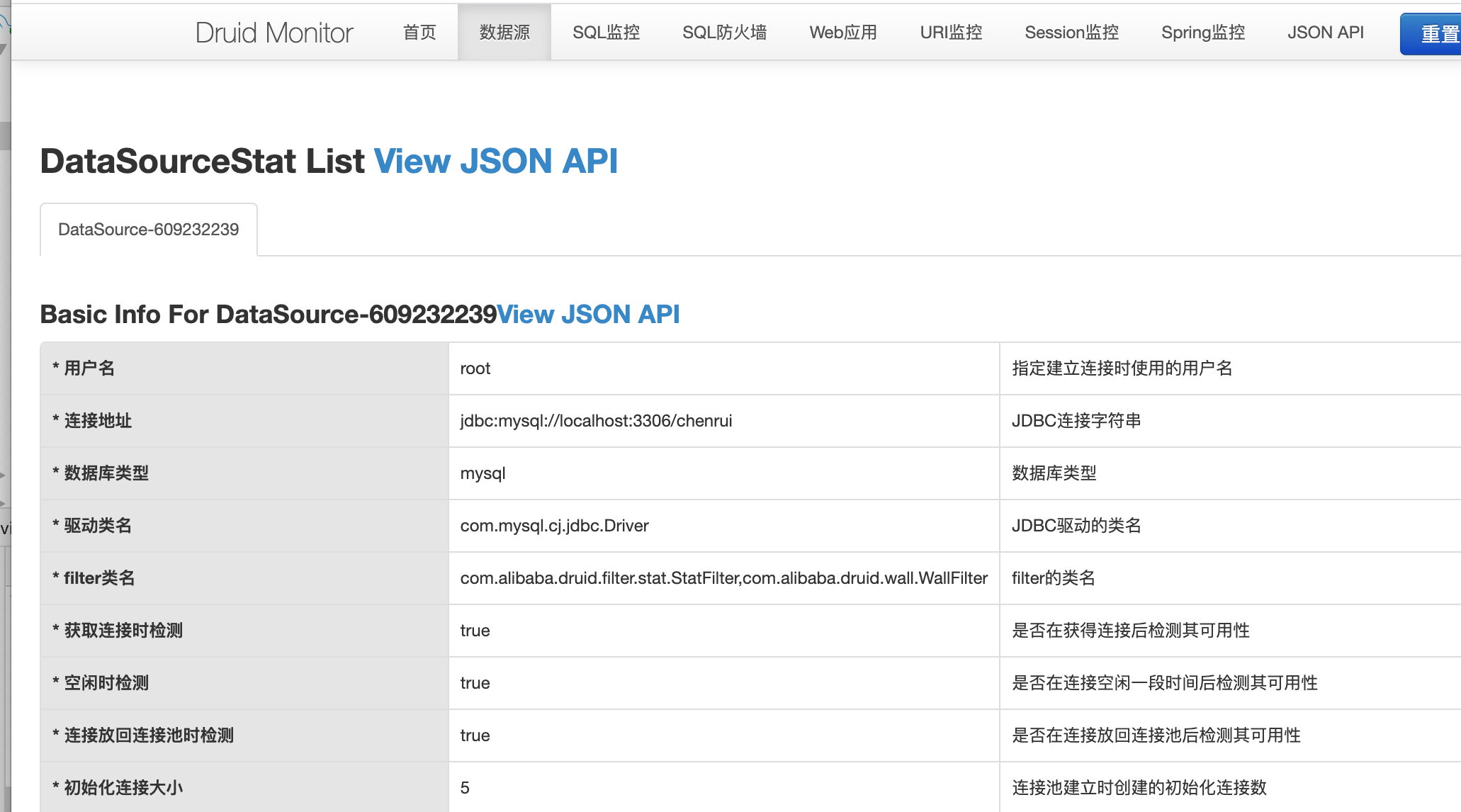
上面我们看到数据源里面的信息和我们在application.properties中配置的一致
下面我们分别执行几次,我们准备好的验证接口
http://127.0.0.1:8080/all
http://127.0.0.1:8080/getUser/1
http://127.0.0.1:8080/getUser/2
http://127.0.0.1:8080/getUser/one
http://127.0.0.1:8080/getUser/two
然后看一下的各项监控信息长什么样子
SQL监控
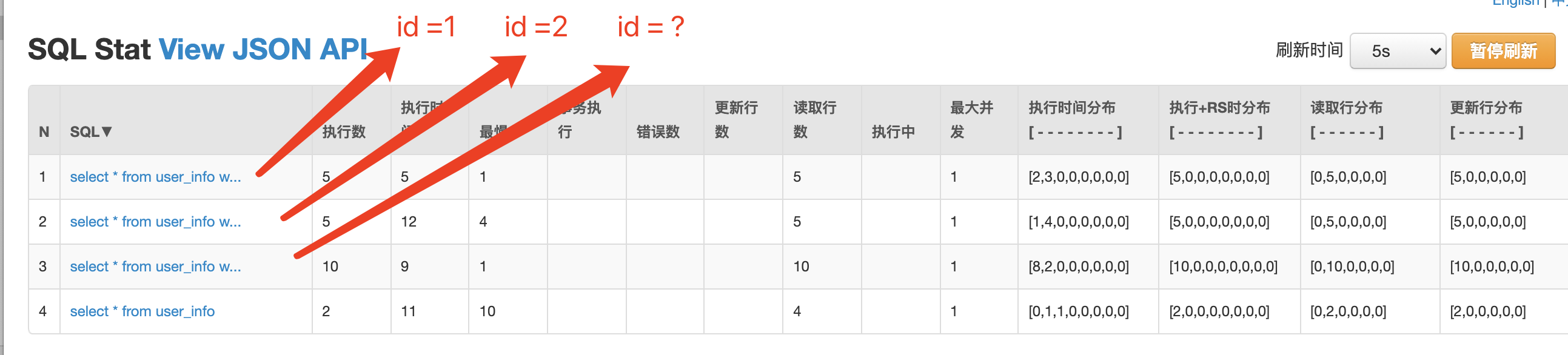
上面我们看到我们总共四个语句,以及四个语句的运行情况
SQL监控项上,执行时间、读取行数、更新行数都有区间分布,将耗时分布成8个区间:
- 0 - 1 耗时0到1毫秒的次数
- 1 - 10 耗时1到10毫秒的次数
- 10 - 100 耗时10到100毫秒的次数
- 100 - 1,000 耗时100到1000毫秒的次数
- 1,000 - 10,000 耗时1到10秒的次数
- 10,000 - 100,000 耗时10到100秒的次数
- 100,000 - 1,000,000 耗时100到1000秒的次数
- 1,000,000 - 耗时1000秒以上的次数
这里你可能会有疑问 ,id =1和id=2怎么还是分开的,如果我id有一亿个,难道要在监控页面上有一亿条记录吗?不是应该都应该是id=?的形式吗?这里后面会讲到,涉及到sql合并的监控配置
URL监控
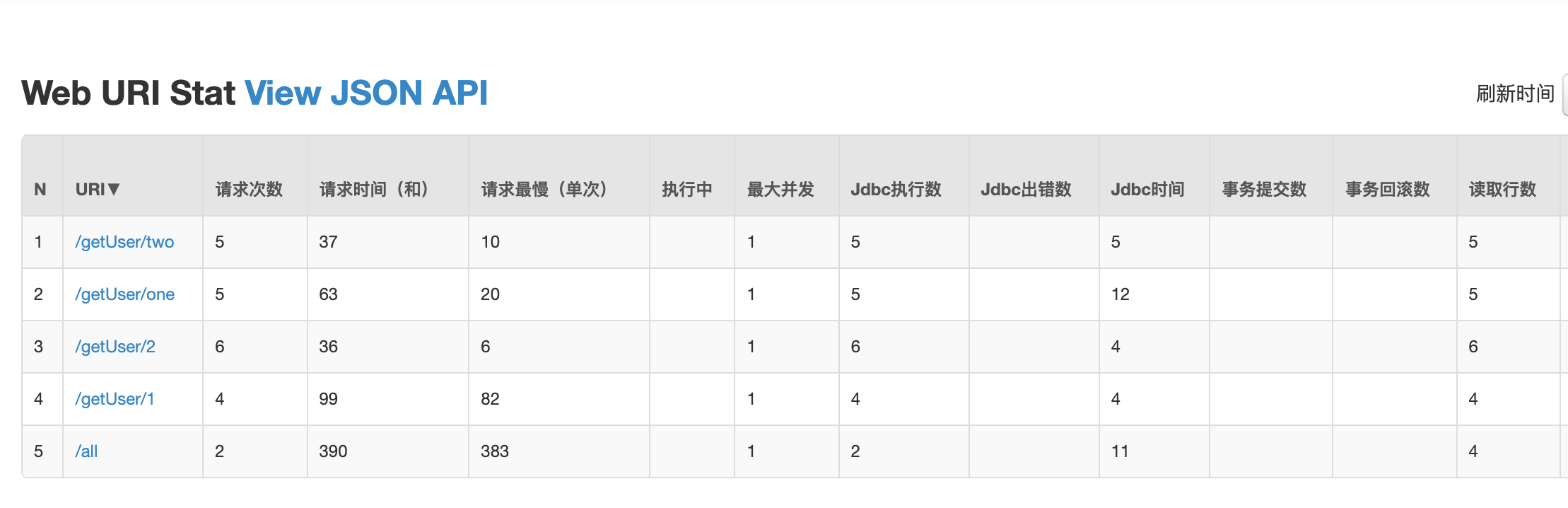
这里可以很清晰的看到,每个url涉及到的数据库执行的信息
druid的内置filters
在druid的jar中,META-INF/druid-filter.properties中有其内置的filter,内容如下:
druid.filters.default=com.alibaba.druid.filter.stat.StatFilter

druid.filters.stat=com.alibaba.druid.filter.stat.StatFilter

druid.filters.mergeStat=com.alibaba.druid.filter.stat.MergeStatFilter

druid.filters.counter=com.alibaba.druid.filter.stat.StatFilter

druid.filters.encoding=com.alibaba.druid.filter.encoding.EncodingConvertFilter

druid.filters.log4j=com.alibaba.druid.filter.logging.Log4jFilter

druid.filters.log4j2=com.alibaba.druid.filter.logging.Log4j2Filter

druid.filters.slf4j=com.alibaba.druid.filter.logging.Slf4jLogFilter

druid.filters.commonlogging=com.alibaba.druid.filter.logging.CommonsLogFilter

druid.filters.commonLogging=com.alibaba.druid.filter.logging.CommonsLogFilter

druid.filters.wall=com.alibaba.druid.wall.WallFilter

druid.filters.config=com.alibaba.druid.filter.config.ConfigFilter

druid.filters.haRandomValidator=com.alibaba.druid.pool.ha.selector.RandomDataSourceValidateFilter
default、stat、wall等是filter的别名,可以在application.properties中可以通过spring.datasource.druid.filters属性指定别名来开启相应的filter,也可以在Spring中通过属性注入方式来开启,接下来介绍一下比较常用的filter
拦截器stat(default、counter)
在spring.datasource.druid.filters配置中包含stat,代表开启监控统计信息,在上面内容中,我们已经看到包含执行次数、时间、最慢SQL等信息。也提到因为有的sql是非参数话的,这样会导致在监控页面有很多监控的sql都是一样的,只是参数不一样,我们这时候需要将合同sql配置打开;
只需要在application.properties增加配置:
#为监控开启SQL合并,将慢SQL的时间定为2毫秒,记录慢SQL日志

spring.datasource.druid.connection-properties=druid.stat.mergeSql=true;druid.stat.slowSqlMillis=2;druid.stat.logSlowSql=true
看一下运行结果:
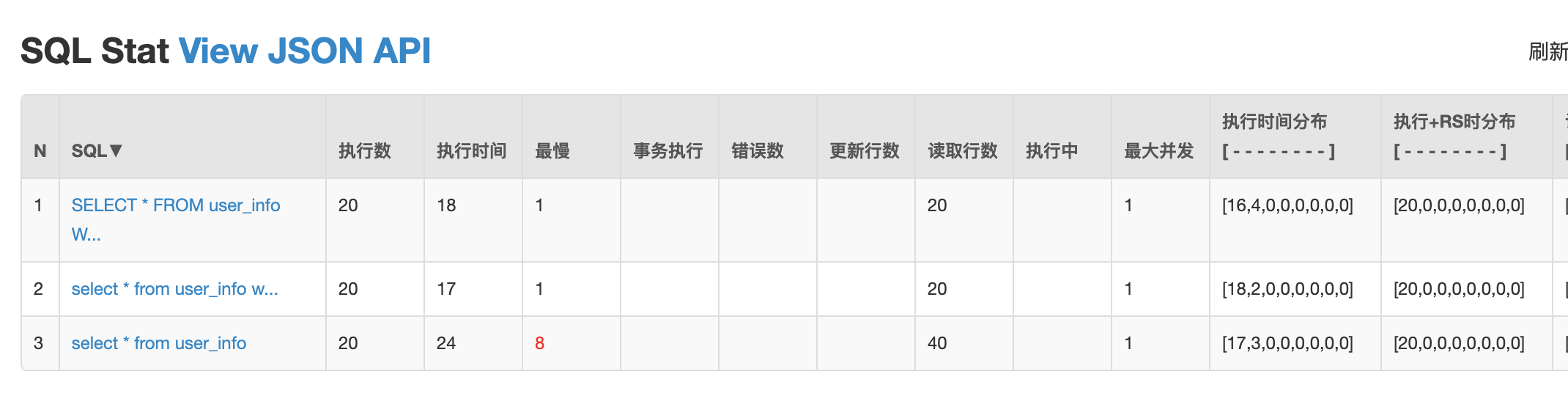
1、下面2个语句在监控页面被合并了:
select * from user_info where id=1

select * from user_info where id=2

// 合并后的结果是:

SELECT * FROM user_info WHERE id = ?
2、超过2ms的语句,在监控页面红色展示出来
3、慢SQL在日志中会被体现出来

拦截器mergeStat
继承stat,基本特性和stat是一样的,不做延伸
拦截器encoding
由于历史原因,一些数据库保存数据的时候使用了错误编码,需要做编码转换。
可以用下面的方式开启:
spring.datasource.druid.filters=stat,encoding

#配置客户端的编码UTF-8,服务端的编码是ISO-8859-1,这样存在数据库中的乱码查询出来就不是乱码了。

spring.datasource.druid.connection-properties=druid.stat.mergeSql=true;druid.stat.slowSqlMillis=2;druid.stat.logSlowSql=true;clientEncoding=UTF-8;serverEncoding=ISO-8859-1
拦截器 log4j(log4j2、slf4j、commonlogging、commonLogging)
Druid内置提供了四种LogFilter(Log4jFilter、Log4j2Filter、CommonsLogFilter、Slf4jLogFilter),用于输出JDBC执行的日志
#这里使用log4j2为例

spring.datasource.druid.filters=stat,log4j2

#druid.log.conn记录连接、druid.log.stmt记录语句、druid.log.rs记录结果集、druid.log.stmt.executableSql记录可执行的SQL

spring.datasource.druid.connection-properties=druid.stat.mergeSql=true;druid.stat.slowSqlMillis=2;druid.stat.logSlowSql=true;druid.log.conn=true;druid.log.stmt=true;druid.log.rs=true;druid.log.stmt.executableSql=true

#为方便验证,我们开启以下loggerName为DEBUG

logging.level.druid.sql.Statement=DEBUG

logging.level.druid.sql.ResultSet=DEBUG

logging.level.druid.sql.Connection=DEBUG

logging.level.druid.sql.DataSource=DEBUG
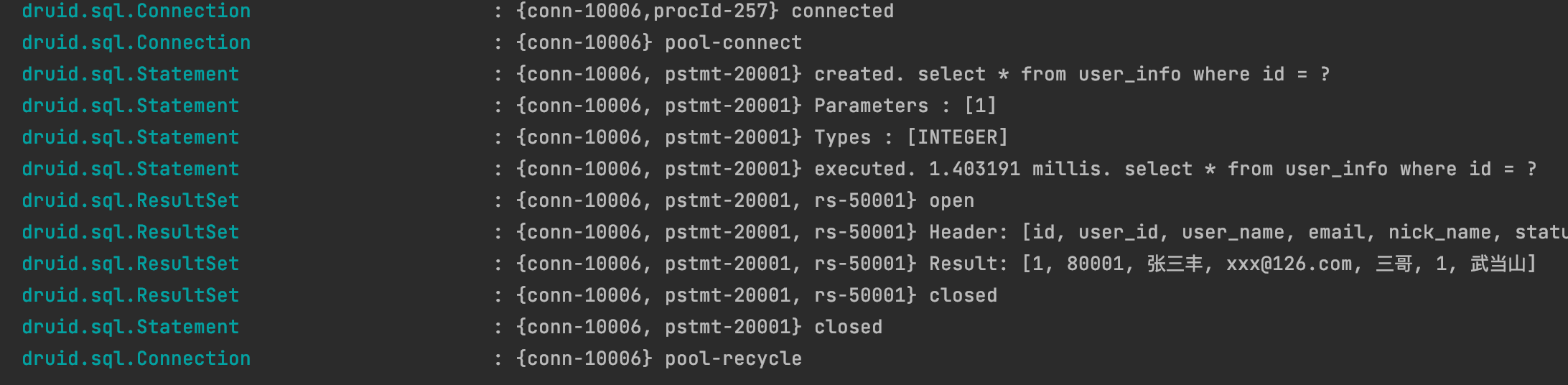
我们可以看到执行SQL的整个过程,开启连接>从连接池获取一个连接>组装SQL语句>执行>结果集返回>连接池回收连接
这里只用了log4j2这一种类型,其他可以自行去验证。
拦截器wall
WallFilter的功能是防御SQL注入攻击。它是基于SQL语法分析,理解其中的SQL语义,然后做处理的,智能,准确,误报率低。减少风险的发生,wall拦截器还是很重要的。比如说不允许使用truncate,不允许物理删除,这时候wall就用得上了。配置方式有两种:
第一种:缺省配置
spring.datasource.druid.filters=stat,wall,log4j2
这种配置是默认配置,而且大多数都不会拦截,可能不符合特定的场景,默认属性值参照:https://www.bookstack.cn/read/Druid/ffdd9118e6208531.md
第二种:属性指定配置
这种方式的好处是:我们可以针对特定场景进行限定,比如说不能用存储过程,不能物理删除,是否允许语句中有注释等等。
//在DruidDataSource生成前注入WallFilter

@ConfigurationProperties(prefix = "spring.datasource.druid")

    @Bean

    public DataSource dataSource(){

        DruidDataSource dataSource = new DruidDataSource();

        dataSource.getProxyFilters().add(wallFilter());

        return dataSource;

    }

    @Bean

    @ConfigurationProperties("spring.datasource.druid.filter.wall.config")

    public WallConfig wallConfig(){

        return new WallConfig();

    }

	@Bean

    public WallFilter wallFilter(){

        WallFilter filter = new WallFilter();

        filter.setConfig(wallConfig());

        filter.setDbType("mysql");

        return filter;

    }
#不允许物理删除语句

spring.datasource.druid.filter.wall.config.delete-allow=false
执行一下试试效果:

可以看到日志显示,不允许删除,这样可以避免一些同学不按照公司开发规范来开发代码,减少风险。其他配置自己可以试验一下。
拦截器Config
Config作用:从配置文件中读取配置;从远程http文件中读取配置;为数据库密码提供加密功能
实际上前两项作用意义不大,最关键的是第三项作用,因为数据库密码直接写在配置中,对运维安全来说,是一个很大的挑战。Druid为此提供一种数据库密码加密的手段ConfigFilter
如何使用:
#在application.properties的链接属性配置项中增加config.file,可以是本地文件,也可以是远程文件,比如config.file=http://127.0.0.1/druid-pool.properties

spring.datasource.druid.connection-properties=config.file=file:///Users/chenrui/druid-pool.properties
加密我们的数据库密码
使用下面的命令生成数据库密码的密文和秘钥对
java -cp druid-1.0.16.jar com.alibaba.druid.filter.config.ConfigTools you_password
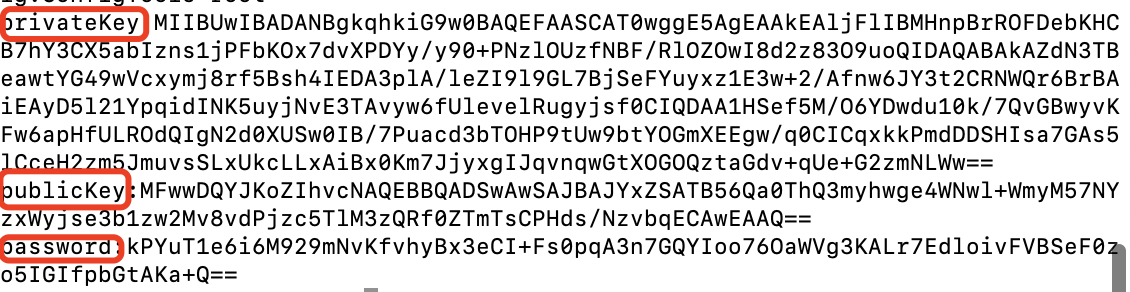
druid-pool.properties文件内容

数据库密码配置项的值改为密文
spring.datasource.druid.password=kPYuT1e6i6M929mNvKfvhyBx3eCI+Fs0pqA3n7GQYIoo76OaWVg3KALr7EdloivFVBSeF0zo5IGIfpbGtAKa+Q==
自己启动一下试试,发现一切正常,信息安全问题也解决了。
Druid和HikariCP如何选择
网络上有这么一个图,可以看到Druid是和其声明的一致(为监控而生),但是目前市面上有很多监控相关的中间件和技术,HikariCP可以通过这些技术弥补监控方面的不足
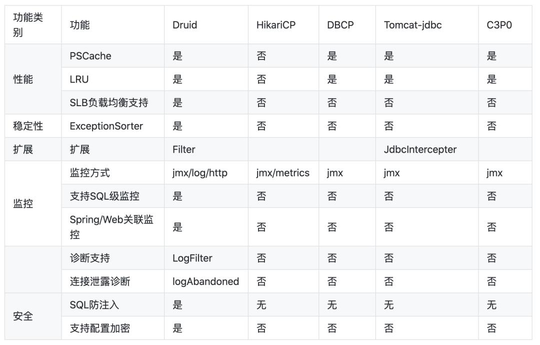
HikariCP则说自己是性能最好的连接池,但是Druid也经受住了阿里双11的大考,实际上性能也是很好的
选择哪一款就见仁见智了,不过两款都是开源产品,阿里的Druid有中文的开源社区,交流起来更加方便,并且经过阿里多个系统的实验,想必也是非常的稳定,而Hikari是SpringBoot2.0默认的连接池,全世界使用范围也非常广,对于大部分业务来说,使用哪一款都是差不多的,毕竟性能瓶颈一般都不在连接池。大家可根据自己的喜好自由选择
Spring系列之集成Druid连接池及监控配置的更多相关文章
- springboot+druid连接池及监控配置
1. 问题描述 阿里巴巴的数据库连接池Druid在效率与稳定性都很高,被很多开发团队使用,并且自带的Druid监控也很好用,本章简单介绍下springboot+druid配置连接池及监控. 2. 解决 ...
- spring boot 学习(四)Druid连接池的使用配置
Druid介绍 Druid是一个JDBC组件,druid 是阿里开源在 github 上面的数据库连接池,它包括三部分: * DruidDriver 代理Driver,能够提供基于Filter-Cha ...
- Druid连接池及监控在spring中的配置
Druid连接池及监控在spring配置如下: <bean id="dataSource" class="com.alibaba.druid.pool.DruidD ...
- SpringBoot2.0 基础案例(07):集成Druid连接池,配置监控界面
一.Druid连接池 1.druid简介 Druid连接池是阿里巴巴开源的数据库连接池项目.Druid连接池为监控而生,内置强大的监控功能,监控特性不影响性能.功能强大,能防SQL注入,内置Login ...
- spring配置druid连接池和监控数据库访问性能
Druid连接池及监控在spring配置如下: <bean id="dataSource" class="com.alibaba.druid.pool.DruidD ...
- Spring学习总结(12)——Druid连接池及监控在spring配置
Druid连接池及监控在spring配置如下: <bean id="dataSource" class="com.alibaba.druid.pool.DruidD ...
- Druid连接池参数maxWait配置错误引发的问题
Druid连接池参数maxWait配置错误引发的问题 1. 背景 数据库服务器(服务部署在客户内网环境)的运行一段时间后,网卡出现了问题,导致所有服务都连接不上数据库,客户把网络恢复之后,反馈有个服务 ...
- springboot集成druid连接池
使用druid连接池主要有几步: 1.添加jar和依赖 <groupId>org.mybatis.spring.boot</groupId> <artifactId> ...
- Spring整合JDBC和Druid连接池
我的博客名为黑客之谜,喜欢我的,或者喜欢未来的大神,点一波关注吧!顺便说一下,双十二快到了,祝大家双十二快乐,尽情的买买买~ 如果转载我的文章请标明出处和著名,谢谢配合. 我的博客地址为: https ...
随机推荐
- NestJS WebSocket 开始使用
使用NestJs提供WebSocket服务. 本文会在新建项目的基础上增加2个类 Gateway 实现业务逻辑的地方 WebSocketAdapter WebSocket适配器 新建项目 新建一个项目 ...
- 【超值分享】为何写服务器程序需要自己管理内存,从改造std::string字符串操作说起。。。
服务器程序为何要进行内存管理,管中窥豹,让我们从string字符串的操作说起...... new/delete是用于c++中的动态内存管理函数,而malloc/free在c++和c中都可以使用,本质上 ...
- c#链接MySql数据库方法
方法一: 打开visual studio,在项目->管理NuGet程序包->搜索"MySql.Data"并安装: 在程序部分,引入 using MySql.Data.M ...
- 五个 .NET 性能小贴士
原文:bit.ly/3wSpO4o 作者:Nikita Starichenko 翻译:精致码农 大家好!今天我想和大家分享几个 .NET 的性能小贴士与基准测试. 我的系统环境: BenchmarkD ...
- Skywalking-03:Skywalking本地调试
live-demo 与 skywalking 源码联调 构建项目 找一个目录执行如下命令 git clone https://github.com/apache/skywalking.git # cl ...
- LinkedHashMap 的实现原理
LinkedHashMap 概述 HashMap 是无序的,HashMap 在 put 的时候是根据 key 的 hashcode 进行 hash 然后放入对应的地方.所以在按照一定顺序 put 进 ...
- Java 异步编程的几种方式
前言 异步编程是让程序并发运行的一种手段.它允许多个事情同时发生,当程序调用需要长时间运行的方法时,它不会阻塞当前的执行流程,程序可以继续运行,当方法执行完成时通知给主线程根据需要获取其执行结果或者失 ...
- 2020厦门大学综述翻译:3D点云深度学习(Remote Sensiong期刊)
目录 摘要 1.引言: 2.点云深度学习的挑战 3.基于结构化网格的学习 3.1 基于体素 3.2 基于多视图 3.3 高维晶格 4.直接在点云上进行的深度学习 4.1 PointNet 4.2 局部 ...
- 数据结构——图的深度优先遍历(邻接矩阵表示+java版本)
1.深度优先遍历(DFS) 图的深度优先遍历本质上是一棵树的前序遍历(即先遍历自身,然后遍历其左子树,再遍历右子树),总之图的深度优先遍历是一个递归的过程. 如下图所示,左图是一个图,右图是图的深度 ...
- 为什么大部分的Android开发成为不了架构师
小团队一般 10 人左右,其中常常是技术最牛的人做架构师(或TL).所以,架构师在广大码农中的占比大概平均不到 10%.而架构师也可以分为初级.中级.高级三档,江湖上真正高水平的软件架构师就更少了. ...