
WPF Expander style
<!--ExpanderStyle-->
<Style x:Key="ExpanderStyleOne" TargetType="{x:Type Expander}">
<Setter Property="Foreground" Value="#FF217cb5"/>
<Setter Property="FontFamily" Value="宋体" />
<Setter Property="FontSize" Value="14" />
<Setter Property="Background" Value="Transparent"/>
<Setter Property="HorizontalContentAlignment" Value="Stretch"/>
<Setter Property="VerticalContentAlignment" Value="Stretch"/>
<Setter Property="BorderBrush" Value="Transparent"/>
<Setter Property="BorderThickness" Value="0"/>
<Setter Property="Template">
<Setter.Value>
<ControlTemplate TargetType="{x:Type Expander}">
<Canvas Background="{TemplateBinding Background}" SnapsToDevicePixels="true">
<ToggleButton x:Name="HeaderSite"
Canvas.Top="0"
ContentTemplate="{TemplateBinding HeaderTemplate}"
ContentTemplateSelector="{TemplateBinding HeaderTemplateSelector}"
Content="{TemplateBinding Header}"
IsChecked="{Binding IsExpanded, Mode=TwoWay, RelativeSource={RelativeSource TemplatedParent}}"
Style="{DynamicResource ToggleButtonStyleOne}"/>
<Border x:Name="ExpandSite" HorizontalAlignment="{TemplateBinding HorizontalContentAlignment}"
VerticalAlignment="{TemplateBinding VerticalContentAlignment}"
Visibility="Collapsed"
Canvas.Top="56" Canvas.Left="0"
Focusable="false"
BorderBrush="{TemplateBinding BorderBrush}"
BorderThickness="{TemplateBinding BorderThickness}"
Width="{Binding ElementName=HeaderSite,Path=Width}"
Background="#FF6a8d9c">
<ContentPresenter Margin="0 0"
HorizontalAlignment="{TemplateBinding HorizontalContentAlignment}"
VerticalAlignment="{TemplateBinding VerticalContentAlignment}" />
</Border>
</Canvas>
<ControlTemplate.Triggers>
<Trigger Property="IsExpanded" Value="False">
<Setter Property="Visibility" TargetName="ExpandSite" Value="Visible"/>
</Trigger>
<Trigger Property="IsEnabled" Value="false">
<Setter Property="Foreground" Value="{DynamicResource {x:Static SystemColors.GrayTextBrushKey}}"/>
</Trigger>
</ControlTemplate.Triggers>
</ControlTemplate>
</Setter.Value>
</Setter>
</Style>
<Style x:Key="ToggleButtonStyleOne" TargetType="{x:Type ToggleButton}">
<Setter Property="FocusVisualStyle" Value="{x:Null}"/>
<Setter Property="Width" Value="285"/>
<Setter Property="Height" Value="56" />
<Setter Property="Background" Value="{DynamicResource ReviewGridbackground}" />
<Setter Property="Foreground" Value="#FF217cb5"/>
<Setter Property="FontSize" Value="14" />
<Setter Property="FontFamily" Value="宋体" />
<Setter Property="FontWeight" Value="Bold" />
<Setter Property="BorderThickness" Value="0"/>
<Setter Property="HorizontalContentAlignment" Value="Left"/>
<Setter Property="VerticalContentAlignment" Value="Center"/>
<Setter Property="Padding" Value="0 0"/>
<Setter Property="Template">
<Setter.Value>
<ControlTemplate TargetType="{x:Type ToggleButton}">
<Canvas Width="{TemplateBinding Width}" Height="{TemplateBinding Height}"
Background="{TemplateBinding Background}" SnapsToDevicePixels="True">
<Canvas x:Name="canvNormal" Visibility="Visible"
Width="{TemplateBinding Width}" Height="{TemplateBinding Height}"
Background="{TemplateBinding Background}" SnapsToDevicePixels="True" Canvas.Right="0">
<Button Width="235" Height="56" Opacity="0"/>
<Rectangle Width="15" Height="56" Fill="#4a5f6a" Canvas.Right="0"/>
<Image Source="../Image/1.PNG" Margin="235,0,0,0" Height="55" Width="15"/>
<!--<Path Data="M13.494,10.697l-3.497-3.6l-3.497,3.6L6.494,8.328l3.503-3.631l3.48,3.592L13.494,10.697z" Fill="#297eb4" Canvas.Right="4" Canvas.Top="15"/>
<Path Data="M13.494,10.697l-3.497-3.6l-3.497,3.6L6.494,8.328l3.503-3.631l3.48,3.592L13.494,10.697z" Fill="#297eb4" Canvas.Right="4" Canvas.Top="25"/>-->
<!--<Line X1="0" Y1="0" X2="0" Y2="15" Stroke="#297eb4" StrokeThickness="3"
Margin="6 10" StrokeDashArray="1" Canvas.Right="0"/>-->
<!--<Rectangle Width="{TemplateBinding Width}" Height="1" Canvas.Bottom="0" Fill="#FFbacfda" />-->
</Canvas>
<Canvas x:Name="canvChecked" Visibility="Hidden"
Width="{TemplateBinding Width}" Height="{TemplateBinding Height}"
Background="{TemplateBinding Background}" SnapsToDevicePixels="True" Canvas.Right="0">
<Button Width="235" Height="56" Opacity="0"/>
<Rectangle Width="15" Height="56" Fill="#4a5f6a" Canvas.Right="0"/>
<!--<Path Data="M13.494,10.697l-3.497-3.6l-3.497,3.6L6.494,8.328l3.503-3.631l3.48,3.592" Fill="#297eb4" Canvas.Right="4" Canvas.Top="8"/>
<Path Data="M13.494,10.697l-3.497-3.6l-3.497,3.6L6.494,8.328l3.503-3.631l3.48,3.592" Fill="#297eb4" Canvas.Right="4" Canvas.Top="15"/>-->
<Image Source="../Image/2.PNG" Margin="235,0,0,0" Height="55" Width="15"/>
<!--<Rectangle Width="{TemplateBinding Width}" Height="1" Canvas.Bottom="0" Fill="#FFbacfda" />-->
</Canvas>
<ContentPresenter HorizontalAlignment="{TemplateBinding HorizontalContentAlignment}"
Margin="{TemplateBinding Padding}"
RecognizesAccessKey="True"
SnapsToDevicePixels="{TemplateBinding SnapsToDevicePixels}"
VerticalAlignment="{TemplateBinding VerticalContentAlignment}"/>
</Canvas> <ControlTemplate.Triggers>
<!--<Trigger Property="IsPressed" Value="true">
<Setter Property="Background" Value="#FFd2e7f4" />
</Trigger>-->
<Trigger Property="IsChecked" Value="true">
<Setter Property="Visibility" TargetName="canvChecked" Value="Visible" />
<Setter Property="Visibility" TargetName="canvNormal" Value="Hidden" />
</Trigger>
<!--<Trigger Property="IsEnabled" Value="false">
<Setter Property="Foreground" Value="{DynamicResource {x:Static SystemColors.GrayTextBrushKey}}"/>
</Trigger>-->
</ControlTemplate.Triggers>
</ControlTemplate>
</Setter.Value>
</Setter>
</Style>
<Style x:Key="ExpanderStyleTwo" TargetType="{x:Type Expander}">
<Setter Property="Foreground" Value="#FF217cb5"/>
<Setter Property="FontFamily" Value="宋体" />
<Setter Property="FontSize" Value="14" />
<Setter Property="Background" Value="Transparent"/>
<Setter Property="HorizontalContentAlignment" Value="Stretch"/>
<Setter Property="VerticalContentAlignment" Value="Stretch"/>
<Setter Property="BorderBrush" Value="Transparent"/>
<Setter Property="BorderThickness" Value="0"/>
<Setter Property="Template">
<Setter.Value>
<ControlTemplate TargetType="{x:Type Expander}">
<Canvas Background="{TemplateBinding Background}" SnapsToDevicePixels="true">
<ToggleButton x:Name="HeaderSite"
Canvas.Top="0"
ContentTemplate="{TemplateBinding HeaderTemplate}"
ContentTemplateSelector="{TemplateBinding HeaderTemplateSelector}"
Content="{TemplateBinding Header}"
IsChecked="{Binding IsExpanded, Mode=TwoWay, RelativeSource={RelativeSource TemplatedParent}}"
Style="{DynamicResource ToggleButtonStyleTwo}"/>
<Border x:Name="ExpandSite" HorizontalAlignment="{TemplateBinding HorizontalContentAlignment}"
VerticalAlignment="{TemplateBinding VerticalContentAlignment}"
Visibility="Collapsed"
Canvas.Top="35" Canvas.Left="0"
Focusable="false"
BorderBrush="{TemplateBinding BorderBrush}"
BorderThickness="{TemplateBinding BorderThickness}"
Width="{Binding ElementName=HeaderSite,Path=Width}"
Background="#4a5f6a">
<ContentPresenter Margin="0 0"
HorizontalAlignment="{TemplateBinding HorizontalContentAlignment}"
VerticalAlignment="{TemplateBinding VerticalContentAlignment}" />
</Border>
</Canvas>
<ControlTemplate.Triggers>
<Trigger Property="IsExpanded" Value="False">
<Setter Property="Visibility" TargetName="ExpandSite" Value="Visible"/>
</Trigger>
<Trigger Property="IsEnabled" Value="false">
<Setter Property="Foreground" Value="{DynamicResource {x:Static SystemColors.GrayTextBrushKey}}"/>
</Trigger>
</ControlTemplate.Triggers>
</ControlTemplate>
</Setter.Value>
</Setter>
</Style>
<Style x:Key="ToggleButtonStyleTwo" TargetType="{x:Type ToggleButton}">
<Setter Property="FocusVisualStyle" Value="{x:Null}"/>
<Setter Property="Width" Value="250"/>
<Setter Property="Height" Value="56" />
<Setter Property="Background" Value="{DynamicResource ReviewGridbackground}" />
<Setter Property="Foreground" Value="#FF217cb5"/>
<Setter Property="FontSize" Value="14" />
<Setter Property="FontFamily" Value="宋体" />
<Setter Property="FontWeight" Value="Bold" />
<Setter Property="BorderThickness" Value="0"/>
<Setter Property="HorizontalContentAlignment" Value="Left"/>
<Setter Property="VerticalContentAlignment" Value="Center"/>
<Setter Property="Padding" Value="0 0"/>
<Setter Property="Template">
<Setter.Value>
<ControlTemplate TargetType="{x:Type ToggleButton}">
<Canvas Width="{TemplateBinding Width}" Height="{TemplateBinding Height}"
Background="{TemplateBinding Background}" SnapsToDevicePixels="True">
<Canvas x:Name="canvNormal" Visibility="Visible"
Width="{TemplateBinding Width}" Height="{TemplateBinding Height}"
Background="{TemplateBinding Background}" SnapsToDevicePixels="True" Canvas.Right="0">
<Button Width="250" Height="{TemplateBinding Height}" Opacity="0"/>
<!--<Rectangle Width="15" Height="35" Fill="#FFc7ebff" Canvas.Right="0"/>-->
<!--<Path Data="M13.494,10.697l-3.497-3.6l-3.497,3.6L6.494,8.328l3.503-3.631l3.48,3.592L13.494,10.697z" Fill="#297eb4" Canvas.Right="4" Canvas.Top="8"/>
<Path Data="M13.494,10.697l-3.497-3.6l-3.497,3.6L6.494,8.328l3.503-3.631l3.48,3.592L13.494,10.697z" Fill="#297eb4" Canvas.Right="4" Canvas.Top="15"/>-->
<!--<Line X1="0" Y1="0" X2="0" Y2="15" Stroke="#297eb4" StrokeThickness="3"
Margin="6 10" StrokeDashArray="1" Canvas.Right="0"/>-->
</Canvas>
<Canvas x:Name="canvChecked" Visibility="Hidden"
Width="{TemplateBinding Width}" Height="{TemplateBinding Height}"
Background="{TemplateBinding Background}" SnapsToDevicePixels="True" Canvas.Right="0">
<Button Width="250" Height="{TemplateBinding Height}" Opacity="0"/>
<!--<Rectangle Width="15" Height="35" Fill="#FFc7ebff" Canvas.Right="0"/>-->
<!--<Path Data="M13.494,10.697l-3.497-3.6l-3.497,3.6L6.494,8.328l3.503-3.631l3.48,3.592" Fill="#297eb4" Canvas.Right="4" Canvas.Top="8"/>
<Path Data="M13.494,10.697l-3.497-3.6l-3.497,3.6L6.494,8.328l3.503-3.631l3.48,3.592" Fill="#297eb4" Canvas.Right="4" Canvas.Top="15"/>-->
<!--<Image Source="image/1.PNG" Margin="228,-1,0,0"/>-->
<Rectangle Width="{TemplateBinding Width}" Height="1" Canvas.Bottom="0" Fill="#FFbacfda" />
</Canvas>
<ContentPresenter HorizontalAlignment="{TemplateBinding HorizontalContentAlignment}"
Margin="{TemplateBinding Padding}"
RecognizesAccessKey="True"
SnapsToDevicePixels="{TemplateBinding SnapsToDevicePixels}"
VerticalAlignment="{TemplateBinding VerticalContentAlignment}"/>
</Canvas> <!--<ControlTemplate.Triggers>
<Trigger Property="IsPressed" Value="true">
<Setter Property="Background" Value="#FFd2e7f4" />
</Trigger>
<Trigger Property="IsChecked" Value="true">
<Setter Property="Visibility" TargetName="canvChecked" Value="Visible" />
<Setter Property="Visibility" TargetName="canvNormal" Value="Hidden" />
</Trigger>
<Trigger Property="IsEnabled" Value="false">
<Setter Property="Foreground" Value="{DynamicResource {x:Static SystemColors.GrayTextBrushKey}}"/>
</Trigger>
</ControlTemplate.Triggers>-->
</ControlTemplate>
</Setter.Value>
</Setter>
</Style>
<Style x:Key="ExpanderStyleThree" TargetType="{x:Type Expander}">
<Setter Property="Foreground" Value="#FF217cb5"/>
<Setter Property="FontFamily" Value="宋体" />
<Setter Property="FontSize" Value="14" />
<Setter Property="Background" Value="Transparent"/>
<Setter Property="HorizontalContentAlignment" Value="Stretch"/>
<Setter Property="VerticalContentAlignment" Value="Stretch"/>
<Setter Property="BorderBrush" Value="Transparent"/>
<Setter Property="BorderThickness" Value="0"/>
<Setter Property="Template">
<Setter.Value>
<ControlTemplate TargetType="{x:Type Expander}">
<Canvas Background="{TemplateBinding Background}" SnapsToDevicePixels="true">
<ToggleButton x:Name="HeaderSite"
Canvas.Top="0"
ContentTemplate="{TemplateBinding HeaderTemplate}"
ContentTemplateSelector="{TemplateBinding HeaderTemplateSelector}"
Content="{TemplateBinding Header}"
IsChecked="{Binding IsExpanded, Mode=TwoWay, RelativeSource={RelativeSource TemplatedParent}}"
Style="{DynamicResource ToggleButtonStyleThree}"/>
<Border x:Name="ExpandSite" HorizontalAlignment="{TemplateBinding HorizontalContentAlignment}"
VerticalAlignment="{TemplateBinding VerticalContentAlignment}"
Visibility="Collapsed"
Canvas.Top="35" Canvas.Left="0"
Focusable="false"
BorderBrush="{TemplateBinding BorderBrush}"
BorderThickness="{TemplateBinding BorderThickness}"
Width="{Binding ElementName=HeaderSite,Path=Width}"
Background="#4a5f6a">
<ContentPresenter Margin="0 0"
HorizontalAlignment="{TemplateBinding HorizontalContentAlignment}"
VerticalAlignment="{TemplateBinding VerticalContentAlignment}" />
</Border>
</Canvas>
<ControlTemplate.Triggers>
<Trigger Property="IsExpanded" Value="False">
<Setter Property="Visibility" TargetName="ExpandSite" Value="Visible"/>
</Trigger>
<Trigger Property="IsEnabled" Value="false">
<Setter Property="Foreground" Value="{DynamicResource {x:Static SystemColors.GrayTextBrushKey}}"/>
</Trigger>
</ControlTemplate.Triggers>
</ControlTemplate>
</Setter.Value>
</Setter>
</Style>
<Style x:Key="ToggleButtonStyleThree" TargetType="{x:Type ToggleButton}">
<Setter Property="FocusVisualStyle" Value="{x:Null}"/>
<Setter Property="Width" Value="250"/>
<Setter Property="Height" Value="114" />
<Setter Property="Background" Value="{DynamicResource ReviewGridbackground}" />
<Setter Property="Foreground" Value="#FF217cb5"/>
<Setter Property="FontSize" Value="14" />
<Setter Property="FontFamily" Value="宋体" />
<Setter Property="FontWeight" Value="Bold" />
<Setter Property="BorderThickness" Value="0"/>
<Setter Property="HorizontalContentAlignment" Value="Left"/>
<Setter Property="VerticalContentAlignment" Value="Center"/>
<Setter Property="Padding" Value="0 0"/>
<Setter Property="Template">
<Setter.Value>
<ControlTemplate TargetType="{x:Type ToggleButton}">
<Canvas Width="{TemplateBinding Width}" Height="{TemplateBinding Height}"
Background="{TemplateBinding Background}" SnapsToDevicePixels="True">
<Canvas x:Name="canvNormal" Visibility="Visible"
Width="{TemplateBinding Width}" Height="{TemplateBinding Height}"
Background="{TemplateBinding Background}" SnapsToDevicePixels="True" Canvas.Right="0">
<Button Width="250" Height="{TemplateBinding Height}" Opacity="0"/>
<!--<Rectangle Width="15" Height="35" Fill="#FFc7ebff" Canvas.Right="0"/>-->
<!--<Path Data="M13.494,10.697l-3.497-3.6l-3.497,3.6L6.494,8.328l3.503-3.631l3.48,3.592L13.494,10.697z" Fill="#297eb4" Canvas.Right="4" Canvas.Top="8"/>
<Path Data="M13.494,10.697l-3.497-3.6l-3.497,3.6L6.494,8.328l3.503-3.631l3.48,3.592L13.494,10.697z" Fill="#297eb4" Canvas.Right="4" Canvas.Top="15"/>-->
<!--<Line X1="0" Y1="0" X2="0" Y2="15" Stroke="#297eb4" StrokeThickness="3"
Margin="6 10" StrokeDashArray="1" Canvas.Right="0"/>-->
</Canvas>
<Canvas x:Name="canvChecked" Visibility="Hidden"
Width="{TemplateBinding Width}" Height="{TemplateBinding Height}"
Background="{TemplateBinding Background}" SnapsToDevicePixels="True" Canvas.Right="0">
<Button Width="250" Height="{TemplateBinding Height}" Opacity="0"/>
<!--<Rectangle Width="15" Height="35" Fill="#FFc7ebff" Canvas.Right="0"/>-->
<!--<Path Data="M13.494,10.697l-3.497-3.6l-3.497,3.6L6.494,8.328l3.503-3.631l3.48,3.592" Fill="#297eb4" Canvas.Right="4" Canvas.Top="8"/>
<Path Data="M13.494,10.697l-3.497-3.6l-3.497,3.6L6.494,8.328l3.503-3.631l3.48,3.592" Fill="#297eb4" Canvas.Right="4" Canvas.Top="15"/>-->
<!--<Image Source="image/1.PNG" Margin="228,-1,0,0"/>-->
<Rectangle Width="{TemplateBinding Width}" Height="1" Canvas.Bottom="0" Fill="#4a5f6a" />
</Canvas>
<ContentPresenter HorizontalAlignment="{TemplateBinding HorizontalContentAlignment}"
Margin="{TemplateBinding Padding}"
RecognizesAccessKey="True"
SnapsToDevicePixels="{TemplateBinding SnapsToDevicePixels}"
VerticalAlignment="{TemplateBinding VerticalContentAlignment}"/>
</Canvas> <!--<ControlTemplate.Triggers>
<Trigger Property="IsPressed" Value="true">
<Setter Property="Background" Value="#FFd2e7f4" />
</Trigger>
<Trigger Property="IsChecked" Value="true">
<Setter Property="Visibility" TargetName="canvChecked" Value="Visible" />
<Setter Property="Visibility" TargetName="canvNormal" Value="Hidden" />
</Trigger>
<Trigger Property="IsEnabled" Value="false">
<Setter Property="Foreground" Value="{DynamicResource {x:Static SystemColors.GrayTextBrushKey}}"/>
</Trigger>
</ControlTemplate.Triggers>-->
</ControlTemplate>
</Setter.Value>
</Setter>
</Style>
使用Expander的示例:
 <Expander Name="ExpanderTools" Style="{DynamicResource ExpanderStyleOne}" IsExpanded="True" ExpandDirection="Down">

                    <Expander.Header>

                        <Grid Name="ExpanderToolsHeaderGrid">

                            <Grid.ColumnDefinitions>

                                <ColumnDefinition Width="2"/>

                                <ColumnDefinition Width="40"/>

                                <ColumnDefinition Width="40"/>

                                <ColumnDefinition Width="40"/>

                                <ColumnDefinition Width="40"/>

                                <ColumnDefinition Width="40"/>

                                <ColumnDefinition Width="40"/>

                                <ColumnDefinition Width="2"/>

                            </Grid.ColumnDefinitions>

                            <Grid.RowDefinitions>

                                <RowDefinition Height="5"/>

                                <RowDefinition Height="40"/>

                                <RowDefinition Height="5"/>

                                <RowDefinition/>

                            </Grid.RowDefinitions>

                            <ToggleButton Grid.Column="1" Grid.Row="1"  />

                            <ToggleButton Grid.Column="2" Grid.Row="1" />

                            <Button Grid.Column="3" Grid.Row="1"/>

                            <ToggleButton Grid.Column="4" Grid.Row="1" />

                            <ToggleButton Grid.Column="5" Grid.Row="1" />

                        </Grid>

                    </Expander.Header>

                    <Expander.Content>

                        <Grid Name="ExpanderToolsContentGrid" Background="#4a5f6a">

                            <Grid.ColumnDefinitions>

                                <ColumnDefinition Width="2"/>

                                <ColumnDefinition Width="40"/>

                                <ColumnDefinition Width="40"/>

                                <ColumnDefinition Width="40"/>

                                <ColumnDefinition Width="40"/>

                                <ColumnDefinition Width="40"/>

                                <ColumnDefinition Width="40"/>

                                <ColumnDefinition Width="2"/>

                            </Grid.ColumnDefinitions>

                            <Grid.RowDefinitions>

                                <RowDefinition Height="5"/>

                                <RowDefinition Height="40"/>

                                <RowDefinition Height="5"/>

                                <RowDefinition Height="40"/>

                                <RowDefinition Height="5"/>

                                <RowDefinition/>

                            </Grid.RowDefinitions>

                            <ToggleButton Grid.Column="1" Grid.Row="1" />

                            <ToggleButton Grid.Column="2" Grid.Row="1" />

                            <ToggleButton Grid.Column="3" Grid.Row="1" />

                            <ToggleButton Grid.Column="4" Grid.Row="1" />

                            <ToggleButton Grid.Column="5" Grid.Row="1" />

                            <ToggleButton Grid.Column="6" Grid.Row="1"/>

                            <ToggleButton Grid.Column="1" Grid.Row="3" />

                        </Grid>

                    </Expander.Content>

                </Expander>
运行效果:
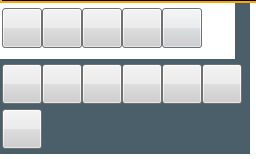
需要注意的是:Expander展开后,有可能会出现Expander内容区域范围到达其他内容区域时,显示其他区域的内容,造成交叉背景显示。
此时需要将被当区域控件的 Panel.ZIndex="-1" 该值设置为负数。
WPF Expander style的更多相关文章
- WPF 之 style文件的引用
总结一下WPF中Style样式的引用方法. 一.内联样式: 直接设置控件的Height.Width.Foreground.HorizontalAlignment.VerticalAlignment等属 ...
- WPF的Style的TargetType不同写法的异同
原文:WPF的Style的TargetType不同写法的异同 <Style TargetType="TextBlock"> <Setter Property=&q ...
- WPF Expander获得ToggleButton
原文:WPF Expander获得ToggleButton ToggleButton m_ToggleButton = this.Template.FindName("HeaderSite& ...
- WPF中Style文件的引用——使用xaml代码或者C#代码动态加载
原文:WPF中Style文件的引用--使用xaml代码或者C#代码动态加载 WPF中控件拥有很多依赖属性(Dependency Property),我们可以通过编写自定义Style文件来控制控件的外观 ...
- WPF 中style文件的引用
原文:WPF 中style文件的引用 总结一下WPF中Style样式的引用方法: 一,内联样式: 直接设置控件的Height.Width.Foreground.HorizontalAlignment. ...
- WPF整理-Style
"Consistency in a user interface is an important trait; there are many facets of consistency, ...
- [WPF] 为Style 里的button添加鼠标点击响应事件
一个TabControl, 用的是PagedTabControl style, 在style中有个button, button在style里已经写了click事件,但是现在还需要加上一段功能,就是在响 ...
- 继续聊WPF——Expander控件(2)
<Window x:Class="Expander_Sample2.Window1" xmlns="http://schemas.microsoft.com/win ...
- ControlTemplate in WPF —— Expander
<ResourceDictionary xmlns="http://schemas.microsoft.com/winfx/2006/xaml/presentation" x ...
- wpf 的style
<ResourceDictionary xmlns="http://schemas.microsoft.com/winfx/2006/xaml/presentation" x ...
随机推荐
- openEuler欧拉修改SSH端口
修改SSH端口的主要原因是提高服务器的安全性.默认情况下,SSH服务运行在端口22上,因此攻击者和自动化脚本通常会针对此端口发起暴力破解攻击.密码猜测和其他恶意活动. vim /etc/ssh/ssh ...
- 【Java】关于Maven仓库地址
仓库 如果你没有配置阿里云仓库镜像源,可以到这里来找 https://mvnrepository.com/ 如果你配置了阿里云仓库镜像源,可以来这里找 https://developer.aliyun ...
- 【MyBatis】学习笔记15:通过分步查询解决一对多或多对多问题
目录 对象 SmbmsProvider.java SmbmsBill.java 接口 providerMapper.java orderMapper.java 映射文件 providerMapper. ...
- 龙哥量化:通达信macd黄白线变色公式macd金叉怎么写macd死叉怎么写(需要继续优化,各种变色方式)
你提出的任何逻辑要求,只要是软件能实现的,我都能用通达信写出来,我レメLong622889通达信.大智慧.文华.博易的编程逻辑差不多,只是个别函数不一样.TB交易开拓者.金字塔和文华8,都是专业的期货 ...
- Qt音视频开发28-ffmpeg解码本地摄像头(yuv422转yuv420)
一.前言 一开始用ffmpeg做的是视频流的解析,后面增加了本地视频文件的支持,到后面发现ffmpeg也是支持本地摄像头设备的,只要是原则上打通的比如win系统上相机程序.linux上茄子程序可以正常 ...
- [转]分享几款微软官方Office卸载工具与使用方法
更换Office版本时,需要先卸载旧版Office,如果是卸载普通软件,我们只需在"控制面板"里点击"卸载"就能轻松实现,但这种方法对卸载Office 可能无效 ...
- [转]Windows10+VS2013+OpenCV3.0开发环境搭建配置
首先要说明一下:不管VS(Visual Studio)的版本是什么,也不管OpenCV的版本是什么,配置都大同小异.所以如果您希望在Window下配置OpenCV的开发环境,那么仔细阅读学习这篇文章即 ...
- IDEA导入他人的项目时提示“project sdk is not defined”的解决办法
IDEA导入他人的项目时提示"project sdk is not defined"的解决办法 1.在IDEA中,在有问题的项目上单击鼠标右键,然后选择"Open Mod ...
- 基于源码分析 SHOW GLOBAL STATUS 的实现原理
问题 在 MySQL 中,查询全局状态变量的方式一般有两种:SHOW GLOBAL STATUS和performance_schema.global_status. 但不知道大家注意到没有,perfo ...
- 查看Android是否开机启动进入桌面
adb 或者 串口终端 getprop sys.boot_completed 返回空代表没有进入桌面返回1代表已进入桌面