
【Linux】Cent OS 虚拟机开机自启动配置
一次断电,导致实体机关机了,虚拟机也连不上去,只好手动来起来。
我想增加一下自启动,让硬件开机的时候,自动启动虚拟机;
其实是有办法的,尝试了一下,也成功了,这里简单标记下。
virsh autostart dev
要想停止开机自启动
virsh autostart --disable dev
注意:上面的dev是机器名称,看下下面截图,就明白了。
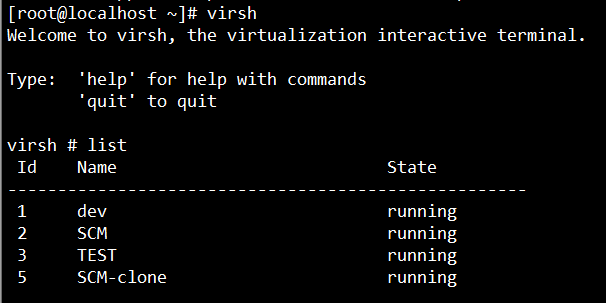
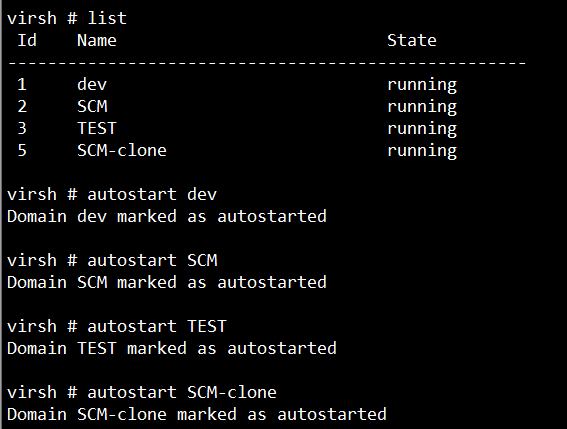
当然,virsh有很多命令可用,一般help基本都明白了。
virsh # help
Grouped commands: Domain Management (help keyword 'domain'):
attach-device attach device from an XML file
attach-disk attach disk device
attach-interface attach network interface
autostart autostart a domain
blkdeviotune Set or query a block device I/O tuning parameters.
blkiotune Get or set blkio parameters
blockcommit Start a block commit operation.
blockcopy Start a block copy operation.
blockjob Manage active block operations
blockpull Populate a disk from its backing image.
blockresize Resize block device of domain.
change-media Change media of CD or floppy drive
console connect to the guest console
cpu-baseline compute baseline CPU
cpu-compare compare host CPU with a CPU described by an XML file
cpu-stats show domain cpu statistics
create create a domain from an XML file
define define (but don't start) a domain from an XML file
desc show or set domain's description or title
destroy destroy (stop) a domain
detach-device detach device from an XML file
detach-disk detach disk device
detach-interface detach network interface
domdisplay domain display connection URI
domfsfreeze Freeze domain's mounted filesystems.
domfsthaw Thaw domain's mounted filesystems.
domfsinfo Get information of domain's mounted filesystems.
domfstrim Invoke fstrim on domain's mounted filesystems.
domhostname print the domain's hostname
domid convert a domain name or UUID to domain id
domif-setlink set link state of a virtual interface
domiftune get/set parameters of a virtual interface
domjobabort abort active domain job
domjobinfo domain job information
domname convert a domain id or UUID to domain name
domrename rename a domain
dompmsuspend suspend a domain gracefully using power management functions
dompmwakeup wakeup a domain from pmsuspended state
domuuid convert a domain name or id to domain UUID
domxml-from-native Convert native config to domain XML
domxml-to-native Convert domain XML to native config
dump dump the core of a domain to a file for analysis
dumpxml domain information in XML
edit edit XML configuration for a domain
event Domain Events
inject-nmi Inject NMI to the guest
iothreadinfo view domain IOThreads
iothreadpin control domain IOThread affinity
iothreadadd add an IOThread to the guest domain
iothreaddel delete an IOThread from the guest domain
send-key Send keycodes to the guest
send-process-signal Send signals to processes
lxc-enter-namespace LXC Guest Enter Namespace
managedsave managed save of a domain state
managedsave-remove Remove managed save of a domain
memtune Get or set memory parameters
perf Get or set perf event
metadata show or set domain's custom XML metadata
migrate migrate domain to another host
migrate-setmaxdowntime set maximum tolerable downtime
migrate-compcache get/set compression cache size
migrate-setspeed Set the maximum migration bandwidth
migrate-getspeed Get the maximum migration bandwidth
migrate-postcopy Switch running migration from pre-copy to post-copy
numatune Get or set numa parameters
qemu-attach QEMU Attach
qemu-monitor-command QEMU Monitor Command
qemu-monitor-event QEMU Monitor Events
qemu-agent-command QEMU Guest Agent Command
reboot reboot a domain
reset reset a domain
restore restore a domain from a saved state in a file
resume resume a domain
save save a domain state to a file
save-image-define redefine the XML for a domain's saved state file
save-image-dumpxml saved state domain information in XML
save-image-edit edit XML for a domain's saved state file
schedinfo show/set scheduler parameters
screenshot take a screenshot of a current domain console and store it into a file
set-user-password set the user password inside the domain
setmaxmem change maximum memory limit
setmem change memory allocation
setvcpus change number of virtual CPUs
shutdown gracefully shutdown a domain
start start a (previously defined) inactive domain
suspend suspend a domain
ttyconsole tty console
undefine undefine a domain
update-device update device from an XML file
vcpucount domain vcpu counts
vcpuinfo detailed domain vcpu information
vcpupin control or query domain vcpu affinity
emulatorpin control or query domain emulator affinity
vncdisplay vnc display
guestvcpus query or modify state of vcpu in the guest (via agent)
setvcpu attach/detach vcpu or groups of threads
domblkthreshold set the threshold for block-threshold event for a given block device or it's backing chain element Domain Monitoring (help keyword 'monitor'):
domblkerror Show errors on block devices
domblkinfo domain block device size information
domblklist list all domain blocks
domblkstat get device block stats for a domain
domcontrol domain control interface state
domif-getlink get link state of a virtual interface
domifaddr Get network interfaces' addresses for a running domain
domiflist list all domain virtual interfaces
domifstat get network interface stats for a domain
dominfo domain information
dommemstat get memory statistics for a domain
domstate domain state
domstats get statistics about one or multiple domains
domtime domain time
list list domains Host and Hypervisor (help keyword 'host'):
allocpages Manipulate pages pool size
capabilities capabilities
cpu-models CPU models
domcapabilities domain capabilities
freecell NUMA free memory
freepages NUMA free pages
hostname print the hypervisor hostname
maxvcpus connection vcpu maximum
node-memory-tune Get or set node memory parameters
nodecpumap node cpu map
nodecpustats Prints cpu stats of the node.
nodeinfo node information
nodememstats Prints memory stats of the node.
nodesuspend suspend the host node for a given time duration
sysinfo print the hypervisor sysinfo
uri print the hypervisor canonical URI
version show version Interface (help keyword 'interface'):
iface-begin create a snapshot of current interfaces settings, which can be later committed (iface-commit) or restored (iface-rollback)
iface-bridge create a bridge device and attach an existing network device to it
iface-commit commit changes made since iface-begin and free restore point
iface-define define an inactive persistent physical host interface or modify an existing persistent one from an XML file
iface-destroy destroy a physical host interface (disable it / "if-down")
iface-dumpxml interface information in XML
iface-edit edit XML configuration for a physical host interface
iface-list list physical host interfaces
iface-mac convert an interface name to interface MAC address
iface-name convert an interface MAC address to interface name
iface-rollback rollback to previous saved configuration created via iface-begin
iface-start start a physical host interface (enable it / "if-up")
iface-unbridge undefine a bridge device after detaching its slave device
iface-undefine undefine a physical host interface (remove it from configuration) Network Filter (help keyword 'filter'):
nwfilter-define define or update a network filter from an XML file
nwfilter-dumpxml network filter information in XML
nwfilter-edit edit XML configuration for a network filter
nwfilter-list list network filters
nwfilter-undefine undefine a network filter Networking (help keyword 'network'):
net-autostart autostart a network
net-create create a network from an XML file
net-define define an inactive persistent virtual network or modify an existing persistent one from an XML file
net-destroy destroy (stop) a network
net-dhcp-leases print lease info for a given network
net-dumpxml network information in XML
net-edit edit XML configuration for a network
net-event Network Events
net-info network information
net-list list networks
net-name convert a network UUID to network name
net-start start a (previously defined) inactive network
net-undefine undefine a persistent network
net-update update parts of an existing network's configuration
net-uuid convert a network name to network UUID Node Device (help keyword 'nodedev'):
nodedev-create create a device defined by an XML file on the node
nodedev-destroy destroy (stop) a device on the node
nodedev-detach detach node device from its device driver
nodedev-dumpxml node device details in XML
nodedev-list enumerate devices on this host
nodedev-reattach reattach node device to its device driver
nodedev-reset reset node device
nodedev-event Node Device Events Secret (help keyword 'secret'):
secret-define define or modify a secret from an XML file
secret-dumpxml secret attributes in XML
secret-event Secret Events
secret-get-value Output a secret value
secret-list list secrets
secret-set-value set a secret value
secret-undefine undefine a secret Snapshot (help keyword 'snapshot'):
snapshot-create Create a snapshot from XML
snapshot-create-as Create a snapshot from a set of args
snapshot-current Get or set the current snapshot
snapshot-delete Delete a domain snapshot
snapshot-dumpxml Dump XML for a domain snapshot
snapshot-edit edit XML for a snapshot
snapshot-info snapshot information
snapshot-list List snapshots for a domain
snapshot-parent Get the name of the parent of a snapshot
snapshot-revert Revert a domain to a snapshot Storage Pool (help keyword 'pool'):
find-storage-pool-sources-as find potential storage pool sources
find-storage-pool-sources discover potential storage pool sources
pool-autostart autostart a pool
pool-build build a pool
pool-create-as create a pool from a set of args
pool-create create a pool from an XML file
pool-define-as define a pool from a set of args
pool-define define an inactive persistent storage pool or modify an existing persistent one from an XML file
pool-delete delete a pool
pool-destroy destroy (stop) a pool
pool-dumpxml pool information in XML
pool-edit edit XML configuration for a storage pool
pool-info storage pool information
pool-list list pools
pool-name convert a pool UUID to pool name
pool-refresh refresh a pool
pool-start start a (previously defined) inactive pool
pool-undefine undefine an inactive pool
pool-uuid convert a pool name to pool UUID
pool-event Storage Pool Events Storage Volume (help keyword 'volume'):
vol-clone clone a volume.
vol-create-as create a volume from a set of args
vol-create create a vol from an XML file
vol-create-from create a vol, using another volume as input
vol-delete delete a vol
vol-download download volume contents to a file
vol-dumpxml vol information in XML
vol-info storage vol information
vol-key returns the volume key for a given volume name or path
vol-list list vols
vol-name returns the volume name for a given volume key or path
vol-path returns the volume path for a given volume name or key
vol-pool returns the storage pool for a given volume key or path
vol-resize resize a vol
vol-upload upload file contents to a volume
vol-wipe wipe a vol Virsh itself (help keyword 'virsh'):
cd change the current directory
echo echo arguments
exit quit this interactive terminal
help print help
pwd print the current directory
quit quit this interactive terminal
connect (re)connect to hypervisor
补充部分Virsh操作命令,如下:
libvirt是一个通用的虚拟化框架,支持xen,kvm,lxc多种虚拟化技术,本文作为一个笔记。
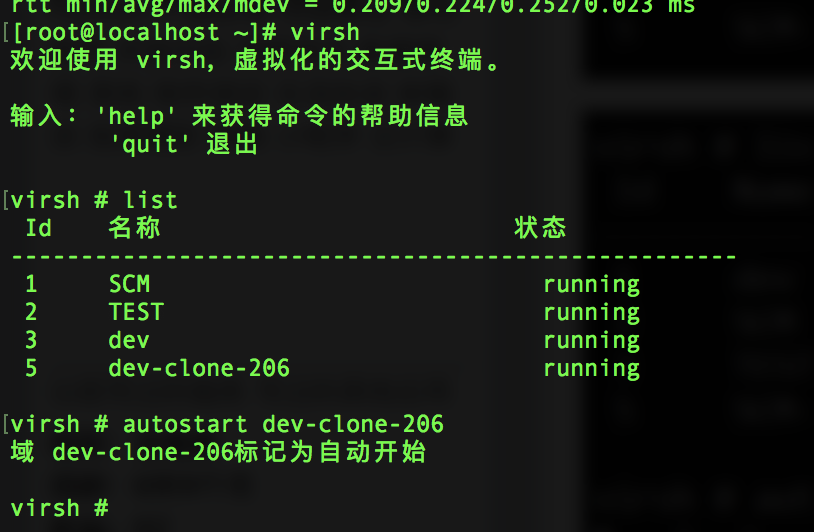
设置LXC为默认(默认为qemu)
export LIBVIRT_DEFAULT_URI=lxc:///
virsh -c lxc:/// 可省略
网络设置
NAT
NAT是libvirt默认自带,叫做default,通过下面的 命令查看
virsh net-list
假设宿主机有两个网卡,eth0为内网,eth1为外网,我们可以为容器桥接出两个接口:
#cat lan.xml
<network>

   <name>lan</name>

   <forward mode="bridge" />

      <interface dev="eth0" />

 </network>
#cat wan.xml
<network>

  <name>wan</name>

     <forward mode="bridge" />

       <interface dev="eth1" />

  </network>
导入配置

virsh net-define lan.xm

virsh net-define wan.xml
开启网卡
virsh net-start lan

virsh net-autostart lan

virsh net-start wan

virsh net-autostart wan
应用容器
应用容器共享宿主机的各种资源,包括内核,各种软件包,各种库,它仅有一个独立的运行空间,像是一个沙箱环境。
创建一个名为web的应用容器
cat web.xml
<domain type="lxc">

   <name>web</name>

      <memory>102400</memory>

      <os>

         <type>exec</type>

         <init>/bin/sh</init>

       </os>

     <device>

        <console type="pty" />

     </device>

 </domain>
导入virsh
virsh define web.xml
开机启动
virsh autostart web
进入容器
virsh console web
编辑容器配置
virsh edit web
删除容器
virsh undefine web
操作系统容器
操作系统容器除了Linux内核,自己包含一整套运行环境,像是一个chroot环境。
操作系统容器创建稍稍复杂一点
1、创建根目录
mkdir -p /lxc/centos7
2、下载并解压镜像 http://images.linuxcontainers.org/images/centos/7/amd64/default/20140807_02:37/rootfs.tar.xz
cd /lxc/centos7

wget   xxx

xz -d rootfs.tar.xz

tar xvf rootfs.tar
3、创建xml模板
cat centos7.xml
<domain type="lxc">

 <name>centos7</name>

 <memory unit="KiB">1048576</memory>

 <currentMemory unit="KiB">1048576</currentMemory>

 <resource>

   <partition>/machine</partition>

 </resource>

 <os>

 <clock offset='utc' />

 <on_poweroff>destory</on_poweroff>

 <on_reboot>restart</on_reboot>

 <on_crash>restart<on_crash>

</devices>

 <emulator>/usr/lib/libvirt/libvirt_lxc</emulator>

 <filesystem type='mount' accessmode='passthrough'>

   <source dir='/lxc/centos7'/>

   <target dir='/'/>

  </filesystem>

  <interface type='network'>

   <mac address='00:16:3e:52:87:f1'/>

    <source network='lan'/>

   </interface>

   <console type='pty'>

     <target type='lxc' port='0'/>

    </console>

   </devices>

  </domain>
导入容器
virsh define centos7.xml
启动容器
virsh start centos7

virsh autostart centos7
进入容器
virsh console centos7
停止开机启动
virsh autostart --disable centos7
退出lxc console
ctrl+]
virt manager 虚拟机路径位置:
[root@localhost qemu]# ls /var/lib/libvirt/images
SCM-clone.qcow2 SCM.qcow2
[root@localhost qemu]# ls /var/lib/libvirt/qemu
channel domain-1-SCM-clone domain-2-SCM-clone domain-3-SCM-clone domain-4-dev-clone-206 domain-5-dev domain-5-SCM-clone domain-7-TEST domain-9-SCM-clone nvram snapshot
domain-1-dev domain-1-TEST domain-2-TEST domain-3-TEST domain-4-SCM domain-5-dev-clone-206 domain-6-dev domain-7-test-212 domain-9-test-210 ram
domain-1-SCM domain-2-dev domain-3-SCM domain-4-dev domain-4-TEST domain-5-dev-clone-for-test domain-7-SCM domain-8-SCM dump save
[root@localhost qemu]#
启动虚拟机:
[root@localhost qemu]# virsh start test-212
域 test-212 已开始
[root@localhost qemu]# virsh start test-210
域 test-210 已开始
[root@localhost qemu]# virsh list
Id 名称 状态
----------------------------------------------------
1 TEST running
2 SCM-clone running
3 SCM running
4 dev-clone-206 running
5 dev running
6 test-212 running
7 test-210 running
另外,补充一个服务自启动的,可以参考,比较简单,就两条命令好了,刚才顺手也添加了一下。
vi /etc/rc.d/rc.local
touch /var/lock/subsys/local

/home/bgop/start_redis.sh &

/home/bgop/start_nexus.sh &
shell如下:
[root@localhost ~]# cat /home/bgop/start_redis.sh

#/bin/sh

/usr/local/bin/redis-server /mnt/softwares/redis-2.8./redis.conf

[root@localhost ~]# cat /home/bgop/start_nexus.sh

#/bin/sh

/mnt/softwares/nexus-2.14.-/bin/nexus
目前机器正常,下次断电后,补充测试结果
【Linux】Cent OS 虚拟机开机自启动配置的更多相关文章
- Linux系统环境下Tomcat8、httpd、mysql8开机自启动配置
Linux系统环境下Tomcat8.httpd.mysql8开机自启动配置: 相关命令:chkconfig 参考链接:https://jingyan.baidu.com/article/6525d4b ...
- linux系统下tomcat应用开机自启动 配置
linux系统下tomcat应用开机自启动 配置 相对简单的方式是将tomcat添加为系统服务第一步 复制文件将 $Tomcat_Home/bin目录下的 catalina.sh脚本文件复制到目录/ ...
- VMware虚拟机开机自启动
VMware虚拟机开机自启动 linux 2018年05月09日 08时30分18秒 VMware的命令行语句可以切换到VMware安装目录,使用vmrun.exe --help(windows下)查 ...
- linux 让一个程序开机自启动并把一个程序加为服务
本文以tomcat7为例 首先找到tomcat启动的目录,我的为 cd /usr/local/tomcat7/bin/ 这个目录 启动脚本是startup.sh 然后在/etc/rc.d/rc.loc ...
- 【linux基础】如何开机自启动某个程序-linux工具-ubuntu
前言 实际使用中应用程序或者服务需要开机自启动,而不是人为手动开启运行,那么,该如何做呢,本文对此进行介绍. 操作过程 1. 确定系统的桌面环境: 具体可参考here; 2. 如何自启动: 博主ubu ...
- linux cent os putty 问题彻底解决办法
出现乱码的根本原因: linux系统和putty使用的编码格式不一致. 解决办法: 1.首先使用命令查看linux当前使用的是什么编码格式 echo $LANG 返回的结果有如下几种情况:1)zh_C ...
- Linux 系统设置sh文件开机自启动
工作中有一个linux下的服务需要启动,但是机器总是断电,导致需要反复启动,找了一下开机自启动的方法,解决了这个问题.Linux设置开机自启动非常简单,只要找到rc.local文件,将你需要自启动的文 ...
- Linux系统重要的开机自启动的服务
重要的开机自启动的服务 1.sshd 连接Linux服务器是需要用到的服务程序 2.rsyslog 操作日志的一种机制 系统日志:/var/log/message ...
- linux下的tomcat开机自启动(亲测),更改静态ip
开机自启动Tomcat: 1.修改脚本文件rc.local:vim /etc/rc.d/rc.local 这个脚本是使用者自定的开机启动程序,可以在里面添加想在系统启动之后执行的脚本或者脚本执行命令 ...
随机推荐
- Luogu P4945 【最后的战役】
本来以为做法一样,就是少带个$log$,结果发现看不懂出题人的题解(我好菜啊) 那就自己写一篇吧 比较简单的$DP$思路 状态定义: 前两个转移很好处理,第三个好像就不好办了 不妨暴力定义进状态里 设 ...
- Python 定值类
1.__str__和__repr__ 如果要把一个类的实例变成 str,就需要实现特殊方法__str__(): class Person(object): def __init__(self, nam ...
- String中根据,(逗号)进行分割
package zhengze; public class StringTest07 { public static void main(String[] args) { String s = &qu ...
- Spring之配置文件bean作用域的详细介绍
Spring的配置文件applicationContext.xml中bean作用域的详细介绍: 1:对象的创建:单例和多例 scope="singleton",默认值 ...
- 异常Cannot get a text value from a numeric cell
POI操作Excel时偶尔会出现Cannot get a text value from a numeric cell的异常错误. 异常原因:Excel数据Cell有不同的类型,当我们试图从一个数字类 ...
- mysql explain优化
简介 MySQL 提供了一个 EXPLAIN 命令, 它可以对 SELECT 语句进行分析, 并输出 SELECT 执行的详细信息, 以供开发人员针对性优化.EXPLAIN 命令用法十分简单, 在 S ...
- Python 模块介绍
一.模块:用一坨代码实现了某个功能的代码集合. 二.模块分为三种 1.自定义模块 2.内置标准模块(又称标准库) 3.开源模块(上传方式,百度PyPi) 开源模块安装方式: a.yum b.pip c ...
- win10下Spark的环境搭建
win10下Spark的环境搭建 2018-08-19 18:36:45 一.jdk 1.8.0 安装与配置 二.scala 2.11.8 安装与配置http://www.scala-lang.or ...
- hdu 2844 Coins【多重背包】
题目链接:https://vjudge.net/contest/228640#problem/F 转载于:http://www.voidcn.com/article/p-mxcorksq-gh.htm ...
- [漏洞分析]thinkphp 5.x全版本任意代码执行分析全记录
0x00 简介 2018年12月10日中午,thinkphp官方公众号发布了一个更新通知,包含了一个5.x系列所有版本存在被getshell的高风险漏洞. 吃完饭回来看到这个公告都傻眼了,整个tp5系 ...