
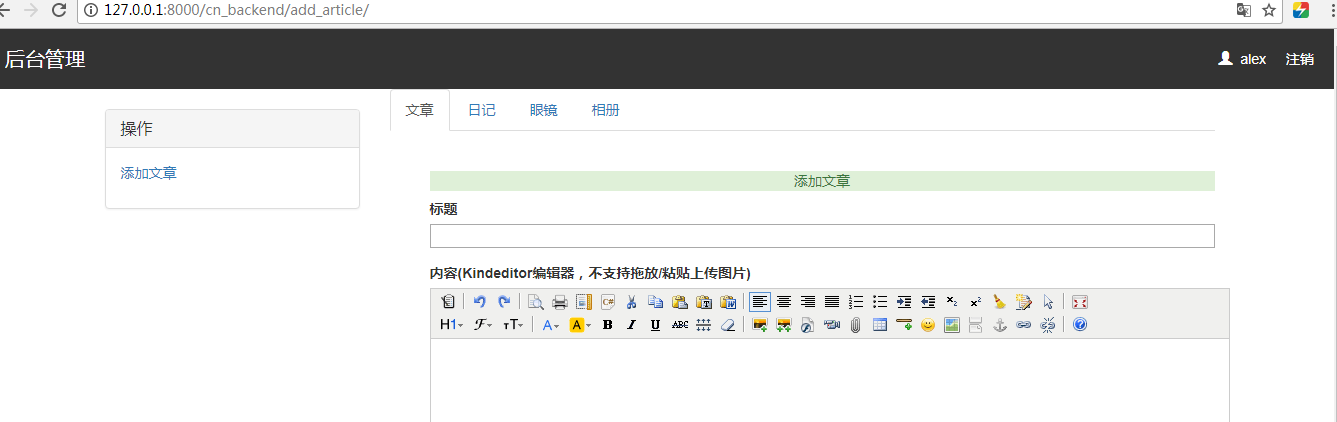
8. 博客系统| 富文本编辑框和基于bs4模块防御xss攻击
views.py
@login_required

def cn_backend(request):

    article_list = models.Article.objects.filter(user=request.user)

    return render(request, "backend/backend.html", locals())

@login_required

def add_article(request):

    if request.method == "POST":

        title = request.POST.get("title")

        content = request.POST.get("content")

        models.Article.objects.create(title=title, content=content,user=request.user)

        return redirect("/cn_backend/")

    return render(request, "backend/add_article.html")

import os

from cnblog import settings

def upload(request):

    print(request.FILES)

    img = request.FILES.get("upload_img")

    print(img.name)

    path = os.path.join(settings.MEDIA_ROOT, "add_article_img", img.name)

    with open(path, "wb") as f:

        for line in img:

            f.write(line)

    response = {

        "error":0,

        "url":"/media/add_article_img/%s" % img.name

    }

    import json

    return HttpResponse(json.dumps(response))
add_article.html
{% extends 'backend/base.html' %}

{% block content %}

    <form action="" method="post">

        {% csrf_token %}

        <div class="add_article">

            <div class="alert-success text-center">添加文章</div>

            <div class="add_article_region">

                <div class="title form-group">

                    <label for="">标题</label>

                    <div>

                        <input type="text" name="title">

                    </div>

                </div>

                <div class="content form-group">

                    <label for="">内容(Kindeditor编辑器,不支持拖放/粘贴上传图片) </label>

                    <div>

                        <textarea name="content" id="article_content" cols="" rows=""></textarea>

                    </div>

                </div>

                <input type="submit" class="btn btn-default">

            </div>

        </div>

    </form>

    <script src="/static/js/jquery-3.2.1.min.js"></script>

    <script charset="utf-8" src="/static/blog/kindeditor/kindeditor-all.js"></script>

    <script>

        KindEditor.ready(function (K) {

            window.editor = K.create('#article_content', {

                width: "",

                height: "",

                resizeType: 0,

                uploadJson: "/upload/",

                extraFileUploadParams: {

                    csrfmiddlewaretoken: $("[name='csrfmiddlewaretoken']").val()

                },

                filePostName: "upload_img"

            });

        });

    </script>

{% endblock %}
backend.html
{% extends 'backend/base.html' %}

{% block content %}

    <div class="article_list small">

        <table class="table table-hover table-striped">

            <thead>

            <th>标题</th>

            <th>评论数</th>

            <th>点赞数</th>

            <th>操作</th>

            <th>操作</th>

            </thead>

            <tbody>

            {% for article in article_list %}

                <tr>

                    <td>{{ article.title }}</td>

                    <td>{{ article.comment_count }}</td>

                    <td>{{ article.up_count }}</td>

                    <td><a href="">编辑</a></td>

                    <td><a href="">删除</a></td>

                </tr>

            {% endfor %}

            </tbody>

        </table>

    </div>

{% endblock %}
backend\base.html
<!DOCTYPE html>
<html lang="en">
<head>
<meta charset="UTF-8">
<title>博客后台管理 - 博客园</title> <link rel="stylesheet" href="/static/blog/bootstrap/css/bootstrap.css">
<script src="/static/js/jquery-3.2.1.min.js"></script>
<script src="/static/blog/bootstrap/js/bootstrap.min.js"></script>
<link rel="stylesheet" href="/static/blog/css/backend.css">
</head>
<body> <div class="header">
<p class="title">
后台管理
<a class="info" href="/logout/">注销</a>
<span class="info"><span class="glyphicon glyphicon-user"></span> {{ request.user.username }}</span>
</p>
</div> <div class="container">
<div class="col-md-3">
<div class="panel-group" id="accordion" role="tablist" aria-multiselectable="true">
<div class="panel panel-default">
<div class="panel-heading" role="tab" id="headingOne">
<h4 class="panel-title">
<a role="button" data-toggle="collapse" data-parent="#accordion" href="#collapseOne"
aria-expanded="true" aria-controls="collapseOne">
操作
</a>
</h4>
</div>
<div id="collapseOne" class="panel-collapse collapse in" role="tabpanel" aria-labelledby="headingOne">
<div class="panel-body">
<p><a href="/cn_backend/add_article/">添加文章</a></p>
</div>
</div>
</div> </div>
</div>
<div class="col-md-9"> <div> <!-- Nav tabs -->
<ul class="nav nav-tabs" role="tablist">
<li role="presentation" class="active"><a href="#home" aria-controls="home" role="tab"
data-toggle="tab">文章</a></li>
<li role="presentation"><a href="#profile" aria-controls="profile" role="tab"
data-toggle="tab">日记</a></li>
<li role="presentation"><a href="#messages" aria-controls="messages" role="tab" data-toggle="tab">眼镜</a>
</li>
<li role="presentation"><a href="#settings" aria-controls="settings" role="tab" data-toggle="tab">相册</a>
</li>
</ul> <!-- Tab panes -->
<div class="tab-content">
<div role="tabpanel" class="tab-pane active" id="home"> {% block content %} {% endblock %} </div>
<div role="tabpanel" class="tab-pane" id="profile"> <img src="/static/blog/img/meinv2.jpg" alt="">
<img src="/static/blog/img/meinv3.jpg" alt="">
<img class="pull-right" src="/static/blog/img/meinv.jpg" alt="">
</div>
<div role="tabpanel" class="tab-pane" id="messages"> <img width="" height="" src="/static/blog/img/hashiqi2.jpg" alt=""> <img width="" height="" src="/static/blog/img/dogg4.jpg" alt="">
<img width="" height="" src="/static/blog/img/linhaifeng.jpg" alt=""><br>
<img width="" height="" src="/static/blog/img/dogg3.jpeg" alt="">
<img width="" height="" src="/static/blog/img/dogge2.jpg" alt=""> <img width="" height="" src="/static/blog/img/dogg5.jpg" alt=""> </div>
<div role="tabpanel" class="tab-pane" id="settings"> </div>
</div> </div> </div>
</div> </body>
</html>
bs4截断文本段和基于bs4模块防御xss攻击
from bs4 import BeautifulSoup

@login_required

def add_article(request):

    if request.method == "POST":

        title = request.POST.get("title")

        content = request.POST.get("content")

        soup = BeautifulSoup(content, "html.parser")

        #过滤

        for tag in soup.find_all():

            print(tag.name)

            if tag.name == "script":

                tag.decompose()

        #获取文本进行截取,赋值给desc字段

        desc = soup.text[0:150]

        models.Article.objects.create(title=title,desc=desc,content=str(soup),user=request.user)

        return redirect("/cn_backend/")

    return render(request, "backend/add_article.html")
8. 博客系统| 富文本编辑框和基于bs4模块防御xss攻击的更多相关文章
- 富文本编辑框和防止xss攻击
一.后台管理页面构建 1.创建后台管理url urlpatterns = [ ... # 后台管理url re_path("cn_backend/$", views.cn_back ...
- python 全栈开发,Day83(博客系统子评论,后台管理,富文本编辑器kindeditor,bs4模块)
一.子评论 必须点击回复,才是子评论!否则是根评论点击回复之后,定位到输入框,同时加入@评论者的用户名 定位输入框 focus focus:获取对象焦点触发事件 先做样式.点击回复之后,定位到输入框, ...
- web开发-Django博客系统
项目界面图片预览 项目代码github地址 项目完整流程 项目流程: 1 搞清楚需求(产品经理) (1) 基于用户认证组件和Ajax实现登录验证(图片验证码) (2) 基于forms组件和Ajax实现 ...
- 从零开始,搭建博客系统MVC5+EF6搭建框架(5),博客详情页、留言、轮播图管理、右侧统计博文
一.博客系统进度回顾 上一遍博客介绍到,系统已经实现到了发布以及前台布局展示,接下来就是实现一些,详情页,留言.轮播图管理.右侧博文统计信息实现. 二.博客系统详情页实现 2.1先来看看详情页展示的效 ...
- 从零开始,搭建博客系统MVC5+EF6搭建框架(4)下,前后台布局实现、发布博客以及展示。
一.博客系统进度回顾 目前已经完成了,前台展示,以及后台发布的功能,最近都在做这个,其实我在国庆的时候就可以弄完的,但是每天自己弄,突然最后国庆2天,连电脑都不想碰,所以就一直拖着,上一篇写了前端实现 ...
- 【干货】利用MVC5+EF6搭建博客系统(四)(下)前后台布局实现、发布博客以及展示
二.博客系统后台布局实现 2.1.这里所用的是MVC的布局页来实现的,后台主要分为三部分:导航.菜单.主要内容 代码实现: 这里把后台单独放在一个区域里面,所以我这里建立一个admin的区域 在布局页 ...
- 基于开源博客系统(mblog)搭建网站
基于开源博客系统(mblog)搭建网站 上一章讲了基于jpress部署的博客系统,这一章了解一下 mblog这个开源的基于springboot的博客系统,相比与jpress 的热度fork数量要少一些 ...
- 【完全开源】Django多人博客系统——支持MarkDown和tinyMce
目录 说明 功能 如何使用 说明 这是一个用Django开发的多人博客系统,功能简单,但完全满足公司内部或个人的博客使用需求.支持普通富文本编辑器(tinyMCE)和MarkDown编辑器 由于嫌弃D ...
- 从零开始,搭建博客系统MVC5+EF6搭建框架(4)上,前后台页面布局页面实现,介绍使用的UI框架以及JS组件
一.博客系统进度回顾以及页面设计 1.1页面设计说明 紧接前面基础基本完成了框架搭建,现在开始设计页面,前台页面设计我是模仿我博客园的风格来设计的,后台是常规的左右布局风格. 1.2前台页面风格 主页 ...
随机推荐
- 20155337 2016-2017-2 《Java程序设计》第七周学习总结
20155337 2016-2017-2 <Java程序设计>第七周学习总结 教材学习内容总结 •认识时间与日期 •格林威治标准时间:简称GMT时间,参考格林威治皇家天文台的标准太阳时间. ...
- static, const
static 静态的,类的静态成员函数,静态成员变量是和类相关的,但不和具体对象相关.即使没有具体对象,也能调用类的静态成员函数和成员变量.一般类的静态函数就是一个全局函数,只是作用域在包含它的文件中 ...
- OpenCV不同类型Mat的at方法访问元素时该如何确定模板函数的typename(转)
自从OpenCV推出了Mat后越来越像是Matlab了,使用起来方便了很多,但是,在用at方法访问Mat时,如何选用合适的typename类型来访问相应的Mat元素是个头疼的问题. 比如: int H ...
- The folder can’t be opened because you don’t have permission to see its contents.
1 自己在windows上面copy过去的文件夹,在Mac下面无法查看 一开始以为是windows文件的权限问题,然后 自己赋予了everyone所有的权限,结果在Mac上面还是无法打开文件夹 2 最 ...
- 说几个python与c区别的地方以及静态变量,全局变量的区别
一: python代码: a = 2 def b(): print a a = 4 print a b() 在b函数中,有a=4这样的代码,说明a是函数b内部的局部变量,而不是外部的那个值为2的全局变 ...
- Database学习 - mysql 连接数据库 库操作
连接数据库 语法格式: mysql -h 服务器IP -P 端口号 -u用户名 -p密码 --prompt 命令提示符 --delimiter 指定分隔符 示例: mysql -h 127.0.0.1 ...
- js数组的操作push,pop,shift,unshift
push(args)可以每次压入多个元素,并返回更新后的数组长度. var oldArr=[1,2,3]; alert(oldArr.push(4,[5,6]))–>5(这里只会将[5,6]当做 ...
- 阿里云apache服务器外网无法访问(配置安全组,添加80服务)
CentOS的系统 ,已经安装好了 apache php mysql 常规排错过程(ps:没耐心的童鞋请直接看最后一步,学习在阿里云控制台配置 安全组,允许 http服务) 第一步:检查apache ...
- 2017-2018-2 165X 『Java程序设计』课程 助教总结
2017-2018-2 165X 『Java程序设计』课程 助教总结 本学期完成的助教工作主要包括: 编写300道左右测试题,用于蓝墨云课下测试: 发布博客三篇:<2017-2018-2 165 ...
- Debian 无线网卡驱动问题
参考这里:https://wiki.debian.org/iwlwifi Debian 9 "Stretch" Add a "non-free" compone ...