
MySQL-[Err] 1055 - Expression #1
© 版权声明:本文为博主原创文章,转载请注明出处
问题描述:在MySQL数据库下,执行SQL插入语句报错。错误信息如下:

错误原因:在MySQL5.7之后,sql_mode中默认存在ONLY_FULL_GROUP_BY,SQL语句未通过ONLY_FULL_GROUP_BY语义检查所以报错。
ONLY_FULL_GROUP_BY:ONLY_FULL_GROUP_BY要求select语句中查询出来的列必须是明确的(其他语句也是一样)。
以SQL语句select columes from table group by list为例:columns必须是聚集函数或者在group by后的表达式list中,并且list中必须包含主键,否则也会报错。
insert、update、delete语句都会报错(但不影响SQL语句的执行),因为这三种语句执行之前也会执行查询操作。
以主键为id的表为例:
SELECT count(1) FROM customer GROUP BY `name`;该SQL执行成功,因为count是聚集函数;
SELECT * FROM customer GROUP BY `name`;该SQL执行失败,因为*中包含主键id,而group by后的表达式中并没有包含id
SELECT name FROM customer GROUP BY `name`;该SQL执行成功,因为name包含在group by后的表达式中
SELECT name, contact FROM customer GROUP BY `name`;该SQL执行失败,因为contact没有包含在group by后的表达式中
解决方案:
一、永久解决
1)在MySQL下执行SELECT @@sql_mode语句

2)将查询结果中的ONLY_FULL_GROUP_BY去掉然后复制,打开MySQL的配置文件,将sql_mode的值设置为复制的值
(若没有sql_mode在[mysqld]下方添加一行即可)。
MySQL配置文件所在位置:安装版可通过windows服务所对应mysql启动项,查看其对应属性->可执行文件路径,获取my.ini路径。
免安装版一般在其根目录下。(默认是my-default.ini,必须将名字改为my.ini才能生效)
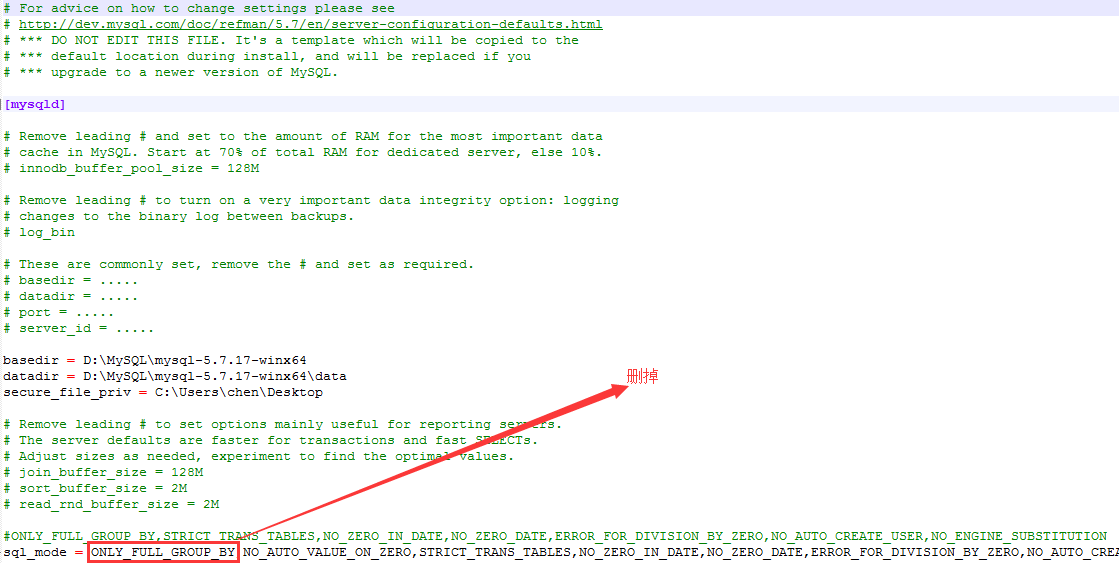
3)重新MySQL服务即可生效
二、只在当前会话中解决,重新进入MySQL后失效
1)在MySQL下执行SELECT @@sql_mode语句
2)将查询结果中的ONLY_FULL_GROUP_BY去掉然后复制,然后执行set sql_mode = '修改后的值'

三、只在当前服务中解决,重新MySQL服务后失效
1)解决方式同方法二,只是在select和set时添加global关键字。具体可查看下图

MySQL-[Err] 1055 - Expression #1的更多相关文章
- MySQL [Err] 1055 - Expression #1 of ORDER BY clause is not in GROUP BY clause
MySQL[Err]1055 上次MySQL5.7.19主从建立完成之后,所有的测试都是在MySQL命令行下进行的,最近用Navicat Premium进行MySQL的连接,然后在插入数据的时候MyS ...
- mysql [Err] 1055 - Expression #1 of ORDER BY clause is not in GROUP BY clause and contains nonaggregated column 'information_schema.PROFILING.SEQ' which is not functionally dependent on columns in GRO
[Err] 1055 - Expression #1 of ORDER BY clause is not in GROUP BY clause and contains nonaggregated c ...
- mysql主给备赋予权限时报错,MySQL [Err] 1055 - Expression #1 of ORDER BY clause is not in GROUP BY clause
https://www.cnblogs.com/skymyyang/p/7551646.html 在my.cnf 里面设置sql_mode='STRICT_TRANS_TABLES,NO_ZERO_I ...
- [bug]MySQL [Err] 1055 - Expression #1 of ORDER BY clause is not in GROUP BY clause
参考 http://www.10qianwan.com/articledetail/220315.html
- mysql错误:[Err] 1055 - Expression #1 of ORDER BY clause is not in GROUP BY clause and contains nonaggregated
今天迁移django数据库的时候,跑程序的时候出现这样的错误: [Err] 1055 - Expression #1 of ORDER BY clause is not in GROUP BY cla ...
- [Err] 1055 - Expression #1 of ORDER BY clause is not in GROUP BY clause 的问题 MySQL
问题:[Err] 1055 - Expression #1 of ORDER BY clause is not in GROUP BY clause and contains nonaggregate ...
- Mysql err 1055
目录: 错误信息 原因分析 解决方案 操作示例 错误信息 [Err] 1055 - Expression #1 of ORDER BY clause is not in GROUP BY clause ...
- [Err] 1055 - Expression #1 of ORDER BY clause is not in GROUP BY clause and contains nonaggregated column 'information_schema.PROFILING.SEQ'
在Navicat Premium中执行Mysql的一条删除语句,虽然执行成功了,却提示已下错误: 受影响的行: 时间: .005s of ORDER BY clause is not in GROUP ...
- MySQL5.7.27报错[Err] 1055 - Expression #1 of ORDER BY clause is not in GROUP BY clause and contains nonaggregated
mysql5.7.27在运行更新语句时出现如下情况,mysql5.6之前没有这种情况出现. of ORDER BY clause is not in GROUP BY clause and conta ...
- [Err] 1055 - Expression #1 of ORDER BY clause is not in GROUP BY clause 的问题
问题: [Err] 1055 - Expression #1 of ORDER BY clause is not in GROUP BY clause and contains nonaggregat ...
随机推荐
- PowerDesigner数据模型(CDM—PDM—SQL脚本的转换流程)
原文地址:PowerDesigner数据模型(CDM-PDM-SQL脚本的转换流程)作者:zzenglish 有图片的参考http://blog.sina.com.cn/s/blog_64742675 ...
- div两侧的boder断开 消失 奇怪
原文发布时间为:2009-11-06 -- 来源于本人的百度文章 [由搬家工具导入] 解决方法: 设定外层DIV的宽度即可,如 width:99% ========================== ...
- 气象城市ID列表
气象城市ID列表 数据来源: http://cj.weather.com.cn/support/Detail.aspx?id=51837fba1b35fe0f8411b6df 记录了2574个地区,2 ...
- vim中代码注释与取消的两种方法
一.灵活应用列操作 取消注释(删除列) 1.光标定位到需要注释的第一行的行首. 2.CTRL+v 进入"可视 块"模式,选取需要注释的其他多行. 3.d 删除,注释取消. 添加 ...
- locust性能测试(无 web ui 模式)
前言 前面是在web页面操作,需要手动的点start启动,结束的时候也需要手工去点stop,没法自定义运行时间,这就不太方便.locust提供了命令行运行的方法,不启动web页面也能运行,这就是no- ...
- [SaltStack] salt-minion启动流程
SaltStack源码阅读 前面理了下salt-master的启动流程, 这次来看看salt-minion的启动流程. 启动salt-minion方法: /etc/init.d/salt-minion ...
- Eclipse 导入项目乱码问题
1.编码不对 a.对某文件或某工程更改编码: 鼠标移到工程名或文件名,右键->Properties->Resource->Text file enCoding ->更改编码(G ...
- Python环境安装与配置
1.官网下载:https://www.python.org/选择不同的版本 2.进入运行:使用pip安装selenium 3.设置pip的环境变量 4.安装后使用pip(一个Python包管理工具)安 ...
- Codeforces 583 DIV2 Asphalting Roads 模拟
原题链接:http://codeforces.com/problemset/problem/583/A 题意: 很迷很迷,表示没看懂..但是你看样例就秒懂了 题解: 照着样例模拟就好 代码: #inc ...
- 2016北京集训测试赛(九)Problem C: 狂飙突进的幻想乡
Solution 我们发现, 对于一条路径来说, 花费总时间为\(ap + q\), 其中\(p\)和\(q\)为定值. 对于每个点, 我们有多条路径可以到达, 因此对于每个区间中的\(a\)我们可以 ...