
Maven 集成Tomcat7插件自动部署
1、配置tomcat-users.xml文件
在tomcat安装目录下找到tomcat-users.xml文件。该文件路径为【tomcat安装根目录】/conf/
修改文件内容,增加下列内容:(一般配置后两个角色就行了)
<tomcat-users>

<role rolename="manager"/>

<role rolename="admin"/>

<role rolename="manager-gui"/>

 <role rolename="manager-script"/>

<user username = "tomcat" password = "tomcat" roles = "admin,manager,manager-gui,manager-script" /> </tomcat-users>
启动tomcat7,然后访问http://localhost/manager/html,输入tomcat/tomcat,如果出现以下界面,表示tomcat一切OK
如果是Tomcat6 http://localhost/manager
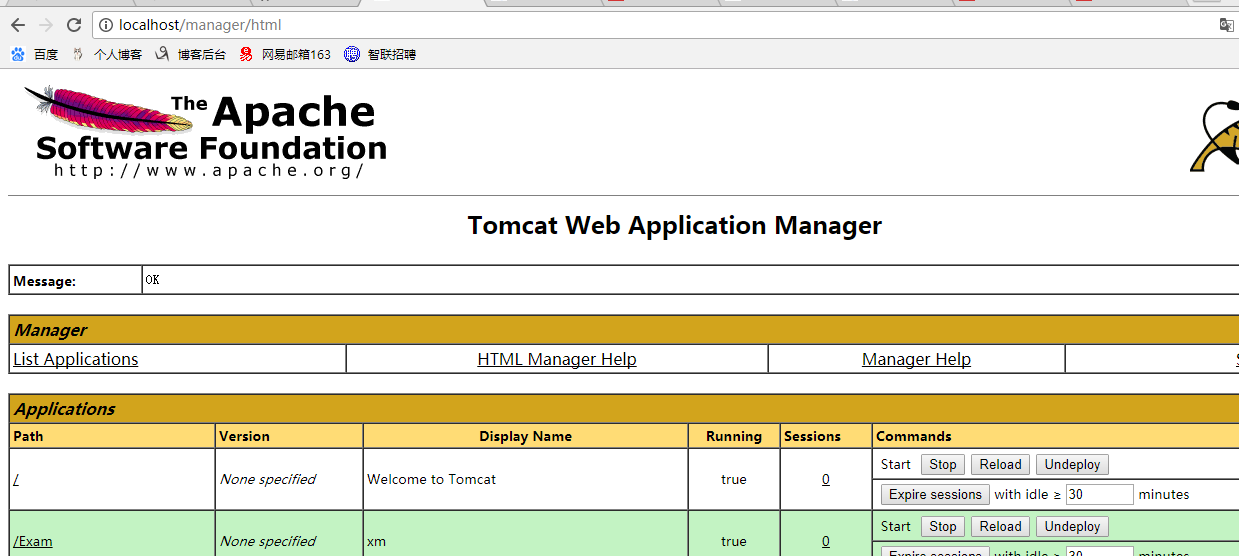
2、配置maven 的setting.xml 文件
在Maven的conf目录中的setting.xml servers节点增加
<server>

 <id>tomcat7</id>

 <username>tomcat</username>

 <password>tomcat</password>
 </server>
3、配置项目pom.xml文件(下面将端口改为80的配置)
            <!-- tomcat插件 -->

            <plugin>

                <groupId>org.apache.tomcat.maven</groupId>

                <artifactId>tomcat7-maven-plugin</artifactId>

                <version>2.2</version>

                <configuration>

                    <url>http://localhost/manager/text</url>

                    <server>tomcat7</server>

                    <username>tomcat</username>

                    <password>tomcat</password>

                    <port>80</port>

                    <path>/blog</path>

                </configuration>

            </plugin>
注:此处的url 注意是xxx/manager/text 并非是 xxx/manager/html 原因是我用的tomcat 是tomcat7 的版本
4、cmd运行
先进入到项目所在的目录,然后运行
mvn tomcat:redeploy

最终结果:
其中只有system-web是web项目,其它都不是,只是一些依赖项目

在目录D:\Java\Tool\apache-tomcat-7.0.62\webapps可以找到发布好的文件
第二种:
Eclipse中发布项目:

刚才那个界面会部署上blog

浏览器输入:http://localhost/blog

常见错误排除:
1.Connection refused错误
报错信息如下:
[ERROR]Failed to execute goal org.apache.tomcat.maven: tomcat7-maven-plugin: 2.0- SNAPSHOT: deploy (default-cli) on project helloworld: Cannot invoke Tomcat manager: Connection refused: connect -> [Help 1]
原因:未启动Tomcat服务器
解决办法:先启动Tomcat服务器再选择Run
2. 401错误
报错信息如下:
[ERROR] Failed to execute goal org.apache.tomcat.maven:tomcat7-maven-plugin: 2.0-SNAPSHOT:deploy (default-cli) on project helloworld: Cannot invoke Tomcat manager: Server returned HTTP response code: 401 for URL: http://localhost:8080/manager/text/deploy?path=%2Fhelloworld -> [Help 1]
原因:权限问题
解决办法在$CATALINA_BASE/conf/tomcat-users.xml,
如D:\apache-tomcat-7.0.34\conf\tomcat-users.xml文件中添加权限
修改pom.xml文件,在<configuration> </configuration>中添加
3.403错误
报错信息如下:
[ERROR] Failed to execute goal org.apache.tomcat.maven:tomcat7-maven-plugin: 2.0-SNAPSHOT:deploy (default-cli) on project helloworld: Cannot invoke Tomcat manager: Server returned HTTP response code: 403 for URL: http://localhost:8080/manager/html/deploy?path=%2Fhelloworld -> [Help 1]
原因:产生该问题有可能因为两个原因,具体参见解决办法
解决办法:
1)如果使用的是Tomcat 7,需要修改pom.xml中部署的url地址,将
<url>http://localhost/manager</url>
改
<url>http://localhost/manager/text</url>
在这次部署的问题上,我就是遇到了url 的问题,我用的是tomcat7
2)给tomcat用户权限分配上,需要同时具备manager-gui和manager-script权限
正确的conf/tomcat-users.xml配置应为:
Maven 集成Tomcat7插件自动部署的更多相关文章
- Maven 集成Tomcat7插件
Maven已经是Java的项目管理标配,如何在JavaEE开发使用Maven调用Web应用,是很多同学关心的问题.本文将介绍,Maven如何介绍Tomcat插件. Maven Tomcat插件现在主要 ...
- Maven集成Tomcat插件
目录 类似插件及版本区别: 本地运行,启动嵌入式tomcat: 错误一: 错误二: Idea运行调试: vscode运行调试: 远程部署: 项目中的pom.xml配置: Tomcat中的tomcat- ...
- 使用jenkins 插件自动部署项目至tomcat
前面使用maven.ant编译项目就不说,只说一下使用jenkins的插件自动部署项目 1.首先jenkins安装插件Deploy to container Plugin ,下载地址为:https:/ ...
- Intellij IDEA集成mybatis-generator插件自动生成数据库实体操作类
Intellij IDEA集成mybatis-generator插件自动生成数据库实体操作类 转载至:https://blog.csdn.net/fishinhouse/article/details ...
- IDEA maven使用tomcat7插件启动报错:A child container failed during start
使用maven的tomcat7插件启动项目时出现上面的错误:A child container failed during start, 出现这个问题的原因是导入了servlet-api包,与tomc ...
- 持续集成之Jenkins自动部署war包到远程服务器
一.无war包链接的情况 无war包链接时,需先下载war包到本地,然后执行: ---------------------------------------------以下部分为转载-------- ...
- 【IDEA】IDEA集成Tomcat7插件运行项目
Maven已经是Java的项目管理标配,如何在JavaEE开发使用Maven调用Web应用,是很多同学关心的问题.本文将介绍,Maven如何介绍Tomcat插件. Maven Tomcat插件现在主要 ...
- jenkins maven git windows code 自动部署
本人刚刚接触 写的不好就对付看看吧 哈哈哈O(∩_∩)O哈哈~ 最近看见别人弄得自动部署 自己也是手痒痒 也想弄一个 所以就弄了一个 windows的 我用的是https的 在网上看了很多都是 s ...
- 使用maven插件自动部署web应用至Docker容器的tomcat
配置maven 在pom.xml加入 ? 1 2 3 4 5 6 7 8 9 10 11 12 13 <plugins> <plugin> <gr ...
随机推荐
- 【Python学习之七】面向对象高级编程——使用@property
参考来自廖雪峰Python教程:https://www.liaoxuefeng.com/wiki/0014316089557264a6b348958f449949df42a6d3a2e542c000/ ...
- 服务发现与注册-Eureka
1.搭建 创建一个Springboot项目,添加依赖 <dependencies> <!--添加Eureka服务器端依赖--> <dependency> <g ...
- Class:向传统类模式转变的构造函数
前言 JS基于原型的'类',一直被转行前端的码僚们大呼惊奇,但接近传统模式使用class关键字定义的出现,却使得一些前端同行深感遗憾而纷纷留言:"还我独特的JS"."净搞 ...
- ZendFramework-2.4 源代码 - 关于MVC - Controller层
// 1.控制器管理器 class ServiceManager implements ServiceLocatorInterface { public function __construct(Co ...
- JZOJ 4307. 喝喝喝
Description
- python爬虫的基本思路
爬虫:请求网站并提取数据的自动化程序. 流程: 发送请求 -> 获取数据 -> 解析数据 -> 存储数据
- python实现导出excel表(前端+后端)
之前在做项目管理系统的时候需要实现将数据导出到excel表的功能,搜索之后发现了python的xlwt模块可以很好的实现这项功能. 首先是导入xlwt模块: import xlwtfrom io im ...
- Hibernate中1+N问题以及解决方法
1. Hibernate中的1+N问题描述 在多对一关系中,当我们需要查询多的一方对应的表的记录时,可以用一条sql语句就能完成操作.然而,在多的一方的实体类中的@ManyToOne标注的fetch的 ...
- Fibonacci again and again HDU - 1848
任何一个大学生对菲波那契数列(Fibonacci numbers)应该都不会陌生,它是这样定义的: F(1)=1; F(2)=2; F(n)=F(n-1)+F(n-2)(n>=3); 所以,1, ...
- HighCharts实现双Y轴
<%@ Page Language="C#" AutoEventWireup="true" CodeBehind="Default.aspx.c ...