
iOS8中提示框的使用UIAlertController(UIAlertView和UIActionSheet二合一)
iOS8推出了几个新的“controller”,主要是把类似之前的UIAlertView变成了UIAlertController,这不经意的改变,貌似把我之前理解的“controller”一下子推翻了~但是也无所谓,有新东西不怕,学会使用了就行。接下来会探讨一下这些个新的Controller。

- (void)showOkayCancelAlert {

    NSString *title = NSLocalizedString(@"A Short Title Is Best", nil);

    NSString *message = NSLocalizedString(@"A message should be a short, complete sentence.", nil);

    NSString *cancelButtonTitle = NSLocalizedString(@"Cancel", nil);

    NSString *otherButtonTitle = NSLocalizedString(@"OK", nil);

    UIAlertController *alertController = [UIAlertController alertControllerWithTitle:title message:message preferredStyle:UIAlertControllerStyleAlert];

    // Create the actions.

    UIAlertAction *cancelAction = [UIAlertAction actionWithTitle:cancelButtonTitle style:UIAlertActionStyleCancel handler:^(UIAlertAction *action) {

        NSLog(@"The \"Okay/Cancel\" alert's cancel action occured.");

    }];

    UIAlertAction *otherAction = [UIAlertAction actionWithTitle:otherButtonTitle style:UIAlertActionStyleDefault handler:^(UIAlertAction *action) {

        NSLog(@"The \"Okay/Cancel\" alert's other action occured.");

    }];

    // Add the actions.

    [alertController addAction:cancelAction];

    [alertController addAction:otherAction];

    [self presentViewController:alertController animated:YES completion:nil];

}
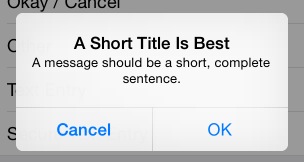
这是最普通的一个alertcontroller,一个取消按钮,一个确定按钮。
新的alertcontroller,其初始化方法也不一样了,按钮响应方法绑定使用了block方式,有利有弊。需要注意的是不要因为block导致了引用循环,记得使用__weak,尤其是使用到self。
上面的界面如下:
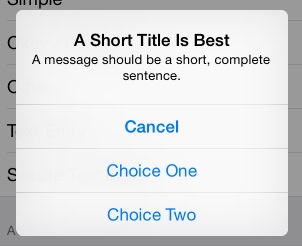
如果UIAlertAction *otherAction这种otherAction多几个的话,它会自动排列成如下:
另外,很多时候,我们需要在alertcontroller中添加一个输入框,例如输入密码:
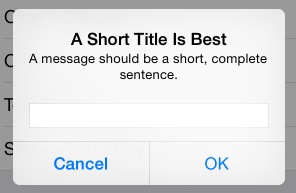
这时候可以添加如下代码:
 [alertController addTextFieldWithConfigurationHandler:^(UITextField *textField) {

        // 可以在这里对textfield进行定制,例如改变背景色

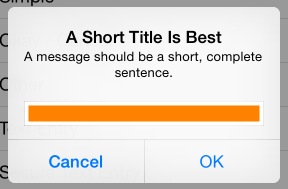
        textField.backgroundColor = [UIColor orangeColor];

    }];
而改变背景色会这样:
完整的密码输入:
- (void)showSecureTextEntryAlert {

    NSString *title = NSLocalizedString(@"A Short Title Is Best", nil);

    NSString *message = NSLocalizedString(@"A message should be a short, complete sentence.", nil);

    NSString *cancelButtonTitle = NSLocalizedString(@"Cancel", nil);

    NSString *otherButtonTitle = NSLocalizedString(@"OK", nil);

    UIAlertController *alertController = [UIAlertController alertControllerWithTitle:title message:message preferredStyle:UIAlertControllerStyleAlert];

    // Add the text field for the secure text entry.

    [alertController addTextFieldWithConfigurationHandler:^(UITextField *textField) {

        // Listen for changes to the text field's text so that we can toggle the current

        // action's enabled property based on whether the user has entered a sufficiently

        // secure entry.

        [[NSNotificationCenter defaultCenter] addObserver:self selector:@selector(handleTextFieldTextDidChangeNotification:) name:UITextFieldTextDidChangeNotification object:textField];

        textField.secureTextEntry = YES;

    }];

    // Create the actions.

    UIAlertAction *cancelAction = [UIAlertAction actionWithTitle:cancelButtonTitle style:UIAlertActionStyleCancel handler:^(UIAlertAction *action) {

        NSLog(@"The \"Secure Text Entry\" alert's cancel action occured.");

        // Stop listening for text changed notifications.

        [[NSNotificationCenter defaultCenter] removeObserver:self name:UITextFieldTextDidChangeNotification object:alertController.textFields.firstObject];

    }];

    UIAlertAction *otherAction = [UIAlertAction actionWithTitle:otherButtonTitle style:UIAlertActionStyleDefault handler:^(UIAlertAction *action) {

        NSLog(@"The \"Secure Text Entry\" alert's other action occured.");

        // Stop listening for text changed notifications.

        [[NSNotificationCenter defaultCenter] removeObserver:self name:UITextFieldTextDidChangeNotification object:alertController.textFields.firstObject];

    }];

    // The text field initially has no text in the text field, so we'll disable it.

    otherAction.enabled = NO;

    // Hold onto the secure text alert action to toggle the enabled/disabled state when the text changed.

    self.secureTextAlertAction = otherAction;

    // Add the actions.

    [alertController addAction:cancelAction];

    [alertController addAction:otherAction];

    [self presentViewController:alertController animated:YES completion:nil];

}
注意四点:
1.添加通知,监听textfield内容的改变:
// Add the text field for the secure text entry.

    [alertController addTextFieldWithConfigurationHandler:^(UITextField *textField) {

        // Listen for changes to the text field's text so that we can toggle the current

        // action's enabled property based on whether the user has entered a sufficiently

        // secure entry.

        [[NSNotificationCenter defaultCenter] addObserver:self selector:@selector(handleTextFieldTextDidChangeNotification:) name:UITextFieldTextDidChangeNotification object:textField];

        textField.secureTextEntry = YES;

    }];
2.初始化时候,禁用“ok”按钮:
otherAction.enabled = NO;
self.secureTextAlertAction = otherAction;//定义一个全局变量来存储
3.当输入超过5个字符时候,使self.secureTextAlertAction = YES:
- (void)handleTextFieldTextDidChangeNotification:(NSNotification *)notification {

    UITextField *textField = notification.object;

    // Enforce a minimum length of >= 5 characters for secure text alerts.

    self.secureTextAlertAction.enabled = textField.text.length >= 5;

}
4.在“OK”action中去掉通知:
UIAlertAction *otherAction = [UIAlertAction actionWithTitle:otherButtonTitle style:UIAlertActionStyleDefault handler:^(UIAlertAction *action) {

        NSLog(@"The \"Secure Text Entry\" alert's other action occured.");

        // Stop listening for text changed notifications.

        [[NSNotificationCenter defaultCenter] removeObserver:self name:UITextFieldTextDidChangeNotification object:alertController.textFields.firstObject];

    }];
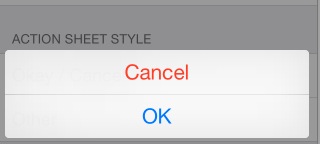
最后是以前经常是alertview与actionsheet结合使用,这里同样也有:
- (void)showOkayCancelActionSheet {

    NSString *cancelButtonTitle = NSLocalizedString(@"Cancel", nil);

    NSString *destructiveButtonTitle = NSLocalizedString(@"OK", nil);

    UIAlertController *alertController = [UIAlertController alertControllerWithTitle:nil message:nil preferredStyle:UIAlertControllerStyleActionSheet];

    // Create the actions.

    UIAlertAction *cancelAction = [UIAlertAction actionWithTitle:cancelButtonTitle style:UIAlertActionStyleCancel handler:^(UIAlertAction *action) {

        NSLog(@"The \"Okay/Cancel\" alert action sheet's cancel action occured.");

    }];

    UIAlertAction *destructiveAction = [UIAlertAction actionWithTitle:destructiveButtonTitle style:UIAlertActionStyleDestructive handler:^(UIAlertAction *action) {

        NSLog(@"The \"Okay/Cancel\" alert action sheet's destructive action occured.");

    }];

    // Add the actions.

    [alertController addAction:cancelAction];

    [alertController addAction:destructiveAction];

    [self presentViewController:alertController animated:YES completion:nil];

}
在底部显示如下:
好了,至此,基本就知道这个新的controller到底是怎样使用了。
iOS8中提示框的使用UIAlertController(UIAlertView和UIActionSheet二合一)的更多相关文章
- IOS 加载中提示框
LoadingView.h #import <Foundation/Foundation.h> @class MBProgressHUD; @interface LoadingView : ...
- iOS -iOS9中提示框(UIAlertController)的常见使用
iOS 8 之前提示框主要使用 UIAlertView和UIActionSheet:iOS 9 将UIAlertView和UIActionSheet合二为一为:UIAlertController . ...
- echarts中提示框的样式调整
第一种方法:利用tooltip 里面的配置项 默认就会有写显示 第二种方法:利用formattet回调函数 返回我们想要显示的信息 formatter : function (params) { va ...
- js中提示框闪退问题
当页面存在刷新 或 在线引用iframe框架时(引用框架也会导致刷新) 会导致页面加载时的弹出框闪退 解决方法:设置弹出框在页面或者框架完全加载一段时间后再弹出 <script type=& ...
- jquery mobile 请求数据方法执行时显示加载中提示框
在jquery mobile开发中,经常需要调用ajax方法,异步获取数据,如果异步获取数据方法由于网速等等的原因,会有一个反应时间,如果能在点击按钮后数据处理期间,给一个正在加载的提示,客户体验会更 ...
- 微信小程序之----加载中提示框loading
loading loading只有一个属性hidden .wxml <view> <loading hidden="{{hidden}}"> 加载中... ...
- js 提示框的实现---组件开发之(二)
接着第上一个,在js文件里再增加一个 popModal 模块,实现弹框效果 css 代码: .alert { padding: 15px; margin-bottom: 20px; border: 1 ...
- 提示框(UIAlertController)的使用。
添加出现在屏幕中间的提示框(也就是之前的UIAlertView): UIAlertController * av = [UIAlertController alertControllerWithTit ...
- js弹出框、对话框、提示框、弹窗总结
一.JS的三种最常见的对话框 //====================== JS最常用三种弹出对话框 ======================== //弹出对话框并输出一段提示信息 funct ...
随机推荐
- Linq技巧3——何时及怎么使用预先加载
通常情况在你的应用程序中,一旦你要查询完数据的的时候,你知道使用实体来做什么. 假如你打印一份订单给顾客,你知道不包括组成订单的Items和Products信息,打印的信息是不完整的,所以查询时也需要 ...
- BZOJ 4077 Messenger
Messenger [问题描述] alice和bob各自在两条折线上行进,一个邮递员要从alice那拿一个包裹,并以直线移动到bob处,alice和bob.邮递员的速度均为1单位/s,问邮递员最少要走 ...
- loading上下左右居中
.loading { width: 50px; height: 60px; text-align: center; font-size: 10px; position:fixed; left:50%; ...
- Codeforces 889C Maximum Element(DP + 计数)
题目链接 Maximum Element 题意 现在有这一段求序列中最大值的程度片段: (假定序列是一个1-n的排列) int fast_max(int n, int a[]) { int ans ...
- spring与事务管理
就我接触到的事务,使用最多的事务管理器是JDBC事务管理器.现在就记录下在spring中是如何使用JDBC事务管理器 1)在spring中配置事务管理器 <!-- JDBC事务 --> ...
- CodeForces - 618F Double Knapsack
Discription You are given two multisets A and B. Each multiset has exactly n integers each between 1 ...
- Life of an Oracle I/O: tracing logical and physical I/O with systemtap
https://db-blog.web.cern.ch/blog/luca-canali/2014-12-life-oracle-io-tracing-logical-and-physical-io- ...
- JavaScript的变量:变量提升
JavaScript代码的运行规则 在JavaScript代码运行之前其实是有一个编译阶段的.编译之后才是从上到下,一行一行解释执行.这样一来也给初学者造成很大的误解.初学者会觉得JavaScript ...
- arcgis andriod Edit features
来自:https://developers.arcgis.com/android/guide/edit-features.htm#ESRI_SECTION1_56C60DB71AF941E98668A ...
- iOS开发 CGBitmapContextCreate
最近项目中,需要对图片进行各种操作. 使用CGBitmapContextCreate 创建位图上下文. CG_EXTERN CGContextRefCGBitmapContextCreate(void ...