
WPF之依赖属性
When you begin to develop appliations with WPF, you will soon stumble across DependencyProperties. They look quite similar to normal .NET properties, but the concept behind is much more complex and powerful.
The main difference is, that the value of a normal .NET property is read directly from a private member in your class, whereas the value of a DependencyProperty is resolved dynamically when calling the GetValue() method that is inherited from DependencyObject.
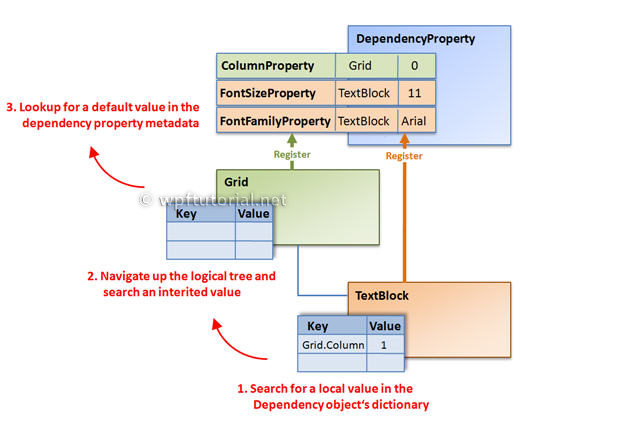
When you set a value of a dependency property it is not stored in a field of your object, but in a dictionary of keys and values provided by the base class DependencyObject. The key of an entry is the name of the property and the value is the value you want to set.
The advantages of dependency properties are
- Reduced memory footprint
It's a huge dissipation to store a field for each property when you think that over 90% of the properties of a UI control typically stay at its initial values. Dependency properties solve these problems by only store modified properties in the instance. The default values are stored once within the dependency property. - Value inheritance
When you access a dependency property the value is resolved by using a value resolution strategy. If no local value is set, the dependency property navigates up the logical tree until it finds a value. When you set the FontSize on the root element it applies to all textblocks below except you override the value. - Change notification
Dependency properties have a built-in change notification mechanism. By registering a callback in the property metadata you get notified, when the value of the property has been changed. This is also used by the databinding.
Every time you access a dependency property, it internally resolves the value by following the precedence from high to low. It checks if a local value is available, if not if a custom style trigger is active,... and continues until it founds a value. At last the default value is always available.

Each WPF control registers a set of DependencyProperties to the static DependencyProperty class. Each of them consists of a key - that must be unique per type - and a metadata that contain callbacks and a default value.
All types that want to use DependencyProperties must derive from DependencyObject. This baseclass defines a key, value dictionary that contains local values of dependency properties. The key of an entry is the key defined with the dependency property.
When you access a dependency property over its .NET property wrapper, it internally calls GetValue(DependencyProperty) to access the value. This method resolves the value by using a value resolution strategy that is explained in detail below. If a local value is available, it reads it directly from the dictionary. If no value is set if goes up the logical tree and searches for an inherited value. If no value is found it takes the default value defined in the property metadata. This sequence is a bit simplified, but it shows the main concept.
How to create a DependencyProperty
To create a DependencyProperty, add a static field of type DepdencyProperty to your type and callDependencyProperty.Register() to create an instance of a dependency property. The name of the DependendyProperty must always end with ...Property. This is a naming convention in WPF.
To make it accessable as a normal .NET property you need to add a property wrapper. This wrapper does nothing else than internally getting and setting the value by using the GetValue() and SetValue() Methods inherited from DependencyObject and passing the DependencyProperty as key.
Important: Do not add any logic to these properties, because they are only called when you set the property from code. If you set the property from XAML the SetValue() method is called directly.
If you are using Visual Studio, you can type propdp and hit 2x tab to create a dependency property.
  // Dependency Property

public static readonly DependencyProperty CurrentTimeProperty =

     DependencyProperty.Register( "CurrentTime", typeof(DateTime),

     typeof(MyClockControl), new FrameworkPropertyMetadata(DateTime.Now));   // .NET Property wrapper

public DateTime CurrentTime

{

    get { return (DateTime)GetValue(CurrentTimeProperty); }

    set { SetValue(CurrentTimeProperty, value); }

}
Each DependencyProperty provides callbacks for change notification, value coercion and validation. These callbacks are registered on the dependency property.
  new FrameworkPropertyMetadata( DateTime.Now,

                       OnCurrentTimePropertyChanged,

                       OnCoerceCurrentTimeProperty ),

                       OnValidateCurrentTimeProperty );
Value Changed Callback
The change notification callback is a static method, that is called everytime when the value of the TimeProperty changes. The new value is passed in the EventArgs, the object on which the value changed is passed as the source.
  private static void OnCurrentTimePropertyChanged(DependencyObject source,

        DependencyPropertyChangedEventArgs e)

{

    MyClockControl control = source as MyClockControl;

    DateTime time = (DateTime)e.NewValue;

    // Put some update logic here...

}
Coerce Value Callback
The coerce callback allows you to adjust the value if its outside the boundaries without throwing an exception. A good example is a progress bar with a Value set below the Minimum or above the Maximum. In this case we can coerce the value within the allowed boundaries. In the following example we limit the time to be in the past.
  private static object OnCoerceTimeProperty( DependencyObject sender, object data )

{

    if ((DateTime)data > DateTime.Now )

    {

        data = DateTime.Now;

    }

    return data;

}
Validation Callback
In the validate callback you check if the set value is valid. If you return false, an ArgumentException will be thrown. In our example demand, that the data is an instance of a DateTime.
  private static bool OnValidateTimeProperty(object data)

{

    return data is DateTime;

}
Some dependency property of WPF controls are readonly. They are often used to report the state of a control, like theIsMouseOver property. Is does not make sense to provide a setter for this value.
Maybe you ask yourself, why not just use a normal .NET property? One important reason is that you cannot set triggers on normal .NET propeties.
Creating a read only property is similar to creating a regular DependencyProperty. Instead of callingDependencyProperty.Register() you call DependencyProperty.RegisterReadonly(). This returns you aDependencyPropertyKey. This key should be stored in a private or protected static readonly field of your class. The key gives you access to set the value from within your class and use it like a normal dependency property.
Second thing to do is registering a public dependency property that is assigned toDependencyPropertyKey.DependencyProperty. This property is the readonly property that can be accessed from external.
  // Register the private key to set the value

private static readonly DependencyPropertyKey IsMouseOverPropertyKey =

      DependencyProperty.RegisterReadOnly("IsMouseOver",

      typeof(bool), typeof(MyClass),

      new FrameworkPropertyMetadata(false));   // Register the public property to get the value

public static readonly DependencyProperty IsMouseoverProperty =

      IsMouseOverPropertyKey.DependencyProperty;   // .NET Property wrapper

public int IsMouseOver

{

   get { return (bool)GetValue(IsMouseoverProperty); }

   private set { SetValue(IsMouseOverPropertyKey, value); }

}
Attached properties are a special kind of DependencyProperties. They allow you to attach a value to an object that does not know anything about this value.
A good example for this concept are layout panels. Each layout panel needs different data to align its child elements. The Canvas needs Top and Left, The DockPanel needs Dock, etc. Since you can write your own layout panel, the list is infinite. So you see, it's not possible to have all those properties on all WPF controls.
The solution are attached properties. They are defined by the control that needs the data from another control in a specific context. For example an element that is aligned by a parent layout panel.
To set the value of an attached property, add an attribute in XAML with a prefix of the element that provides the attached property. To set the the Canvas.Top and Canvas.Left property of a button aligned within a Canvas panel, you write it like this:
<Canvas>

    <Button Canvas.Top="20" Canvas.Left="20" Content="Click me!"/>

</Canvas>
  public static readonly DependencyProperty TopProperty =

    DependencyProperty.RegisterAttached("Top",

    typeof(double), typeof(Canvas),

    new FrameworkPropertyMetadata(0d,

        FrameworkPropertyMetadataOptions.Inherits));   public static void SetTop(UIElement element, double value)

{

    element.SetValue(TopProperty, value);

}   public static double GetTop(UIElement element)

{

    return (double)element.GetValue(TopProperty);

}
Listen to dependency property changes
If you want to listen to changes of a dependency property, you can subclass the type that defines the property and override the property metadata and pass an PropertyChangedCallback. But an much easier way is to get theDependencyPropertyDescriptor and hookup a callback by calling AddValueChanged()
  DependencyPropertyDescriptor textDescr = DependencyPropertyDescriptor.

    FromProperty(TextBox.TextProperty, typeof(TextBox));   if (textDescr!= null)

{

    textDescr.AddValueChanged(myTextBox, delegate

    {

        // Add your propery changed logic here...

    });

}
Because null is also a valid local value, there is the constant DependencyProperty.UnsetValue that describes an unset value.
button1.ClearValue( Button.ContentProperty );
将依赖属相绑定到XAML中的方法:
<Window x:Name="winThis" x:Class="WpfApplication1.Window1"

  xmlns="http://schemas.microsoft.com/winfx/2006/xaml/presentation"

  xmlns:x="http://schemas.microsoft.com/winfx/2006/xaml"

  Title="Create a Read-Only Dependency Property" Height="300" Width="300">

    <Grid>

      <Viewbox>

        <TextBlock Text="{Binding ElementName=winThis, Path=Counter}" />

      </Viewbox>

    </Grid>

</Window>

//File:Window.xaml.cs

using System;

using System.Windows;

using System.Windows.Threading;

namespace WpfApplication1

{

    public partial class Window1 : Window

    {

        public Window1()

        {

            InitializeComponent();

            DispatcherTimer timer =

                new DispatcherTimer(TimeSpan.FromSeconds(1),

                                    DispatcherPriority.Normal,

                                    delegate

                                    {

                                        int newValue = Counter == int.MaxValue ? 0 : Counter + 1;

                                        SetValue(counterKey, newValue);

                                    },

                                    Dispatcher);

        }

        public int Counter

        {

            get { return (int)GetValue(counterKey.DependencyProperty); }

        }

        private static readonly DependencyPropertyKey counterKey =

            DependencyProperty.RegisterReadOnly("Counter",

                                                typeof(int),

                                                typeof(Window1),

                                                new PropertyMetadata(0));

    }

}
WPF之依赖属性的更多相关文章
- WPF的依赖属性
Windows Presentation Foundation (WPF) 提供了一组服务,这些服务可用于扩展公共语言运行时 (CLR)属性的功能,这些服务通常统称为 WPF 属性系统.由 WPF 属 ...
- wpf 的依赖属性只能在loaded 事件之后才能取到
wpf 的依赖属性只能在loaded 事件之后才能取到,在构造函数的 InitializeComponent(); 之后取不到 wpf 的依赖属性只能在loaded 事件之后才能取到,在构造函数的 ...
- WPF 中依赖属性的继承(Inherits)
WPF中依赖属性的值是是可以设置为可继承(Inherits)的,这种模式下,父节点的依赖属性会将其值传递给子节点.例如,数据绑定中经常使用的DataContextProperty: var host ...
- WPF 使用依赖属性(DependencyProperty) 定义用户控件中的Image Source属性
原文:WPF 使用依赖属性(DependencyProperty) 定义用户控件中的Image Source属性 如果你要自定义一个图片按钮控件,那么如何在主窗体绑定这个控件上图片的Source呢? ...
- WPF的依赖属性和附加属性(用法解释较全)
转:https://www.cnblogs.com/zhili/p/WPFDependencyProperty.html 一.引言 感觉最近都颓废了,好久没有学习写博文了,出于负罪感,今天强烈逼迫自己 ...
- WPF利用依赖属性和命令编写自定义控件
以实例讲解(大部分讲解在代码中) 1,新建一个WPF项目,添加一个用户控件之后在用户控件里面添加几个控件用作测试, <UserControl x:Class="SelfControlD ...
- WPF: 只读依赖属性的介绍与实践
在设计与开发 WPF 自定义控件时,我们常常为会控件添加一些依赖属性以便于绑定或动画等.事实上,除了能够添加正常的依赖属性外,我们还可以为控件添加只读依赖属性(以下统称"只读属性" ...
- WPF 自定义依赖属性
原博客地址:http://www.cnblogs.com/DebugLZQ/archive/2012/11/30/2796021.html DependencyObject和Dependen ...
- [转]WPF的依赖属性是怎么节约内存的
WPF升级了CLR的属性系统,加入了依赖属性和附加属性.依赖属性的使用有很多好处,其中有两点是我认为最为亮眼的: 1)节省内存的开销; 2)属性值可以通过Binding依赖于其它对象上,这就使得我的数 ...
- WPF 之 依赖属性与附加属性(五)
一.CLR 属性 程序的本质是"数据+算法",或者说用算法来处理数据以期得到输出结果.在程序中,数据表现为各种各样的变量,算法则表现为各种各样的函数(操作符是函数的简记法). ...
随机推荐
- in addition to 和 except for
except for 除了...以外(与 except for 连用的整体词与 except for 所跟的词往往不是同类的,是指整体中除去 一个细节.) eg:Your composition is ...
- 三、jQuery--jQuery实践--搜索框制作
input标签讲解 <input/>作为按钮的type属性:button.submit(后面会有二者对比分析)
- JavaScript Canvas 根据像素点取位置
<html> <body> <canvas id="canvas" width="100" height="100&qu ...
- 无废话ExtJs 入门教程十四[文本编辑器:Editor]
无废话ExtJs 入门教程十四[文本编辑器:Editor] extjs技术交流,欢迎加群(201926085) ExtJs自带的编辑器没有图片上传的功能,大部分时候能够满足我们的需要. 但有时候这个功 ...
- 一个简单的Promise 实现
用了这么长时间的promise,也看了很多关于promise 的文章博客,对promise 算是些了解.但是要更深的理解promise,最好的办法还是自己实现一个. 我大概清楚promise 是对异步 ...
- WebView相关
Android WebView使用基础 Android WebView中的JavaScript代码使用 很不错的例子:android webview js交互 第一节 (java和js交互)
- 移动 Web 开发技巧
1.使用click会出现绑定点击区域闪一下的情况,解决:给该元素一个样式如下 -webkit-tap-highlight-color: rgba(0,0,0,0); 2.用iphone或ipad浏览很 ...
- 对于Eclipse的正确用法
有时候我们刚刚修改了工程里的文件 但是启动的时候它硬是说你有东西没有声明 而那个东西又明明在那里.. 这时候我们可以认为实际与它调用的工程关系文件(我假想的) 不同步.. 我们可以通过clean功能来 ...
- Jmeter 分布式性能测试
作为一个纯 JAVA 的GUI应用,JMeter 对于CPU和内存的消耗还是很惊人的,所以当需要模拟数以千计的并发用户时,使用单台机器模拟所有的并发用户就有些力不从心,甚至还会引起JAVA内存溢出的错 ...
- Windows下MySQL zip版的简单安装
1.下载MySQL-5.5.10-win32.zip的版本.2.解压到任意路径,比如"D:\Programm Files\".3.进入MySQL路径,复制my-small.ini为 ...