
Android——手机内部文件存储(作业)
作业:把用户的注册信息存储到文件里,登录成功后读出并显示出来
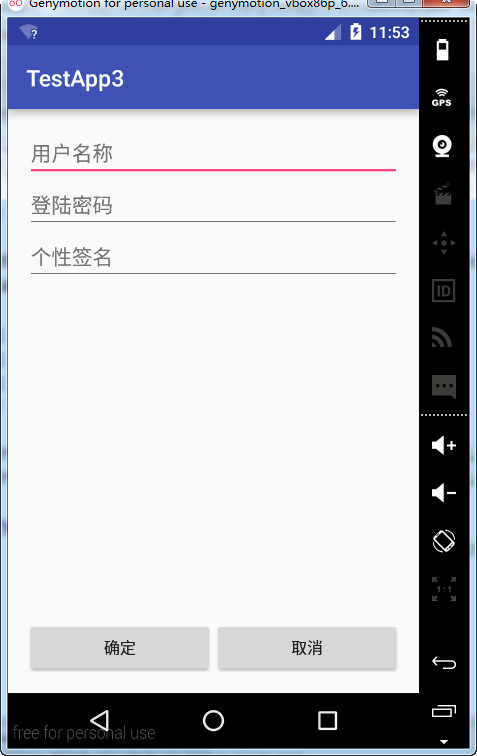
activity_practice2的layout文件:
 <?xml version="1.0" encoding="utf-8"?>

 <LinearLayout xmlns:android="http://schemas.android.com/apk/res/android"

     xmlns:tools="http://schemas.android.com/tools"

     android:layout_width="match_parent"

     android:layout_height="match_parent"

     android:paddingBottom="@dimen/activity_vertical_margin"

     android:paddingLeft="@dimen/activity_horizontal_margin"

     android:paddingRight="@dimen/activity_horizontal_margin"

     android:paddingTop="@dimen/activity_vertical_margin"

     tools:context="com.hanqi.testapp3.PractiseActivity2"

     android:orientation="vertical">

     <LinearLayout

         android:layout_width="match_parent"

         android:layout_height="wrap_content"

         android:orientation="horizontal">

         <TextView

             android:layout_width="wrap_content"

             android:layout_height="wrap_content"

             android:text="用户名:"/>

         <EditText

             android:layout_width="match_parent"

             android:layout_height="wrap_content"

             android:id="@+id/et_username"/>

     </LinearLayout>

     <LinearLayout

         android:layout_width="match_parent"

         android:layout_height="wrap_content"

         android:orientation="horizontal">

         <TextView

             android:layout_width="wrap_content"

             android:layout_height="wrap_content"

             android:text="密码:"/>

         <EditText

             android:layout_width="match_parent"

             android:layout_height="wrap_content"

             android:id="@+id/et_password"

             android:inputType="textPassword"/>

     </LinearLayout>

     <LinearLayout

         android:layout_width="match_parent"

         android:layout_height="wrap_content"

         android:orientation="horizontal">

         <Button

         android:layout_width="0dp"

         android:layout_height="wrap_content"

         android:text="登陆"

         android:onClick="bt_dl_onClick"

         android:layout_weight="1"/>

         <Button

             android:layout_width="0dp"

             android:layout_height="wrap_content"

             android:text="注册"

             android:onClick="bt_zc_onClick"

             android:layout_weight="1"/>

     </LinearLayout>

     <!--<Button-->

         <!--android:layout_width="match_parent"-->

         <!--android:layout_height="wrap_content"-->

         <!--android:text="fdasf"-->

         <!--android:onClick="bt_onClick"-->

         <!--android:id="@+id/bt_1"/>-->

 </LinearLayout>
activity_practice2_2的layout文件:
 <?xml version="1.0" encoding="utf-8"?>

 <RelativeLayout xmlns:android="http://schemas.android.com/apk/res/android"

     xmlns:tools="http://schemas.android.com/tools"

     android:layout_width="match_parent"

     android:layout_height="match_parent"

     android:paddingBottom="@dimen/activity_vertical_margin"

     android:paddingLeft="@dimen/activity_horizontal_margin"

     android:paddingRight="@dimen/activity_horizontal_margin"

     android:paddingTop="@dimen/activity_vertical_margin"

     tools:context="com.hanqi.testapp3.PractiseActivity2_2">

         <EditText

             android:layout_width="match_parent"

             android:layout_height="wrap_content"

             android:hint="用户名称"

             android:id="@+id/et_username_1"/>

         <EditText

             android:layout_width="match_parent"

             android:layout_height="wrap_content"

             android:hint="登陆密码"

             android:id="@+id/et_password_1"

             android:layout_below="@id/et_username_1"

             android:inputType="textPassword"/>

         <EditText

             android:layout_width="match_parent"

             android:layout_height="wrap_content"

             android:hint="个性签名"

             android:id="@+id/et_gxqm"

             android:layout_below="@id/et_password_1"/>

         <LinearLayout

             android:layout_width="match_parent"

             android:layout_height="wrap_content"

             android:layout_alignParentBottom="true">

             <Button

                 android:layout_width="wrap_content"

                 android:layout_height="wrap_content"

                 android:text="确定"

                 android:layout_weight="1"

                 android:onClick="bt_qd_onClick"/>

             <Button

                 android:layout_width="wrap_content"

                 android:layout_height="wrap_content"

                 android:text="取消"

                 android:layout_weight="1"

                 android:onClick="bt_qx_onClick"/>

         </LinearLayout>

     <!--<Button-->

         <!--android:layout_width="match_parent"-->

         <!--android:layout_height="wrap_content"-->

         <!--android:text="fdasf"-->

         <!--android:onClick="bt_onClick"-->

         <!--android:id="@+id/bt_1"-->

         <!--android:layout_below="@+id/et_gxqm"/>-->

 </RelativeLayout>
activity_practice2_3的layout文件:
 <?xml version="1.0" encoding="utf-8"?>

 <RelativeLayout xmlns:android="http://schemas.android.com/apk/res/android"

     xmlns:tools="http://schemas.android.com/tools"

     android:layout_width="match_parent"

     android:layout_height="match_parent"

     android:paddingBottom="@dimen/activity_vertical_margin"

     android:paddingLeft="@dimen/activity_horizontal_margin"

     android:paddingRight="@dimen/activity_horizontal_margin"

     android:paddingTop="@dimen/activity_vertical_margin"

     tools:context="com.hanqi.testapp3.PractiseActivity2_3">

     <TextView

         android:layout_width="match_parent"

         android:layout_height="wrap_content"

         android:id="@+id/tv_username"

         android:textSize="30dp"/>

     <TextView

         android:layout_width="match_parent"

         android:layout_height="wrap_content"

         android:id="@+id/tv_gxqm"

         android:layout_below="@id/tv_username"

         android:textSize="30dp"/>

 </RelativeLayout>
PractiseActivity2的java类:
 package com.hanqi.testapp3;

 import android.content.Intent;

 import android.os.Bundle;

 import android.support.v7.app.AppCompatActivity;

 import android.view.View;

 import android.widget.EditText;

 import android.widget.Toast;

 import java.io.FileInputStream;

 public class PractiseActivity2 extends AppCompatActivity {

     EditText et_username;

     EditText et_password;

 //    Button bt_1;

     @Override

     protected void onCreate(Bundle savedInstanceState) {

         super.onCreate(savedInstanceState);

         setContentView(R.layout.activity_practise2);

         et_username = (EditText)findViewById(R.id.et_username);

         et_password = (EditText)findViewById(R.id.et_password);

         //bt_1 = (Button)findViewById(R.id.bt_1);

     }

     public void bt_zc_onClick(View v)

     {

         Intent intent = new Intent(this,PractiseActivity2_2.class);

         startActivity(intent);

     }

     public void bt_dl_onClick(View v)

     {

         String str1 = "";

         String str2 = "";

         String str3 = "";

         String uc = et_username.getText().toString();

         String pw = et_password.getText().toString();

         try {

             FileInputStream fis = openFileInput("practise2-1.txt");

             byte[] b = new byte[1024];

             int i;

             while ((i=fis.read(b))>0)

             {

                 String str = new String(b,0,i);

                 str1 += str;

             }

             fis.close();

             FileInputStream fis2 = openFileInput("practise2-2.txt");

             byte[] b2 = new byte[1024];

             int i2 = 0;

             while ((i2=fis2.read(b2))>0)

             {

                 String str = new String(b2,0,i2);

                 str2 += str;

             }

             fis2.close();

             FileInputStream fis3 = openFileInput("practise2-3.txt");

             byte[] b3 = new byte[1024];

             int i3 = 0;

             while ((i3=fis3.read(b3))>0)

             {

                 String str = new String(b3,0,i3);

                 str3 += str;

             }

             fis3.close();

         }

        catch (Exception e)

        {

        }

         if (uc.trim().length()==0||pw.trim().length()==0)

         {

             Toast.makeText(PractiseActivity2.this, "用户名和密码不能为空", Toast.LENGTH_SHORT).show();

             return;

         }

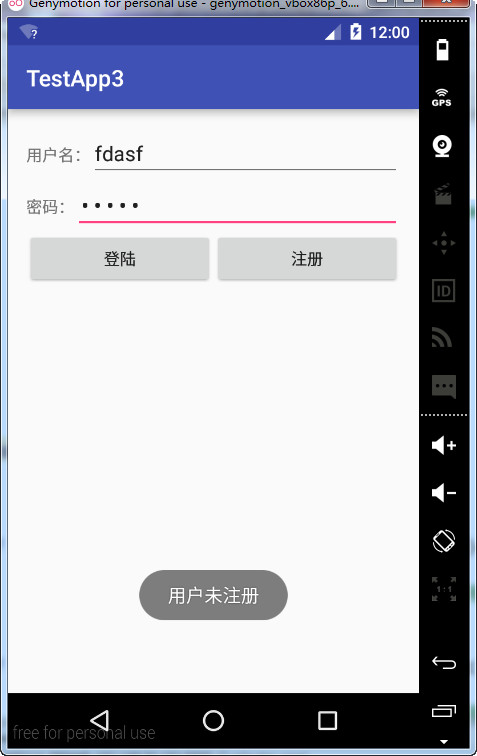
         if (str1 ==null||(str1!=null&&!str1.equals(uc)))

         {

             Toast.makeText(PractiseActivity2.this, "用户未注册", Toast.LENGTH_SHORT).show();

             return;

         }

         if (!str2.equals(pw))

         {

             Toast.makeText(PractiseActivity2.this, "密码错误", Toast.LENGTH_SHORT).show();

             return;

         }

         else

         {

             Toast.makeText(PractiseActivity2.this, "用户验证成功", Toast.LENGTH_SHORT).show();

             Intent intent = new Intent(this,PractiseActivity2_3.class);

             startActivity(intent);

             finish();

         }

     }

 //    public void bt_onClick(View v)

 //    {

 //        try {

 //            FileInputStream fis = openFileInput("practise2-1.txt");

 //            byte[] b = new byte[1024];

 //            int i;

 //

 //            while ((i=fis.read(b))>0)

 //            {

 //                String str = new String(b,0,i);

 //                str1 += str;

 //            }

 //

 //            fis.close();

 //        }

 //        catch (Exception e)

 //        {

 //

 //        }

 //        bt_1.setText(str1);

 //    }

 }
PractiseActivity2_2的java类:
 package com.hanqi.testapp3;

 import android.content.Intent;

 import android.support.v7.app.AppCompatActivity;

 import android.os.Bundle;

 import android.view.View;

 import android.widget.EditText;

 import android.widget.Toast;

 import java.io.FileOutputStream;

 import java.io.PrintStream;

 public class PractiseActivity2_2 extends AppCompatActivity {

     EditText et_username_1;

     EditText et_password_1;

     EditText et_gxqm;

     @Override

     protected void onCreate(Bundle savedInstanceState) {

         super.onCreate(savedInstanceState);

         setContentView(R.layout.activity_practise2_2);

         et_username_1 = (EditText)findViewById(R.id.et_username_1);

         et_password_1 = (EditText)findViewById(R.id.et_password_1);

         et_gxqm = (EditText)findViewById(R.id.et_gxqm);

     }

     public void bt_qd_onClick(View v)

     {

         String username = et_username_1.getText().toString();

         if (username ==null||username.trim().length()==0)

         {

             Toast.makeText(PractiseActivity2_2.this, "请填写用户名", Toast.LENGTH_SHORT).show();

             return;

         }

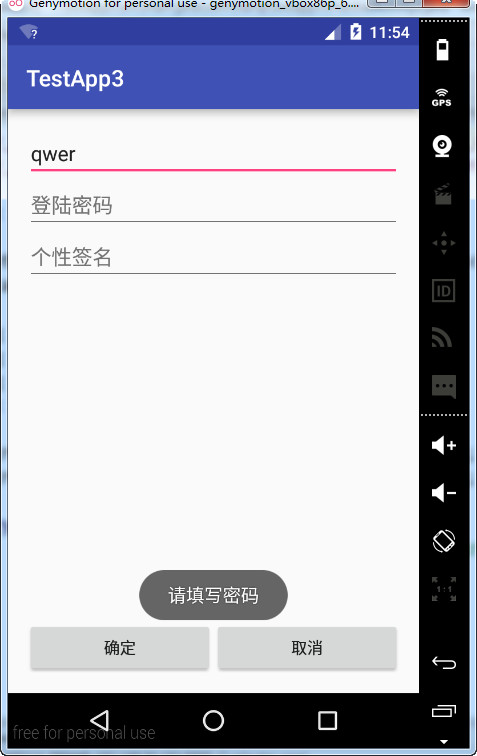
         String password = et_password_1.getText().toString();

         if (password ==null||password.trim().length()==0)

         {

             Toast.makeText(PractiseActivity2_2.this, "请填写密码", Toast.LENGTH_SHORT).show();

             return;

         }

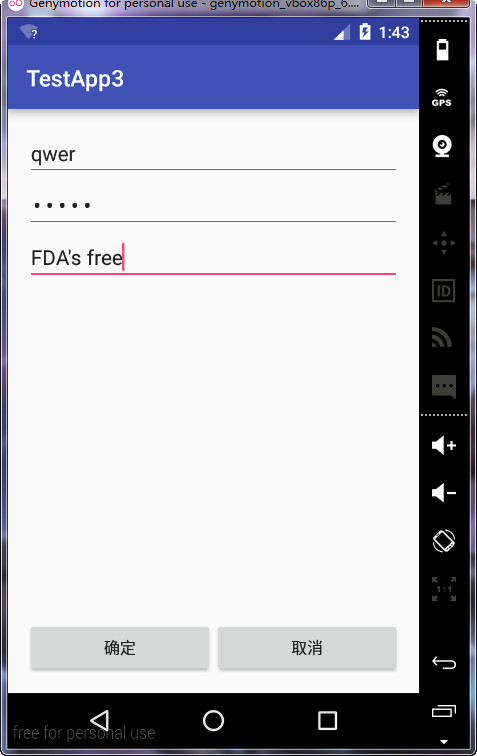
         String gxqm = et_gxqm.getText().toString();

         if (gxqm ==null||gxqm.trim().length()==0)

         {

             Toast.makeText(PractiseActivity2_2.this, "个性签名为必填内容", Toast.LENGTH_SHORT).show();

             return;

         }

         try {

             FileOutputStream fos = openFileOutput("practise2-1.txt",MODE_PRIVATE);

             PrintStream ps = new PrintStream(fos);

             ps.print(username);

             FileOutputStream fos2 = openFileOutput("practise2-2.txt",MODE_PRIVATE);

             PrintStream ps2 = new PrintStream(fos2);

             ps2.print(password);

             FileOutputStream fos3 = openFileOutput("practise2-3.txt",MODE_PRIVATE);

             PrintStream ps3 = new PrintStream(fos3);

             ps3.print(gxqm);

             ps.close();

             ps2.close();

             ps3.close();

             fos.close();

             Toast.makeText(PractiseActivity2_2.this, "保存成功", Toast.LENGTH_SHORT).show();

         }

         catch (Exception e)

         {

         }

         Intent intent = new Intent(this,PractiseActivity2.class);

         startActivity(intent);

         finish();

     }

     public void bt_qx_onClick(View v)

     {

         setResult(RESULT_CANCELED, null);

         finish();

     }

 }
PractiseActivity2_3的java类:
 package com.hanqi.testapp3;

 import android.support.v7.app.AppCompatActivity;

 import android.os.Bundle;

 import android.widget.TextView;

 import java.io.FileInputStream;

 public class PractiseActivity2_3 extends AppCompatActivity {

     TextView tv_username;

     TextView tv_gxqm;

     String str1 = "";

     String str3 = "";

     @Override

     protected void onCreate(Bundle savedInstanceState) {

         super.onCreate(savedInstanceState);

         setContentView(R.layout.activity_practise2_3);

         tv_username = (TextView)findViewById(R.id.tv_username);

         tv_gxqm = (TextView)findViewById(R.id.tv_gxqm);

         try {

             FileInputStream fis = openFileInput("practise2-1.txt");

             byte[] b = new byte[1024];

             int i;

             while ((i=fis.read(b))>0)

             {

                 String str = new String(b,0,i);

                 str1 += str;

             }

             fis.close();

             FileInputStream fis3 = openFileInput("practise2-3.txt");

             byte[] b3 = new byte[1024];

             int i3 = 0;

             while ((i3=fis3.read(b3))>0)

             {

                 String str = new String(b3,0,i3);

                 str3 += str;

             }

             fis3.close();

         }

         catch (Exception e)

         {

         }

         tv_username.setText("用户名是:" + str1);

         tv_gxqm.setText("个性签名是:"+str3);

     }

 }
效果为:




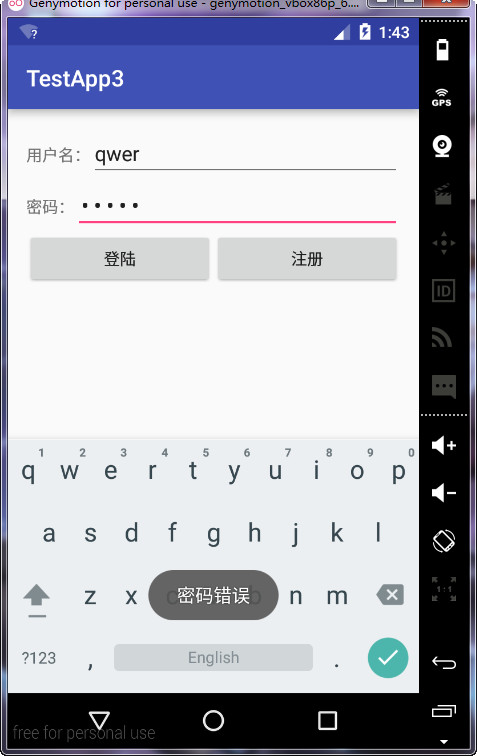
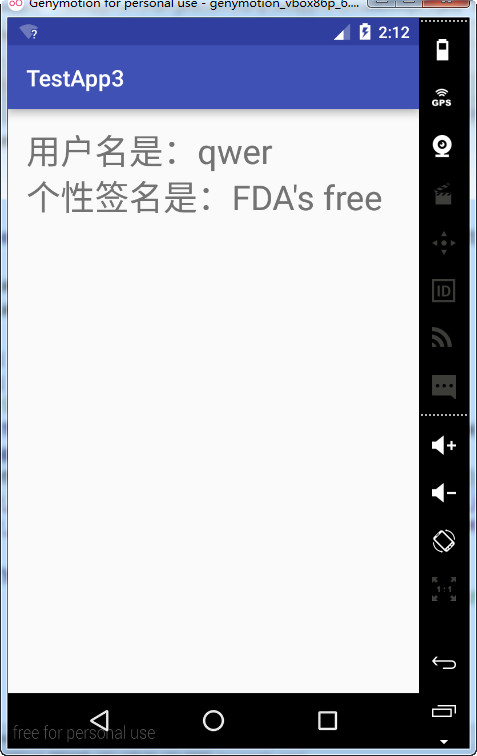
Android——手机内部文件存储(作业)的更多相关文章
- Android——数据存储(课堂代码整理:SharedPreferences存储和手机内部文件存储)
layout文件: <?xml version="1.0" encoding="utf-8"?> <LinearLayout xmlns:an ...
- Android入门(九)文件存储与SharedPreferences存储
原文链接:http://www.orlion.ga/578/ Android系统中主要提供了三种方式用于简单地实现数据持久化功能,即文件存储.SharedPreference存储以及数据库存储.当然, ...
- android-数据存储之手机内部file存储
一.基础概要 1.说明: 1>应用程序运行需要一些较大的数据或者图片可保存在手机内部 2>文件类型:任意 3>路径:/data/data/packageName/files/ 4&g ...
- (转)获取android手机内部存储空间和外部存储空间的参数 && 如何决定一个apk的安装位置
转:http://blog.csdn.net/zhandoushi1982/article/details/8560233 获取android文件系统的信息,需要Environment类和StatFs ...
- Android手机QQ文件夹解析
注:切勿修改手机QQ文件夹,以免造成不必要的使用问题及无法修复的数据丢失] 安卓手机QQ tencent文件夹解析 QQ下载的聊天背景:tencent→MobileQQ→system_backgrou ...
- 【Android】14.1 内部文件存储和读取
分类:C#.Android.VS2015: 创建日期:2016-02-27 一.简介 内部存储(Internal storage)是指将应用程序建立的私有文件保存在内部存储器(移动经销商卖的那种容量较 ...
- android之外部文件存储和读取
这次借用上次读写内部存储的代码,只是对将更换文件的读写路径即可.这里需要对获取SDcard的读写权限. 一.AndroidManifest.xml 这里增加了对外部存储设备的读写权限 <?xml ...
- android面试(4)---文件存储
1.sharePreference? SharedPreferences类,它是一个轻量级的存储类,特别适合用于保存软件配置参数. SharedPreferences保存数据,其背后是用xml文件存放 ...
- android app 内部文件路径
public class MainActivity extends Activity { final String FILE_NAME = "crazyit.bin"; @Over ...
随机推荐
- CentOS中iptables防火墙 开放80端口方法
开放端口: 代码如下 复制代码 [root@WX32 ~]# iptables -I INPUT -p tcp --dport 80 -j ACCEPT 保存配置: 代码如下 复制代码 [root ...
- Clojure学习笔记(二)——函数式编程
定义 “函数式编程”是一种编程范式(programming paradigm),即如何编写程序的方法论.主要思想是把运算过程尽量写成一系列嵌套的函数调用. 举例来说,现在有这样一个数学表达式: (1 ...
- html5-表单
例子: text,number,email 的输入框 <!-- required:必填项 --> <!-- autofocus:获得焦点 --> <!-- placeho ...
- 深入理解 AngularJS 的 Scope
JavaScript 的原型继承就是奇葩. 之前在 V2EX 上看到讨论说,不会 OOP 的 JavaScript 的程序员就是野生程序员.看来我是属于野生的. 一.遇到的问题 问题发生在使用 A ...
- Windows Store App 主题动画
Windows 8系统的动画库中包含了丰富的主题动画,在开发Windows应用商店应用时,使用主题动画编写较少的代码即可实现所期望的动画效果.下面介绍一些常用的主题动画,读者可以根据每种主题动画提供的 ...
- 困扰我多年的Connection reset问题
第一次出现:是thrift的python client去请求server,发现偶尔出现这个问题 第二次:接入第三方的api,去请求数据时,发现一个接入方的api第一次总是报这个错,当时又没有做处理,导 ...
- 用Gen8服务器来学习虚拟化ESXI
虚拟化和云计算是这几年的热门技术,VMware公司是虚拟化的领头羊,小坦克我有幸在VMware从事这方面的测试工作. 本系列将会讲述我学习虚拟化的一些经历. 将会覆盖一些虚拟化产品: 比如:VMwar ...
- mongostat 3.2指标详解
存储引擎:wiredTiger /usr/local/mongodb-3.2.8/bin/mongostat -uroot -pcEqHuoqiJYhjVpuL --host 127.0.0.1 ...
- 电源相关知识—S0、S1(POS)、S2、S3(STR)、 S4、S5、睡眠、休眠、待机
转 http://blog.sina.com.cn/s/blog_52f28dde0100l3ci.html APM https://en.wikipedia.org/wiki/Advanced_Po ...
- JavaScript整合
JavaScript已经学完了,总体感觉良好,但是突然发现原来JS可以做的东西比我想象的还要多!我整理了一些JavaScript的基础知识,这些内容掌握好的话,对我们深入学习JavaScript会有很 ...