
wp8.1 Study15:后台任务
一、介绍
1、多任务处理
什么是多任务处理?它意味着当App被挂起时,它仍然可以完成一些开发者设定的任务,比如更新tiles和toasts、预定toast和提醒、后台任务等。
2、后台任务
App可以注册后台任务,它被系统运行和管理,但它依旧使用和前台程序一样的数据储存等,同时它使用的CPU资源是由系统限制的。它可以使用toast, tile, badge UI等。一个App可以注册使用多个后台任务。
二、添加后台任务
1、添加一个新的项目到解决方案中作为后台任务,如图

然后,添加以下类似代码(重点是添加IBackgroundTask)
public sealed class TheTask : IBackgroundTask

  {

    public void Run(IBackgroundTaskInstance taskInstance)

    {

      var deferral = taskInstance.GetDeferral();

       taskInstance.canceled+=(s,e)=>{};//当后台任务被限制执行时触发事件

        taskInstance.Progress = ;//后台任务的进度

      deferral.Complete();

    }
2、后台任务触发设置(在前台程序,不是在TheTask)
后台任务将根据触发器是否被触发而运行,以下是多种触发器:
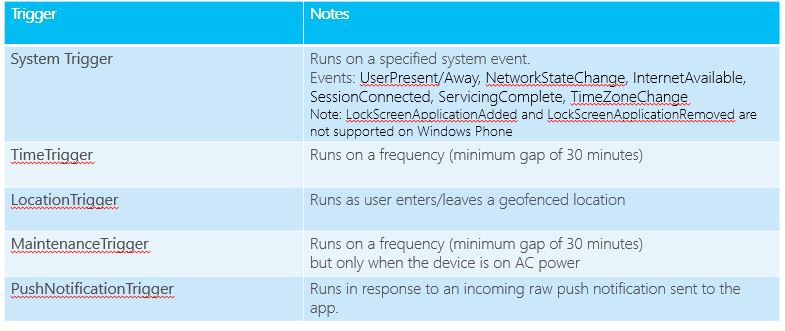

同时也可以添加条件,让后台任务根据条件运行,可以设置一下几种条件等

添加条件代码很简单,代码如下:

3、在manifest声明 中,添加后台任务声明

4、请求及注册后台任务(在前台程序中)
async void RegisterBackgroundTasks()

{

    // On Windows, RequestAccessAsync presents the user with a confirmation

    // dialog that requests that an app be allowed on the lock screen.

    // On Windows Phone, RequestAccessAsync does not show any user confirmation UI

    // but *must* be called before registering any tasks

    var access = await BackgroundExecutionManager.RequestAccessAsync();

    // A 'good' status return on Phone is BackgroundAccess.AllowedMayUseActiveRealTimeConnectivity

    if (access == BackgroundAccessStatus.Denied)

    {

        // Either the user has explicitly denied background execution for this app

        // or the maximum number of background apps across the system has been reached

        // Display some informative message to the user...

    }

    BackgroundTaskBuilder taskBuilder = new BackgroundTaskBuilder();

taskBuilder.Name = "MyBackgroundTask";

// Many different trigger types could be used here

SystemTrigger trigger = new SystemTrigger(SystemTriggerType.TimeZoneChange, false);

taskBuilder.SetTrigger(trigger);

taskBuilder.AddCondition(new SystemCondition(SystemConditionType.InternetAvailable));

// Entry point is the full name of our IBackgroundTask implementation

// Good practice to use reflection as here to ensure correct name

taskBuilder.TaskEntryPoint = typeof(MyBackgroundTask.TheTask).FullName;

BackgroundTaskRegistration registration = taskBuilder.Register();

// Optionally, handle the progress/completed events of the task

registration.Progress += registration_Progress;

registration.Completed += registration_Completed;

}
5、获取后台任务及取消注册后台任务,代码如下:
// AllTasks is a dictionary <Guid, IBackgroundTaskRegistration> so you can get back

// to your registration by id or by posiiton, or select First if you only have one registration.

var taskRegistration = BackgroundTaskRegistration.AllTasks.Values.FirstOrDefault();

// We could then unregister the task, optionally cancelling any running instance

if (taskRegistration != null)

{

    taskRegistration.Unregister(true);

}

// Release the progress/completed event subscriptions

registration.Progress -= registration_Progress;

registration.Completed -= registration_Completed;
tips:在Debugger 中我们可以这样触发后台任务,如图

wp8.1 Study15:后台任务的更多相关文章
- WP8.1开发:后台任务详解(求推荐)
小梦今天给大家分享一下windows phone 8.1中的后台任务如何实现,许多应用都会用到后台任务,所以我们必须得掌握. 新建后台任务类: 首先我们先新建一个windows phone 8.1空白 ...
- WP8.1和Win8.1的不同之处
本文仅是个人见解,如有不足或错误之处欢迎批评指正~ 1.Toast: 创建Toast代码差不多但实现机制及管理上不一样 2.ApplicationData: WP8.1多了一个LocalCacheFo ...
- 【WP8.1开发】认识后台任务
在手机上,使用后台,不像电脑上那么随意,准确地讲嘛,在移动平台上,后台任务都有严格的限制.至于说为什么会有这么多限制,我估计初衷很明显——保证系统的性能不受某个或某几个应用的负面影响:另外就是出于安全 ...
- [深入浅出WP8.1(Runtime)]Windows Phone 8.1和Silverlight 8.1的区别
1.2.2 Windows Phone 8.1应用程序模型 Windows Phone 8.1支持多种开发语言来开发应用程序,包括C#.VB.JavaScript和C++,那么本书的代码主要是采用C# ...
- 【Win10 UWP】后台任务与动态磁贴
动态磁贴(Live Tile)是WP系统的大亮点之一,一直以来受到广大用户的喜爱.这一讲主要研究如何在UWP应用里通过后台任务添加和使用动态磁贴功能. 从WP7到Win8,再到Win10 UWP,磁贴 ...
- 将Win8.1/WP8.1应用迁移到Universal Windows Platform
在上一篇在VS2015 RC打开CTP中创建的工程,我们介绍了怎么在RC中打开CTP中创建的Universal 工程,这一篇我们来讲下怎么将Windows 8.1/WP8.1的应用迁移到Univers ...
- 【Win 10 应用开发】在App所在的进程中执行后台任务
在以往版本中,后台任务都是以独立的专用进程来运行,因此,定义后台任务代码的类型都要位于 Windows 运行时组件项目中. 不过,在14393中,SDK 作了相应的扩展,不仅支持以前的独立进程中运行后 ...
- 【WP8.1】WebView笔记
之前在WP8的时候做过WebBrowser相关的笔记,在WP8.1的WebView和WebBrowser有些不一样,在这里做一些笔记 下面分为几个部分 1.禁止缩放 2.JS通知后台C#代码(noti ...
- 【WP8.1】类似“IT之家” 自定义消息 的实现
曾经在WP7.WP8下的消息 使用的都是Coding4Fun.Phone.Toolkit里面的ToastPrompt类来实现的. 现在我们来自己做个类似IT之家的这种效果:从右边弹出,经过几秒后会自动 ...
随机推荐
- Wamp 设置 www 目录
打开httpd.conf,搜索wwwroot 和 directory 直接改为新目录即可. 对于wamp3是无效的,可以这样解决: “You need to change these values a ...
- jenkins+gerrit
Verified 功能 http://www.cnblogs.com/zhanchenjin/p/5032218.html
- nginx 设置 fastcgi缓存
#增加调试信息 add_header X-Cache-CFC "$upstream_cache_status - $upstream_response_time"; fastcgi ...
- 20145227&20145201 《信息安全系统设计基础》实验二 固件开发
北京电子科技学院(BESTI) 实 验 报 告 课程:信息安全系统设计基础 班级:1452 姓名:(按贡献大小排名)鄢曼君 李子璇 学号:(按贡献大小排名)20145227 20145201 成绩: ...
- 制作圆角:《CSS3 Border-radius》
今天我们在一起来看看CSS3中制作圆角的属性border-radius的具体用法.如今CSS3中的border-radius出现后,让我们没有那么多的烦恼了,首先制作圆角图片的时间是省了,而且其还有多 ...
- [SDN] What is SDN?
本篇学习笔记写于 Sun Nov 13 15:08:02 2016, 可能有认识不全面的地方. 参考资料为ONF的官方网站中: Software-Defined Networking (SDN) De ...
- 用一个案列详细讲解UITextFiled
一. 登陆界面的搭建 首先涉及到登录界面状态栏颜色的问题,我们需要将状态栏颜色改为白色,可以在控制器内实现方法更改 - (UIStatusBarStyle)preferredStatusBarStyl ...
- SelectMany等LINQ运算符的使用
public class Racer : IComparable<Racer>, IFormattable { public string FirstName { get; set; } ...
- js替换字符串问题
利用正则表达式配合replace替换指定字符. 语法 stringObject.replace(regexp,replacement) 参数 描述 regexp 必需.规定了要替换的模式的 RegEx ...
- 为linux系统添加虚拟内存swap分区
阿铭linux学习笔记之swap分区 一.作用: swap分区是交换分区,在系统物理内存不足时与swap进行交换,对web服务器的性能影响极大,通过调整swap分区大小来提升服务器的性能,节省资源费用 ...