
debug apk logCat
Microsoft Windows [版本 10.0.15063]
(c) 2017 Microsoft Corporation。保留所有权利。
C:\Users\Administrator>adb
Android Debug Bridge version 1.0.40
Version 28.0.2-5303910
Installed as C:\Users\Administrator\AppData\Local\Android\Sdk\platform-tools\adb.exe
global options:
-a listen on all network interfaces, not just localhost
-d use USB device (error if multiple devices connected)
-e use TCP/IP device (error if multiple TCP/IP devices available)
-s SERIAL use device with given serial (overrides $ANDROID_SERIAL)
-t ID use device with given transport id
-H name of adb server host [default=localhost]
-P port of adb server [default=5037]
-L SOCKET listen on given socket for adb server [default=tcp:localhost:5037]
general commands:
devices [-l] list connected devices (-l for long output)
help show this help message
version show version num
networking:
connect HOST[:PORT] connect to a device via TCP/IP [default port=5555]
disconnect [HOST[:PORT]]
disconnect from given TCP/IP device [default port=5555], or all
forward --list list all forward socket connections
forward [--no-rebind] LOCAL REMOTE
forward socket connection using:
tcp:<port> (<local> may be "tcp:0" to pick any open port)
localabstract:<unix domain socket name>
localreserved:<unix domain socket name>
localfilesystem:<unix domain socket name>
dev:<character device name>
jdwp:<process pid> (remote only)
forward --remove LOCAL remove specific forward socket connection
forward --remove-all remove all forward socket connections
ppp TTY [PARAMETER...] run PPP over USB
reverse --list list all reverse socket connections from device
reverse [--no-rebind] REMOTE LOCAL
reverse socket connection using:
tcp:<port> (<remote> may be "tcp:0" to pick any open port)
localabstract:<unix domain socket name>
localreserved:<unix domain socket name>
localfilesystem:<unix domain socket name>
reverse --remove REMOTE remove specific reverse socket connection
reverse --remove-all remove all reverse socket connections from device
file transfer:
push [--sync] LOCAL... REMOTE
copy local files/directories to device
--sync: only push files that are newer on the host than the device
pull [-a] REMOTE... LOCAL
copy files/dirs from device
-a: preserve file timestamp and mode
sync [all|data|odm|oem|product_services|product|system|vendor]
sync a local build from $ANDROID_PRODUCT_OUT to the device (default all)
-l: list but don't copy
shell:
shell [-e ESCAPE] [-n] [-Tt] [-x] [COMMAND...]
run remote shell command (interactive shell if no command given)
-e: choose escape character, or "none"; default '~'
-n: don't read from stdin
-T: disable PTY allocation
-t: force PTY allocation
-x: disable remote exit codes and stdout/stderr separation
emu COMMAND run emulator console command
app installation (see also `adb shell cmd package help`):
install [-lrtsdg] [--instant] PACKAGE
push a single package to the device and install it
install-multiple [-lrtsdpg] [--instant] PACKAGE...
push multiple APKs to the device for a single package and install them
install-multi-package [-lrtsdpg] [--instant] PACKAGE...
push one or more packages to the device and install them atomically
-r: replace existing application
-t: allow test packages
-d: allow version code downgrade (debuggable packages only)
-p: partial application install (install-multiple only)
-g: grant all runtime permissions
--instant: cause the app to be installed as an ephemeral install app
--no-streaming: always push APK to device and invoke Package Manager as separate steps
--streaming: force streaming APK directly into Package Manager
--fastdeploy: use fast deploy
--no-fastdeploy: prevent use of fast deploy
--force-agent: force update of deployment agent when using fast deploy
--date-check-agent: update deployment agent when local version is newer and using fast deploy
--version-check-agent: update deployment agent when local version has different version code and using fast deploy
uninstall [-k] PACKAGE
remove this app package from the device
'-k': keep the data and cache directories
backup/restore:
to show usage run "adb shell bu help"
debugging:
bugreport [PATH]
write bugreport to given PATH [default=bugreport.zip];
if PATH is a directory, the bug report is saved in that directory.
devices that don't support zipped bug reports output to stdout.
jdwp list pids of processes hosting a JDWP transport
logcat show device log (logcat --help for more)
security:
disable-verity disable dm-verity checking on userdebug builds
enable-verity re-enable dm-verity checking on userdebug builds
keygen FILE
generate adb public/private key; private key stored in FILE,
scripting:
wait-for[-TRANSPORT]-STATE
wait for device to be in the given state
State: device, recovery, sideload, or bootloader
Transport: usb, local, or any [default=any]
get-state print offline | bootloader | device
get-serialno print <serial-number>
get-devpath print <device-path>
remount [-R]
remount partitions read-write. if a reboot is required, -R will
will automatically reboot the device.
reboot [bootloader|recovery|sideload|sideload-auto-reboot]
reboot the device; defaults to booting system image but
supports bootloader and recovery too. sideload reboots
into recovery and automatically starts sideload mode,
sideload-auto-reboot is the same but reboots after sideloading.
sideload OTAPACKAGE sideload the given full OTA package
root restart adbd with root permissions
unroot restart adbd without root permissions
usb restart adbd listening on USB
tcpip PORT restart adbd listening on TCP on PORT
internal debugging:
start-server ensure that there is a server running
kill-server kill the server if it is running
reconnect kick connection from host side to force reconnect
reconnect device kick connection from device side to force reconnect
reconnect offline reset offline/unauthorized devices to force reconnect
environment variables:
$ADB_TRACE
comma-separated list of debug info to log:
all,adb,sockets,packets,rwx,usb,sync,sysdeps,transport,jdwp
$ADB_VENDOR_KEYS colon-separated list of keys (files or directories)
$ANDROID_SERIAL serial number to connect to (see -s)
$ANDROID_LOG_TAGS tags to be used by logcat (see logcat --help)
C:\Users\Administrator>android、
'android、' 不是内部或外部命令,也不是可运行的程序
或批处理文件。
C:\Users\Administrator>android
**************************************************************************
The "android" command is deprecated.
For manual SDK, AVD, and project management, please use Android Studio.
For command-line tools, use tools\bin\sdkmanager.bat
and tools\bin\avdmanager.bat
**************************************************************************
Invalid or unsupported command ""
Supported commands are:
android list target
android list avd
android list device
android create avd
android move avd
android delete avd
android list sdk
android update sdk
C:\Users\Administrator>adb devices
List of devices attached
* daemon not running; starting now at tcp:5037
* daemon started successfully
C:\Users\Administrator>adb install
adb.exe: install requires an argument
C:\Users\Administrator>adb devices
List of devices attached
C:\Users\Administrator>adb devices
List of devices attached
C:\Users\Administrator>adb install C:\Users\Administrator\Desktop\com.javgame.xlch_2.2.144.1090_833.apk
error: device offline
error: device offline
Performing Streamed Install
adb: connect error for write: device offline
C:\Users\Administrator>adb devices
List of devices attached
emulator-5554 device
C:\Users\Administrator>adb install C:\Users\Administrator\Desktop\com.javgame.xlch_2.2.144.1090_833.apk
Performing Streamed Install
adb: failed to install C:\Users\Administrator\Desktop\com.javgame.xlch_2.2.144.1090_833.apk: Failure [INSTALL_FAILED_NO_MATCHING_ABIS: Failed to extract native libraries, res=-113]
C:\Users\Administrator>
C:\Users\Administrator>adb install C:\Users\Administrator\Desktop\com.javgame.xlch_2.2.144.1090_833.apk
C:\Users\Administrator>adb devices
List of devices attached
f0d2d431 device
emulator-5554 device
C:\Users\Administrator>adb -s f0d2d431 install C:\Users\Administrator\Desktop\com.javgame.xlch_2.2.144.1090_833.apk (选择device)
Performing Streamed Install
adb: failed to install C:\Users\Administrator\Desktop\com.javgame.xlch_2.2.144.1090_833.apk: Failure [-200]
C:\Users\Administrator>adb -s f0d2d431 install C:\Users\Administrator\Desktop\com.javgame.xlch_2.2.144.1090_833.apk
Performing Streamed Install
Success
C:\Users\Administrator>adb devices
List of devices attached
f0d2d431 device
emulator-5554 device
C:\Users\Administrator>
C:\Users\Administrator>
Microsoft Windows [版本 10.0.15063]
(c) 2017 Microsoft Corporation。保留所有权利。
C:\Users\Administrator>adb
Android Debug Bridge version 1.0.40
Version 28.0.2-5303910
Installed as C:\Users\Administrator\AppData\Local\Android\Sdk\platform-tools\adb.exe
global options:
-a listen on all network interfaces, not just localhost
-d use USB device (error if multiple devices connected)
-e use TCP/IP device (error if multiple TCP/IP devices available)
-s SERIAL use device with given serial (overrides $ANDROID_SERIAL)
-t ID use device with given transport id
-H name of adb server host [default=localhost]
-P port of adb server [default=5037]
-L SOCKET listen on given socket for adb server [default=tcp:localhost:5037]
general commands:
devices [-l] list connected devices (-l for long output)
help show this help message
version show version num
networking:
connect HOST[:PORT] connect to a device via TCP/IP [default port=5555]
disconnect [HOST[:PORT]]
disconnect from given TCP/IP device [default port=5555], or all
forward --list list all forward socket connections
forward [--no-rebind] LOCAL REMOTE
forward socket connection using:
tcp:<port> (<local> may be "tcp:0" to pick any open port)
localabstract:<unix domain socket name>
localreserved:<unix domain socket name>
localfilesystem:<unix domain socket name>
dev:<character device name>
jdwp:<process pid> (remote only)
forward --remove LOCAL remove specific forward socket connection
forward --remove-all remove all forward socket connections
ppp TTY [PARAMETER...] run PPP over USB
reverse --list list all reverse socket connections from device
reverse [--no-rebind] REMOTE LOCAL
reverse socket connection using:
tcp:<port> (<remote> may be "tcp:0" to pick any open port)
localabstract:<unix domain socket name>
localreserved:<unix domain socket name>
localfilesystem:<unix domain socket name>
reverse --remove REMOTE remove specific reverse socket connection
reverse --remove-all remove all reverse socket connections from device
file transfer:
push [--sync] LOCAL... REMOTE
copy local files/directories to device
--sync: only push files that are newer on the host than the device
pull [-a] REMOTE... LOCAL
copy files/dirs from device
-a: preserve file timestamp and mode
sync [all|data|odm|oem|product_services|product|system|vendor]
sync a local build from $ANDROID_PRODUCT_OUT to the device (default all)
-l: list but don't copy
shell:
shell [-e ESCAPE] [-n] [-Tt] [-x] [COMMAND...]
run remote shell command (interactive shell if no command given)
-e: choose escape character, or "none"; default '~'
-n: don't read from stdin
-T: disable PTY allocation
-t: force PTY allocation
-x: disable remote exit codes and stdout/stderr separation
emu COMMAND run emulator console command
app installation (see also `adb shell cmd package help`):
install [-lrtsdg] [--instant] PACKAGE
push a single package to the device and install it
install-multiple [-lrtsdpg] [--instant] PACKAGE...
push multiple APKs to the device for a single package and install them
install-multi-package [-lrtsdpg] [--instant] PACKAGE...
push one or more packages to the device and install them atomically
-r: replace existing application
-t: allow test packages
-d: allow version code downgrade (debuggable packages only)
-p: partial application install (install-multiple only)
-g: grant all runtime permissions
--instant: cause the app to be installed as an ephemeral install app
--no-streaming: always push APK to device and invoke Package Manager as separate steps
--streaming: force streaming APK directly into Package Manager
--fastdeploy: use fast deploy
--no-fastdeploy: prevent use of fast deploy
--force-agent: force update of deployment agent when using fast deploy
--date-check-agent: update deployment agent when local version is newer and using fast deploy
--version-check-agent: update deployment agent when local version has different version code and using fast deploy
uninstall [-k] PACKAGE
remove this app package from the device
'-k': keep the data and cache directories
backup/restore:
to show usage run "adb shell bu help"
debugging:
bugreport [PATH]
write bugreport to given PATH [default=bugreport.zip];
if PATH is a directory, the bug report is saved in that directory.
devices that don't support zipped bug reports output to stdout.
jdwp list pids of processes hosting a JDWP transport
logcat show device log (logcat --help for more)
security:
disable-verity disable dm-verity checking on userdebug builds
enable-verity re-enable dm-verity checking on userdebug builds
keygen FILE
generate adb public/private key; private key stored in FILE,
scripting:
wait-for[-TRANSPORT]-STATE
wait for device to be in the given state
State: device, recovery, sideload, or bootloader
Transport: usb, local, or any [default=any]
get-state print offline | bootloader | device
get-serialno print <serial-number>
get-devpath print <device-path>
remount [-R]
remount partitions read-write. if a reboot is required, -R will
will automatically reboot the device.
reboot [bootloader|recovery|sideload|sideload-auto-reboot]
reboot the device; defaults to booting system image but
supports bootloader and recovery too. sideload reboots
into recovery and automatically starts sideload mode,
sideload-auto-reboot is the same but reboots after sideloading.
sideload OTAPACKAGE sideload the given full OTA package
root restart adbd with root permissions
unroot restart adbd without root permissions
usb restart adbd listening on USB
tcpip PORT restart adbd listening on TCP on PORT
internal debugging:
start-server ensure that there is a server running
kill-server kill the server if it is running
reconnect kick connection from host side to force reconnect
reconnect device kick connection from device side to force reconnect
reconnect offline reset offline/unauthorized devices to force reconnect
environment variables:
$ADB_TRACE
comma-separated list of debug info to log:
all,adb,sockets,packets,rwx,usb,sync,sysdeps,transport,jdwp
$ADB_VENDOR_KEYS colon-separated list of keys (files or directories)
$ANDROID_SERIAL serial number to connect to (see -s)
$ANDROID_LOG_TAGS tags to be used by logcat (see logcat --help)
C:\Users\Administrator>android、
'android、' 不是内部或外部命令,也不是可运行的程序
或批处理文件。
C:\Users\Administrator>android
**************************************************************************
The "android" command is deprecated.
For manual SDK, AVD, and project management, please use Android Studio.
For command-line tools, use tools\bin\sdkmanager.bat
and tools\bin\avdmanager.bat
**************************************************************************
Invalid or unsupported command ""
Supported commands are:
android list target
android list avd
android list device
android create avd
android move avd
android delete avd
android list sdk
android update sdk
C:\Users\Administrator>adb devices (虚拟机查询)
List of devices attached
* daemon not running; starting now at tcp:5037
* daemon started successfully
C:\Users\Administrator>adb install (apk路径)
adb.exe: install requires an argument
C:\Users\Administrator>

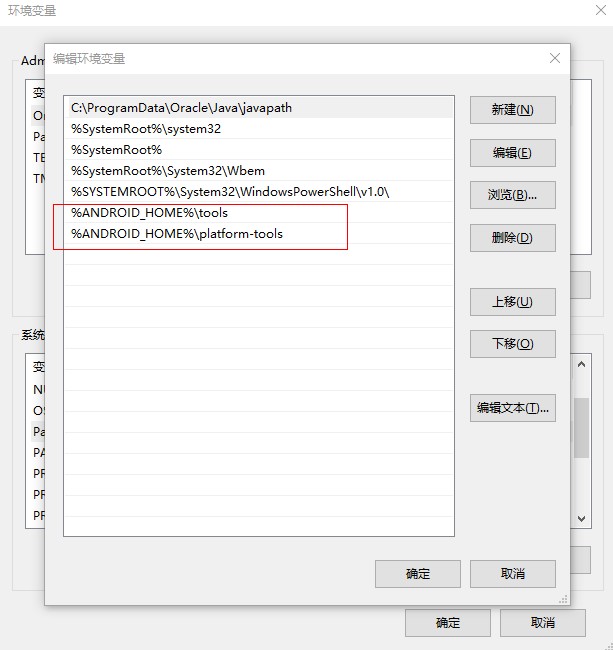
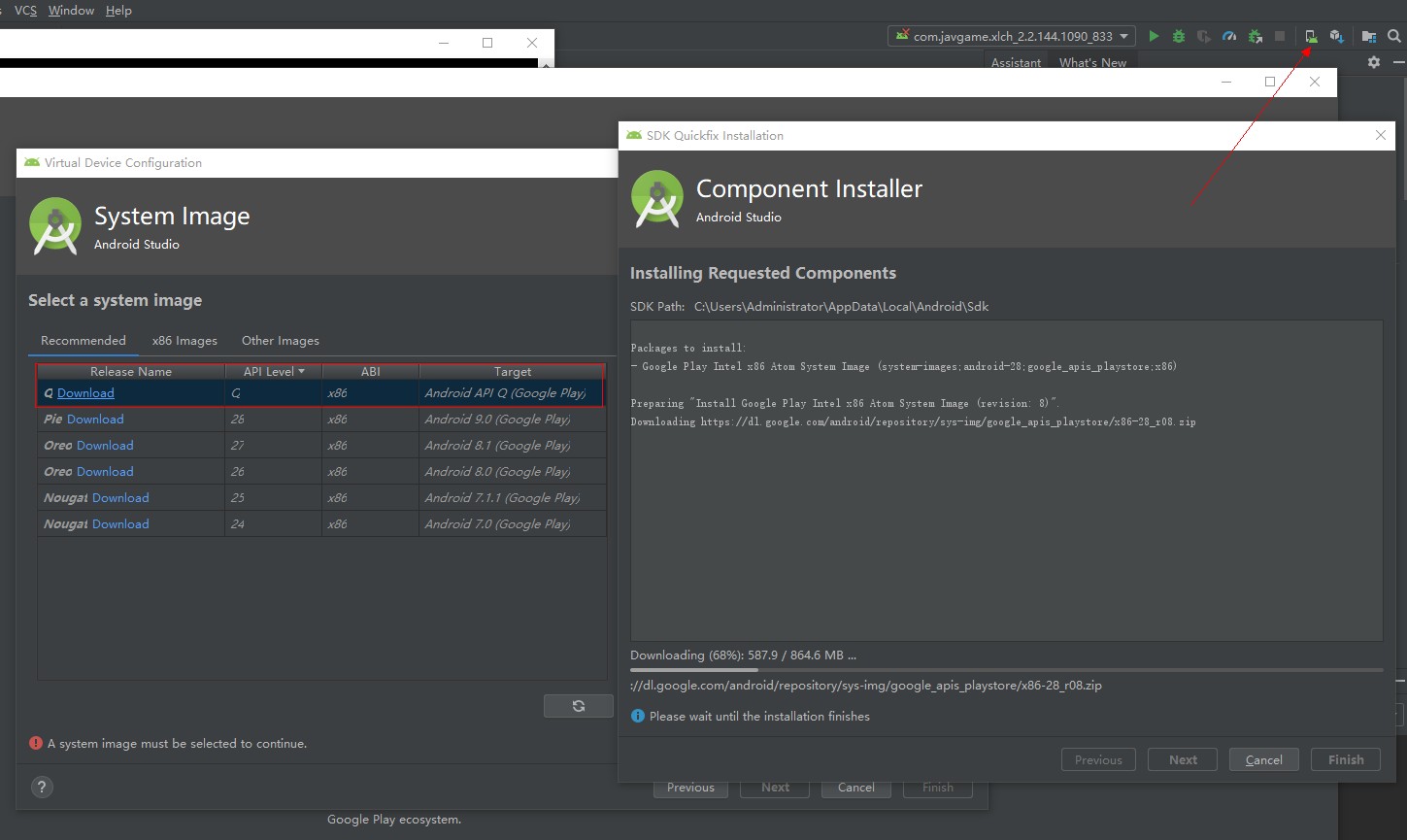
debug apk logCat的更多相关文章
- Android studio debug apk包安装失败
可在根目录gradle.properties中配置 android.injected.testOnly=false
- 反编译与调试APK
0×01前言 这年头,apk全都是加密啊,加壳啊,反调试啊,小伙伴们表示已经不能愉快的玩耍了.静态分析越来越不靠谱了,apktool.ApkIDE.jd GUI.dex2jar等已经无法满足大家的需求 ...
- android黑科技系列——静态分析技术来破解Apk
一.前言 从这篇文章开始我们开始我们的破解之路,之前的几篇文章中我们是如何讲解怎么加固我们的Apk,防止被别人破解,那么现在我们要开始破解我们的Apk,针对于之前的加密方式采用相对应的破解技术,And ...
- Android逆向之旅---静态分析技术来破解Apk
一.前言 从这篇文章开始我们开始我们的破解之路,之前的几篇文章中我们是如何讲解怎么加固我们的Apk,防止被别人破解,那么现在我们要开始破解我们的Apk,针对于之前的加密方式采用相对应的破解技术,And ...
- APK程序Dex文件无源码调试方法讨论
那些不靠谱的工具 先来说说那些不靠谱的工具,就是今天吭了我小半天的各种工具,看官上坐,待我细细道来.IDA pro IDA pro6.6之后加入了dex动态调试功能,一时间普天同庆.喜大普奔.兴奋之后 ...
- Android动态方式破解apk进阶篇(IDA调试so源码)
一.前言 今天我们继续来看破解apk的相关知识,在前一篇:Eclipse动态调试smali源码破解apk 我们今天主要来看如何使用IDA来调试Android中的native源码,因为现在一些app,为 ...
- Android动态方式破解apk前奏篇(Eclipse动态调试smail源码)
一.前言 今天我们开始apk破解的另外一种方式:动态代码调试破解,之前其实已经在一篇文章中说到如何破解apk了: Android中使用静态方式破解Apk 主要采用的是静态方式,步骤也很简单,首先使用 ...
- APK重签名总结
keytool -genkey -alias aeo_android.keystore -keyalg RSA -validity 20000 -keystore aeo_android.keysto ...
- apktool动态破解apk
那么今天我们就用另外一种方式来破解apk:动态方式,关于动态方式其实很广义的,因为动态方式相对于静态方式来说,难度大一点,但是他比静态方式高效点,能够针对更过的破解范围.当然动态方式很多,所以这里就分 ...
随机推荐
- Java Spring Boot VS .NetCore (五)MyBatis vs EFCore
Java Spring Boot VS .NetCore (一)来一个简单的 Hello World Java Spring Boot VS .NetCore (二)实现一个过滤器Filter Jav ...
- 20175312 2018-2019-2 《Java程序设计》结对编程练习_四则运算(第二周:整体性总结)
20175312 2018-2019-2 <Java程序设计>结对编程练习_四则运算(第二周:整体性总结) 结对对象与其博客链接 20175309 刘雨恒:https://www.cnbl ...
- import文件时 ~/ 不识别问题(react)
在最近写的react的项目中,在webpack中配置的“~”可以定位到根路径,但是知道在同事在windows中跑程序时,发现怎么都不识别这个路径,所有相关文件都could not find modul ...
- C#堆和栈
一.在讲堆栈之前,我们先看看值类型和引用类型: 1,我们看看值类型与引用类型的存储方式: 引用类型:引用类型存储在堆中.类型实例化的时候,会在堆中开辟一部分空间存储类的实例.类对象的引用还是存储在栈中 ...
- 2019-2-13TextBox技巧
清空所有的TextBox文本框 思路:这些TextBox都是在一个窗体上的,这时候我们可以利用一个循环去遍历窗体上所有的TextBox控件.(代码如下) foreach (Control i in C ...
- Do-Now—团队冲刺博客四
各个成员今日完成的任务 侯泽洋:完成奖励页面设计,完成奖励从云端拉取到本地:完成奖励从云端拉取到本地 周亚杰:冲刺博客,个人中心设计(未完成) 王志伟:积分页面设计:积分页面设计 仇夏:树苗成长过程设 ...
- golang str 首字母大写
首字母大写 //如果是小写字母, 则变换为大写字母 func strFirstToUpper(str string) string { if len(str) < 1 { return &quo ...
- jQuery 获取不到 kindeditor 内容 的解决方法
错误写法 : var content = $('#Content').val(); 正确写法: var content = $(document.getElementsByTagName(" ...
- python的array初识
from array import array """ 'b' signed char int 1 'B' unsigned char int 1 'u' Py_UNIC ...
- ECMA Script 6_Symbol() 唯一类型值声明函数_Symbol 数据类型
Symbol 数据类型 let s = Symbol(); typeof s; // "symbol" 是 ES6 继 Number,String,Boolean,Undefine ...