
vue-cli 脚手架 Command Line Interface
mac
sudo npm install -g nrm
sudo npm config -g set unsafe-perm
sudo npm install webpack@3.0.0 -g
sudo npm install --global webpack-cli
sudo npm install --global vue-cli
vue-cli 脚手架 Command Line Interface
使用管理员身份运行 "命令行提示符"
1. npm install --global webpack
2. npm install --global webpack-cli // 参考
npm install -g vue-cli // 全局安装 脚手架,如果安装不了就使用: 3. npm install --global vue-cli
4. vue init webpack my-vue // 生成项目 工程文件夹 npm run dev 启动项目
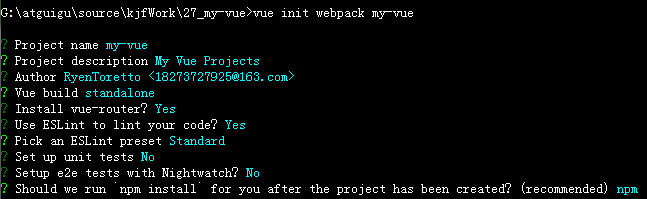
简写 "rc" ----的意思是----- runtime control
build -------- 不是构建项目,而是暴露的 webpack 的配置
config/index.js -------- 可能会根据需要修改
webpack.base.conf.js // 可以修改项目入口文件 main.js
5. autoOpenBrowser: true, // 启动项目后自动打开浏览器
.babelrc -------- babel 的配置 - (多个预设插件包的集合)预设包 presets - 插件包 plugins
"env" ---- 已加入规范的语法
"stage-2" ---- 草案语法
"plugins" ---- 社区语法
eslint* -------- 语法检查
.eslintignore -------- 对指定文件或文件夹下的指定文件不做检查
*.js
*.vue
.eslintrc.js
// 关闭检查 0、开启检查 1警告级别,开启检查2错误级别
// /* eslint-disable no-new */ // 告诉编译器下面这行是正确的
rules:{
'indent': "off",
no-unused-vars: 0
}
...
index.html -------- 网站首页
<div id="app">
</div>
main.js
import Vue from 'vue'
import App from "./App.vue"
new Vue({
el: "#app",
components: {APP},
template: "<App/>"
})
组件: 实现某功能模块的所有资源的集合
App.vue 通常称为“一个组件”
<template>
<div>
{{myVueData}}
<MyComponent/>
</div>
</template>
-----------------------------------------------------------------
<script>
import MyComponent from "./components/MyComponent.vue" // 1. 引入组件
export default {
name: "App",
conponents: {
MyComponent // 2. 必须注册组件,才能使用
}
data(){ // 只能使用函数的方式来配置 data
return {
myVueData: "Hello World!"
}
}
}
</script>
-----------------------------------------------------------------
<style scoped> // 设置 scoped 表示 该样式只在当前组件生效,而不影响其他部分
</style>
项目发包 serve dist
vue-cli 脚手架 Command Line Interface的更多相关文章
- Spring-boot在windows上安装CLI(Command Line Interface)的步骤!
首先去下载安装包,我这里整了一个zip包,一个tar包,下载地址:https://github.com/zhangyawei117/Spring-boot-CLI.git 下载完了之后,把zip包解压 ...
- Install the AWS Command Line Interface on Linux
Install the AWS Command Line Interface on Linux You can install the AWS Command Line Interface and i ...
- 13. Vue CLI脚手架
一. Vue CLI 介绍 1. 什么是Vue CLI? Vue CLI 是一个基于 Vue.js 进行快速开发的完整系统.Vue CLI 致力于将 Vue 生态中的工具基础标准化.它确保了各种构建工 ...
- MySQL 5.6 Warning: Using a password on the command line interface can be insecure
MySQL 5.6 在命令行输入密码,就会提示这些安全警告信息. Warning: Using a password on the command line interface can be inse ...
- MySQL 5.6 警告信息 command line interface can be insecure 修复
在命令行输入密码,就会提示这些安全警告信息. Warning: Using a password on the command line interface can be insecure. 注: ...
- atprogram.exe : Atmel Studio Command Line Interface
C:\Program Files\Atmel\Atmel Studio 6.1\atbackend\atprogram.exe No command specified.Atmel Studio Co ...
- Centos下_MysqL5.7在使用mysqldump命令备份数据库报错:mysqldump: [Warning] Using a password on the command line interface can be insecure.
在阿里云服务器增加一个shell脚本定时备份数据库脚本执行任务时,测试性的执行了备份命令,如下 [root@iZ2ze503xw2q1fftv5rhboZ mysql_bak]# /usr/local ...
- Warning: Using a password on the command line interface can be insecure.
[root@qttc ~]# /usr/local/mysql/bin/mysqldump -uroot -proot db > bak.sqlWarning: Using a passwor ...
- mysql 备份报错mysqldump: [Warning] Using a password on the command line interface can be insecure.
-------------------------------------------------------------------------------- mysql 备份报错mysqldump ...
随机推荐
- CMS收集器和G1收集器优缺点
首先要知道 Stop the world的含义(网易面试):不管选择哪种GC算法,stop-the-world都是不可避免的.Stop-the-world意味着从应用中停下来并进入到GC执行过程中去. ...
- Vim使用技巧:特定文件类型关联缩进
Vim如何打开特定文件类型关联自动缩进呢?答案:将filetype indent on写入你的.vimrc文件中
- 深入学习css伪类和伪元素及其用法
前言 CSS的伪类和伪元素在平时的代码中经常会出现,可是一旦别人问你,什么是伪类,什么是伪元素,可能还是不能完整的表述出来,下面我们来一探究竟. 伪类和伪元素定义 伪类用于在页面中的元素处于某个状态时 ...
- Spring Security 之方法级的安全管控
默认情况下, Spring Security 并不启用方法级的安全管控. 启用方法级的管控后, 可以针对不同的方法通过注解设置不同的访问条件. Spring Security 支持三种方法级注解, 分 ...
- Class.forname和ClassLoader.loadClass的源码分析
最近在研读<深入理解java虚拟机:JVM高继特性与最佳实践>第二版, 今天想起来很久前,写数据库连接,使用Class.forName,当时没有深究,所以便简单的看了下源码,顺便做了以下记 ...
- axios发送post请求,如何提交表单数据?
axios发送post请求,提交表单数据的方式 默认情况下,axios将JavaScript对象序列化为JSON.要以application / x-www-form-urlencoded格式发送数据 ...
- oracle建表 和 设置主键自增
1.新建table CREATE TABLE ysb_log( id ) primary key not null , tbdate ) NULL, tb_time ) NOT NULL, tblog ...
- IKanalyzer分词器分词并且统计词频
<dependency> <groupId>com.janeluo</groupId> <artifactId>ikanalyzer</artif ...
- 1120 机器人走方格 V3(组合数)
题目实际上是求catalan数的,Catalan[n] = C(2*n,n) / (n+1) = C(2*n,n) % mod * inv[n+1],inv[n+1]为n+1的逆元,根据费马小定理,可 ...
- 关于redis服务无法启动问题
打开cmd终端找到redis安装路径下 输入redis-server redis.windows.conf报错信息如下 之后重新输入redis-cli.exe 运行结果 然后输入 127.0.0.1: ...