
CentOS7 源码编译安装Tengine
简介

Tengine是由淘宝网发起的Web服务器项目。它在Nginx的基础上,针对大访问量网站的需求,添加了很多高级功能和特性。它的目的是打造一个高效、安全的Web平台。
发展
Tengine的性能和稳定性已经在大型的网站如淘宝网,天猫商城等得到了很好的检验。
从2011年12月开始,Tengine成为一个开源项目,Tengine团队在积极地开发和维护着它。Tengine团队的核心成员来自于淘宝、搜狗等互联网企业。Tengine是社区合作的成果,我们欢迎大家参与其中,贡献自己的力量。
一、安装编译环境
1.安装依赖包
[root@Tengine ~]# yum -y install gcc \
gcc-c++ \ bzip2 perl curl curl-devel \
expat-devel gettext-devel openssl-devel \
libxml2 libxml2-devel libjpeg-devel libpng-devel \
freetype-devel libmcrypt-devel autoconf
2.配置扩展包安装源
[root@Tengine ~]# yum -y install epel-release

[root@Tengine ~]# yum -y install libmcrypt libmcrypt-devel mcrypt mhash
3.安装编译所需要的组件
(1)pcre:是一个Perl库,包括 perl 兼容的正则表达式库。nginx rewrite依赖于PCRE库,所以在安装Tengine前一定要先安装PCRE。
[root@Tengine ~]# cd /usr/local/src && wget ftp://ftp.csx.cam.ac.uk/pub/software/programming/pcre/pcre-8.42.tar.gz && tar zxvf pcre-8.42.tar.gz && cd pcre-8.42 && ./configure --prefix=/usr/local/pcre && make && make install
(2)zlib:Zlib是提供资料压缩之用的函式库,当Tengine想启用GZIP压缩的时候就需要使用到Zlib。
[root@Tengine pcre-8.42]# cd /usr/local/src && wget http://zlib.net/zlib-1.2.11.tar.gz && tar zxvf zlib-1.2.11.tar.gz && cd zlib-1.2.11 && ./configure --prefix=/usr/local/zlib && make && make install
(3)jemalloc:是一个更好的内存管理工具,使用jemalloc可以更好的优化Tengine的内存管理。
[root@Tengine zlib-1.2.]# cd /usr/local/src && wget https://github.com/jemalloc/jemalloc/releases/download/5.1.0/jemalloc-5.1.0.tar.bz2 && tar xvf jemalloc-5.1.0.tar.bz2 && cd jemalloc-5.1.0 && ./configure --prefix=/usr/local/jemalloc && make && make install
(4)OpenSSL:是一个强大的安全套接字层密码库,囊括主要的密码算法、常用的密钥和证书封装管理功能及SSL协议,并提供丰富的应用程序供测试或其它目的使用。主要是为了让tengine支持Https的访问请求。
[root@Tengine jemalloc-5.1.]# cd /usr/local/src && wget https://www.openssl.org/source/openssl-1.1.1.tar.gz && tar zxvf openssl-1.1.1.tar.gz && cd openssl-1.1.1 && ./config --prefix=/usr/local/openssl && make && make install
二、安装Tengine
在主要核心的组件安装完毕以后就可以安装Tegine了,最新版本的Tegine可从官网(http://tengine.taobao.org/)获取。
在编译安装前还需要做的一件事是添加一个专门的用户来执行Tengine。不建议使用root用户启动
[root@Tengine openssl-1.1.]# useradd www -s /sbin/nologin -M
下载Tengine
[root@Tengine openssl-1.1.]# cd /usr/local/src && wget http://tengine.taobao.org/download/tengine-2.2.3.tar.gz && tar -zxvf tengine-2.2.3.tar.gz && cd tengine-2.2.3
配置编译安装
[root@Tengine tengine-2.2.]# ./configure --prefix=/usr/local/tengine \

> --user=www \

> --group=www \

> --with-pcre=/usr/local/src/pcre-8.42 \

> --with-openssl=/usr/local/src/openssl-1.1. \

> --with-jemalloc=/usr/local/src/jemalloc-5.1. \

> --with-http_gzip_static_module \

> --with-http_realip_module \

> --with-http_stub_status_module \

> --with-http_concat_module=shared \

> --with-zlib=/usr/local/src/zlib-1.2.
[root@Tengine tengine-2.2.]# echo $?

[root@Tengine tengine-2.2.]# make -j &&make install

[root@Tengine tengine-2.2.3]# echo $?
0
加入到系统服务
[root@Tengine tengine-2.2.]# cd /lib/systemd/system

[root@Tengine system]# vi tengine.service

[Unit]

Description=The nginx HTTP and reverse proxy server

After=syslog.target network.target remote-fs.target nss-lookup.target

[Service]

Type=forking

PIDFile=/usr/local/nginx/logs/nginx.pid

ExecStartPre=/usr/local/nginx/sbin/nginx -t

ExecStart=/usr/local/nginx/sbin/nginx -c /usr/local/nginx/conf/nginx.conf

ExecReload=/bin/kill -s HUP $MAINPID

ExecStop=/bin/kill -s QUIT $MAINPID

PrivateTmp=true

[Install]

WantedBy=multi-user.target

[root@Tengine system]# chmod  nginx.service  # 修改权限

[root@Tengine system]# systemctl enable tengine.service  # 开机自启

Created symlink from /etc/systemd/system/multi-user.target.wants/tengine.service to /usr/lib/systemd/system/tengine.service.
[root@Tengine system]# systemctl start tengine.service  #启动Tengine
安装完成
可能有的人在make的时候会报这个错 我在安装2.2.3时也碰到了这个问题
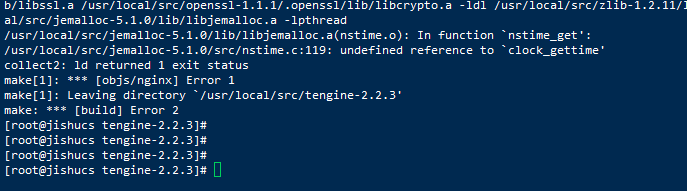
上面出错根本原因是编译nginx找不到实时库librt
只要将tengine文件中的objs/Makefile中的第一行的 CC = cc 改成 CC = cc -lrt后在编译安装就可以了
-lrt的意思是让编译的时候加入实时库librt

CentOS7 源码编译安装Tengine的更多相关文章
- Centos7源码编译安装PHP7.2(生产环境)
安装PHP依赖包,否则在编译的过程中可能会出现各种报错 # Centos 安装epel-release源并将系统包更新到最新版本 $ yum install epel-release-y $ yum ...
- centos7源码编译安装lamp/lnmp
centos7源码编译安装lamp/lnmp 进程:是包工头(相当于是个门,只管开门关门,不管门内的事儿) 线程:是各种工种(cpu调度的是线程) 进程 是一件事情, 线程 是 同一个时间范围内 同时 ...
- centos7 源码编译安装TensorFlow CPU 版本
一.前言 我们都知道,普通使用pip安装的TensorFlow是万金油版本,当你运行的时候,会提示你不是当前电脑中最优的版本,特别是CPU版本,没有使用指令集优化会让TensorFlow用起来更慢. ...
- Centos7源码编译安装mysql8
前面介绍了很多关于mysql的文章,下面主要介绍一下mysql8的源码编译安装 一 基本环境 [root@CentOS-7-x86-64-Minimal-1810 ~]# cd /usr/local/ ...
- CentOS7 源码编译安装Nginx
源码编译安装nginx 1.下载nginx源码包(这里以nginx-1.18.0为例) wget http://nginx.org/download/nginx-1.18.0.tar.gz 2 ...
- centos7源码编译安装Subversion 1.9.5
svn是Subversion的简称,是一个开放源代码的版本控制系统.svn有两种运行方式:1.独立服务器(svn://xxx.xxx/xxx) 2.借助apache(http://svn.xxx.xx ...
- centos7 源码编译安装 php
准备工作 下载 PHP 源码包并解压 $ wget https://www.php.net/distributions/php-7.2.19.tar.bz2 $ yum -y install bzip ...
- centos7 源码编译安装 nginx
安装步骤 下载 nginx 源码包 官网 $ wget http://nginx.org/download/nginx-1.16.0.tar.gz 解压 nginx 压缩包 $ tar -zxvf n ...
- Centos7源码编译安装tengine1.5.1
安装依赖包 yum install pcre pcre-devel openssl openssl-devel gcc make zlib-devel wget -y 下载和创建用户 mkdir /t ...
随机推荐
- mysql 查询近7天数据,缺失补0
相信很多人的项目都有这种需求,就是查询近7天的记录,但是这7天总有那么几天是没数据的,所以缺失的只能补 0 下面的代码不知道能不能看懂,我简单的说一下思路 1)先查询红色字体的近7天,再转换成日期 2 ...
- 69. x 的平方根
问题描述 实现 int sqrt(int x) 函数. 计算并返回 x 的平方根,其中 x 是非负整数. 由于返回类型是整数,结果只保留整数的部分,小数部分将被舍去. 示例 1: 输入: 4 输出: ...
- 201771010126 王燕《面向对象程序设计(java)》第八周学习总结
实验六 接口的定义与使用 实验时间 2018-10-18 1.实验目的与要求 (1) 掌握接口定义方法 JAVA中通过interface关键字定义接口: 接口中只能定义public static fi ...
- mobile_点透_传透_touch-action
点透(传透) <meta name="viewport" content="width=device-width, initial-scale=1.0, user- ...
- Tinker 热修复
集成方式: 第一步:在project build.gradle 文件中添加: dependencies { // Tinker classpath("com.tinkerpatch.sdk ...
- ubuntu重复登录问题
第一次遇到: 昨天好不容易装好了驱动,紧接着装了CUDA,cuDNN,Anaconda,VSCode等等.然后安装pytorch的时候遇到了下载的问题,后来也算搞定了.但是在更换了显示器后重启(好像是 ...
- js中函数创建的三种方式
1.函数声明 function sum1(n1,n2){ return n1+n2; }; 2.函数表达式,又叫函数字面量 var sum2=function(n1,n2){ re ...
- Linux filesystem
文件系统的运作与操作系统的文件数据有关.较新的操作系统的文件数据除了文件实际内容外,通常含有非常多的属性,例如Linux操作系统的文件权限(rwx)与文件属性(属主.属组.时间参数等).文件系统通常会 ...
- Sun SPARC Enterprise M5000 启动步骤
1.串口线与笔记本连接(需在笔记本上安装串口线的驱动程序,usb口接笔记本,网线水晶头接M5000)2.接通电源.此时XSCF卡充电,自检,前面板XSCF等闪烁.3.登录超级终端,注意波特率要跟主机匹 ...
- 与PON相关的abbreviation
AAL:Asynchronous transfer mode Adaptation Layer 异步传输适配层 ACS:Autoconfiguration Server 自动配置服务 ADSL:Asy ...