
[ionic3.x开发记录]参考ionic的float-label动效,写一个项目内通用的input组件,易扩展
上图:
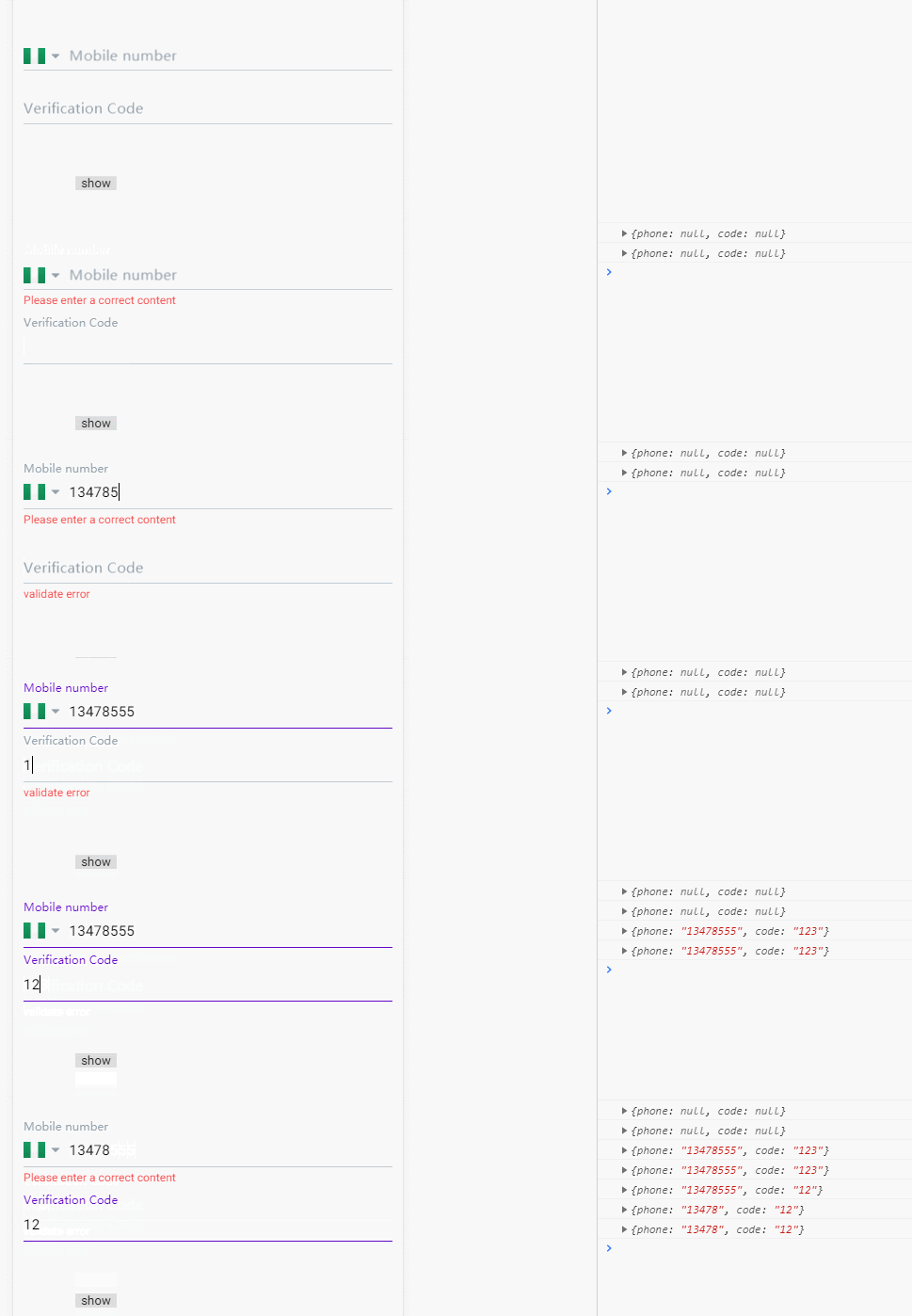
module:
import {NgModule} from "@angular/core";

import {CommonModule} from "@angular/common"

import {PpInputComponent} from './pp-input'

import {FormsModule} from "@angular/forms";

@NgModule({

  declarations: [PpInputComponent],

  imports: [

    CommonModule,

    FormsModule,

  ],

  exports: [PpInputComponent],

})

export class PpInputComponentModule {

}
ts:
import {Component, Input, Output, EventEmitter, OnInit, ViewChild, ElementRef, Renderer2, AfterViewInit} from '@angular/core';

/**

 * Generated class for the PpInputComponent component.

 *

 * See https://angular.io/api/core/Component for more info on Angular

 * Components.

 */

@Component({

  selector: 'pp-input',

  templateUrl: 'pp-input.html'

})

export class PpInputComponent implements OnInit, AfterViewInit {

  constructor(private renderer: Renderer2) {

  }

  @ViewChild('ppLabel') private ppLabel: ElementRef; // 获取元素

  @Input() ppValue: any; // input的值,双向绑定

  @Input('pp-label') label: string = 'Label'; // label文案

  @Input() validate: any = function (input) { // 验证数据方法

    if (input) {

      return true

    } else {

      return false

    }

  };

  @Input() type: string = 'text'; // input类型

  @Input() x: string; // label的X轴偏移量

  @Input() isRequired: boolean; // false

  @Input('error-message')  errorMessage: string = 'validate error'; // 错误提示信息

  @Output() ppValueChange = new EventEmitter();

  actived: boolean = false; // 样式控制

  float: boolean; // label是否浮动

  showErrMsg: boolean = false; // 是否显示错误信息

  ngOnInit() {

    if (this.ppValue) {

      this.float = true;

      this.actived = true;

    } else {

      this.float = false;

    }

  }

  ngAfterViewInit() {

    if (this.x) {

      this.renderer.setStyle(this.ppLabel.nativeElement, 'transform', `translate3d(${Number(this.x) / 100}rem, 0.48rem, 0)`)

    }

  }

  // 获得焦点

  ppFocus() {

    this.float = true;

  }

  // 失去焦点

  ppBlur() {

    if (this.ppValue) {

      this.float = true;

    } else {

      this.float = false;

    }

    if (this.validate(this.ppValue)) {

      this.showErrMsg = false;

    } else {

      this.showErrMsg = true;

    }

  }

  // 更新父组件model值

  changeValue() {

    this.ppValueChange.emit(this.ppValue);

    if (this.validate(this.ppValue)) {

      this.actived = true;

      this.showErrMsg = false;

    } else {

      this.actived = false;

    }

  }

}
scss
pp-input {

  .pp-input-container {

    border-bottom: 1px solid #C1CCD5;

    height: 0.92rem;

    &.actived {

      border-color: #6308C7

    }

    .label {

      font-size: 0.28rem;

      color: #95A1AB;

      position: relative;

      font-family: Avenir-Medium;

      pointer-events: none;

      transform: translate3d(0,0.48rem, 0);

      transition: all 0.2s;

      margin: 0.11rem 0.08rem 0.11rem 0;

      &.actived {

        transform: translate3d(0, 0, 0)!important;

        font-size: 0.22rem;

        transition: all 0.2s;

        .actived {

          color: #6308C7

        }

      }

      .required {

        color: #F44E4E

      }

    }

    .pp-input {

      border: none;

      font-size: 0.28rem;

      height: 0.5rem;

      line-height: 0.5rem;

    }

    .content {

      display: flex;

      align-items: center;

    }

  }

  .error-message {

    color: #F44E4E;

    font-size: 0.22rem;

    height: 0;

    line-height: 0.4rem;

    opacity: 0.5;

    transition: all 0.2s;

    overflow: hidden;

    &.show {

      opacity: 1;

      height: 0.4rem;

      transition: all 0.2s;

    }

  }

}
html
<!-- Generated template for the PpInputComponent component -->

<div class="pp-input-wrapper">

  <div class="pp-input-container" [class.actived]="actived">

    <div class="label" [class.actived]="float" #ppLabel>

      <span class="required" *ngIf="isRequired">*</span><span [class.actived]="actived">{{label}}</span>

    </div>

    <div class="content">

      <ng-content></ng-content>

      <input class="pp-input"

             (focus)="ppFocus()"

             (blur)="ppBlur()"

             (keyup)="changeValue()"

             [type]="type"

             [(ngModel)]="ppValue">

    </div>

  </div>

  <div class="error-message" [class.show]="showErrMsg">{{errorMessage}}</div>

</div>
目前实现可传入label文案, label的x轴偏移,input类型,验证数据的validate方法,input的双向绑定value值,错误提示信息等
用<ng-content></ng-content>预留的编辑位置,可以添加更多的html,方便扩展,例如上图的国家图标显示。
可以考虑把所有的@Input集合成一个config,html的font-size的值我是动态算的,所以样式rem的值可能要修改成你需要的大小。
ps: 之前用vue组件也写过类型的组件,传送门:https://www.cnblogs.com/cong-bao/p/9204940.html
[ionic3.x开发记录]参考ionic的float-label动效,写一个项目内通用的input组件,易扩展的更多相关文章
- YII框架开发一个项目的通用目录结构
YII框架开发一个项目的通用目录结构: 3 testdrive/ 4 index.php Web 应用入口脚本文件 5 assets/ 包含公开的资源文件 6 css/ 包含 CSS 文件 7 ima ...
- [ionic3.x开发记录]ng-content使用
在ionic开发公用组件的时候,我一直在想有没有angular有没有像vue一样的slot插槽.方便组件后期扩展. 然后去翻文档,发现有ng-content这么个东西,用法很像vue的slot. 组件 ...
- [ionic3.x开发记录]ios下页面过渡效果不出现的小坑
如果内容没有被<ion-content></ion-content>或者<ion-header></ion-header>标签包裹,页面过渡的时候是没有 ...
- 参考MySQL Internals手册,使用Golang写一个简单解析binlog的程序
GreatSQL社区原创内容未经授权不得随意使用,转载请联系小编并注明来源. MySQL作为最流行的开源关系型数据库,有大量的拥趸.其生态已经相当完善,各项特性在圈内都有大量研究.每次新特性发布,都会 ...
- 参考JDK1.8源码,自己写一个类似于ArrayList的动态数组
1. ArrayList的基本实现原理 ArrayLiST其内部用一个普通数组来存储数据,当此数组不够容纳新添加的元素的时候,则创建一个更大长度的新数组,并将原来数组中的元素复制到新数组中. 2.Ar ...
- YII框架开发一个项目的通用目录结构:
testdrive/ index. assets/ css/ images/ themes/ yiic. commands/ ...
- Anytime项目开发记录0
Anytime,中文名:我很忙. 开发者:孤独的猫咪神. 这个项目会持续更新,直到我决定不再维护这个APP. 2014年3月10日:近日有事,暂时断更.希望可以会尽快完事. 2014年3月27日:很抱 ...
- 如何用Eggjs从零开始开发一个项目(1)
前言 "纸上得来终觉浅,绝知此事要躬行."虽然node一直在断断续续地学,但总是东一榔头西一榔头的,没有一点系统,所以打算写一个项目来串联一下之前的学习成果. 为什么选择Eggjs ...
- ionic js 滑动框ion-slide-box 滑动框是一个包含多页容器的组件,每页滑动或拖动切换
ionic 滑动框 ion-slide-box 滑动框是一个包含多页容器的组件,每页滑动或拖动切换: 效果图如下: 用法 <ion-slide-box on-slide-changed=&quo ...
随机推荐
- ubuntu 32/64 bit
https://askubuntu.com/questions/454253/how-to-run-32-bit-app-in-ubuntu-64-bit how to run 32-bit app ...
- python学习之Numpy.genfromtxt
Python 并没有提供数组功能,虽然列表 (list) 可以完成基本的数组功能,但它并不是真正的数组,而且在数据量较大时,使用列表的速度就会慢的让人难受.Numpy 提供了真正的数组功能,以及对数据 ...
- unity setactive的使用
1.可以用本身移出布局来实现隐藏 2.RawImage的texture的设置生成的一定要及时消除,避免内存泄漏
- scrapy 通过FormRequest模拟登录再继续
1.参考 https://doc.scrapy.org/en/latest/topics/spiders.html#scrapy.spiders.Spider.start_requests 自动提交 ...
- 10_27_requests模块
1.get请求: 看源码 import requests url= "https://www.baidu.com" res = requests.get(url) print(re ...
- manjaro安装及设置
因我的笔记本(联想的拯救者)昨晚打开后什么都还没做就被更新系统“抢走”了画面导致按什么都不管用 所以就想起能不能不用win系统,都知道linux比win稳定,so....就找到了manjaro.以下是 ...
- Sicily T-primes
DescriptionWe know that prime numbers are positive integers that have exactly two distinct positive ...
- 关于jmeter读取CSV文件的详细设置
jmeter 读取excel数据使用的方法是使用Jmeter CSV Data Set Config参数化 但是将excel文件保存成csv格式后,jmeter读取后返回的数据总是出现乱码问题, 以下 ...
- CodeForces 721C Journey(拓扑排序+DP)
<题目链接> 题目大意:一个DAG图有n个点,m条边,走过每条边都会花费一定的时间,问你在不超过T时间的条件下,从1到n点最多能够经过几个节点. 解题分析:对这个有向图,我们进行拓扑排序, ...
- Spring Data JPA入门
1. Spring Data JPA是什么 它是Spring基于ORM框架.JPA规范封装的一套JPA应用框架,可使开发者用极简的代码即可实现对数据的访问和操作.它提供了包括增删改查等在内的常用功能, ...