
Creating Excel files with Python and XlsxWriter(通过 Python和XlsxWriter来创建Excel文件(xlsx格式))
以下所有内容翻译至: https://xlsxwriter.readthedocs.io/
#-------------------------------------------------------------------------------------------------------------------------------
XlsxWriter 是一个用来创建Excel XLSX 文件的Python 模块。
demo:
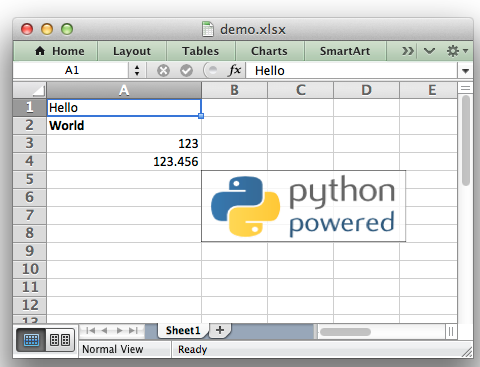
demo 代码:
###################################################################################
##############################################################################

#

# A simple example of some of the features of the XlsxWriter Python module.

#

# Copyright 2013-2018, John McNamara, jmcnamara@cpan.org

#

import xlsxwriter  #导入xlsxwriter模块

# Create an new Excel file and add a worksheet. #创建一个新的工作簿和工作表

workbook = xlsxwriter.Workbook('demo.xlsx')

worksheet = workbook.add_worksheet()

# Widen the first column to make the text clearer. #设置第一列的宽度

worksheet.set_column('A:A', 20)

# Add a bold format to use to highlight cells. #定义加粗的格式

bold = workbook.add_format({'bold': True})

# Write some simple text.  #用‘A1’等表达方式在单元格中写入简单的文本

worksheet.write('A1', 'Hello')

# Text with formatting. #在单元格中写入文本的同时设置格式

worksheet.write('A2', 'World', bold)

# Write some numbers, with row/column notation. #用行列号的表达方式(从00开始)在单元格写入数值

worksheet.write(2, 0, 123)

worksheet.write(3, 0, 123.456)

# Insert an image. #在单元格中插入图片

worksheet.insert_image('B5', 'logo.png')

workbook.close()  #关闭工作簿,只有关闭工作簿,文档才会最终显示;
#################################################################################################################
XlsxWriter
XlsxWriter 是一个Python模块,用这个模块可以实现在2007以上版本的exel格式为xlsx的文件中添加多个工作表并且可以插入文本,数字,公式,超链接等。它支持例如格式等很多功能,包含如下:
100% 和excel xlsx 文件兼容;
支持所有格式;
支持合并单元格;
定义名字;
图表;
筛选;
数据验证和下拉列表;
条件格式;
工作表插入PNG/JPEG/GMP/WMF/WMF 图片;
富文本格式字符串;
单元格注释;
文本框组件;
联合Pndas模块;
写入大文件时支持记忆优化模式;
它支持Python 2.5,2.6,2.7,3.1,3.2,3.3,3.4,3.5,3.6等版本,Jython和PyPy 只使用标准库。
这个文件解释了怎么使用xlsxwrite 模块,阅读下面的章节来了解更多内容,或者直接跳到 Introduction。
- Content
- Introduction
- Getting Started with XlsxWriter
- ---------------------------------------------------------------------------------
- Tutorial 1: Create a simple XLSX file
- Tutorial 2: Adding formatting to the XLSX file
- Tutorial 3:Writting different types of data to the XLSX file
- --------------------------------------------------------------------------------
- The Workbook Class
- The Worksheet Class
- The Worbook Class(Page Setup)
- The Format Class
- The Chart Class
- The Chartsheet Class
- The Exceptions Class
- ------------------------------------------------------------------------------
- Working with Cell Notation
- Working with Formulas
- Working with Dates and Times
- Working with Colors
- Working with Charts
- Working with Autofilters
- Working with Data Validation
- Working with Conditional Formatting
- Working with Worksheet Tables
- Working with Textboxes
- Working with Sparklines
- Working with Cell Comments
- Working with Outlines and Grouping
- Working with Memory and Performance
- Working with VBA Macros
- Working with Python Pandas and XlsxWriter
- ----------------------------------------------------------------------------------
- Examples
- ----------------------------------------------------------------------------------
- Chart Examples
- ----------------------------------------------------------------------------------
- Pandas with XlsxWriter Examples
- ----------------------------------------------------------------------------------
- Alternative modules for handing Excel files
- Libraries that use or enhance XlsxWriter
- Known Issues and Bugs
- Reporting Bugs
- Frequently Asked Questions
- Changes in XlsxWriter
- Author
- License
Creating Excel files with Python and XlsxWriter(通过 Python和XlsxWriter来创建Excel文件(xlsx格式))的更多相关文章
- Working with Excel Files in Python
Working with Excel Files in Python from: http://www.python-excel.org/ This site contains pointers to ...
- Creating Excel files with Python and XlsxWriter——Introduction
XlsxWriter 是用来写Excel2007版本以上的xlsx文件的Python模块. XlsxWriter 在供选择的可以写Excel的Python模块中有自己的优缺点. #---------- ...
- How to export Excel files in a Python/Django application
https://assist-software.net/blog/how-export-excel-files-python-django-application CONTENTS Introduct ...
- python xlsxwriter创建excel 之('Exception caught in workbook destructor. Explicit close() may be required for workbook.',)
python2.7使用xlsxwriter创建excel ,不关闭xlsxwriter对象,会报错: Exception Exception: Exception('Exception caught ...
- Unity3D研究院之在MAC上脚本XlsxWriter写入Excel .xlsx格式
原地址:http://www.xuanyusong.com/archives/3011 以前找了很久可以跨平台支持读写Excel的工具,我也试了很多种DLL.可在Windows上各个完美支持,可是在M ...
- python读、写、修改、追写excel文件
三个工具包 python操作excel的三个工具包如下 xlrd: 对excel进行读相关操作 xlwt: 对excel进行写相关操作 xlutils: 对excel读写操作的整合 注意,只能操作.x ...
- 1、关于python第三方工具操作xls和xlsx格式的excel文档选型的吐血经历
首先,最近看了python的一本书,其中第7章是关于文章操作的,就计划把python操作excel,word,txt,xml,html,json等格式的文档做个总结,并实现一些功能,但是,第一步就要把 ...
- 用 python 来操作 docx, xlsx 格式文件(一)(使用 xlsxwriter 库操作xlsx格式文件)
需要从数据库读取日志生成相应的 docx,xlsx 文件做相应的记录 所以自然要用到docx, xlsxwriter 库 但是这些库的应用场景非常广泛,任何需要对 word,excel 文件执行重复性 ...
- python模块介绍- xlwt 创建xls文件(excel)
python模块介绍- xlwt 创建xls文件(excel) 2013-06-24磁针石 #承接软件自动化实施与培训等gtalk:ouyangchongwu#gmail.comqq 37391319 ...
随机推荐
- 【译】PX、EM还是REM媒体查询?
原文链接:https://zellwk.com/blog/media-query-units/ 你有没有想过使用媒体查询的时候到底该用px.em还是rem作单位呢?我曾经也有同样的疑问,而且我到现在也 ...
- java中字符串“不可变性”的破坏,使用反射破坏final属性。以及涉及到字符串常量池的问题。
大家都清楚java中String类是不可变的,它的定义中包含final关键字.一旦被创建,值就不能被改变(引用是可以改变的). 但这种“不可变性”不是完全可靠的,可以通过反射机制破坏.参考一下代码: ...
- shell脚本判断安装包位置及类型
Log() { LogFile=/tmp/``.log LogDate=$(date +"%F %T") echo -e "\n\n||| ${LogDate} ||| ...
- ubuntu安装ssh-service出现无法依赖的解决
(1)首先先确认下ubuntu系统是否已经安装ssh(通常ubuntu中默认是安装的) 通过命令进行查看:$dpkg -l | grep ssh这里我们可以看到,系统显示已经安装了openssh-cl ...
- Ubuntu的显示问题不全解决
首先我们安装的是Ubuntu 16.04版本.最开始一直不能解分辨率问题,导致信息显示不全 利用xrandr -s 1369x768(中间x是乘号不是英文字母) 命令来设置分辨率, 需注意的是: 1. ...
- 关于springboot项目中自动注入,但是用的时候值为空的BUG
最近想做一些web项目来填充下业余时间,首先想到了使用springboot框架,毕竟方便 快捷 首先:去这里 http://start.spring.io/ 直接构建了一个springboot初始化的 ...
- 定时器setTimeout()和Node.js的Event Loop
一.定时器 setTimeout(fn,0)的含义是,指定某个任务在主线程最早可得的空闲时间执行,也就是说,尽可能早得执行.它在"任务队列"的尾部添加一个事件,因此要等到同步任务和 ...
- wxPython制作跑monkey工具(python3)-带事件百分比显示界面
一. wxPython制作跑monkey工具(python3)-带事件百分比显示界面 源代码 Run Monkey.py #!/usr/bin/env python import wx import ...
- 2018 CCPC网络赛 hdu6444 Neko's loop
题目描述: Neko has a loop of size n.The loop has a happy value ai on the i−th(0≤i≤n−1) grid. Neko likes ...
- UVa——1600(巡逻机器人)
迷宫求最短路的话一般用bfs都可以解决,但是这个加了个状态,那么就增加一个维度,用来判断k的值.比较简单的三维bfs.写搜索题的话一定要注意细节.这个题花了好长的时间.因为k的原因,一开始用了k的原因 ...