
Java 由浅入深GUI编程实战练习(三)
一,項目介紹
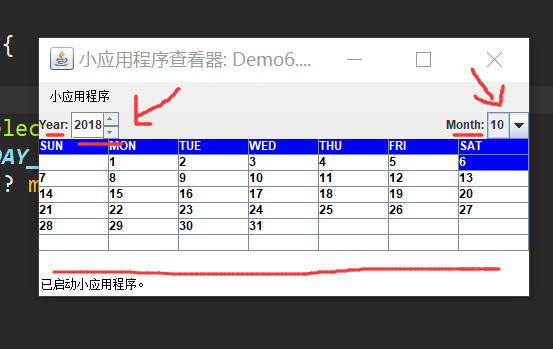
1.可以查看年,月,日等功能。能获取今天的日期,并且能够通过下拉年,月的列表。
2.当程序运行时,显示的时间是系统当前时间。
3.可以手动输入时间,确定后系统跳转到制定的时间。
4.提供一种点击功能,通过点击实现年份,月份的自增和自减功能。
二,运行界面
三,代码详情
import java.awt.*;

import java.awt.event.*;

import java.util.*;

import javax.swing.*;

import javax.swing.event.*;

import javax.swing.table.*;

public class Demo6 extends JApplet {

 private static final long serialVersionUID = 1L;

 public static final String WEEK_SUN = "SUN";

    public static final String WEEK_MON = "MON";

    public static final String WEEK_TUE = "TUE";

    public static final String WEEK_WED = "WED";

    public static final String WEEK_THU = "THU";

    public static final String WEEK_FRI = "FRI";

    public static final String WEEK_SAT = "SAT";

    public static final Color background = Color.white;

    public static final Color foreground = Color.black;

    public static final Color headerBackground = Color.blue;

    public static final Color headerForeground = Color.white;

    public static final Color selectedBackground = Color.blue;

    public static final Color selectedForeground = Color.white;

    private JPanel cPane;

    private JLabel yearsLabel;

    private JSpinner yearsSpinner;

    private JLabel monthsLabel;

    private JComboBox<Integer> monthsComboBox;

    private JTable daysTable;

    private AbstractTableModel daysModel;

    private Calendar calendar;

    public Demo6() {

        cPane = (JPanel) getContentPane();

    }

    public void init() {

        cPane.setLayout(new BorderLayout());

        calendar = Calendar.getInstance();

        yearsLabel = new JLabel("Year: ");

        yearsSpinner = new JSpinner();

        //利用编辑器

        yearsSpinner.setEditor(new JSpinner.NumberEditor(yearsSpinner, "0000"));

        yearsSpinner.setValue(new Integer(calendar.get(Calendar.YEAR)));

        yearsSpinner.addChangeListener(new ChangeListener() {

            @Override

            public void stateChanged(ChangeEvent e) {

                // TODO Auto-generated method stub

                int day = calendar.get(Calendar.DAY_OF_MONTH);

                calendar.set(Calendar.DAY_OF_MONTH, 1);

                calendar.set(Calendar.YEAR, ((Integer) yearsSpinner.getValue()).intValue());

                int maxDay = calendar.getActualMaximum(Calendar.DAY_OF_MONTH);

                calendar.set(Calendar.DAY_OF_MONTH, day > maxDay ? maxDay : day);

                updateView();

            }

            });

        JPanel yearMonthPanel = new JPanel();

        cPane.add(yearMonthPanel, BorderLayout.NORTH);

        yearMonthPanel.setLayout(new BorderLayout());

        yearMonthPanel.add(new JPanel(), BorderLayout.CENTER);

        JPanel yearPanel = new JPanel();

        yearMonthPanel.add(yearPanel, BorderLayout.WEST);

        yearPanel.setLayout(new BorderLayout());

        yearPanel.add(yearsLabel, BorderLayout.WEST);

        yearPanel.add(yearsSpinner, BorderLayout.CENTER);

        monthsLabel = new JLabel("Month: ");

        monthsComboBox = new JComboBox<Integer>();

        for (int i = 1; i <= 12; i++) {

            monthsComboBox.addItem(new Integer(i));

        }

        monthsComboBox.setSelectedIndex(calendar.get(Calendar.MONTH));

        monthsComboBox.addActionListener(new ActionListener() {

                @Override

                public void actionPerformed(ActionEvent actionEvent) {

                    int day = calendar.get(Calendar.DAY_OF_MONTH);

                    calendar.set(Calendar.DAY_OF_MONTH, 1);

                    calendar.set(Calendar.MONTH, monthsComboBox.getSelectedIndex());

                    int maxDay = calendar.getActualMaximum(Calendar.DAY_OF_MONTH);

                    calendar.set(Calendar.DAY_OF_MONTH, day > maxDay ? maxDay : day);

                    updateView();

                }

            });

        JPanel monthPanel = new JPanel();

        yearMonthPanel.add(monthPanel, BorderLayout.EAST);

        monthPanel.setLayout(new BorderLayout());

        monthPanel.add(monthsLabel, BorderLayout.WEST);

        monthPanel.add(monthsComboBox, BorderLayout.CENTER);

        daysModel = new AbstractTableModel() {

                /**

    *

    */

   private static final long serialVersionUID = -3517455337953024330L;

                public int getRowCount() {

                    return 7;

                }

                public int getColumnCount() {

                    return 7;

                }

                public Object getValueAt(int row, int column) {

                    if (row == 0) {

                        return getHeader(column);

                    }

                    row--;

                    Calendar calendar = (Calendar) Demo6.this.calendar.clone();

                    calendar.set(Calendar.DAY_OF_MONTH, 1);

                    int dayCount = calendar.getActualMaximum(Calendar.DAY_OF_MONTH);

                    int moreDayCount = calendar.get(Calendar.DAY_OF_WEEK) - 1;

                    int index = row * 7 + column;

                    int dayIndex = index - moreDayCount + 1;

                    if (index < moreDayCount || dayIndex > dayCount) {

                        return null;

                    } else {

                        return new Integer(dayIndex);

                    }

                }

            };

        daysTable = new CalendarTable(daysModel, calendar);

        daysTable.setCellSelectionEnabled(true);

        daysTable.setSelectionMode(ListSelectionModel.SINGLE_SELECTION);

        daysTable.setDefaultRenderer(daysTable.getColumnClass(0), new TableCellRenderer() {

                public Component getTableCellRendererComponent(JTable table, Object value, boolean isSelected,

                                                               boolean hasFocus, int row, int column) {

                    String text = (value == null) ? "" : value.toString();

                    JLabel cell = new JLabel(text);

                    cell.setOpaque(true);

                    if (row == 0) {

                        cell.setForeground(headerForeground);

                        cell.setBackground(headerBackground);

                    } else {

                        if (isSelected) {

                            cell.setForeground(selectedForeground);

                            cell.setBackground(selectedBackground);

                        } else {

                            cell.setForeground(foreground);

                            cell.setBackground(background);

                        }

                    }

                    return cell;

                }

            });

        updateView();

        cPane.add(daysTable, BorderLayout.CENTER);

    }

    public static String getHeader(int index) {

        switch (index) {

        case 0:

            return WEEK_SUN;

        case 1:

            return WEEK_MON;

        case 2:

            return WEEK_TUE;

        case 3:

            return WEEK_WED;

        case 4:

            return WEEK_THU;

        case 5:

            return WEEK_FRI;

        case 6:

            return WEEK_SAT;

        default:

            return null;

        }

    }

    public void updateView() {

        daysModel.fireTableDataChanged();

        daysTable.setRowSelectionInterval(calendar.get(Calendar.WEEK_OF_MONTH),

                                          calendar.get(Calendar.WEEK_OF_MONTH));

        daysTable.setColumnSelectionInterval(calendar.get(Calendar.DAY_OF_WEEK) - 1,

                                             calendar.get(Calendar.DAY_OF_WEEK) - 1);

}

public static class CalendarTable extends JTable {

  private static final long serialVersionUID = 1L;

  private Calendar calendar;

  public CalendarTable(TableModel model, Calendar calendar) {

            super(model);

            this.calendar = calendar;

        }

  public void changeSelection(int row, int column, boolean toggle, boolean extend) {

            super.changeSelection(row, column, toggle, extend);

            if (row == 0) {

                return;

            }

            Object obj = getValueAt(row, column);

            if (obj != null) {

                calendar.set(Calendar.DAY_OF_MONTH, ((Integer)obj).intValue());

            }

        }

  }

    public static void main(String[] args) {

        JFrame frame = new JFrame("Calendar Application");

        frame.setDefaultCloseOperation(JFrame.EXIT_ON_CLOSE);

        Demo6 myCalendar = new Demo6();

        myCalendar.init();

        frame.getContentPane().add(myCalendar);

        frame.setSize(240, 172);

    }

}
Java 由浅入深GUI编程实战练习(三)的更多相关文章
- Java 由浅入深GUI编程实战练习(二)
一,项目简介 1.利用Java GUI 绘制图像界面,设置整体布局 2.编写一个随机数生成1~100的随机数 3.编写一个验证类,用于验证用户输入值与生成随机数是否相等并记录用户猜测次数,当用户猜测成 ...
- Java 由浅入深GUI编程实战练习(一)
项目简介: 1.实现利用下拉菜单的方式选择发送快捷语句: 2.实现对留言信息内容的置顶处理以及至尾处理: 3.实现清屏处理或现实保留部分留言内容: 运行界面: 代码展示: import java.aw ...
- 【Java】GUI编程
GUI编程 前言 某koukou老师的任务罢了,好在狂神老师居然有GUI的课,只能说是有救星了. [狂神说Java]GUI编程入门到游戏实战 最好笑的是,老师要求掌握的居然是14年的知识,就连狂神在上 ...
- 5.JAVA之GUI编程窗体事件
我们回顾下第三篇时的内容: 在3.JAVA之GUI编程Frame窗口中窗体是无法直接关闭的,想要关闭须进程管理器结束进程方式关掉. 现在我们就来解决下这个问题. ******************* ...
- Java之GUI编程(一)
GUI全称Graphical User Interfaces,意为图形用户户界面,又称为图形用户接口.GUI指的就是採用图形方式显示的计算机操作用户界面,打个例如吧.我们点击QQ图标,就会弹出一个QQ ...
- java基础—GUI编程(一)
一.AWT介绍
- Java之GUI编程
GUI编程 组建 窗口 弹窗 面板 文本框 列表框 按钮 图片 监听事件 鼠标 键盘事件 破解工具 1.简介 GUI的核心技术:Swing AWT 为什么不流行? 界面不美观. 需要jre环境.(没必 ...
- 1.JAVA之GUI编程概述
下列内容为本人看毕向东老师java视频教程学习笔记! JAVA GUI图形用户界面编程: Windows 操作系统提供两种操作方式: ...
- 2.JAVA之GUI编程布局
布局管理器 容器中的组件排放方式,就是布局 常见的布局管理器: **************************************************** 1.FlowLayout(流式 ...
随机推荐
- 微信小程序开发工具中快捷键
微信小程序开发工具表面上是没有更多的样式类的工具,例如缩进.隐藏代码什么的. 现在总结一下小程序开发工具常用的一些快捷键: 格式调整 Ctrl+S:保存文件Ctrl+[, Ctrl+]:代码行缩进Ct ...
- Winform将一个窗体显示在另一个窗体中
private void ShowForm(Form Indexform) { Form1 form1 = new Form1(); form1 .TopLevel = false; form1 .P ...
- 【安富莱二代示波器教程】第19章 附件E---参考资料
第19章 附件E---参考资料 DSP教程 http://forum.armfly.com/forum.php?mod=viewthread&tid=3886 . FreeRTOS教 ...
- Redis API的原子性分析
在学习Redis的常用操作时,经常看到介绍说,Redis的set.get以及hset等等命令的执行都是原子性的,但是令自己百思不得其解的是,为什么这些操作是原子性的? 原子性 原子性是数据库的事务中的 ...
- [Swift]LeetCode470. 用 Rand7() 实现 Rand10() | Implement Rand10() Using Rand7()
Given a function rand7 which generates a uniform random integer in the range 1 to 7, write a functio ...
- [Swift]LeetCode770. 基本计算器 IV | Basic Calculator IV
Given an expression such as expression = "e + 8 - a + 5" and an evaluation map such as {&q ...
- 工作5年的Java程序员,才学会阅读源码,可悲吗?
最近一位5年开发经验的群友与我聊天 他说:最近慢慢的尝试去看spring的源码,学习spring,以前都只是会用就行了,但是越是到后面,发现只懂怎么用还不够,在面试的时候经常被问到一些开源框架的源码问 ...
- C# 8中的范围类型(Range Type)
C# 8.0中加入了一个新的范围类型(Range Type). 这里我们首先展示一些代码,并一步一步为代码添加一些不同的东西, 为大家展示一下范围类型的功能和用法. 我们最原始的代码如下: stati ...
- redis 系列10 字符串对象
一. 字符串对象编码 Redis中字符串可以存储3种类型,分别是字节串(byte string).整数.浮点数.在上章节中讲到字符串对象的编码可以是int, raw,embstr. 如果一个字符串对象 ...
- 前端笔记之HTML5&CSS3(中)选择器&伪类伪元素&CSS3效果&渐变背景&过渡
一.CSS3选择器 CSS3是CSS的第三代版本,新增了很多功能,例如:强大的选择器.盒模型.圆角.渐变.动画.2D/3D转换.文字特效等. CSS3和HTML5没有任何关系!HTML5骨架中,可以用 ...