
ElasticSearch-6.2安装head插件
环境
- Windows10企业版X64
- JDK-1.8
- ElasticSearch-6.2.4
- node-v10.1
- git客户端
步骤
安装node到K盘。如K:\nodejs。
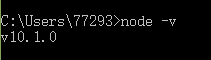
把NODE_HOME设置到环境变量里(安装包也可以自动加入PATH环境变量)。测试一下node是否生效:
安装grunt
grunt是一个很方便的构建工具,可以进行打包压缩、测试、执行等等的工作,5.0里的head插件就是通过grunt启动的。因此需要安装grunt:
注意:路径切到K:\Program Files\nodejs下。
npm install -g grunt-cli
-g代表全局安装。安装路径为C:\Users\yourname\AppData\Roaming\npm,并且自动加入PATH变量。安装完成后检查一下:

把head插件的源码git clone下来:
git clone git://github.com/mobz/elasticsearch-head.git
备注:以上请切换到任意目录既可。比如我的是:G:\web\projects\elasticsearch-header
修改head源码
由于head的代码还是2.6版本的,直接执行有很多限制,比如无法跨机器访问。因此需要用户修改两个地方:
目录:G:\web\projects\elasticsearch-header\elasticsearch-head|Gruntfile.js:
connect: {

    server: {

        options: {

            port: ,

            hostname: '*',

            base: '.',

            keepalive: true

        }

    }

}
增加hostname属性,设置为*
修改连接地址:
目录:head/_site/app.js
修改head的连接地址:
this.base_uri = this.config.base_uri || this.prefs.get("app-base_uri") || "http://localhost:9200";
把localhost修改成你es的服务器地址,如:
this.base_uri = this.config.base_uri || this.prefs.get("app-base_uri") || "http://你的服务器ip:9200";// 这里我的还是localhost
运行head
然后在head源码目录中,执行npm install 下载的包:
npm install
效果如图: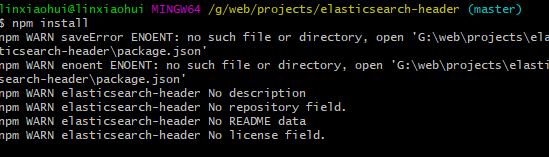
最后,在head源代码目录下启动nodejs:
grunt server
效果如图:

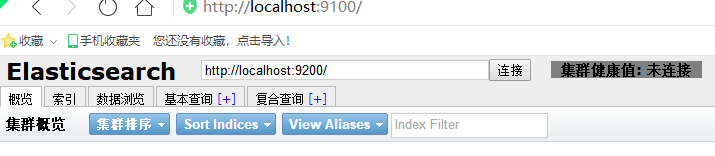
这个时候,访问http://localhost:9100就可以访问head插件了:
ElasticSearch-6.2安装head插件的更多相关文章
- Elasticsearch高版本安装head插件
安装Elasticsearch 1.安装Elasticsearch-6.5.4.tar.gz [merce@info5 ~]$ cd /appmerce/zrapp/ [merce@info5 zra ...
- 2、elasticsearch 的安装和插件的安装
1.安装Elasticsearch集群 1.下载elasticsearch-2.0.0.tar.gz,执行tar -zxvf elasticsearch-2.0.0.tar.gz解压 2.修改conf ...
- Elasticsearch 5.0 安装 Search Guard 5 插件 (五)
一.Search Guard 简介 Search Guard 是 Elasticsearch 的安全插件.它为后端系统(如LDAP或Kerberos)提供身份验证和授权,并向Elasticsearc ...
- elasticsearch安装head插件
安装Head插件 由于head插件本质上还是一个nodejs的工程,因此需要安装node,使用npm来安装依赖的包. <1>安装Node.js 下载解压 wget https://node ...
- Elasticsearch 5.4.3实战--插件安装
elasticsearch 5.0以后的版本对head的插件支持跟以前不同,安装方法如下: 1. 安装node $ wget https://npm.taobao.org/mirrors/node/ ...
- ElasticSearch 5.0及head插件安装
一.elasticsearch安装配置 1.官网下载源码包 https://artifacts.elastic.co/downloads/elasticsearch/elasticsearch-5.0 ...
- elasticsearch 口水篇(1) 安装、插件
一)安装elasticsearch 1)下载elasticsearch-0.90.10,解压,运行\bin\elasticsearch.bat (windwos) 2)进入http://localho ...
- Elasticsearch 5.0 安装 Search Guard 5 插件
一.Search Guard 简介 Search Guard 是 Elasticsearch 的安全插件.它为后端系统(如LDAP或Kerberos)提供身份验证和授权,并向Elasticsearc ...
- (转) Elasticsearch 5.0 安装 Search Guard 5 插件
一.Search Guard 简介 Search Guard 是 Elasticsearch 的安全插件.它为后端系统(如LDAP或Kerberos)提供身份验证和授权,并向Elasticsearc ...
- elasticsearch 安装 head插件
head插件 切换到Elasticsearch的安装目录 cd ~/demo/elasticsearch/es1 执行安装命令 [root@localhost es1]# bin/plugin ins ...
随机推荐
- AJAX-同源策略 跨域访问
## 同源策略 概述: 同源策略是浏览器的一种安全策略,视为同源是指域名,协议,端口完全相同.只有同源的地址才可以通过AJAX方式请求.同源或者不同源说的是两个地址的关系,不同源地址之间请求我们称之为 ...
- 关于分页器border重叠问题
.paging li { cursor: pointer; display: inline-block; float: left; box-sizing: border-box; margin-lef ...
- [.net 面向对象程序设计深入](18)实战设计模式——设计模式使用场景及原则
[.net 面向对象程序设计深入](18)实战设计模式——设计模式使用场景及原则 1,什么是设计模式? 设计模式(Design pattern)是一套被反复使用.多数人知晓的.经过分类编目的.代码设计 ...
- Ansible配置免密登陆
0x01: 把远程服务器的公钥来获取到本地 #ssh-keyscan ip1 ip2 ip3 ip4 >> /root/.ssh/known_hosts 完成后,/root/.ssh/k ...
- JavaScript中如何理解如何理解Array.apply(null, {length:5})
先来看一个问题: 如何理解Array.apply(null, {length:5})的{length:5}? 我测试过Array.apply(null, {length:5}) //返回[undefi ...
- Android OpenGL ES 开发(五): OpenGL ES 使用投影和相机视图
OpenGL ES环境允许你以更接近于你眼睛看到的物理对象的方式来显示你绘制的对象.物理查看的模拟是通过对你所绘制的对象的坐标进行数学变换完成的: Projection - 这个变换是基于他们所显示的 ...
- [Swift]LeetCode257. 二叉树的所有路径 | Binary Tree Paths
Given a binary tree, return all root-to-leaf paths. Note: A leaf is a node with no children. Example ...
- [Swift]LeetCode264.丑数 II | Ugly Number II
Write a program to find the n-th ugly number. Ugly numbers are positive numbers whose prime factors ...
- [Swift]LeetCode787. K 站中转内最便宜的航班 | Cheapest Flights Within K Stops
There are n cities connected by m flights. Each fight starts from city u and arrives at v with a pri ...
- [Swift]LeetCode837. 新21点 | New 21 Game
Alice plays the following game, loosely based on the card game "21". Alice starts with 0 p ...