
SWPU新闻后台登录页面
最终效果图: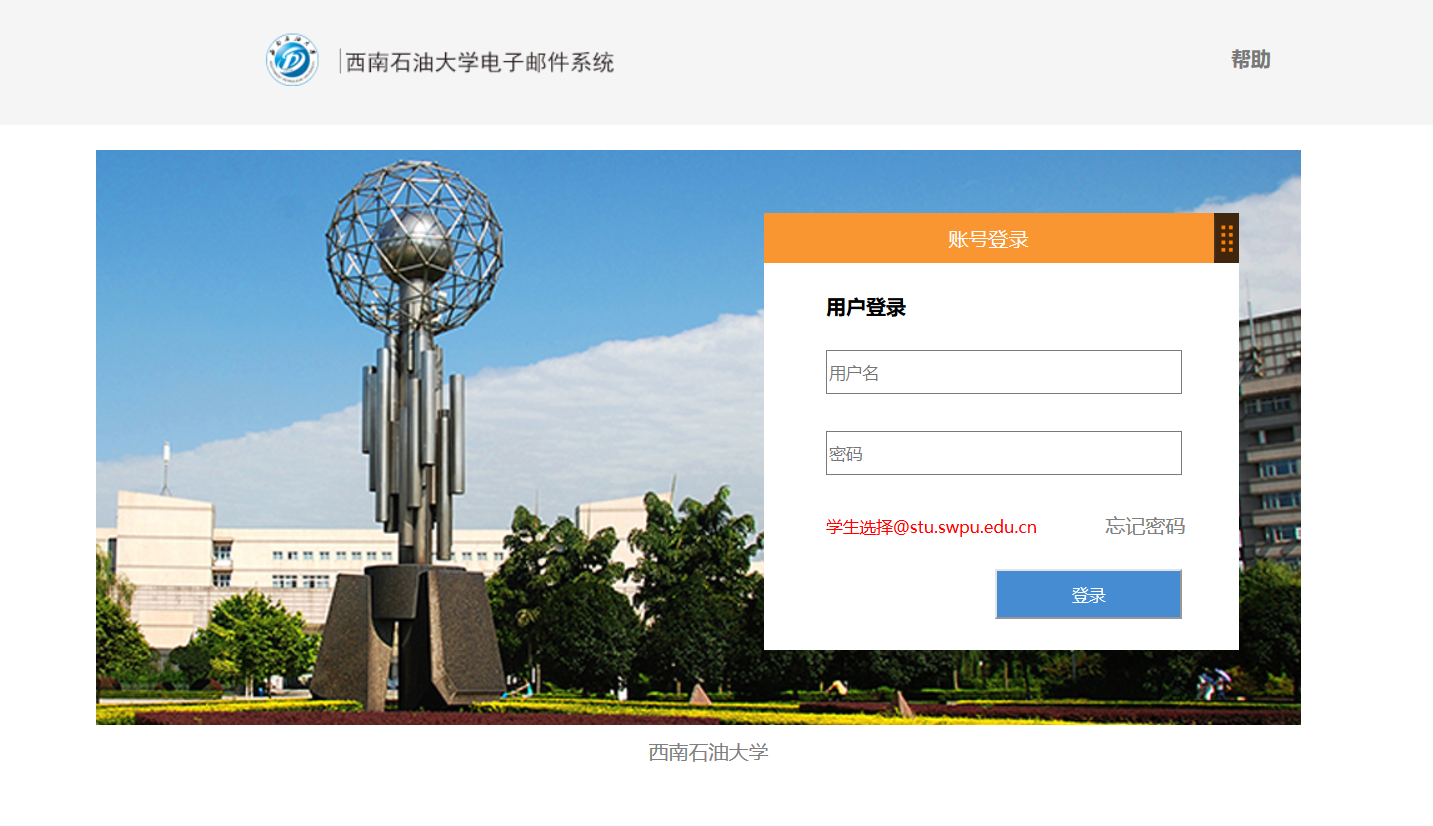
 <!DOCTYPE html>

 <html>

 <head>

 <meta charset="UTF-8">

 <title>西南石油大学邮件系统</title>

 <link rel="stylesheet" type="text/css" href="style.css" />

 </head>

 <body>

     <div class="top">

         <img alt="西南石油大学电子邮件系统" src="data:images/login_logo.png" style="padding-left:400px;padding-top:25px">

         <p class="p1"><a href="#" class="a1"><b>帮助</b></a></p>

     </div>

     <div class="main">

         <div class="login1">

             <div class="login2">账号登录

                 <a href="#"><img alt="拖动" src="data:images/dragbar.png" style="float:right"></a>

             </div>

             <div class="login3"><b style="padding-left:50px;line-height:70px;">用户登录</b><br>

                 <input type="text" placeholder="用户名" class="input"><br>

                 <input type="password" placeholder="密码" class="input">

                 <small style="color:red;padding-left:50px;">学生选择@stu.swpu.edu.cn</small>

                 <a href="#" class="a2">忘记密码</a>

                 <button class="buttom1">登录</button>

             </div>

         </div>

     </div>

     <div style="width:100%;height:50px;color:gray;text-align:center;margin:10px;"> 西南石油大学</div>

 </body>

 </html>
main.html
 @CHARSET "UTF-8";

 .top{

     width:100%;

     height:100px;

     background-color:#F5F5F5;

     display:line;

 }

 .p1{

     display:inline;

     float:right;

     padding-top:20px;

     padding-right:300px;

 }

 .main{

     width:964px;

     height:460px;

     background-image:url(images/login_bg_02.jpg);

     margin-top:20px;

     margin-left:280px;

 }

 .login1{

     width:380px;

     height:350px;

     float:right;

     margin-top:50px;

     margin-right:50px;

 }

 .login2{

     width:380px;

     height:40px;

     background-color:rgba(250,150,50,1);

     text-align:center;

     line-height:40px;

     color:white;

 }

 .login3{

     width:380px;

     height:310px;

     background-color:white;

 }

 .input{

     margin-left:50px;

     margin-bottom:30px;

     width:280px;

     height:30px;

 }

 .a1{

     text-decoration:none;

     color:#787878;

 }

 .a2{

     padding-left:50px;

     color:gray;

     text-decoration:none;

 }

 .buttom1{

     width:150px;

     height:40px;

     background-color:#468CD2;

     float:right;

     margin-right:45px;

     margin-top:25px;

     color:white;

 }
style.css
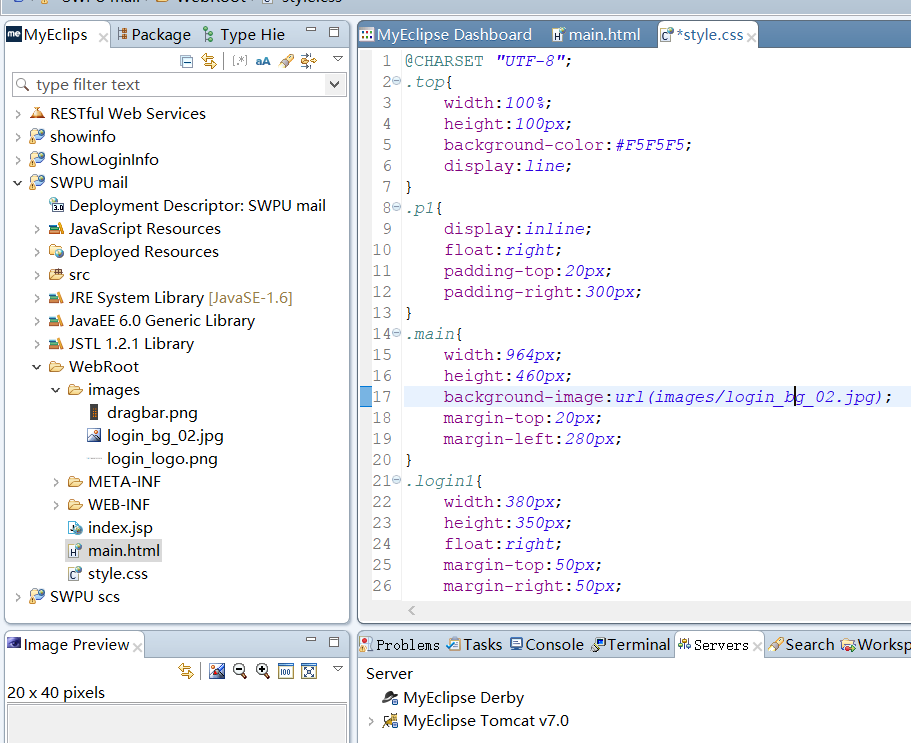
代码结构图:
链接:https://pan.baidu.com/s/1-mZ5pyWH4bmdvKN8uISWiw
提取码:e2k0
复制这段内容后打开百度网盘手机App,操作更方便哦
SWPU新闻后台登录页面的更多相关文章
- DEDE暴力破解后台登录页面
DEDE暴力破解后台登录页面 #!/usr/bin/env python '''/* * author = Mochazz * team = 红日安全团队 * env = pyton3 * */ '' ...
- thinkPHP中怎么访问域名直接跳到后台登录页面
问题: 我想只访问域名就跳到后台登录页面,怎么把地址栏里的路径隐藏掉 答案: 修改配置Common里的conf文件夹里,把默认模块改成“Admin”,默认控制器改成“login”系统默认的默认模块式h ...
- 今天网站后台登录页面需要生成一个二维码,然后在手机app上扫描这个二维码,实现网站登录的效果及其解决方案如下
要实现二维码登录,需要解决2个技术,1.需要js websocket 与后台php实现长连接技术 2.实现二维码生成技术 要实现这个功能第二个算是比较简单,只需要下载一个php的二维码生成器即可,但要 ...
- SpringBoot学习笔记四之后台登录页面的实现
注:图片如果损坏,点击文章链接: https://www.toutiao.com/i6803542216150090252/ 继续之前完成的内容,首先创建一个常量类 常量类的内容 服务器端渲染 前后端 ...
- Magento2-2.3.4 win10安装完magento无法加载静态资源导致无法进入后台登录页面
后台面无法进入,截图如下
- 新闻cms管理系统(二) ---- 后台登录功能
1.页面准备: (1)前端资源的导入:将准备好的页面添加到项目中,放到Public目录下(公共的页面样式.js.图片等资源) (2)添加登录的视图模板 将登录页面的视图放到Amin>View&g ...
- 27、Flask实战第27天:cms后台登录
cms后台登录界面 后台登录页面,我们不用自己写,只需要去Bootstrap中文网去找一个模板改一下就行 这里使用的模板是:https://v3.bootcss.com/examples/signin ...
- php大力力 [036节] 后台系统的登录页面界面做完啦
php大力力 [036节] 后台系统的登录页面界面做完啦 我认为做的不错,我就先不上截图啦 要你的祝福 分布注册 Twitter Login Or Signup Form 藤藤每日一练——172个Ic ...
- dede织梦后台-退出空白,注销空白,打开空白,登录返回首页,登录返回登录页面
24.php 5.4版本 后台500错误,打开空白的问题 不兼容 登录时空白 后台空白 24-1./include/userlogin.class.php 今天把电脑上的phpStudy升级到2013 ...
随机推荐
- ELK+Filebeat 集中式日志解决方案详解
链接:https://www.ibm.com/developerworks/cn/opensource/os-cn-elk-filebeat/index.html?ca=drs- ELK Stack ...
- object tracking 词汇积累
1. off-the-shelf adj. 现成的:常备的:成品的 adv. 现成地:无需作重大修改地 commercial off-the-shelf商用现货商规成品商业货架产品供应 off-the ...
- linux上的图片查看器FEH_image_view
Linux上的图片查看器, 简单,没有多余功能,打开快速,体积小 在终端用feh # 直接执行feh显示当前目录所有图片 feh # 或者指定图片名 feh pic1 pic2 pic3 # 显示一个 ...
- SpringBoot整合Apache Shiro权限验证框架
比较常见的权限框架有两种,一种是Spring Security,另一种是Apache Shiro,两种框架各有优劣,个人感觉Shiro更容易使用,更加灵活,也更符合RABC规则,而且是java官方更推 ...
- t-SNE完整笔记
http://www.datakit.cn/blog/2017/02/05/t_sne_full.html t-SNE(t-distributed stochastic neighbor embedd ...
- BOM定时器,onresize
定时器 <body> <button onclick="stop()">吃药</button> <button onclick=" ...
- windows 共享文件
- springboot+web文件上传和下载
一.首先安装mysql数据库,开启web服务器. 二.pom.xml文件依赖包配置如下: <?xml version="1.0" encoding="UTF-8&q ...
- Oarcle之单行函数(上)
dual 是一个虚表,为了满足sql句式而设置这么一个表 单行函数 字符函数 concat 拼接两个字符串 select concat (concat(ename,‘的职位是’),job) fro ...
- 安装redis报错 you need tcl 8.5 or newer in order to run redis test
解决方法: wget http://downloads.sourceforge.net/tcl/tcl8.6.1-src.tar.gz tar -zxvf tcl8.6.1-src.tar.gz -C ...