
DApp demo之pet-shop
注意: 这里使用的truffle版本为4.1.4,貌似使用高版本在truffle test时候会出问题,提示
truffle/Assert.sol is not found等错误
使用Truffle Box创建Truffle项目
$ mkdir petshop

$ cd petshop

$ truffle unbox pet-shop
项目目录结构
$ ls

box-img-lg.png  contracts/   node_modules/      src/

box-img-sm.png  LICENSE      package.json       test/

bs-config.json  migrations/  package-lock.json  truffle.js
项目
$ touch contracts/Adoption.sol
内容如下:
pragma solidity ^0.4.17;

contract Adoption {

    address[16] public adopters;

    // Adopting a pet

    function adopt(uint petId) public returns (uint) {

        require(petId >= 0 && petId <= 15);

        adopters[petId] = msg.sender;

        return petId;

    }

    // Retrieving the adopters

    function getAdopters() public view returns(address[16]) {

        return adopters;

    }

}
Migrations.sol代码如下:
pragma solidity ^0.4.17;

contract Migrations {

  address public owner;

  uint public last_completed_migration;

  modifier restricted() {

    if (msg.sender == owner) _;

  }

  function Migrations() public {

    owner = msg.sender;

  }

  function setCompleted(uint completed) public restricted {

    last_completed_migration = completed;

  }

  function upgrade(address new_address) public restricted {

    Migrations upgraded = Migrations(new_address);

    upgraded.setCompleted(last_completed_migration);

  }

}
编译
将solidity代码编译成以太坊虚拟机(Ethereum Virtual Machine,简称EVM)可以执行的字节码。
$ truffle compile

Compiling .\contracts\Adoption.sol...

Compiling .\contracts\Migrations.sol...

Writing artifacts to .\build\contracts
运行ganache
Quickly fire up a personal Ethereum blockchain which you can use to run tests, execute commands, and inspect state while controlling how the chain operates.
Migration(迁移)
A migration is a deployment script meant to alter the state of your application's contracts, moving it from one state to the next.
$ touch migrations/2_deploy_contracts.js
内容如下:
var Adoption = artifacts.require("./Adoption.sol");

module.exports = function (deployer) {

    deployer.deploy(Adoption);

}
$ truffle migrate

Using network 'development'.

Running migration: 1_initial_migration.js

  Deploying Migrations...

  ... 0x69df0a2b452808f94386709c3c22f6c10607ff7473d92558eb75c743cbae0e1c

  Migrations: 0x658dfbe4e9a30de42b8c48373eca4d05d6a0fe52

Saving successful migration to network...

  ... 0xa7fd9f435d8d942bd3e83ab8fef01ed8f7d1d161803364a9193a526e681cb7c4

Saving artifacts...

Running migration: 2_deploy_contracts.js

  Deploying Adoption...

  ... 0x340f8e750a19a0178f54b328e59802231dd001c11ddb999776f900113e570dba

  Adoption: 0xa739c709b5c06110fb15433f9f65832f5188fe43

Saving successful migration to network...

  ... 0x6c9b3b180ea294d968d7e607bd78c53872e08a688b01aca629e5bb6e73440c8e

Saving artifacts...
编写测试代码
$ touch test/TestAdoption.sol
内容如下:
pragma solidity ^0.4.17;

import "truffle/Assert.sol";

import "truffle/DeployedAddresses.sol";

import "../contracts/Adoption.sol";

contract TestAdoption {

    Adoption adoption = Adoption(DeployedAddresses.Adoption());

    function testUserCanAdoptPet() public {

        uint returnedId = adoption.adopt(8);

        uint expected = 8;

        Assert.equal(returnedId, expected, "Adoption of pet ID 8 should be recorded.");

    }

    function testGetAdopterAddressByPetId() public {

        // Expected owner is this contract

        address expected = this;

        address adopter = adoption.adopters(8);

        Assert.equal(adopter, expected, "Owner of pet Id 8 should be recored.");

    }

    // Testing retrieval of all pet owners

    function testGetAdopterAddressByPetIdInArray() public {

        // Expected owner is this contract

        address expected = this;

        // store adopters in memory rather than contract's storage

        address[16] memory adopters = adoption.getAdopters();

        Assert.equal(adopters[8], expected, "Owner of pet ID 8 should be recorded.");

    }

}
测试
$ truffle test
效果:
 TestAdoption

    √ testUserCanAdoptPet (83ms)

    √ testGetAdopterAddressByPetId (87ms)

    √ testGetAdopterAddressByPetIdInArray (107ms)

  3 passing (1s)
虽然vscode依然有错误提示,但是能够测试通过
创建和智能合约交互的用户接口
1) 实例化web3对象
打开项目目录src/js/app.js
修改initWeb3,使用下面内容替换带多行注释:
// Is there an injected web3 instance?

if (typeof web3 !== 'undefined') {

  App.web3Provider = web3.currentProvider;

} else {

  // If no injected web3 instance is detected, fall back to Ganache

  App.web3Provider = new Web3.providers.HttpProvider('http://localhost:7545');

}

web3 = new Web3(App.web3Provider);
2) 实例化合约
修改initContract,使用下面内容替换带多行注释:
$.getJSON('Adoption.json', function(data) {

  // Get the necessary contract artifact file and instantiate it with truffle-contract

  var AdoptionArtifact = data;

  App.contracts.Adoption = TruffleContract(AdoptionArtifact);

  // Set the provider for our contract

  App.contracts.Adoption.setProvider(App.web3Provider);

  // Use our contract to retrieve and mark the adopted pets

  return App.markAdopted();

});
3) 获取已收养的宠物并更新UI
修改markAdopted,使用下面内容替换带多行注释:
var adoptionInstance;

App.contracts.Adoption.deployed().then(function(instance) {

  adoptionInstance = instance;

  return adoptionInstance.getAdopters.call();

}).then(function(adopters) {

  for (i = 0; i < adopters.length; i++) {

    if (adopters[i] !== '0x0000000000000000000000000000000000000000') {

      $('.panel-pet').eq(i).find('button').text('Success').attr('disabled', true);

    }

  }

}).catch(function(err) {

  console.log(err.message);

});
4) 处理adopt()函数
修改handleAdopt,使用下面内容替换带多行注释:
var adoptionInstance;

web3.eth.getAccounts(function(error, accounts) {

  if (error) {

    console.log(error);

  }

  var account = accounts[0];

  App.contracts.Adoption.deployed().then(function(instance) {

    adoptionInstance = instance;

    // Execute adopt as a transaction by sending account

    return adoptionInstance.adopt(petId, {from: account});

  }).then(function(result) {

    return App.markAdopted();

  }).catch(function(err) {

    console.log(err.message);

  });

});
5) 安装配置metamask插件,创建并切换网络为localhost:7545
6) 启动服务
$ npm run dev
app.js代码如下:
App = {

  web3Provider: null,

  contracts: {},

  init: function () {

    // Load pets.

    $.getJSON('../pets.json', function (data) {

      var petsRow = $('#petsRow');

      var petTemplate = $('#petTemplate');

      for (i = 0; i < data.length; i++) {

        petTemplate.find('.panel-title').text(data[i].name);

        petTemplate.find('img').attr('src', data[i].picture);

        petTemplate.find('.pet-breed').text(data[i].breed);

        petTemplate.find('.pet-age').text(data[i].age);

        petTemplate.find('.pet-location').text(data[i].location);

        petTemplate.find('.btn-adopt').attr('data-id', data[i].id);

        petsRow.append(petTemplate.html());

      }

    });

    return App.initWeb3();

  },

  initWeb3: function () {

    // Is there an injected web3 instance?

    if (typeof web3 !== 'undefined') {

      App.web3Provider = web3.currentProvider;

    } else {

      // If no injected web3 instance is detected, fall back to Ganache

      App.web3Provider = new Web3.providers.HttpProvider('http://localhost:7545');

    }

    web3 = new Web3(App.web3Provider);

    return App.initContract();

  },

  initContract: function () {

    $.getJSON('Adoption.json', function (data) {

      // Get the necessary contract artifact file and instantiate it with truffle-contract

      var AdoptionArtifact = data;

      App.contracts.Adoption = TruffleContract(AdoptionArtifact);

      // Set the provider for our contract

      App.contracts.Adoption.setProvider(App.web3Provider);

      // Use our contract to retrieve and mark the adopted pets

      return App.markAdopted();

    });

    return App.bindEvents();

  },

  bindEvents: function () {

    $(document).on('click', '.btn-adopt', App.handleAdopt);

  },

  markAdopted: function (adopters, account) {

    var adoptionInstance;

    App.contracts.Adoption.deployed().then(function (instance) {

      adoptionInstance = instance;

      return adoptionInstance.getAdopters.call();

    }).then(function (adopters) {

      for (i = 0; i < adopters.length; i++) {

        if (adopters[i] !== '0x0000000000000000000000000000000000000000') {

          $('.panel-pet').eq(i).find('button').text('Success').attr('disabled', true);

        }

      }

    }).catch(function (err) {

      console.log(err.message);

    });

  },

  handleAdopt: function (event) {

    event.preventDefault();

    var petId = parseInt($(event.target).data('id'));

    var adoptionInstance;

    web3.eth.getAccounts(function (error, accounts) {

      if (error) {

        console.log(error);

      }

      var account = accounts[0];

      App.contracts.Adoption.deployed().then(function (instance) {

        adoptionInstance = instance;

        // Execute adopt as a transaction by sending account

        return adoptionInstance.adopt(petId, { from: account });

      }).then(function (result) {

        return App.markAdopted();

      }).catch(function (err) {

        console.log(err.message);

      });

    });

  }

};

$(function () {

  $(window).load(function () {

    App.init();

  });

});
效果:
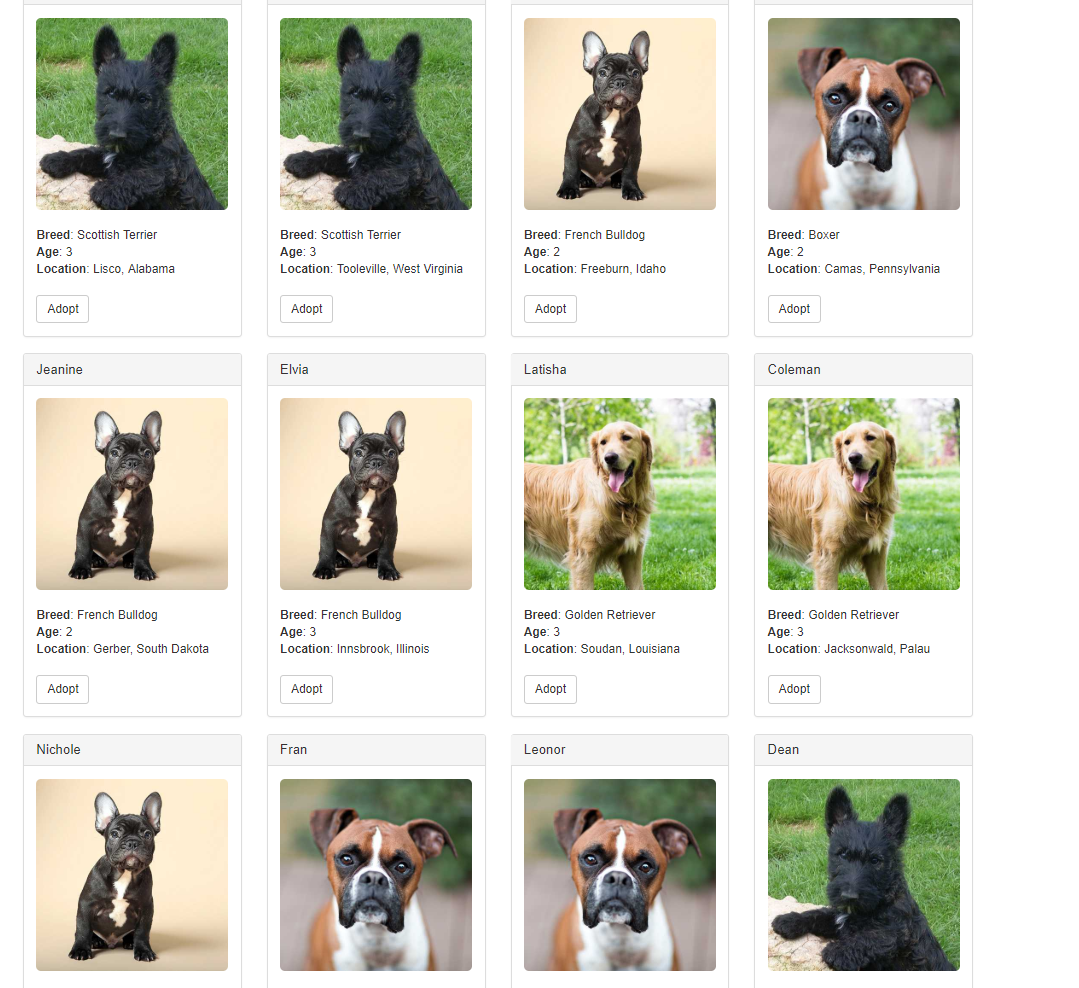
出现的问题
1 > 执行truffle test的时候出现如下错误: truffle/Assert.sol is not found
$ npm view truffle versions

$ npm uninstall -g truffle

$ npm install -g truffle@4.1.4
删除build目录
然后重新执行命令即可。
$ truffle compile

$ truffle test
参考:
DApp demo之pet-shop的更多相关文章
- Microsoft .NET Pet Shop 4
Microsoft .NET Pet Shop 4:将 ASP.NET 1.1 应用程序迁移到 2.0 299(共 313)对本文的评价是有帮助 - 评价此主题 发布日期 : 2006-5-9 | 更 ...
- asp.net的3个经典范例(ASP.NET Starter Kit ,Duwamish,NET Pet Shop)学习资料
asp.net的3个经典范例(ASP.NET Starter Kit ,Duwamish,NET Pet Shop)学习资料 NET Pet Shop .NET Pet Shop是一个电子商务的实例, ...
- Microsoft .NET Pet Shop 简介
最初研究 .NET Pet Shop 的目的是用 Microsoft .NET 实现 Sun 主要的 J2EE 蓝图应用程序 Sun Java Pet Store 同样的应用程序功能. 根据用 .NE ...
- Microsoft .NET Pet Shop 4: Migrating an ASP.NET 1.1 Application to 2.0
249 out of 297 rated this helpful - Rate this topic Gregory Leake Microsoft Corporation Alan Le, Ale ...
- Bytom Dapp 开发笔记(三):Dapp Demo前端源码分析
本章内容会针对比原官方提供的dapp-demo,分析里面的前端源码,分析清楚整个demo的流程,然后针对里面开发过程遇到的坑,添加一下个人的见解还有解决的方案. 储蓄分红合约简述 为了方便理解,这里简 ...
- ethereum Pet Shop
在部署宠物商店时遇到的一些坑,给大家总结一下,以免大家多走弯路 转载的地址(详细):https://steemit.com/cn/@lucia3/ethereum-pet-shop 启动"n ...
- Microsoft-PetSop4.0(宠物商店)-数据库设计-Sql
ylbtech-DatabaseDesgin:Microsoft-PetSop4.0(宠物商店)-数据库设计-Sql DatabaseName:PetShop(宠物商店) Model:宠物商店网站 T ...
- 以太仿DApp开发环境搭建
在网上找了些以太仿的资料,是node.js写的,之前也了解过node.js,正好也可以用上.本篇主要学习以太仿DApp开发环境搭建. 一.安装 DApp 开发环境 1.1安装 Node.js 首先下载 ...
- 调用Bytom Chrome插件钱包开发Dapp
安装使用插件钱包 1. 打开Google浏览器的应用商店,搜索Bystore 下载链接:http://t.cn/E6cFFwb 2. 然后点击添加到Chrome,就可以添加到我们的: 3. 使用goo ...
随机推荐
- echarts 折线图点击高亮
echarts中注册事件很多 ,记录下今天做的折线图点击高亮: 查了api,看了半天,发现折线图点击时只能做到圆点变大,并不能实现点击线条,整条线条高亮,也真是醉了. 上图: 如图所示,只能圆点变大. ...
- JavaScript作用域[[scope]]
[[scope]] : 隐式的属性 每个JavaScript函数都是一个对象,对象中有些属性可以访问,而有些属性是不可以访问的,这些属性仅供JavaScript引擎存取, [[scope]]就是其中一 ...
- 最近的AI
虚拟币和AI 两个大类怎么兴起?
- DashBoard创建各种表(二)
添加范围过滤器 “ 范围过滤器”允许您将过滤应用于其他仪表板项.此项目显示带有选择拇指的图表,允许您过滤掉沿参数轴显示的值. 如图,可以根据选择不同的CategorySales范围显示图表1的内容了. ...
- JS拖拽div(移动)
<!doctype html><html><head> <meta charset="utf-8"> <title>JS ...
- CentOS 7安全加固
本次实验使用的centos 7 版本 一.查找系统中是否存在空密码账户 1.使用命令: awk -F: '($2==""){print $1}' /etc/shadow 直接查看. ...
- adv生成控制器手腕位置倾斜原因以及解决方案
系统默认问题导致手腕倾斜详情描述: 手腕部分默认生成轴向是冲向模板下一层级第一个物体 简单说就是 FK轴向冲向模板中指方向 如图 默认模板没问题是因为 默认模板没有改动情况下系统中指与手腕在一条直 ...
- python 第三方库
1.tqdm 进度条 from tqdm import tqdm for i in tqdm(range(10000)): pass 2.fire 自动创建命令行接口(command line int ...
- Appium环境搭建——安卓真机调试注意点
1.安卓设备连接失败 通过adb devices命令 查看安卓设备的连接情况,如图,未成功连接 解决方法: (1)关闭360安全卫士和360手机助手(2)查看5037端口是否被占用 netstat - ...
- LVS-DR模式 SOP
LVS DR SOP 1.1虚拟机地址信息LVS-DR模式DR1:172.31.0.29 DR2:172.31.0.28 RS1:172.31.0.25 RS2:172.31.0.26 lvs-cli ...