
CNN卷积神经网络
import os

# third-party library

import torch

import torch.nn as nn

import torch.utils.data as Data

import torchvision

import matplotlib.pyplot as plt

# torch.manual_seed(1)    # reproducible

# Hyper Parameters

EPOCH = 1               # train the training data n times, to save time, we just train 1 epoch

BATCH_SIZE = 50

LR = 0.001              # learning rate

DOWNLOAD_MNIST = False

# Mnist digits dataset

if not(os.path.exists('./mnist/')) or not os.listdir('./mnist/'):

    # not mnist dir or mnist is empyt dir

    DOWNLOAD_MNIST = True

train_data = torchvision.datasets.MNIST(

    root='./mnist/',

    train=True,                                     # this is training data

    transform=torchvision.transforms.ToTensor(),    # Converts a PIL.Image or numpy.ndarray to

                                                    # torch.FloatTensor of shape (C x H x W) and normalize in the range [0.0, 1.0]

    download=DOWNLOAD_MNIST,

)

# plot one example

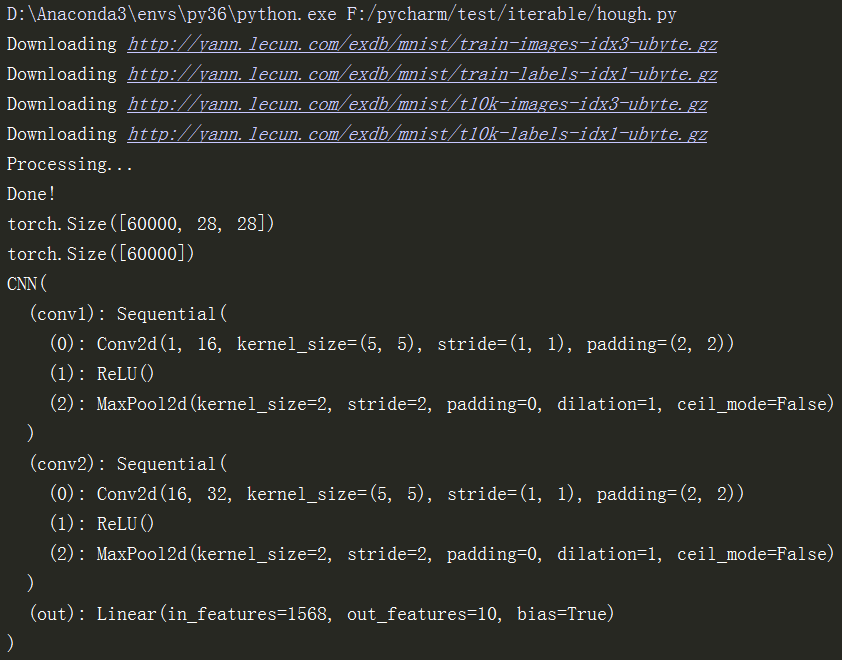
print(train_data.train_data.size())                 # (60000, 28, 28)

print(train_data.train_labels.size())               # (60000)

plt.imshow(train_data.train_data[0].numpy(), cmap='gray')

plt.title('%i' % train_data.train_labels[0])

plt.show()

# Data Loader for easy mini-batch return in training, the image batch shape will be (50, 1, 28, 28)

train_loader = Data.DataLoader(dataset=train_data, batch_size=BATCH_SIZE, shuffle=True)

# pick 2000 samples to speed up testing

test_data = torchvision.datasets.MNIST(root='./mnist/', train=False)

test_x = torch.unsqueeze(test_data.test_data, dim=1).type(torch.FloatTensor)[:2000]/255.   # shape from (2000, 28, 28) to (2000, 1, 28, 28), value in range(0,1)

test_y = test_data.test_labels[:2000]

class CNN(nn.Module):

    def __init__(self):

        super(CNN, self).__init__()

        self.conv1 = nn.Sequential(         # input shape (1, 28, 28)

            nn.Conv2d(

                in_channels=1,              # input height

                out_channels=16,            # n_filters

                kernel_size=5,              # filter size

                stride=1,                   # filter movement/step

                padding=2,                  # if want same width and length of this image after Conv2d, padding=(kernel_size-1)/2 if stride=1

            ),                              # output shape (16, 28, 28)

            nn.ReLU(),                      # activation

            nn.MaxPool2d(kernel_size=2),    # choose max value in 2x2 area, output shape (16, 14, 14)

        )

        self.conv2 = nn.Sequential(         # input shape (16, 14, 14)

            nn.Conv2d(16, 32, 5, 1, 2),     # output shape (32, 14, 14)

            nn.ReLU(),                      # activation

            nn.MaxPool2d(2),                # output shape (32, 7, 7)

        )

        self.out = nn.Linear(32 * 7 * 7, 10)   # fully connected layer, output 10 classes

    def forward(self, x):

        x = self.conv1(x)

        x = self.conv2(x)

        x = x.view(x.size(0), -1)           # flatten the output of conv2 to (batch_size, 32 * 7 * 7)

        output = self.out(x)

        return output, x    # return x for visualization

cnn = CNN()

print(cnn)  # net architecture

optimizer = torch.optim.Adam(cnn.parameters(), lr=LR)   # optimize all cnn parameters

loss_func = nn.CrossEntropyLoss()                       # the target label is not one-hotted

# following function (plot_with_labels) is for visualization, can be ignored if not interested

from matplotlib import cm

try: from sklearn.manifold import TSNE; HAS_SK = True

except: HAS_SK = False; print('Please install sklearn for layer visualization')

def plot_with_labels(lowDWeights, labels):

    plt.cla()

    X, Y = lowDWeights[:, 0], lowDWeights[:, 1]

    for x, y, s in zip(X, Y, labels):

        c = cm.rainbow(int(255 * s / 9)); plt.text(x, y, s, backgroundcolor=c, fontsize=9)

    plt.xlim(X.min(), X.max()); plt.ylim(Y.min(), Y.max()); plt.title('Visualize last layer'); plt.show(); plt.pause(0.01)

plt.ion()

# training and testing

for epoch in range(EPOCH):

    for step, (b_x, b_y) in enumerate(train_loader):   # gives batch data, normalize x when iterate train_loader

        output = cnn(b_x)[0]               # cnn output

        loss = loss_func(output, b_y)   # cross entropy loss

        optimizer.zero_grad()           # clear gradients for this training step

        loss.backward()                 # backpropagation, compute gradients

        optimizer.step()                # apply gradients

        if step % 50 == 0:

            test_output, last_layer = cnn(test_x)

            pred_y = torch.max(test_output, 1)[1].data.numpy()

            accuracy = float((pred_y == test_y.data.numpy()).astype(int).sum()) / float(test_y.size(0))

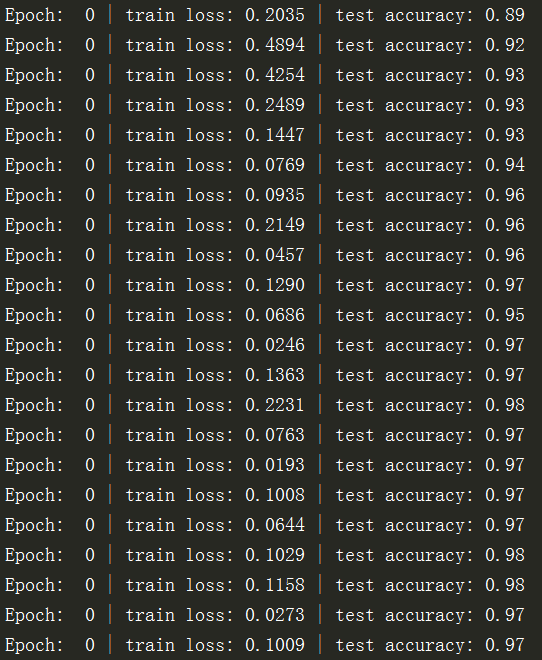
            print('Epoch: ', epoch, '| train loss: %.4f' % loss.data.numpy(), '| test accuracy: %.2f' % accuracy)

            if HAS_SK:

                # Visualization of trained flatten layer (T-SNE)

                tsne = TSNE(perplexity=30, n_components=2, init='pca', n_iter=5000)

                plot_only = 500

                low_dim_embs = tsne.fit_transform(last_layer.data.numpy()[:plot_only, :])

                labels = test_y.numpy()[:plot_only]

                plot_with_labels(low_dim_embs, labels)

plt.ioff()

# print 10 predictions from test data

test_output, _ = cnn(test_x[:10])

pred_y = torch.max(test_output, 1)[1].data.numpy()

print(pred_y, 'prediction number')

print(test_y[:10].numpy(), 'real number')
运行效果:

CNN卷积神经网络的更多相关文章
- Deep Learning模型之:CNN卷积神经网络(一)深度解析CNN
http://m.blog.csdn.net/blog/wu010555688/24487301 本文整理了网上几位大牛的博客,详细地讲解了CNN的基础结构与核心思想,欢迎交流. [1]Deep le ...
- [转]Theano下用CNN(卷积神经网络)做车牌中文字符OCR
Theano下用CNN(卷积神经网络)做车牌中文字符OCR 原文地址:http://m.blog.csdn.net/article/details?id=50989742 之前时间一直在看 Micha ...
- Deep Learning论文笔记之(四)CNN卷积神经网络推导和实现(转)
Deep Learning论文笔记之(四)CNN卷积神经网络推导和实现 zouxy09@qq.com http://blog.csdn.net/zouxy09 自己平时看了一些论文, ...
- CNN(卷积神经网络)、RNN(循环神经网络)、DNN(深度神经网络)的内部网络结构有什么区别?
https://www.zhihu.com/question/34681168 CNN(卷积神经网络).RNN(循环神经网络).DNN(深度神经网络)的内部网络结构有什么区别?修改 CNN(卷积神经网 ...
- CNN(卷积神经网络)、RNN(循环神经网络)、DNN,LSTM
http://cs231n.github.io/neural-networks-1 https://arxiv.org/pdf/1603.07285.pdf https://adeshpande3.g ...
- day-16 CNN卷积神经网络算法之Max pooling池化操作学习
利用CNN卷积神经网络进行训练时,进行完卷积运算,还需要接着进行Max pooling池化操作,目的是在尽量不丢失图像特征前期下,对图像进行downsampling. 首先看下max pooling的 ...
- cnn(卷积神经网络)比较系统的讲解
本文整理了网上几位大牛的博客,详细地讲解了CNN的基础结构与核心思想,欢迎交流. [1]Deep learning简介 [2]Deep Learning训练过程 [3]Deep Learning模型之 ...
- Keras(四)CNN 卷积神经网络 RNN 循环神经网络 原理及实例
CNN 卷积神经网络 卷积 池化 https://www.cnblogs.com/peng8098/p/nlp_16.html 中有介绍 以数据集MNIST构建一个卷积神经网路 from keras. ...
- TensorFlow——CNN卷积神经网络处理Mnist数据集
CNN卷积神经网络处理Mnist数据集 CNN模型结构: 输入层:Mnist数据集(28*28) 第一层卷积:感受视野5*5,步长为1,卷积核:32个 第一层池化:池化视野2*2,步长为2 第二层卷积 ...
- tensorflow CNN 卷积神经网络中的卷积层和池化层的代码和效果图
tensorflow CNN 卷积神经网络中的卷积层和池化层的代码和效果图 因为很多 demo 都比较复杂,专门抽出这两个函数,写的 demo. 更多教程:http://www.tensorflown ...
随机推荐
- 分布式唯一ID生成方案是什么样的?(转)
一.前言 分布式系统中我们会对一些数据量大的业务进行分拆,如:用户表,订单表.因为数据量巨大一张表无法承接,就会对其进行分库分表. 但一旦涉及到分库分表,就会引申出分布式系统中唯一主键ID的生成问题, ...
- Windows apache-flume-1.6.0+Kafka+Es
apache-flume-1.6.0 kafka_2.11-1.1.0 elasticsearch1.5.1 flume配置 a1.sources = kafkaSource a1.channels ...
- mysql-笔记-默认值
1 指定列的默认值 columnName int default '-1' 2 integer 列-设置自增列 也是指定默认值的方式 3 默认值必须是常量 不能使用函数.表达式---特例:timest ...
- hashlib 模块:加密
import hashlib # 基本使用 cipher = hashlib.md5('需要加密的数据的二进制形式'.encode('utf-8')) print(cipher.hexdigest() ...
- vue cli使用融云实现聊天
公司有个项目要实现一个聊天功能,需求如下图,略显随意 公司最终选择融云这个吊炸天的即时通信,文档详细的一匹,刚开始看文档感觉很详细实现起来也不麻烦,有很多开源的demo可以在线演示和下载 不过我们的项 ...
- 火眼发布Windows攻击工具集
导读 渗透测试员的喜讯:安全公司火眼发布Windows攻击工具集--足足包含140个程序. Kali Linux 已成为攻击型安全专家的标配工具,但对需要原生Windows功能的渗透测试员来说,维护良 ...
- nodejs 搭建本地静态服务器
1. http-server 参看 https://www.npmjs.com/package/http-server 使用http-server搭建本地静态服务器 全局安装http-server n ...
- Python3 找不到库
import sys sys.path.append('/usr/local/lib64/python3.6/site-packages')sys.path.append('/usr/local/li ...
- ios端position为fixed失效的解决办法
关键代码 document.getElementById("searchInputbox").addEventListener('touchmove', handler, {pas ...
- CC++语法::数组名退化(array decaying)
参考: CSDN::C/C++中数组名退化为指针的情况 stackoverflow::What is array decaying? 起因 笔者在写memset的时候总想偷一点懒(因为我们一般都是为了 ...