
Android Studio 2.1及其以上版本中的instant run功能 介绍
Android Studio 2.0及其以后版本中的instant run功能 介绍
Studio 2.0 之后就有了instant run 功能
说说 instant run 功能:字面意思就能明白 即时运行
这个功能在2.1是默认开启的 而它的相关设置界面呢如下:
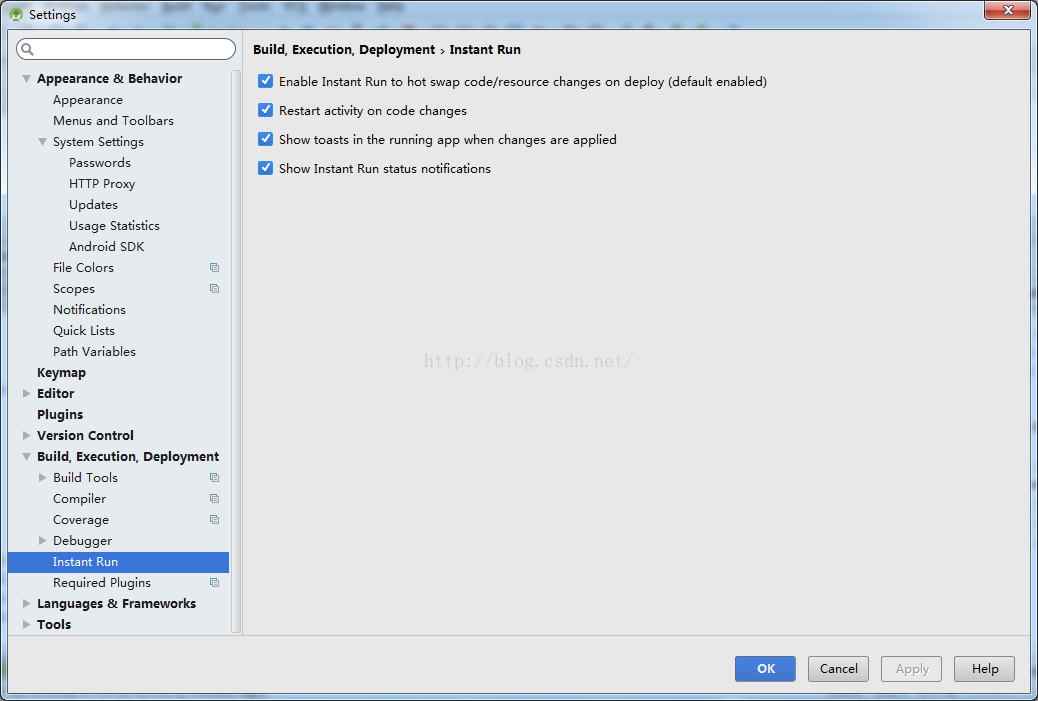
就是右边的是个设置了
如何判断是否可以呢 通过
先给 大家贴上 官方介绍文档
这个功能就是当你修改了代码或者布局的时候 点击运行 它不会将整改项目都进行重新打包,而是能直接在你的测试机上体现。
比如我们以前调整了布局后 需要看到效果就得重新打包运行了。
而现在呢就不用了,当然了使用方法是一样的 。但是呢速度要快很多。几秒内就能完成。
而如果是整体打包的话那速度就慢了。以前1.4版本的时候一分钟就能打包完了。现在得3分钟。
| Code Change | Instant Run Behavior |
|---|---|
|
Supported with hot swap: This is the fastest type of swap and makes changes visible almost instantly. Your application keeps running and a stub method with the new implementation is used the next time the method is called. 如果是左边的这种情况,那就是热插拔模式了,修改后能马上看到效果(热插拔大家都了解,就是现在的U盘的那种模式,插上就能用) |
|
Supported with warm swap: This swap is still very fast, but requires an automatic activity restart when Instant Run pushes the changed resources to the target device. Your app keeps running, but a small flicker may appear on the screen as the activity restarts—this is normal. (如果是这种情况的话,那速度也挺快的 但是没有上面的快,如果你要修改的这个页面是正在显示的页面 它就会闪一下,然后你的修改就能看到你。 这种情况 你的app 不会重新启动的。成功后 你的设备中就会弹出一个Toash)  |
| Structural code changes, such as: (代码结构进行了变化)
|
Supported with cold swap (API level 21 or higher): Instant Run pushes the structural code changes to the target device and restarts the whole app. For target devices running API level 20 or lower, Android Studio deploys a full build of the APK. 就是说 如果发生了左边说的那种情况,而刚好你的api登记是在21或以上,那就会将修改结构代码更改推到目标设备运行。这个时候你的app会重新启动。但是耗时不会很长。 但是如果你的版本是20版本或以下,那就没什么好说的你。 重新生成构建整个apk了。那速度 可真是相当慢了。 |
|
When making changes to the app manifest or resources referenced by the manifest, Android Studio automatically deploys a new build in order to push changes to your target device. This is because certain information about the app, such as its name, app icon resources, and intent filters, are determined from the manifest when the APK is installed on the device. If your build process automatically updates any part of the app manifest, such as automatically iterating 这边就告诉你说,这种情况下 instant run 就不起作用了。得重新打包生成整个项目了 |
Android Studio 2.1及其以上版本中的instant run功能 介绍的更多相关文章
- 1.运行Android Studio,一直提示:Error running app: Instant Run requires 'Tools | Android | Enable ADB integration' to be enabled.
1.解决问题办法:菜单栏,Tools -> Adnroid -> enable ADB integration勾上 2.暂时性的解决方案:在Android Studio中的:Prefere ...
- Android Studio更改项目SDK的版本
Elipse 中的安卓项目,在Android Studio中可以通过File -->new -- > Import Project的方法建立起来.但是有时候需要用到更改项目的API Lev ...
- Android Studio稍微较新的版本下载
ALL ANDROID STUDIO PACKAGES-V1.4.1.2422023 Select a specific Android Studio package for your platfor ...
- 告别编译运行 ---- Android Studio 2.0 Preview发布Instant Run功能
以往的Android开发有一个头疼的且拖慢速度的问题,就是你每改一行代码要想看到结果必须要编译运行到手机或者模拟器上,而且需要从头(可能是登录界面)一直点击到你修改的界面为止.开发一个完整的Andro ...
- [Android Pro] 告别编译运行 ---- Android Studio 2.0 Preview发布Instant Run功能
reference to : http://www.cnblogs.com/soaringEveryday/p/4991563.html 以往的Android开发有一个头疼的且拖慢速度的问题,就是你每 ...
- Android Studio 2.2.2导入Eclipse中创建的项目
最近随视频教程学习Android,原本都是用Adt写Android程序,中途教程换成了Android Studio,于是我自己下了android studio 2.2.2安装好,并下载好sdk,也跟着 ...
- Android 项目利用 Android Studio 和 Gradle 打包多版本APK
在项目开发过程中,经常会有需要打包不同版本的 APK 的需求. 比如 debug版,release版,dev版等等. 有时候不同的版本中使用到的不同的服务端api域名也不相同. 比如 debug_ap ...
- 利用 Android Studio 和 Gradle 打包多版本APK
在项目开发过程中,经常会有需要打包不同版本的 APK 的需求. 比如 debug版,release版,dev版等等. 有时候不同的版本中使用到的不同的服务端api域名也不相同. 比如 debug_ap ...
- Android Studio 3.0 及以上版本使用技巧总结
1.更新Android Studio后下载Gradle文件的技巧 更新到3.0版本后,可能会出现创建新项目一直停留在如下图的界面: 选择等待?不知道要等到什么时候,这时候怎么办呢?显然,不能一直等待下 ...
随机推荐
- Neo4j安装
一.Windows版本 1)下载java8,并配置环境变量 java下载请点击,提取码:f6ci 2)Neo4j下载 选windows版本 新建系统环境变量: 并配置Path环境变量,添加bin所在目 ...
- weblogic找不到数据源
查看weblogic日志 报错是每个数据源都找不到. 查看oracle用户状态 select username,account_status,lock_date from dba_users; 解 ...
- [Android] Android 手机下 仿 微信 客户端 界面 -- 微聊
Android 手机下 仿 微信 客户端 界面 -- 微聊 (包括聊天列表 + 聊天对话页 + 朋友圈列表页 + 我的/发现 列表页) 项目演示: 功能说明: 1)底部标签切换 (TabHost + ...
- 20155324《网络对抗技术》web安全基础实践
20155324<网络对抗技术>web安全基础实践 实验内容 使用webgoat进行XSS攻击.CSRF攻击.SQL注入 实验问答 SQL注入攻击原理,如何防御 ①SQL注入攻击是攻击者在 ...
- C# 用Serializer.ToXml()方法转换成两种格式的XML
常见XML格式两种: 这种是属性的格式,实体的Model属性上面加上这个特性 [XmlAttribute] <AAA aa="/> 这种是标签的格式,实体的Model属性上面加上 ...
- P5303 [GXOI/GZOI2019]逼死强迫症
题目地址:P5303 [GXOI/GZOI2019]逼死强迫症 这里是官方题解 初步分析 从题目和数据范围很容易看出来这是一个递推 + 矩阵快速幂,那么主要问题在于递推的过程. 满足条件的答案一定是以 ...
- 【译】索引进阶(十三):SQL SERVER中的索引碎片【下篇】
原文链接:传送门. 通用碎片模式 如果一个表具有多个索引,那么这些索引便具有多个索引键,因而也具有不同的顺序.通常情况下,这些索引中的一两个展示了之前描述过的升序插入模式,而其他的通常展示了随机插入模 ...
- 关于/tmp/ 目录自动清理文件
问题:今天开发人员给我说了一个错误:The temporary upload location [/tmp/tomcat.1337767218595042057.80/work/Tomcat/loca ...
- WPF 10天修炼 第五天- 内容控件
WPF内容控件 在WPF中,所有呈现在用户界面上的对象都称为用户界面元素.但是只有派生自System.Windows.Controls.Control类的对象才称为控件.内容控件通常是指具有Conte ...
- 将mysql中的一张表中的一个字段数据根据条件导入另一张表中
添加字段:alter table matInformation add facid varchar(99) default ''; 导入数据:update matInformation m set ...