
vue的动态路由(登录之后拿到动态路由通过addRouters()动态添加路由)
登录后我们拿到路由动态路由,后端传的数据可能为这个
{
path: '/index',
meta: {
title: '首页',
icon: 'icon-shouye',
tab_index: , //给头部导航获取的
requireAuth:true,//验证用户能不能跳转这个页面true能false不能
},
name: 'index',
component: index
},
//用印中心
{
path: '/chapterCenter',
redirect: {
name: 'applicationChapter'
},
meta: {
title: '用印中心',
icon: 'icon-shuazi',
status: , //0展示1不展示
tab_index: , //给头部导航获取的
requireAuth:true,//验证用户能不能跳转这个页面true能false不能
},
name: 'chapterCenter',
component: chapterCenter,
children: [{
path: '/applicationChapter',
name: 'applicationChapter',
meta: {
title: '申请用章',
icon: 'icon-ico_zhongyaofangguanli_caigoushenqingdanshenhe',
status: , //0展示1不展示
tab_index: , //给头部导航获取的
requireAuth:true,//验证用户能不能跳转这个页面true能false不能
},
component: applicationChapter
}, {
path: '/approvalProcessing',
name: 'approvalProcessing',
meta: {
title: '审批处理',
icon: 'icon-yinzhang',
status: , //0展示1不展示
tab_index: , //给头部导航获取的
requireAuth:true,//验证用户能不能跳转这个页面true能false不能
},
component: approvalProcessing
}, {
path: '/authorizationManagement',
name: 'authorizationManagement',
meta: {
title: '授权管理',
icon: 'icon-shouquan',
status: , //0展示1不展示
tab_index: , //给头部导航获取的
requireAuth:true,//验证用户能不能跳转这个页面true能false不能
},
component: authorizationManagement
}, {
path: '/auditProcessing',
name: 'auditProcessing',
meta: {
title: '审计处理',
icon: '',
status: , //0展示1不展示
tab_index: , //给头部导航获取的
requireAuth:true,//验证用户能不能跳转这个页面true能false不能
},
component: auditProcessing
}, {
path: '/usageRecord',
name: 'usageRecord',
meta: {
title: '使用记录',
icon: 'icon-number1',
status: , //0展示1不展示
tab_index: , //给头部导航获取的
requireAuth:true,//验证用户能不能跳转这个页面true能false不能
},
component: usageRecord
}, {
path: '/myApplication',
name: 'myApplication',
meta: {
title: '我的申请',
icon: 'icon-wodeshenqing-moren',
status: , //0展示1不展示
tab_index: , //给头部导航获取的
requireAuth:true,//验证用户能不能跳转这个页面true能false不能
},
component: myApplication
},
]
},
//系统管理
{
path: '/systemManagement',
name: 'systemManagement',
redirect: {
name: 'sealManagement'
},
meta: {
title: '系统管理',
icon: 'el-icon-setting',
status: , //0展示1不展示
tab_index: , //给头部导航获取的
requireAuth:true,//验证用户能不能跳转这个页面true能false不能
},
component: systemManagement,
children: [{
path: '/sealManagement',
name: 'sealManagement',
meta: {
title: '印章管理',
icon: 'icon-yinzhang',
status: , //0展示1不展示
tab_index: , //给头部导航获取的
requireAuth:true,//验证用户能不能跳转这个页面true能false不能
},
component: sealManagement
}, {
path: '/sealDetail',
name: 'sealDetail',
meta: {
title: '印章详情',
icon: '',
status: , //0展示1不展示
tab_index: , //给头部导航获取的
requireAuth:true,//验证用户能不能跳转这个页面true能false不能
},
component: sealDetail
}, {
path: '/staffManagement',
meta: {
title: '员工管理',
icon: 'icon-quanxianguanli',
status: , //0展示1不展示
tab_index: , //给头部导航获取的
requireAuth:true,//验证用户能不能跳转这个页面true能false不能
},
name: 'staffManagement',
component: staffManagement
}, {
path: '/reportManagement',
meta: {
title: '报表管理',
icon: 'icon-baobiaoguanli',
status: , //0展示1不展示
tab_index: , //给头部导航获取的
requireAuth:true,//验证用户能不能跳转这个页面true能false不能
},
name: 'reportManagement',
component: reportManagement
}, {
path: '/processManagement',
meta: {
title: '流程管理',
icon: 'icon-liucheng',
status: , //0展示1不展示
tab_index: , //给头部导航获取的
requireAuth:true,//验证用户能不能跳转这个页面true能false不能
},
name: 'processManagement',
component: processManagement
}, {
path: '/privilegeManagement',
meta: {
title: '权限管理',
icon: 'icon-erji-quanxianguanli',
status: , //0展示1不展示
tab_index: , //给头部导航获取的
requireAuth:true,//验证用户能不能跳转这个页面true能false不能
},
name: 'privilegeManagement',
component: privilegeManagement
}, ]
},
//数据统计
{
path: '/dataStatistics',
meta: {
title: '数据统计',
icon: 'icon-icon-',
status: , //判断当前标签展不展示0展示1不展示
tab_index: , //给头部导航获取的
requireAuth:true,//验证用户能不能跳转这个页面true能false不能
},
name: 'dataStatistics',
component: dataStatistics,
children: []
},
//平台管理
{
path: '/platformManagement',
redirect: {
name: 'companyManagement'
},
meta: {
title: '平台管理',
icon: 'icon-pingtaiguanli',
status: , //0展示1不展示
tab_index: , //给头部导航获取的
requireAuth:true,//验证用户能不能跳转这个页面true能false不能
},
name: 'platformManagement',
component: platformManagement,
children: [{
path: '/companyManagement',
meta: {
title: '公司管理',
icon: 'icon-gongsiguanli',
status: , //0展示1不展示
tab_index: , //给头部导航获取的
requireAuth:true,//验证用户能不能跳转这个页面true能false不能
},
name: 'companyManagement',
component: companyManagement
}, {
path: '/accountManagement',
meta: {
title: '账号管理',
icon: 'icon-zhanghaoguanli',
status: , //0展示1不展示
tab_index: , //给头部导航获取的
requireAuth:true,//验证用户能不能跳转这个页面true能false不能
},
name: 'accountManagement',
component: accountManagement
}, {
path: '/sealMigration',
meta: {
title: '印章迁移',
icon: 'icon-erji-suoyouqianyi',
status: , //0展示1不展示
tab_index: , //给头部导航获取的
requireAuth:true,//验证用户能不能跳转这个页面true能false不能
},
name: 'sealMigration',
component: sealMigration
},
]
}
这个时候我们通常有一个固定路由,这些页面是不需要后台动态获取的,如登录页,错误页面,如下
//固定的路由

    const routes = [{

            path: '/login',

            name: 'login',

            meta: {

                key: ,

                title: '登录',

                requireAuth:true,//验证用户能不能跳转这个页面true能false不能

            },

            component: login

        }, {

            path: '/register',

            name: 'register',

            meta: {

                key: ,

                title: '注册',

                requireAuth:true,//验证用户能不能跳转这个页面true能false不能

            },

            component: register

        }, {

            path: '/forgetPassword',

            name: 'forgetPassword',

            meta: {

                key: ,

                title: '忘记密码',

                requireAuth:true,//验证用户能不能跳转这个页面true能false不能

            },

            component: forgetPassword

        }, {

            path: '/error',

            name: 'error',

            meta: {

                key: ,

                title: '页面不存在',

                requireAuth:true,//验证用户能不能跳转这个页面true能false不能

            },

            component: error

        },

        {

            path: '/',

            name: 'home',

            redirect: {

                name: 'index'

            },

            meta: {

                title: '首页',

                requireAuth:true,//验证用户能不能跳转这个页面true能false不能

            },

            component: home,

            children: [

                //我们后台获取到的路由放在这里

            ],

        }

    ]
我们把后台获取到的放入上面数组里,之后有个问题就是,后台传给我们的

是字符串,他无法替代
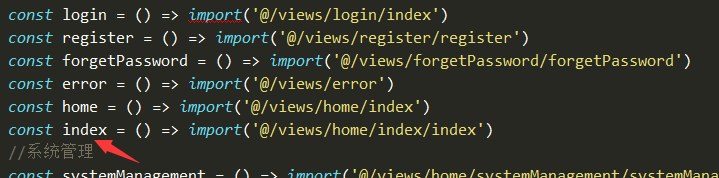
所以我们要用map对后台数据做映射所以我在router文件里新建一个router.js
const login = () => import('@/views/login/index')

const register = () => import('@/views/register/register')

const forgetPassword = () => import('@/views/forgetPassword/forgetPassword')

const error = () => import('@/views/error')

const home = () => import('@/views/home/index')

const index = () => import('@/views/home/index/index')

var map = new Map()

map.set("login", () => import('@/views/login/index'))

map.set("register", () => import('@/views/register/register'))//注册

map.set("forgetPassword", () => import('@/views/forgetPassword/forgetPassword'))//忘记密码

map.set("error", () => import('@/views/error'))

map.set("home", () => import('@/views/home/index'))

map.set("index", () => import('@/views/home/index/index'))

//系统管理

map.set("systemManagement", () => import('@/views/home/systemManagement/systemManagement'))

map.set("sealManagement", () => import('@/views/home/systemManagement/sealManagement/sealManagement')) //印章管理

map.set("sealDetail", () => import('@/views/home/systemManagement/sealDetail/sealDetail')) //印章详情

map.set("staffManagement", () => import('@/views/home/systemManagement/staffManagement/staffManagement')) //员工管理

map.set("processManagement", () => import('@/views/home/systemManagement/processManagement/processManagement')) //流程管理

map.set("reportManagement", () => import('@/views/home/systemManagement/reportManagement/reportManagement')) //报表管理

map.set("privilegeManagement", () => import('@/views/home/systemManagement/privilegeManagement/privilegeManagement')) //权限管理

//数据统计

map.set("dataStatistics", () => import('@/views/home/dataStatistics/dataStatistics'))

//用印中心

map.set("chapterCenter", () => import('@/views/home/chapterCenter/chapterCenter'))

map.set("applicationChapter", () => import('@/views/home/chapterCenter/applicationChapter/applicationChapter')) //申请用章

map.set("approvalProcessing", () => import('@/views/home/chapterCenter/approvalProcessing/approvalProcessing')) //审批处理

map.set("authorizationManagement", () => import('@/views/home/chapterCenter/authorizationManagement/authorizationManagement')) //授权管理

map.set("auditProcessing", () => import('@/views/home/chapterCenter/auditProcessing/auditProcessing')) //审计处理

map.set("usageRecord", () => import('@/views/home/chapterCenter/usageRecord/usageRecord')) //使用记录

map.set("myApplication", () => import('@/views/home/chapterCenter/myApplication/myApplication')) //我的申请

//平台管理

map.set("platformManagement", () => import('@/views/home/platformManagement/platformManagement'))

map.set("companyManagement", () => import('@/views/home/platformManagement/companyManagement/companyManagement')) //公司管理

map.set("accountManagement", () => import('@/views/home/platformManagement/accountManagement/accountManagement')) //账号管理

map.set("sealMigration", () => import('@/views/home/platformManagement/sealMigration/sealMigration')) //印章迁移

//获取动态路由方法

function getRouterList(successCallback){

    //登录之后获取动态路由

    let userRouter = ''

    let role_router=''

    role_router=localStorage.getItem('role_router')

    userRouter = JSON.parse(role_router).children

    digui(userRouter)

    function digui(userRouter = []) {

        userRouter.forEach(function(item, index) {

            if (item.children != null && item.children.length > ) {

                digui(item.children)

            }

            item.component = map.get(item.component)//通过映射找到我们定义好的组件

        })

    }

    //固定的路由

    const routes = [{

            path: '/login',

            name: 'login',

            meta: {

                key: ,

                title: '登录',

                requireAuth:true,//验证用户能不能跳转这个页面true能false不能

            },

            component: login

        }, {

            path: '/register',

            name: 'register',

            meta: {

                key: ,

                title: '注册',

                requireAuth:true,//验证用户能不能跳转这个页面true能false不能

            },

            component: register

        }, {

            path: '/forgetPassword',

            name: 'forgetPassword',

            meta: {

                key: ,

                title: '忘记密码',

                requireAuth:true,//验证用户能不能跳转这个页面true能false不能

            },

            component: forgetPassword

        }, {

            path: '/error',

            name: 'error',

            meta: {

                key: ,

                title: '页面不存在',

                requireAuth:true,//验证用户能不能跳转这个页面true能false不能

            },

            component: error

        },

        {

            path: '/',

            name: 'home',

            redirect: {

                name: 'index'

            },

            meta: {

                title: '首页',

                requireAuth:true,//验证用户能不能跳转这个页面true能false不能

            },

            component: home,

            children: [

                //我们后台获取到的路由放在这里

            ],

        }

    ]

    //把筛选的路由添加进去name: 'home',的children

    routes[].children=userRouter

    console.log('',routes)

    successCallback(routes)

}

export default {

    getRouterList

}
把我创建的方法暴露出去
而我们router文件下了index.js里放我们固定的路由表如下
import Vue from 'vue'

import Router from 'vue-router'

const login = () => import('@/views/login/index')

const register = () => import('@/views/register/register')

const forgetPassword = () => import('@/views/forgetPassword/forgetPassword')

const error = () => import('@/views/error')

const home = () => import('@/views/home/index')

const index = () => import('@/views/home/index/index')

Vue.use(Router)

//固定的路由

const routes = [{

        path: '/login',

        name: 'login',

        meta: {

            key: ,

            title: '登录',

            requireAuth:true,//验证用户能不能跳转这个页面true能false不能

        },

        component: login

    },{

        path: '/register',

        name: 'register',

        meta: {

            key: ,

            title: '注册',

            requireAuth:true,//验证用户能不能跳转这个页面true能false不能

        },

        component: register

    },{

        path: '/forgetPassword',

        name: 'forgetPassword',

        meta: {

            key: ,

            title: '忘记密码',

            requireAuth:true,//验证用户能不能跳转这个页面true能false不能

        },

        component: forgetPassword

    },{

        path: '/error',

        name: 'error',

        meta: {

            key: ,

            title: '页面不存在',

            requireAuth:true,//验证用户能不能跳转这个页面true能false不能

        },

        component: error

    },

    {

        path: '/',

        name: 'home',

        redirect: {

            name: 'index'

        },

        meta: {

            title: '首页',

            requireAuth:true,//验证用户能不能跳转这个页面true能false不能

        },

        component: home,

        children: [{

                path: '/index',

                meta: {

                    title: '首页',

                    icon: '',

                    tab_index: , //给头部导航获取的

                    requireAuth:true,//验证用户能不能跳转这个页面true能false不能

                },

                name: 'index',

                component: index

            },

        ],

    }

]

const router =new Router({

    routes,

})

export default router
下面是我们如何动态添加路由了在main.js里全局引入刚刚创建的router.js

后面是使用添加动态路由在mian.js里加入以下代码
//防止刷新当前页面时动态路由还没挂在vue上出现空白页面,在挂载之前router.addRoutes(routerlist)

if(localStorage.getItem('role_router')){

    let routerlist=[]
  //这里是调用router.js里的方法拿到动态路由

    Vue.prototype.ROUTER.getRouterList(function(data){

        routerlist=data

    })
  //动态添加路由

    router.addRoutes(routerlist)

}

// 路由拦截器

router.beforeEach((to, from, next) => {

    console.log(to)

    if(localStorage.getItem('role_router')){

        if (to.meta.requireAuth==true) {

            next();

        }else {

            Vue.prototype.$message({

                message: '您没有权限进入'+to.meta.title+'页面,请联系系统管理员',

                type: 'warning'

            });

            next({

                path:from.fullPath,//待在此页面

            });

        }

    }else{

        localStorage.setItem('role_router',)

        Vue.prototype.$message({

            message: '您没有登录请登录',

            type: 'warning'

        });

        next({

            path:'/login',//待在此页面

        });

    }

})
vue的动态路由(登录之后拿到动态路由通过addRouters()动态添加路由)的更多相关文章
- vue动态添加路由addRoutes之不能将动态路由存入缓存
在我不知道vue的路由还可以通过addRoutes动态添加时,我只知道vue的路由都是写死在路由表中的,每当跳转时再去加载相应的路由.直到在一个新公司接到需要根据用户的权限显示不同的菜单的需求时才知道 ...
- vue-element-admin登录逻辑,以及动态添加路由,显示侧边栏
这段时间在研究element-admin,感觉这个库有许多值得学习的地方,我学习这个库的方法是,先看它的路由,顺着路由,摸清它的逻辑,有点像顺藤摸瓜. 这个库分的模块非常清晰,适合多人合作开发项目,但 ...
- vue 动态添加路由 require.context()
之前的写法 'use strict' import Vue from 'vue' import MessageBroadcast from 'page/MessageBroadcast' import ...
- Vue页面权限控制和动态添加路由
原文转自:点我 页面权限控制 页面权限控制是什么意思呢? 就是一个网站有不同的角色,比如管理员和普通用户,要求不同的角色能访问的页面是不一样的.如果一个页面,有角色越权访问,这时就得做出限制了. Vu ...
- vue动态添加路由,跳转页面时,页面报错路由重复:vue-router.esm.js?8c4f:16 [vue-router] Duplicate named routes definition: { name: "Login", path: "/login" }
之前用了一个vue-element-admin做了一个小项目,里面用到了动态添加路由,动态展示侧边栏, 当我切换页面时,控制台总是警告提示路由重复,连续跳转几次页面后,控制台就被这些警告占满了, 于是 ...
- 一步步带你做vue后台管理框架(三)——登录功能
系列教程<一步步带你做vue后台管理框架>第三课 github地址:vue-framework-wz 线上体验地址:立即体验 <一步步带你做vue后台管理框架>第一课:介绍框架 ...
- vue-router 动态添加 路由
动态添加路由可以用了做权限管理.登录后服务器端返回权限菜单,前端动态添加路由 然后在设置菜单 1.vue-router 有方法router.addRoutes(routes) 动态添加更多的路由规则 ...
- Vue + Element UI 实现权限管理系统 前端篇(十):动态加载菜单
动态加载菜单 之前我们的导航树都是写死在页面里的,而实际应用中是需要从后台服务器获取菜单数据之后动态生成的. 我们在这里就用上一篇准备好的数据格式Mock出模拟数据,然后动态生成我们的导航菜单. 接口 ...
- Vue小项目二手书商城:(一)准备工作、组件和路由
本项目基于vue2.5.2,与低版本部分不同之处会在(五)参考资料中提出 完整程序:https://github.com/M-M-Monica/bukesi 实现内容: 资源准备(mock数据) 组件 ...
随机推荐
- Python基础:编码规范(4)
1.命名规范 Python中不同代码元素采用不同命名方式: ◊ 包名:全部小写字母,中间可以由点分隔开.作为命名空间,包名需具有唯一性. ◊ 模块名:全部小写字母,如果是多个单词构成,使用下划线分隔. ...
- 【HTML+CSS】在书写代码时的便捷应用
创建多个相同元素: <!DOCTYPE html> <html> <head> <meta charset="UTF-8"> < ...
- Git——开启区分大小写
前言 默认情况下git是忽略区分大小写的,多人合作的情况下不规范很容易造成问题,所以开启区分大小写. 步骤 开启 全局开启 git config --global core.ignorecase fa ...
- 【LUOGU???】WD与地图 整体二分 线段树合并
题目大意 有一个简单有向图.每个点有点权. 有三种操作: 修改点权 删除一条边 询问和某个点在同一个强连通分量中的点的前 \(k\) 大点权和. \(n\leq 100000,m,q\leq 2000 ...
- 深入理解JVM(7)——线程安全和锁优化
Java中的线程安全 按照线程安全的“安全程度”由强至弱来排序,可以将Java语中各种操作共享的数据分为以下5类:不可变. 绝对线程安全. 相对线程安全. 线程兼容和线程对立. 1.不可变 不变的对象 ...
- Java集合的总结
参考博客: http://www.jianshu.com/p/63e76826e852 http://www.cnblogs.com/LittleHann/p/3690187.html https:/ ...
- Day054--MySQL, 创建用户和授权, 数据类型, 枚举和集合, 约束,唯一, 主键,外键
创建用户和授权 1.创建用户: # 指定ip:192.118.1.1的mjj用户登录 create user 'mjj'@'192.118.1.1' identified by '123'; # 指定 ...
- Unity 子弹移动以及碰撞条件
一.子弹移动 游戏物体移动最主要的是获取一个刚体组件,再对这个刚体组件添加一个向前的力: 具体代码: public class BulletCtrl : MonoBehaviour { ; publi ...
- idea创建springboot Web项目
一.File —— New —— Project 二.next 三.选择你要的骨架,然后 next.个人觉的这些不用选,因为就是帮你建了几个文件夹,导入了几个jar包依赖而已. 四.Finish 五. ...
- Exp2 后门原理与实践 20164314 郭浏聿
1.实践内容 (1)使用nc实现win,Linux间的后门连接. 热身 (2)使用netcat获取主机操作Shell,cron启动. (3)使用socat获取主机操作Shell, 任务计划启动. (4 ...