
(转载)python调用shell命令之os 、commands、subprocess
linux系统下进入python交互式环境:
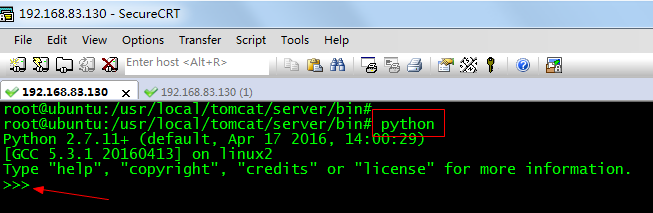
一、os 模块
1.1.os模块的exec方法簇:
python交互界面中:
In [1]: import os

In [2]: os.exec

os.execl    os.execlp   os.execv    os.execvp

os.execle   os.execlpe  os.execve   os.execvpe

In [2]: os.execl?

Type:        function

String form: <function execl at 0xb73673e4>

File:        /home/shifeng/anaconda/lib/python2.7/os.py

Definition:  os.execl(file, *args)

Docstring:

execl(file, *args)

Execute the executable file with argument list args, replacing the

current process.
os.exec+Tab键智能提示能够看到有8个,help(os.execl)等能够找到其使用方法说明。
1.2.os模块的system方法
system方法会创建子进程执行外部程序。方法仅仅返回外部程序的执行结果。0表示执行成功。
In [10]: os.system("echo \"hello world\"")

hello world

Out[10]: 0

In [11]: os.system("ls")

all_roc_plot.py~  task1_feature_all2.py  test.py   test.sh   ui_without_buy~

scrapy_work	  test			 test.py~  test.sh~

Out[11]: 0

In [12]: os.system("cat test.sh")

echo "hello world"

Out[12]: 0

In [13]: os.system("sh test.sh")

hello world

Out[13]: 0
如上。一些主要的shell命令,传入os.system()參数里面,便能运行。
只是无法得到命令的返回值。
1.3.os模块popen方法
popen方法可以得到shell命令的返回值。os.popen(cmd)后,须要再调用read()或者readlines()这两个命令。输出结果。
In [14]: os.popen("ls")

Out[14]: <open file 'ls', mode 'r' at 0xb67efd30>

In [15]: os.popen("ls").read()

Out[15]: 'all_roc_plot.py~\nscrapy_work\ntask1_feature_all2.py\ntest\ntest.py\ntest.py~\ntest.sh\ntest.sh~\nui_without_buy~\n'

In [16]: os.popen("ls").readlines()

Out[16]:

['all_roc_plot.py~\n',

 'scrapy_work\n',

 'task1_feature_all2.py\n',

 'test\n',

 'test.py\n',

 'test.py~\n',

 'test.sh\n',

 'test.sh~\n',

 'ui_without_buy~\n']

In [17]: s = os.popen("ls").read()

In [18]: for i in s.split("\n"):

   ....:     print i

   ....:

all_roc_plot.py~

scrapy_work

task1_feature_all2.py

test

test.py

test.py~

test.sh

test.sh~

ui_without_buy~
注意。read()或者readlines()后,其每一个元素包括一个回车符\n。
二、commands模块
使用commands模块的getoutput方法,这样的方法同popend的差别在于popen返回的是一个文件句柄,而本方法将外部程序的输出结果当作字符串返回。非常多情况下用起来要更方便些。
主要方法:
* commands.getstatusoutput(cmd) 返回(status, output)
* commands.getoutput(cmd) 仅仅返回输出结果
* commands.getstatus(file) 返回ls -ld file的运行结果字符串,调用了getoutput。不建议使用此方法
In [8]: import commands

In [9]: commands.getoutput("ls")

Out[9]: 'all_roc_plot.py~\nscrapy_work\ntask1_feature_all2.py\ntest\ntest.py\ntest.py~\ntest.sh\ntest.sh~\nui_without_buy~'

In [10]: commands.getstatusoutput("ls")

Out[10]:

(0,

 'all_roc_plot.py~\nscrapy_work\ntask1_feature_all2.py\ntest\ntest.py\ntest.py~\ntest.sh\ntest.sh~\nui_without_buy~')
三、subprocess模块
使用subprocess模块能够创建新的进程。能够与新建进程的输入/输出/错误管道连通。并能够获得新建进程运行的返回状态。使用subprocess模块的目的是替代os.system()、os.popen*()、commands.*等旧的函数或模块。
3.1.subprocess.call(["some_command","some_argument","another_argument_or_path"])
subprocess.call(command,shell=True)
使用subprocess模块能够创建新的进程,能够与新建进程的输入/输出/错误管道连通。并能够获得新建进程运行的返回状态。使用subprocess模块的目的是替代os.system()、os.popen*()、commands.*等旧的函数或模块。
In [11]: from subprocess import  call

In [12]: call(["ls","-l"])

总用量 40

-rw-rw-r-- 1 shifeng shifeng  3266  5月  3 14:14 all_roc_plot.py~

drwxrwxr-x 6 shifeng shifeng  4096  6月 18 16:59 scrapy_work

-rw-rw-r-- 1 shifeng shifeng 12786  6月 10 10:20 task1_feature_all2.py

drwxrwxr-x 2 shifeng shifeng  4096  6月  8 11:36 test

-rw-rw-r-- 1 shifeng shifeng  3649  6月 19 10:21 test.py

-rw-rw-r-- 1 shifeng shifeng   255  6月 11 21:21 test.py~

-rw-rw-r-- 1 shifeng shifeng    19  6月 25 19:49 test.sh

-rw-rw-r-- 1 shifeng shifeng     0  6月 25 19:49 test.sh~

-rw-rw-r-- 1 shifeng shifeng     0  4月  8 22:15 ui_without_buy~

Out[12]: 0

In [13]: from subprocess import  Popen

In [14]: Popen(["ls","-l"])

Out[14]: <subprocess.Popen at 0xb67c91ac>

In [15]: 总用量 40

-rw-rw-r-- 1 shifeng shifeng  3266  5月  3 14:14 all_roc_plot.py~

drwxrwxr-x 6 shifeng shifeng  4096  6月 18 16:59 scrapy_work

-rw-rw-r-- 1 shifeng shifeng 12786  6月 10 10:20 task1_feature_all2.py

drwxrwxr-x 2 shifeng shifeng  4096  6月  8 11:36 test

-rw-rw-r-- 1 shifeng shifeng  3649  6月 19 10:21 test.py

-rw-rw-r-- 1 shifeng shifeng   255  6月 11 21:21 test.py~

-rw-rw-r-- 1 shifeng shifeng    19  6月 25 19:49 test.sh

-rw-rw-r-- 1 shifeng shifeng     0  6月 25 19:49 test.sh~

-rw-rw-r-- 1 shifeng shifeng     0  4月  8 22:15 ui_without_buy~
1、subprocess.call(command, shell=True)#会直接打印出结果。
2、subprocess.Popen(command, shell=True) 也能够是subprocess.Popen(command, stdout=subprocess.PIPE, shell=True) 这样就能够输出结果了。假设command不是一个可运行文件,shell=True是不可省略的。shell=True意思是shell下运行command。
#========================下面转载============
四、 众方法的比較以及总结
4.1. 关于 os.system
os.system("some_command with args")将命令以及參数传递给你的系统shell。这非常好,由于你能够用这样的方法同一时候执行多个命令而且能够设置管道以及输入输出重定向。比方:
os.system("some_command < input_file | another_command > output_file")
然而,尽管这非常方便,可是你须要手动处理shell字符的转义,比方空格等。此外。这也仅仅能让你执行简单的shell命令并且不能执行外部程序。
4.2. 关于os.popen
使用stream = os.popen("some_command with args")也能做与os.system一样的事。与os.system不同的是os.popen会给你一个像文件的对象从而你能够使用它来訪问哪个程序的标准输入、输出。
并且popen还有三个变种都是在I/O处理上有轻微不同。假如你通过一个字符串传递全部东西。你的命令会传递给shell;假设你通过一个列表传递他们。你不用操心逃避不论什么事。
4.3. 关于subprocess.popen
subprocess模块的Popen类,意图作为os.popen的替代,可是由于其非常全面所以比os.popen要显得略微复杂。使用起来须要学习哦~~。
比方你能够使用 print Popen("echo Hello World", stdout=PIPE, shell=True).stdout.read() 来替代 print os.popen("echo Hello World").read()。
可是相比之下它使用一个统一的类包含4中不同的popen函数还是不错的。
4.4. 关于subprocess.call
subprocess模块的call函数。
它基本上就像Popen类并都使用同样的參数,可是它仅仅简单的等待命令完毕并给你返回代码。比方:
return_code = subprocess.call("echo Hello World", shell=True)
五、实战
见之前博文:Python脚本之安装linux源码包-Jenkins 。
(转载)python调用shell命令之os 、commands、subprocess的更多相关文章
- python 调用 shell 命令方法
python调用shell命令方法 1.os.system(cmd) 缺点:不能获取返回值 2.os.popen(cmd) 要得到命令的输出内容,只需再调用下read()或readlines()等 ...
- python 调用shell命令三种方法
#!/usr/bin/python是告诉操作系统执行这个脚本的时候,调用/usr/bin下的python解释器: #!/usr/bin/env python这种用法是为了防止操作系统用户没有将pyth ...
- 用Python调用Shell命令
Python经常被称作“胶水语言”,因为它能够轻易地操作其他程序,轻易地包装使用其他语言编写的库,也当然可以用Python调用Shell命令. 用Python调用Shell命令有如下几种方式: 第一种 ...
- python 调用 shell 命令
记录 python 调用 shell 命令的方法 加载 os 模块, 使用 os 类 import os; os.system("ls /");
- python 调用shell命令的方法
在python程序中调用shell命令,是件很酷且常用的事情…… 1. os.system(command) 此函数会启动子进程,在子进程中执行command,并返回command命令执行完毕后的退出 ...
- Python 调用 Shell命令
python程序中调用shell命令,是件很酷且常用的事情今天来总结一下 1.使用os模块 的 system 此函数会启动子进程,在子进程中执行command,并返回comman ...
- Python调用shell命令常用方法
Python调用shell指令 方法一.使用os模块的system方法:os.system(cmd),其返回值是shell指令运行后返回的状态码,int类型,0表示shell指令成功执行,256表示未 ...
- python调用shell命令
1.subprocess介绍 官方推荐 subprocess模块,os.system(command) 这个废弃了 亲测 os.system 使用sed需要进行字符转义,非常麻烦 python3 su ...
- python调用shell命令之三慷慨法
preface: 忙于近期的任务,须要用到libsvm的一些命令.如在终端执行java svm_train train_file model_file. pythonsubset.py file tr ...
随机推荐
- C++ 变长模板参数
转载自: http://www.cnblogs.com/liyiwen/archive/2013/04/13/3018608.html C++11 语言核心的改进中,最为关注的有 rvalue ref ...
- python 的生成器,yield的使用
生成器 :含有yield 的关键字的函数就是一个生成器. 生成器的运行原理:调用函数时,当函数运行到yield时停止,返回值,下次调用时,就从这次的yield出继续执行,局部变量还是使用这次变量的值. ...
- linux下堆溢出unlink的一个简单例子及利用
最近认真学习了下linux下堆的管理及堆溢出利用,做下笔记:作者作为初学者,如果有什么写的不对的地方而您又碰巧看到,欢迎指正. 本文用到的例子下载链接https://github.com/ctfs/w ...
- Set 里的元素是不能重复的,那么用什么方法来区分重复与否呢?是用==还 是 equals()?它们有何区别?
Set 里的元素是不能重复的,元素重复与否是使用 equals()方法进行判断的.equals()和==方法决定引用值是否指向同一对象 equals()在类中被覆盖,为的是当两个分离的对象的内容和类型 ...
- java学习 之 java基本数据类型
java 8个基本数据类型 public class BasicDataType { public static void main(String args[]) { //数据类型 //Byte Sy ...
- nl命令
nl (Number of Lines) 将指定的文件添加行号标注后写到标准输出.如果不指定文件或指定文件为"-" ,程序将从标准输入读取数据. 选项: -b, --body-nu ...
- 服务器启动socket服务报错 java.net.BindException:Cannot assign requested address
错误信息: 2017-06-13 11:18:00,865 [GateServer.java:82][ERROR]:启动服务出错了java.net.BindException: Cannot ass ...
- spring boot vuejs
项目介绍 Spring Boot 2.0 + VueJs 2.0 开发项目示例 GitHub: https://github.com/fqybzhangji/spring-boot-vue 码云: h ...
- thinkphp使用PHPExcel导出
thinkphp3. 将PHPExcel下载包放在项目\ThinkPHP\Library\Vendor\PHPExcel thinkphp5 将PHPExcel下载包放在项目\vendor\PHPEx ...
- 使用wps插件,实现word转PDF
项目需求:不打算用office自带的组件实现word转pdf操作 环境需求:安装wps2016专业版 新建一个控制台应用程序 添加引用:在COM下 Kingsoft Add-In Designer和U ...