
最简单的 springboot 发送邮件,使用thymeleaf模板
1,导入需要的包
        <dependency>

            <groupId>org.springframework.boot</groupId>

            <artifactId>spring-boot-starter-thymeleaf</artifactId>

        </dependency>

         <dependency>

            <groupId>org.springframework.boot</groupId>

            <artifactId>spring-boot-starter-mail</artifactId>

        </dependency>
2,添加配置
添加配置前先要到邮箱设置里开启SMTP服务

application.yml
spring:

  mail:

    host: smtp.qq.com

    username: xxxxxxx@qq.com #发送邮件人的邮箱

    password: xxxxx #这个密码是邮箱设置里SMTP服务生成的授权码

    default-encoding: UTF-8
3,编写发送邮箱的类
接收类MailDO.java
package com.bootdo.oa.domain;

import java.util.Map;

/**

 * 邮件接收参数

 */

public class MailDO {

    //标题

    private String title;

    //内容

    private String content;

    //接收人邮件地址

    private String email;

    //附加,value 文件的绝对地址/动态模板数据

    private Map<String, Object> attachment;

    public String getTitle() {

        return title;

    }

    public void setTitle(String title) {

        this.title = title;

    }

    public String getContent() {

        return content;

    }

    public void setContent(String content) {

        this.content = content;

    }

    public String getEmail() {

        return email;

    }

    public void setEmail(String email) {

        this.email = email;

    }

    public Map<String, Object> getAttachment() {

        return attachment;

    }

    public void setAttachment(Map<String, Object> attachment) {

        this.attachment = attachment;

    }

}
MailService.java
package com.bootdo.oa.service;

import com.bootdo.oa.domain.MailDO;

public interface MailService {

    void sendTextMail(MailDO mailDO);

    void sendHtmlMail(MailDO mailDO,boolean isShowHtml);

    void sendTemplateMail(MailDO mailDO);

}
MailServiceImpl.java
package com.bootdo.oa.service.impl;

import com.bootdo.common.exception.SystemException;

import com.bootdo.oa.domain.MailDO;

import com.bootdo.oa.service.MailService;

import org.slf4j.Logger;

import org.slf4j.LoggerFactory;

import org.springframework.beans.factory.annotation.Autowired;

import org.springframework.beans.factory.annotation.Value;

import org.springframework.core.io.FileSystemResource;

import org.springframework.mail.MailException;

import org.springframework.mail.SimpleMailMessage;

import org.springframework.mail.javamail.JavaMailSender;

import org.springframework.mail.javamail.MimeMessageHelper;

import org.springframework.scheduling.annotation.Async;

import org.springframework.stereotype.Service;

import org.thymeleaf.TemplateEngine;

import org.thymeleaf.context.Context;

import javax.mail.MessagingException;

import javax.mail.internet.MimeMessage;

import java.io.File;

/**

 * 发送邮件

 */

@Service

public class MailServiceImpl implements MailService {

    private final static Logger log = LoggerFactory.getLogger(MailServiceImpl.class);

    //template模板引擎

    @Autowired

    private TemplateEngine templateEngine;

    @Autowired

    private JavaMailSender javaMailSender;

    @Value("${spring.mail.username}")

    private String from;

    /**

     * 纯文本邮件

     * @param mail

     */

    @Async //不解释不懂自行百度,友情提示:有坑

    @Override

    public void sendTextMail(MailDO mail){

        //建立邮件消息

        SimpleMailMessage message = new SimpleMailMessage();

        message.setFrom(from); // 发送人的邮箱

        message.setSubject(mail.getTitle()); //标题

        message.setTo(mail.getEmail()); //发给谁  对方邮箱

        message.setText(mail.getContent()); //内容

        try {

            javaMailSender.send(message); //发送

        } catch (MailException e) {

            log.error("纯文本邮件发送失败->message:{}",e.getMessage());

            throw new SystemException("邮件发送失败");

        }

    }

    /**

     * 发送的邮件是富文本(附件,图片,html等)

     * @param mailDO

     * @param isShowHtml 是否解析html

     */

    @Async

    @Override

    public void sendHtmlMail(MailDO mailDO, boolean isShowHtml) {

        try {

            MimeMessage mimeMessage = javaMailSender.createMimeMessage();

            //是否发送的邮件是富文本(附件,图片,html等)

            MimeMessageHelper messageHelper = new MimeMessageHelper(mimeMessage,true);

            messageHelper.setFrom(from);// 发送人的邮箱

            messageHelper.setTo(mailDO.getEmail());//发给谁  对方邮箱

            messageHelper.setSubject(mailDO.getTitle());//标题

            messageHelper.setText(mailDO.getContent(),isShowHtml);//false,显示原始html代码,无效果

            //判断是否有附加图片等

            if(mailDO.getAttachment() != null && mailDO.getAttachment().size() > 0){

                mailDO.getAttachment().entrySet().stream().forEach(entrySet -> {

                    try {

                        File file = new File(String.valueOf(entrySet.getValue()));

                        if(file.exists()){

                            messageHelper.addAttachment(entrySet.getKey(), new FileSystemResource(file));

                        }

                    } catch (MessagingException e) {

                        log.error("附件发送失败->message:{}",e.getMessage());

                        throw new SystemException("附件发送失败");

                    }

                });

            }

            //发送

            javaMailSender.send(mimeMessage);

        } catch (MessagingException e) {

            log.error("富文本邮件发送失败->message:{}",e.getMessage());

            throw new SystemException("邮件发送失败");

        }

    }

    /**

     * 发送模板邮件 使用thymeleaf模板

     * 若果使用freemarker模板

     *     Configuration configuration = new Configuration(Configuration.VERSION_2_3_28);

     *     configuration.setClassForTemplateLoading(this.getClass(), "/templates");

     *     String emailContent = FreeMarkerTemplateUtils.processTemplateIntoString(configuration.getTemplate("mail.ftl"), params);

     * @param mailDO

     */

    @Async

    @Override

    public void sendTemplateMail(MailDO mailDO) {

        try {

            MimeMessage mimeMessage = javaMailSender.createMimeMessage();

            MimeMessageHelper messageHelper = new MimeMessageHelper(mimeMessage,true);

            messageHelper.setFrom(from);// 发送人的邮箱

            messageHelper.setTo(mailDO.getEmail());//发给谁  对方邮箱

            messageHelper.setSubject(mailDO.getTitle()); //标题

            //使用模板thymeleaf

            //Context是导这个包import org.thymeleaf.context.Context;

            Context context = new Context();

            //定义模板数据

            context.setVariables(mailDO.getAttachment());

            //获取thymeleaf的html模板

            String emailContent = templateEngine.process("/mail/mail",context); //指定模板路径

            messageHelper.setText(emailContent,true);

            //发送邮件

            javaMailSender.send(mimeMessage);

        } catch (MessagingException e) {

            log.error("模板邮件发送失败->message:{}",e.getMessage());

            throw new SystemException("邮件发送失败");

        }

    }

}
差点忘了还有个模板 mail.html
放在templates/mail目录下
<!DOCTYPE html>

<html lang="en" xmlns:th="http://www.thymeleaf.org">

<head>

    <meta charset="UTF-8">

    <title>title</title>

</head>

<body>

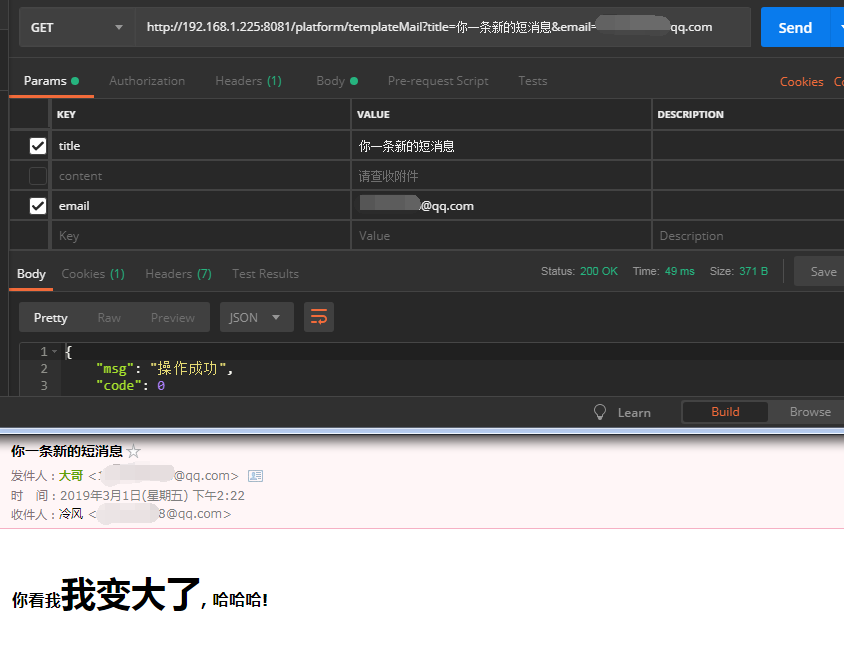
    <h3>你看我<span style="font-size: 35px" th:text="${username}"></span>, 哈哈哈!</h3>

</body>

</html>
4,测试
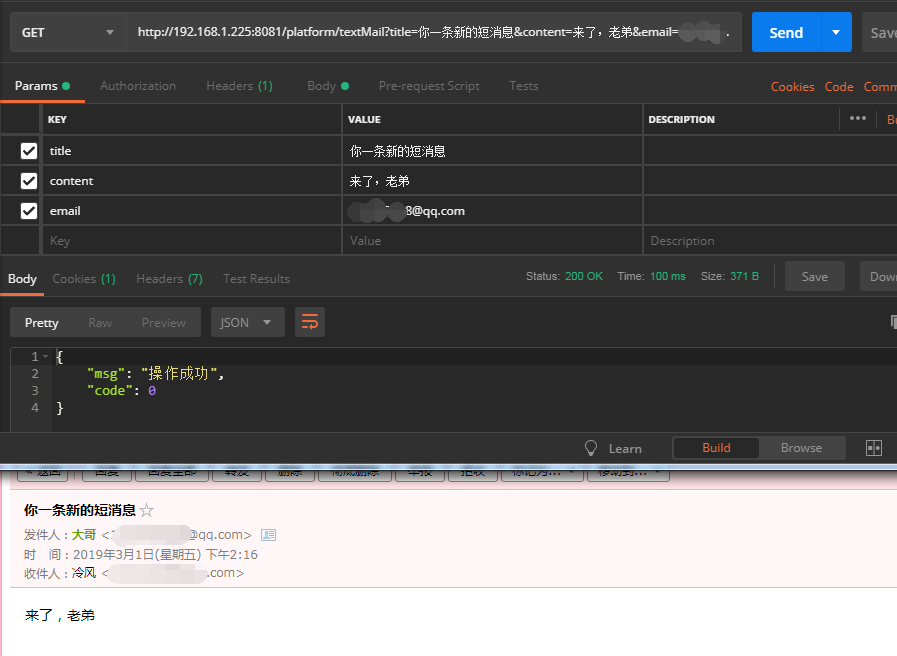
单元测试启动太慢了,直接写controller测试
   @GetMapping("/testMail")

    public R mail(MailDO mailDO){

        try {

            mailService.sendTextMail(mailDO);

        } catch (Exception e) {

            return R.error(e.getMessage());

        }

        return R.ok();

    }

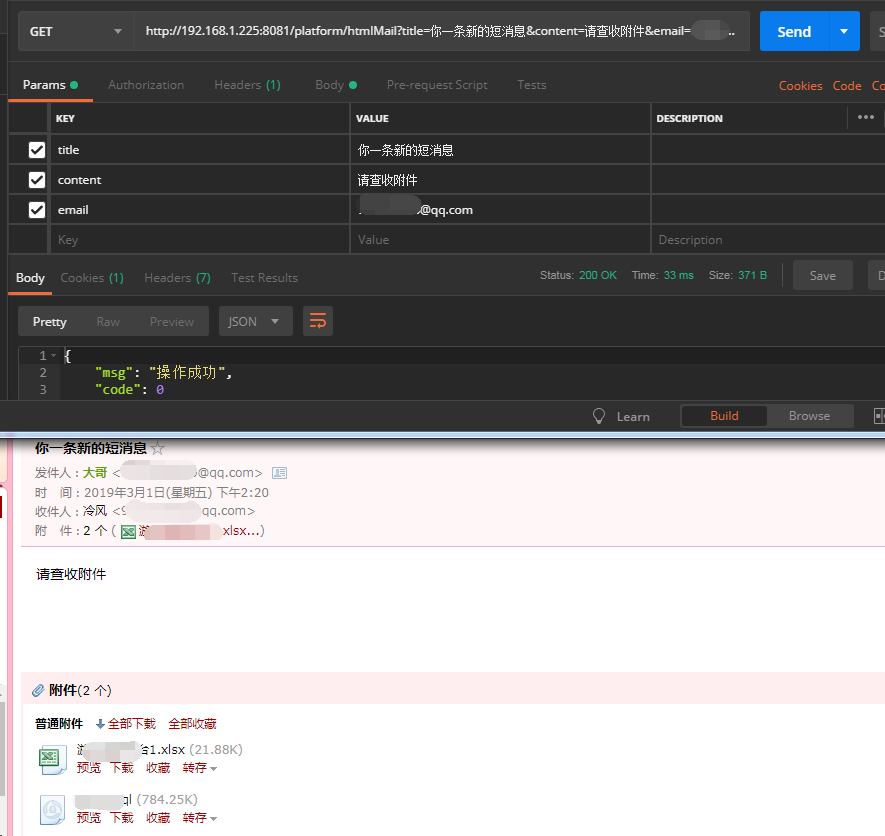
    @GetMapping("/htmlMail")

    public R mail(MailDO mailDO){

        try {

            Map<String,Object> map = new HashMap<>();

            map.put("附件名","附件的绝对路径");

            mailDO.setAttachment(map);

            mailService.sendHtmlMail(mailDO,false);

        } catch (Exception e) {

            return R.error(e.getMessage());

        }

        return R.ok();

    }

   @GetMapping("/templateMail")

    public R mail(MailDO mailDO){

        try {

            Map<String,Object> map = new HashMap<>();

            map.put("username","我变大了");

            mailDO.setAttachment(map);

            mailService.sendTemplateMail(mailDO);

        } catch (Exception e) {

            return R.error(e.getMessage());

        }

        return R.ok();

    }
5,测试结果
收工。
最简单的 springboot 发送邮件,使用thymeleaf模板的更多相关文章
- 7 — 简单了解springboot中的thymeleaf
1.官网学习地址 https://www.thymeleaf.org/doc/tutorials/3.0/usingthymeleaf.html 2.什么是thymeleaf? 一张图看明白: 解读: ...
- 记录一次简单的springboot发送邮件功能
场景:经常在我们系统中有通过邮件功能找回密码,或者发送生日祝福等功能,今天记录下springboot发送邮件的简单功能 1.引入maven <!-- 邮件开发--><dependen ...
- 解决SpringBoot项目中Thymeleaf模板的中文乱码问题
1.使用IDEA创建SpringBoot项目 package com.example.demo; import org.springframework.boot.SpringApplication; ...
- SpringBoot中使用Thymeleaf模板
1.引入pom依赖 <dependency> <groupId>org.springframework.boot</groupId> <artifactId& ...
- SpringBoot 之Thymeleaf模板.
一.前言 Thymeleaf 的出现是为了取代 JSP,虽然 JSP 存在了很长时间,并在 Java Web 开发中无处不在,但是它也存在一些缺陷: 1.JSP 最明显的问题在于它看起来像HTML或X ...
- Spring Boot2(五):使用Spring Boot结合Thymeleaf模板引擎使用总结
一.Thymeleaf概述 一般来说,常用的模板引擎有JSP.Velocity.Freemarker.Thymeleaf . SpringBoot推荐的 Thymeleaf – 语法更简单,功能更强大 ...
- Thymeleaf模板引擎的使用
Thymeleaf模板引擎的使用 1.模板引擎 JSP.Velocity.Freemarker.Thymeleaf 2.springboot推荐使用Thymeleaf模板引擎 特点:语法更简单,功能更 ...
- (二)springboot整合thymeleaf模板
在我们平时的开发中,用了很久的jsp作view显示层,但是标签库和JSP缺乏良好格式的一个副作用就是它很少能够与其产生的HTML类似.所以,在Web浏览器或HTML编辑器中查看未经渲染的JSP模板是非 ...
- SpringBoot系列——Thymeleaf模板
前言 thymeleaf是springboot官方推荐使用的java模板引擎,在springboot的参考指南里的第28.1.10 Template Engines中介绍并推荐使用thymeleaf, ...
随机推荐
- 如何使用Dubbo 2.7.0和Spring boot实现FAT测试(Feature Acceptance Test)
在一个调用链非常长的功能中,如果想修改其中的一个特性,并进行测试,而又不影响该环境的其他用户使用现有功能.特性,例如: 1. A.B.C.D之间通过Dubbo实现远程调用 2. 这些模块可能有一个或者 ...
- Azure Storage用法:使用Blob Storage
Azure Storage 是微软 Azure 云提供的云端存储解决方案,当前支持的存储类型有 Blob.Queue.File 和 Table. 笔者在C# 消息队列-Microsoft Azure ...
- 程序员50题(JS版本)(五)
程序21:有一分数序列:2/1,3/2,5/3,8/5,13/8,21/13...求出这个数列的前20项之和. var arr=[]; var count=20; for(var i=0;i<= ...
- DIV中文字换行显示
居然第一次遇到这种问题,还想了半天到底是怎么回事,为什么明明div设置宽度了,里面的文字超过宽度后居然不换行. (1)word-break属性,可以让浏览器实现在任意位置换行. normal:使用浏览 ...
- SpringBoot集成mybatis配置
一个有趣的现象:传统企业大都喜欢使用hibernate,互联网行业通常使用mybatis:之所以出现这个问题感觉与对应的业务有关,比方说,互联网的业务更加的复杂,更加需要进行灵活性的处理,所以myba ...
- JHipster技术栈定制 - JHipster Registry配置信息加密
本文说明了如何开启和使用JHipster-Registry的加解密功能. 1 整体规划 1.1 名词说明 名词 说明 备注 对称加密 最快速.最简单的一种加密方式,加密(encryption)与解密( ...
- 关于Java中IO流的练习
练习一:统计一个文件calcCharNum.txt中字母‘A’和'a'出现的总次数. package com.test; import java.io.File; import java.io.Fil ...
- Github上html页面(包括CSS样式和JS效果)如何显示出来
在看Github上项目时,发现有的html页面效果能很好的展现出来,而有的则不能.对这个问题很好奇,因此研究了一下,最终做到了将页面展示出来的目的.下面以我的Github的开源项目bootstrap- ...
- 【PAT】B1013 数素数
用埃氏筛筛出素数表(节约时间) 素数的筛选范围不能小了,一定要够大 #include<stdio.h> int main(){ int N,M;scanf("%d %d" ...
- 数据库【mysql】之pymysql
安装模块 pip install pymysql 导入模块 import pymysql 创建链接 conn = pymysql.connect(host=') 创建索引 cursor = conn. ...