
jquerymobile-可折叠内容(Collapsible content)
可能我们在开发中遇到过这样的问题,我们只是看到一个题目或者简单的介绍,然后一点击会在下面展开对应的详细的内容。在jqm中实现这个效果很简单。下面给出一段例子代码:
<!DOCTYPE html>

<html>

<head>

<title>Collapsible Content - 2</title>

<meta name="viewport" content="width=device-width, initial-scale=1">

<link rel="stylesheet" href="http://code.jquery.com/mobile/latest/jquery.mobile.min.css" />

<script src="http://code.jquery.com/jquery-1.7.1.min.js"></script>

<script src="http://code.jquery.com/mobile/latest/jquery.mobile.min.js"></script>

</head>

<body>

<div data-role="page" id="first">

    <div data-role="header">

        <h1>Collapsible Test</h1>

    </div>

    <div data-role="content">

        <div data-role="collapsible">

            <h3>First</h3>

            <p>

                Hello World...

            </p>

        </div>

        <div data-role="collapsible">

            <h3>First</h3>

            <p>

                Hello World...

            </p>

        </div>

        <div data-role="collapsible" data-collapsed-icon="arrow-r" data-expanded-icon="arrow-d">

            <h3>First</h3>

            <p>

                Hello World...

            </p>

        </div>

        <div data-role="collapsible" data-content-theme="c" data-iconpos="right">

              <h3>First</h3>

              <p>

                Hello World again...

              </p>

          </div>

    </div>

</div>

</body>

</html>
页面显示如下:第一个未点开,第二、三、四个都点击开了。
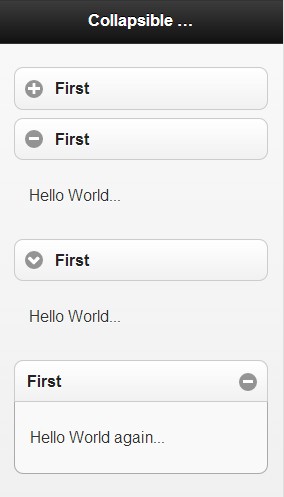
第三个使用了data-collapsed-icon="arrow-r" data-expanded-icon="arrow-d"修改icon。
第四个使用data-content-theme="c"修改显示的主题,使其内容被带有边框的内容包围。 data-iconpos="right"使icon显示在右边。
我们可以将所有带有data-role="collapsible"属性的div,包围在一个<div data-role="collapsible-set">中,使其组成一个整体,但是这样点击其中一个的时候,其他的会自动关闭。这样的显示效果如下:

jquerymobile-可折叠内容(Collapsible content)的更多相关文章
- 电子商务(电销)平台中内容模块(Content)数据库设计明细
以下是自己在电子商务系统设计中的数据库设计经验总结,而今发表出来一起分享,如有不当,欢迎跟帖讨论~ 文章表 (article)|-- 自动编号|-- 文章标题 (title)|-- 文章类别编号 (c ...
- 内容提供者Content Provider
*读取联系人 StringBuilder sb = new StringBuilder(); // 1:得到中间人. ContentResolver resolver = getContentReso ...
- dede首页调用栏目内容{dedefield.content}的方法
Dedecms的功能确实很强大,但是dedecms的全局变量有字节限制,使得我们在使用dedecms制作企业站的时候,首页无法调用大段大段的企业站. 其实dedecms还有另外一种调用大段内容的方法, ...
- Confluence 6 数据库表-内容(Content)
这部分的内容描述了有关 Confluence 存储内容所使用的表格.内容是用户在 Confluence 存储和分享的信息. attachmentdata 附件文件的二进制数据.当 Confluence ...
- SAP CRM和C4C的内容管理(Content Management)
SAP CRM内容管理 SAP CRM使用Attachments这个UI给用户提供内容管理的功能.通过新建按钮可以上传本地文档到CRM系统: 该内容管理支持简单的版本管理功能,用户可点击Check O ...
- sharepoint 2010 如何创建文档库内容类型content type
转:http://biancheng.dnbcw.info/linux/441643.html 这次主要是记录下,如何来创建文档内容类型,例如新建文档的时候,可以选择不同模板,有word,excel文 ...
- DVWA 黑客攻防实战(十五) 绕过内容安全策略 Content Security Policy (CSP) Bypass
看到标题,是否有点疑惑 CPS 是什么东东.简单介绍一下就是浏览器的安全策略,如果 标签,或者是服务器中返回 HTTP 头中有 Content-Security-Policy 标签 ,浏览器会根据标签 ...
- Eclipse代码自动提示(内容辅助content assist)
Eclipse中默认是输入"."后出现自动提示,用于类成员的自动提示,可是有时候我们希望它能在我们输入类的首字母后就出现自动提示,可以节省大量的输入时间(虽然按alt + /会出现 ...
- net5:Theme主题样式的动态变换,在内容页content中操作影响模板页的操作
原文发布时间为:2008-07-29 -- 来源于本人的百度文章 [由搬家工具导入] using System;using System.Data;using System.Configuration ...
随机推荐
- [转]HTTP Error 400. The request hostname is invalid.
一般看到网站提示Bad Request(Invalid Hostname)错误我们都会说是iis,apache出问题了,iis出现这种问题解决办法大概是:IIS> 默认网站> > 属 ...
- matlab中 hold on 与hold off的用法
matlab中 hold on 与hold off的用法 hold on 是当前轴及图形保持而不被刷新,准备接受此后将绘制 hold off 使当前轴及图形不在具备被刷新的性质 hold on 和ho ...
- uva 11168 - Airport
凸包+一点直线的知识: #include <cstdio> #include <cmath> #include <cstring> #include <alg ...
- File上传
http://wenku.baidu.com/link?url=bsufrjDQztceWCUw2gqFeYkL1_95t9yIyV1LfHVYL9URAlpWSK_ALO1bAWSlBdnPXYXE ...
- C++ Socket TCP "Hello World!"
这是C++ SOCKET网络程序中的C/S结构之TCP "Hello World !",共两个控制台工程: //////////////////////////////////// ...
- Visual Studio 2015 Update 1 成功安装后运行 “出现未能正确加载[XXXX]包,此问题可能是由配置更改或安装另一个扩展导致的。” 可能的解决方法
作死装Visual Studio 2015 update 1.安装过程中虽然波澜不惊,但是安装之后运行回报未能正确安装[XXXX]包.找了半天,在stackoverflow中找到了相关的问题,在问题描 ...
- JAVA 内存泄漏与内存溢出
一.Java内存回收机制 不论哪种语言的内存分配方式,都需要返回所分配内存的真实地址,也就是返回一个指针到内存块的首地址.Java中对象是采用new或者反射或者clone或者反序列化的方法创建的, 这 ...
- SIFT算法:特征描述子
SIFT算法:DoG尺度空间生产 SIFT算法:KeyPoint找寻.定位与优化 SIFT算法:确定特征点方向 SIFT算法:特征描述子 目录: 1.确定描述子采样区域 2.生成描述子 2.1 旋 ...
- Android Loader详解一:概述
装载器从android3.0开始引进.它使得在activity或fragment中异步加载数据变得简单.装载器具有如下特性: 它们对每个Activity和Fragment都有效. 他们提供了异步加载数 ...
- wpa_supplicant 配置与应用
概述 wpa_supplicant是wifi客户端(client)加密认证工具,和iwconfig不同,wpa_supplicant支持wep.wpa.wpa2等完整的加密认证,而iwconfig只能 ...