
简单登陆UI设计
简单UI设计
作品效果图:
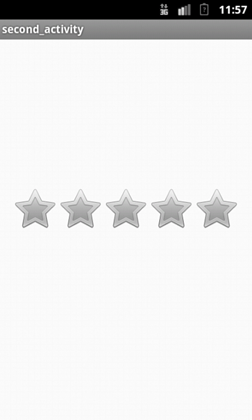
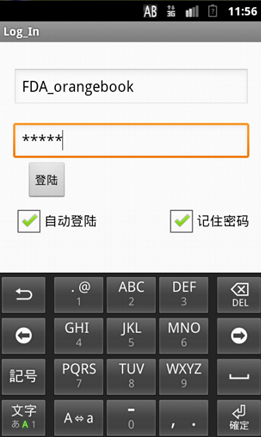
关键技术:
用到了本地化控件:SharedPreferences,简单的说就是本地配置。
四大组件:Intent
基本思路请看代码:
Java代码:
 import android.os.Bundle;

 import android.app.Activity;

 import android.content.Context;

 import android.content.Intent;

 import android.content.SharedPreferences;

 import android.view.Menu;

 import android.view.View;

 import android.view.View.OnClickListener;

 import android.widget.Button;

 import android.widget.CheckBox;

 import android.widget.EditText;

 import android.widget.Toast;

 public class MainActivity extends Activity {

     private Button  logIn;

     private CheckBox rember,auto;

     private EditText name,password;

     private SharedPreferences test;

     private SharedPreferences.Editor editor;

     private boolean haved;

     @Override

     protected void onCreate(Bundle savedInstanceState) {

         super.onCreate(savedInstanceState);

         setContentView(R.layout.activity_main);

         logIn= (Button) findViewById(R.id.button1);

         rember=(CheckBox) findViewById(R.id.remberFlag);

         auto=(CheckBox)    findViewById(R.id.autoRunFlag);

         name=(EditText) findViewById(R.id.name);

         password=(EditText) findViewById(R.id.password);

         final Intent intent=new Intent(MainActivity.this,NewMainActivity.class);

         //打开 或 创建一个名为UserData的xml文件

         test=getSharedPreferences("UserData", Context.MODE_PRIVATE);

         editor=test.edit();

         if(test.getBoolean("auto",false)!=false)

         {

             startActivity(intent);

         }

         if(test.getBoolean("rember", false)!=false)

             {

                 String temp;

                 if((temp=test.getString("name", null))!=null)

                     name.setText(temp);

                 if((temp=test.getString("password",null)) != null)

                     password.setText(temp);

                 rember.setChecked(true);

                 haved=true;

             }

         logIn.setOnClickListener(new View.OnClickListener() {

             @Override

             public void onClick(View v) {

                 if(haved == false )

                 {

                     if(rember.isChecked())

                     {

                         editor.putBoolean("rember", true);

                         editor.putString("name", name.getText().toString());

                         editor.putString("password", password.getText().toString());

                         editor.commit();

                     }

                     if(auto.isChecked()==true)

                         editor.putBoolean("auto", true);

                 }

                 startActivity(intent);

             }

         });

     }

 }
activity_main.xml
 <RelativeLayout xmlns:android="http://schemas.android.com/apk/res/android"

     xmlns:tools="http://schemas.android.com/tools"

     android:layout_width="match_parent"

     android:layout_height="match_parent"

     android:paddingBottom="@dimen/activity_vertical_margin"

     android:paddingLeft="@dimen/activity_horizontal_margin"

     android:paddingRight="@dimen/activity_horizontal_margin"

     android:paddingTop="@dimen/activity_vertical_margin"

     tools:context=".MainActivity" >

     <EditText

         android:id="@+id/name"

         android:layout_width="match_parent"

         android:layout_height="wrap_content"

         android:layout_alignLeft="@+id/password"

         android:layout_alignParentTop="true"

         android:layout_marginTop="16dp"

         android:ems="10" />

     <EditText

         android:id="@+id/password"

         android:layout_width="match_parent"

         android:layout_height="wrap_content"

         android:layout_below="@+id/name"

         android:layout_centerHorizontal="true"

         android:layout_marginTop="18dp"

         android:ems="10" >

         <requestFocus />

     </EditText>

     <Button

         android:id="@+id/button1"

         android:layout_width="wrap_content"

         android:layout_height="wrap_content"

         android:layout_alignLeft="@+id/password"

         android:layout_below="@+id/password"

         android:layout_marginLeft="16dp"

         android:text="登陆" />

     <CheckBox

         android:id="@+id/autoRunFlag"

         android:layout_width="wrap_content"

         android:layout_height="wrap_content"

         android:layout_alignLeft="@+id/password"

         android:layout_below="@+id/button1"

         android:text="自动登陆" />

     <CheckBox

         android:id="@+id/remberFlag"

         android:layout_width="wrap_content"

         android:layout_height="wrap_content"

         android:layout_alignBaseline="@+id/autoRunFlag"

         android:layout_alignBottom="@+id/autoRunFlag"

         android:layout_alignRight="@+id/password"

         android:text="记住密码" />

 </RelativeLayout>
activity_second.xml:
<RelativeLayout xmlns:android="http://schemas.android.com/apk/res/android"

    xmlns:tools="http://schemas.android.com/tools"

    android:layout_width="match_parent"

    android:layout_height="match_parent"

    android:paddingBottom="@dimen/activity_vertical_margin"

    android:paddingLeft="@dimen/activity_horizontal_margin"

    android:paddingRight="@dimen/activity_horizontal_margin"

    android:paddingTop="@dimen/activity_vertical_margin"

    tools:context=".MainActivity" >

    <RatingBar

        android:id="@+id/ratingBar1"

        android:layout_width="wrap_content"

        android:layout_height="wrap_content"

        android:layout_alignParentTop="true"

        android:layout_centerHorizontal="true"

        android:layout_marginTop="170dp" />

</RelativeLayout>
AndroidMainifest中要注册:
 <activity

            android:name="com.example.log_in.NewMainActivity"

            android:label="second_activity" >

        </activity>
简单登陆UI设计的更多相关文章
- JAVA简单的UI设计
手写代码,还是痛苦点,但对布局有再深入的流程理解, 全IDE会更快速.. package SwingGui.sky.com; import javax.swing.*; import java.awt ...
- UI设计学习路线图
文章转载自「开发者圆桌」一个关于开发者入门.进阶.踩坑的微信公众号 这里整理的UI设计学习路线图包含初中高三个部分,你可以通过百度云盘下载观看对应的视频 链接: http://pan.baidu.co ...
- 摇钱树运营小工具UI设计.vsd
去年,我负责公司的一个互联网投融资平台——摇钱树.系统运营过程中,业务和客服那边不断的反馈一些事情让技术这边协助实现.例如,土豪客户忘记登录密码后懒得自己重置,更愿意选择搭讪客服MM:再比如,客户多次 ...
- UI设计中的48dp定律【转】
有朋友建议我偶尔写写技术类的文章,所以我打算开始穿插性的写一些偏技术方面的科普文章,尽量往小白能看懂的方向写,今天我来讲讲UI设计中的48dp定律. 那么先说说什么是dp ?其实对于一个非技术人员要把 ...
- 2017年8个UI设计流行趋势
设计趋势变化的理由需要考虑各种各样的因素.让我们来一起看看2017年的设计流行趋势吧. 应用界面的设计趋势是不断变化的.随着时间的推移他也在不断的成长,进化.虽然有些趋势还有待检验,但我们还是需要不断 ...
- 【Android UI设计与开发】第05期:引导界面(五)实现应用程序只启动一次引导界面
[Android UI设计与开发]第05期:引导界面(五)实现应用程序只启动一次引导界面 jingqing 发表于 2013-7-11 14:42:02 浏览(229501) 这篇文章算是对整个引导界 ...
- UI设计实战篇——利用Bootstrap框架制作查询页面的界面
Bootstrap框架是一个前端UI设计的框架,它提供了统一的UI界面,简化了设计界面UI的过程(缺点是定制了界面,调整的余地不是太大).尤其是现在的响应时布局(我的理解是页面根据不同的分辨率,采用不 ...
- 教你如何用PS制作多款按钮UI设计教程
教你如何用PS制作多款按钮UI设计教程 本文教大家制作按钮的方法 LV. ★ 初入设计,学做按钮.只会套个底色,加个阴影,字体纯白,小聪明的弄个圆角. LV. ★★(描边.字体.内阴影) 看了很多案例 ...
- 10个必备的移动UI设计资源站(转)
创建移动设计模式是非常重要的一步,记住!这是为移动设备设计而不是web.不仅仅是移动屏幕远小于普通的电脑屏幕,关键是鼠标和键盘已经被手指替代了! 当然还有更重要的,说起来很苦逼,我们再也不能使用一种模 ...
随机推荐
- Tomcat - java.lang.UnsupportedClassVersionError:Unsupported major.minor version 51.0 (unable to load class com.microsoft.sqlserver.jdbc.SQLS
今天使用Tomcat连接sql Server 2008 enterprise的时候,报错: HTTP Status 500 - Servlet execution threw an exception ...
- EL标签和JSTL标签---JSP页面的应用
====EL(Expression Language)表达式语言:用于计算和输出存储在标志位置(page.request.session.application)的java对象的值: 1.开启和关闭E ...
- CI笔记6 json 传值
CI3.x 使用json,配合easyui, 其实很简单,走了很多的弯路, 首先在ci的控制器重,建立2个方法,一个用于显示加载view,一个用于echo json,就可以了. 需要注意的是,在ci的 ...
- 初学者自学笔记-this的用法
请注意:这是自学者的笔记,只是个人理解,并非技术分享,如有错误请指正. "this"的意思,简单而言,就是"这个",也就是"当前".谁调用它 ...
- js 中对象属性特性的描述
如何自定义属性的特性? 用对象.属性的特性和自定义的属性的特性有什么区别? 它的四大特性 writable enumerable configable 有什么区别? 先预习一个用对象.属性 ...
- mount 挂载光盘
mount作用 挂载光盘镜像文件.移动硬盘.U盘以及Windows网络共享和UNIX NFS网络共享 mount [-t vfstype] [-o options] device dir mount ...
- php模拟POST请求提交数据
php模拟POST请求提交数据 1.基于fsockopen function phppost00($jsonString){ $URL='https://www.jy.com/phppostok.ph ...
- 在IT学习中的“认识论”
先有“感性认识”,再有“理性认识”.这句经典认识论,在IT领域应用广泛. 一个项目,首先是分析需求,也就是功能层面,这相当于先有“感性认识”:然后才是具体的技术实现,也就是“理性认识”. IT学习分析 ...
- VS 调试相关
最近用VS2013 调试遇到的一点小问题,老年痴呆做一下记录. 1. IIS 用 w3wp.exe 调试: IIS 中的文件系统与工程的保持一致,否则断点不会命中: 发布文件系统后,重启站点对应的应用 ...
- Java反射的理解
反射的作用: 1.运行时检查类的结构 2.运行时更改类的字段值 3.调用类的方法 准备知识: Class类:虚拟机为每一个对象保存的一份对象所属类的清单: static Class for ...