
关于在Django中Json无法序列化datetime的解决办法
我们在网页设计时经常会在前端和后台进行交互,前端回传的方法可以时redirect一个地址加上显式的参数,第二个办法就是使用Ajax结构。那么在传到view函数中进行处理后是需要通过Json格式进行返回给前端,不然前端时不认识返回的数据,此时就需要使用到Json的序列化。
如果是从数据库中取的数据往往时queryset类型,Json无法直接序列化,需要先将其用list转成列表的形式再进行json,此方法可以解决大部分的问题,但是如果数据中包含datetime类型json就会报错。无法对其序列化,显示如下:

看源码,问题出在哪里?
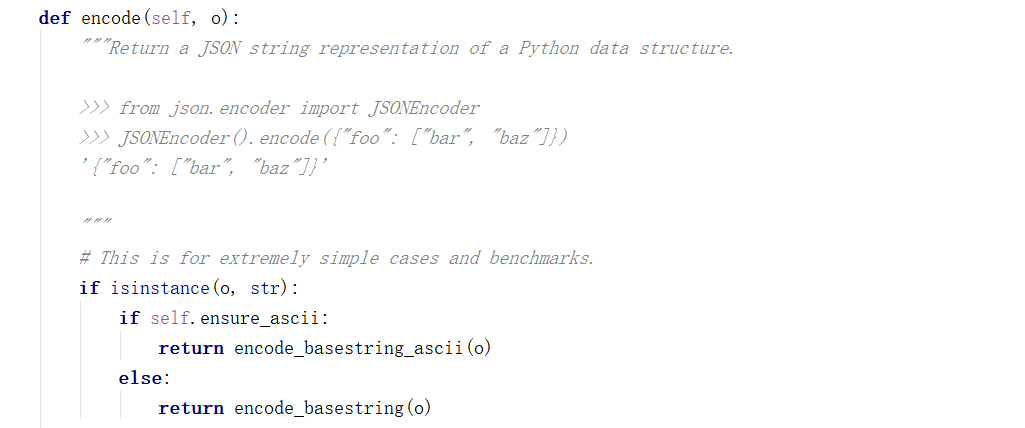
从源码中我们可以看到json只能序列化str类型的数据。那么就没别的办法了吗?
方法一
我们再来看源码:
def dumps(obj, *, skipkeys=False, ensure_ascii=True, check_circular=True,

        allow_nan=True, cls=None, indent=None, separators=None,

        default=None, sort_keys=False, **kw):

    """Serialize ``obj`` to a JSON formatted ``str``.

    If ``skipkeys`` is true then ``dict`` keys that are not basic types

    (``str``, ``int``, ``float``, ``bool``, ``None``) will be skipped

    instead of raising a ``TypeError``.

    If ``ensure_ascii`` is false, then the return value can contain non-ASCII

    characters if they appear in strings contained in ``obj``. Otherwise, all

    such characters are escaped in JSON strings.

    If ``check_circular`` is false, then the circular reference check

    for container types will be skipped and a circular reference will

    result in an ``OverflowError`` (or worse).

    If ``allow_nan`` is false, then it will be a ``ValueError`` to

    serialize out of range ``float`` values (``nan``, ``inf``, ``-inf``) in

    strict compliance of the JSON specification, instead of using the

    JavaScript equivalents (``NaN``, ``Infinity``, ``-Infinity``).

    If ``indent`` is a non-negative integer, then JSON array elements and

    object members will be pretty-printed with that indent level. An indent

    level of 0 will only insert newlines. ``None`` is the most compact

    representation.

    If specified, ``separators`` should be an ``(item_separator, key_separator)``

    tuple.  The default is ``(', ', ': ')`` if *indent* is ``None`` and

    ``(',', ': ')`` otherwise.  To get the most compact JSON representation,

    you should specify ``(',', ':')`` to eliminate whitespace.

    ``default(obj)`` is a function that should return a serializable version

    of obj or raise TypeError. The default simply raises TypeError.

    If *sort_keys* is true (default: ``False``), then the output of

    dictionaries will be sorted by key.

    To use a custom ``JSONEncoder`` subclass (e.g. one that overrides the

    ``.default()`` method to serialize additional types), specify it with

    the ``cls`` kwarg; otherwise ``JSONEncoder`` is used.

    """

    # cached encoder

    if (not skipkeys and ensure_ascii and

        check_circular and allow_nan and

        cls is None and indent is None and separators is None and

        default is None and not sort_keys and not kw):

        return _default_encoder.encode(obj)

    if cls is None:

        cls = JSONEncoder

    return cls(

        skipkeys=skipkeys, ensure_ascii=ensure_ascii,

        check_circular=check_circular, allow_nan=allow_nan, indent=indent,

        separators=separators, default=default, sort_keys=sort_keys,

        **kw).encode(obj)

_default_decoder = JSONDecoder(object_hook=None, object_pairs_hook=None)
json.dumps源码
其中提到了:

所以我们可以尝试自定义JsonEncoder:
class CJSONEncoder(self,o):

    if isinstance(o,datetime.datetime):

        return o.strftime("%Y-%m-%d %H-%M-%S")

    if isinstance(o,datetime.date):

        return o.strftime("%Y-%m-%d")

    else:reture json.JSONEncoder.default(self,o)
然后在Json序列化时使用 json.dumps(data,cls = CJSONEncoder)
方法2:
如果取数据库的时候没有外键的话还可以使用django内置的方法:import django.core中的serializers,专用于序列化queryset类 data = serializers.serialize('json',data) 直接可将queryset序列化,局限就在与对外键的支持不够好。
关于在Django中Json无法序列化datetime的解决办法的更多相关文章
- TypeError: datetime.datetime(2016, 9, 25, 21, 12, 19, 135649) is not JSON serializable解决办法(json无法序列化对象的解决办法)
1.一个简单的方法来修补json模块,这样序列将支持日期时间. import json import datetime json.JSONEncoder.default = lambda self, ...
- ASP.NET中JSON的序列化和反序列化
JSON是专门为浏览器中的网页上运行的JavaScript代码而设计的一种数据格式.在网站应用中使用JSON的场景越来越多,本文介绍 ASP.NET中JSON的序列化和反序列化,主要对JSON的简单介 ...
- ASP.NET 中JSON 的序列化和反序列化
JSON是专门为浏览器中的网页上运行的JavaScript代码而设计的一种数据格式.在网站应用中使用JSON的场景越来越多,本文介绍ASP.NET中JSON的序列化和反序列化,主要对JSON的简单介绍 ...
- ASP.NET中JSON的序列化和反序列化(转)
JSON是专门为浏览器中的网页上运行的JavaScript代码而设计的一种数据格式.在网站应用中使用JSON的场景越来越多,本文介绍ASP.NET中JSON的序列化和反序列化,主要对JSON的简单介绍 ...
- [转]ASP.NET中JSON的序列化和反序列化
本文转自:http://www.cnblogs.com/zhaozhan/archive/2011/01/09/1931340.html JSON是专门为浏览器中的网页上运行的JavaScript代码 ...
- Asp.net中Json的序列化和反序列化(一)
JSON是专门为浏览器中的网页上运行的JavaScript代码而设计的一种数据格式.在网站应用中使用JSON的场景越来越多,本文介绍ASP.NET中JSON的序列化和反序列化,主要对JSON的简单介绍 ...
- 工作总结 EntityFramework中出现DateTime2异常的完美解决办法
EntityFramework中出现DateTime2异常的完美解决办法 今天在使用entityframework往数据库插入数据的时候,突然出现了一个数据类型转换异常的问题: System.Da ...
- IIS关于“ 配置错误 不能在此路径中使用此配置节”的解决办法
IIS关于“ 配置错误 不能在此路径中使用此配置节”的解决办法 原文链接:http://www.cnblogs.com/200325074/p/3679316.html 今天刚安装好IIS8.5, 我 ...
- Excel在任务栏中只显示一个窗口的解决办法
Excel在任务栏中只显示一个窗口的解决办法 以前朋友遇到过这个问题,这次自己又遇到了,习惯了以前的那种在任务栏中显示全部窗口,方便用Alt+Tab键进行切换. 如果同时打开许多Excel工作簿, ...
随机推荐
- Treap-平衡树学习笔记
平衡树-Treap学习笔记 最近刚学了Treap 发现这种数据结构真的是--妙啊妙啊~~ 咳咳.... 所以发一发博客,也是为了加深蒟蒻自己的理解 顺便帮助一下各位小伙伴们 切入正题 Treap的结构 ...
- JAVAEE——BOS物流项目06:分页查询、分区导出Excel文件、定区添加、分页问题总结
1 学习计划 1.分区组合条件分页查询 n 分区分页查询(没有过滤条件) n 分区分页查询(带有过滤条件) 2.分区导出 n 页面调整 n 使用POI将数据写到Excel文件 n 通过输出流进行文件下 ...
- ubuntu安装nginx和设置网站https访问
安装nginx 在控制台 输入 sudo apt-get install nginx 等待安装成功之后.可以打开浏览器.输入你的域名或者ip地址会出现"Welcome to nginx!&q ...
- 通过实例介绍持续集成的应用--基于Jenkins
1.测试工程师为什么要掌握持续集成 一个程序员如果想发布一个产品,他需要编码.编译.测试,发布的过程.对于一个企业来说,如果也想发布一个产品的话,同样的也是需要上述的过程,区别在于企业要发布的产品的需 ...
- bzoj 4596 [Shoi2016]黑暗前的幻想乡 矩阵树定理+容斥
4596: [Shoi2016]黑暗前的幻想乡 Time Limit: 20 Sec Memory Limit: 256 MBSubmit: 559 Solved: 325[Submit][Sta ...
- Spring中的applicationContext.xml实现自动装配
<?xml version="1.0" encoding="UTF-8"?> <beans xmlns="http://www.sp ...
- C语言老司机学Python (二)
标准数据类型: 共6种:Number(数字),String(字符串),List(列表),Tuple(元组),Sets(集合),Dictionary(字典) 本次学习主要是和数据类型混个脸熟,知道每样东 ...
- 阻止微信浏览器/QQ浏览器长按弹框“在浏览器打开”
这个弹框实际上等同于PC环境下的鼠标右键的弹框,因此只要禁止页面的弹框事件就能完美屏蔽该弹框对我们功能带来的影响.程序代码如下: document.oncontextmenu=function(e){ ...
- dojo省份地市级联之省份Dao实现类(五)
dojo省份地市级联之省份Dao实现类 ProvinceDaoImpl.java: /** * */ package com.you.dao.impl; import java.util.ArrayL ...
- 【mysql】mysql密码设置和更改
密码设置: 当用户没有设置密码时: 添加密码: mysqladmin -uroot -password ab12 注:因为开始时root没有密码,所以-p旧密码一项就可以省略了. 当用户存在密码时: ...