
解决SVN Cleanup错误: Failed to run the WC DB work queue associated with
【内容来源自https://www.cnblogs.com/ANCAN-RAY/p/8961832.html】
在svn本地目录更新文件夹时,更新失败。 然后svn提示我,让我cleanup一下,于是就去cleanup。 结果同样失败: Failed to run the WC DB work queue associated with “目录/文件”
-----解决办法
一、首先下载sqlite3 ,安装.如果已经安装请直接开始第二步。 我是window10 64位 具体教程参考这个:https://blog.csdn.net/chaishen10000/article/details/54574060
Sqlite官网地址:http://www.sqlite.org/
Sqlite3文件下载:
1.下载 sqlite-dll-win32-x86-3140100
2.下载 sqlite-tools-win32-x86-3140100
安装:
先在C盘建一个文件夹 sqlite,
1.把 sqlite-dll-win32-x86-3140100 中解压出来的两个文件(sqlite3.def 和 sqlite3.dll)复制到刚才新建的目录(C:\sqlite)中
2.把 sqlite-tools-win32-x86-3140100 中解压出来的文件 sqlite3.exe 复制到C:\sqlite 目录中
3.添加系统环境变量, 在Path变量值后面添加 C:\sqlite(分号不要忘记了),如下图所示:

接下来测试一下是否安装完成
运行cmd,切换到C盘根目录,输入sqlite3,然后回车,如果安装成功的话,会显示sqlite版本号,如下图所示:

OK,Sqlite3已经安装完成了。
二、开始清空队列
步骤一、清空svn的队列
1、进入到需要清理目录的.svn目录中,查看是否存在wc.db文件

F:\svnClient\188\shengshiDoc\.svn>dir

2018/04/27 09:32 3 entries

2018/04/27 09:32 3 format

2018/04/27 09:33 <DIR> pristine

2018/04/27 09:36 <DIR> tmp

2018/04/27 11:35 4,161,536 wc.db --这个文件

2018/04/27 11:35 0 wc.db-journal

4 个文件 4,161,542 字节

2 个目录 29,035,597,824 可用字节
2、执行sqlite3命令查看wc.db数据库的内容
F:\svnClient\188\shengshiDoc\.svn>sqlite3 wc.db "select * from work_queue"

4237|(file-install 113 软件/office2013/SW_DVD5_Office_Professional_Plus_2013_64Bit_ChnSimp_MLF_X18-55285/KMSpico_setup激活版本.exe 1 0 1 1)

4238|(file-install 95 软件/office2013/SW_DVD5_Office_Professional_Plus_2013_64Bit_ChnSimp_MLF_X18-55285/autorun.inf 1 0 1 1)

4239|(file-install 94 软件/office2013/SW_DVD5_Office_Professional_Plus_2013_64Bit_ChnSimp_MLF_X18-55285/readme.htm 1 0 1 1)

4240|(file-install 93 软件/office2013/SW_DVD5_Office_Professional_Plus_2013_64Bit_ChnSimp_MLF_X18-55285/setup.dll 1 0 1 1)

4241|(file-install 93 软件/office2013/SW_DVD5_Office_Professional_Plus_2013_64Bit_ChnSimp_MLF_X18-55285/setup.exe 1 0 1 1)
3、清空work_queue表数据,然后查看是否清楚完毕
F:\svnClient\188\shengshiDoc\.svn>sqlite3 wc.db "delete from work_queue"
4、清空wc_lock表数据
有时候只是清空work_queue表数据不行,还得清空wc_lock表数据,才能cleanup成功
F:\svnClient\188\shengshiDoc\.svn>sqlite3 wc.db "delete from wc_lock
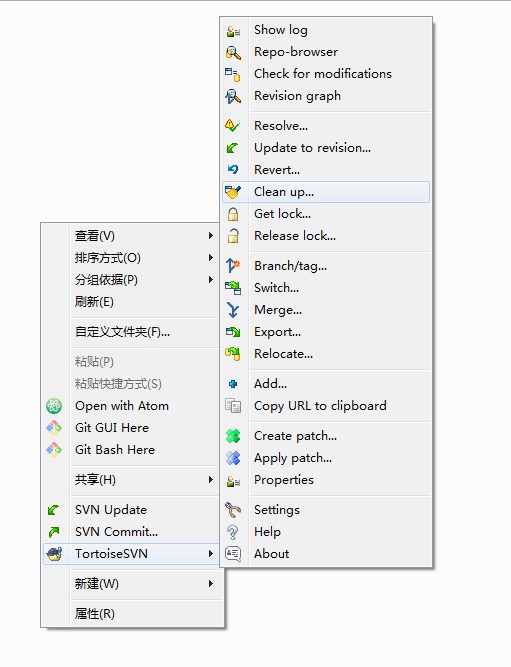
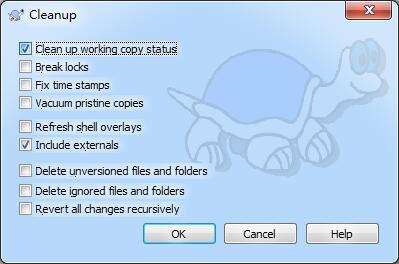
步骤二、运行 Cleanup命令
再运行 Cleanup命令之后,弹出如下所示的界面,则可以正常的进行Cleanup操作了。
步骤三、运行 SVN Update命令
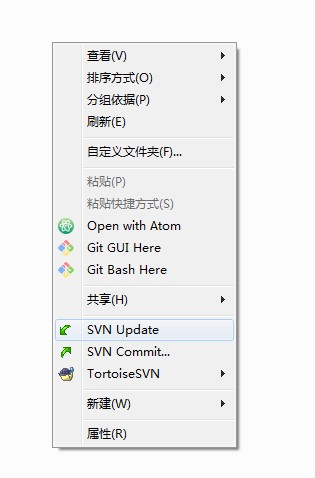
成功Cleanup之后在运行SVN Update即可更新成功,如下所示:
参考 https://blog.csdn.net/ouyang_peng/article/details/53082607
解决SVN Cleanup错误: Failed to run the WC DB work queue associated with的更多相关文章
- SVN报错“Failed to run the WC DB work queue associated with”解决办法
最近在更新SVN上的ISO代码时,失败报错: Failed to run the WC DB work queue associated with "目录/文件",clean u ...
- 【我的Android进阶之旅】解决SVN Cleanup错误: Failed to run the WC DB work queue associated with
错误描述 在Android Studio中点击VCS向下箭头使用SVN Update功能更新代码的时候,报错如下所示: 错误描述信息: Error:svn: E155037: Previous ope ...
- Failed to run the WC DB work queue associated with 错误的解决
转载自 http://blog.csdn.net/alan00000/article/details/44084455 svn checkout 代码是出现如标题的错误,提示我clean up ,cl ...
- 转 Failed to run the WC DB work queue associated with 错误的解决
svn 异常终止导致的缓存工作队列问题 解决方法:清空svn的队列 1.下载sqlite3.exe 2.找到你项目的.svn文件,查看是否存在wc.db 3.将sqlite3.exe放到.svn的同级 ...
- svn: Failed to run the WC DB work queue associated svn的bug解决
第一步,下载sqlite 官方网址 :https://www.sqlite.org/download.html 第二步:解压放在c盘 第三步:配置环境变量 第四步:找到工作空间的.svn文件,cmd ...
- SVN-Failed to run the WC DB work queue associated with
解决方法:清空svn的队列 1.下载sqlite3.exe 2.找到你项目的.svn文件,查看是否存在wc.db 3.将sqlite3.exe放到.svn的同级目录 4.启动cmd执行sqlite3 ...
- 解决SVN Cleanup时遇到错误信息:Cleanup failed to process the following paths:xxxxxxx Previous operation has not finished: run 'cleanup' if it was interrupted Please execute the 'Cleanup' command.
解决SVN Cleanup时遇到错误信息:Cleanup failed to process the following paths:xxxxxxx Previous operation has no ...
- 解决 SVN cleanup 任务中断导致无法 update
解决 SVN cleanup 任务中断导致无法 update 今天在更新 svn 时, TortoiseSVN 一直在提示要进行 cleanup ,而执行 cleanup 时又提示: Cleanup ...
- 解决svn:E155037错误(另附查看.db文件的工具)
今天使用svn提交代码的时候出问题了,Error:svn: E155037.....Previous operation has not finished; run 'cleanup' if it w ...
随机推荐
- Spring Boot 2.X 如何快速集成单元测试?
本文将详细介绍下使用Spring Boot 2.X 集成单元测试,对API(Controller)测试的过程. 一.实现原理 使用MockMvc发起请求,然后执行API中相应的代码,在执行的过程中使m ...
- Linux遗忘root密码的其中两种解决方法
由于安全的需要,系统一般只有一个root用户,因此若遗忘root用户的登录密码,因此需要通过其他途径进行修改密码.1.通过单用户模式(1)重启系统,按任意键进入grub菜单.出现grub菜单时,按↑, ...
- 前端基础之--css中可被继承和不可被继承的属性
一.无继承性的属性 1.display:规定元素应该生成的框的类型 2.文本属性:vertical-align:垂直文本对齐 text-decoration:规定添加到文本的装饰 text-shado ...
- shell 简单脚本编程
shell脚本编程 编译器,解释器 编程语言: 机器语言,汇编语言,高级语言 静态语言:编译型语言 强类型(变量) 事先转换成可执行格式 C,C++,JAVA,C# 动态语言:解释型语言,on the ...
- Spring Boot 面试,一个问题就干趴下了!
最近栈长面试了不少人,其中不乏说对 Spring Boot 非常熟悉的,然后当我问到一些 Spring Boot 核心功能和原理的时候,没人能说得上来,或者说不到点上,可以说一个问题就问趴下了! 这是 ...
- 难以理解的AQS(上)
在一篇博客中,我们看了下CopyOnWriteArrayList的源码,不是很难,里面用到了一个可重入的排他锁: ReentrantLock,这东西看上去和Synchronized差不多,但是和Syn ...
- Jenkins|简单Job配置|启动脚本|测试报告
目录 1.Jenkins安装 2.Jenkins启动脚本 3.节点配置 4.任务配置 5.集成HTML测试报告 1.Jenkins安装 操作环境:Ubuntu jenkins针对windows,ubu ...
- apriori && fpgrowth:频繁模式与关联规则挖掘
已迁移到我新博客,阅读体验更佳apriori && fpgrowth:频繁模式与关联规则挖掘 详细代码我放在github上:click me 一.实验说明 1.1 任务描述 1.2 数 ...
- Python编程从入门到实践笔记——变量和简单数据类型
Python编程从入门到实践笔记——变量和简单数据类型 #coding=gbk #变量 message_1 = 'aAa fff' message_2 = 'hart' message_3 = &qu ...
- 你的响应阻塞了没有?--Spring-WebFlux源码分析
1. Spring WebFlux是什么? Spring WebFlux是Spring Framework 5.0中引入的新的反应式Web框架. 与Spring MVC不同,它不需要Servlet A ...