
div中的内容水平垂直居中
1. div高度自适应的情况
div在不设置高度的时候,会被里面的内容撑开,内容自动填充在div中,无论是一行内容还是多行内容,此时不需要设置垂直居中,内容自动在中间的,
想要看的更直观些,只需要加上padding元素,内容四周便会留下空白,实现水平垂直居中的效果
css代码如下:
.demo{

    width: 200px;

    border: 1px solid red;

    padding: 20px;

 }
HTML代码如下:
<div class="demo">

        this is a test of margin

        this is a test of margin

        this is a test of margin

        this is a test of margin

        this is a test of margin

 </div>
效果如下所示:

2.div设置具体高度
(1)内容只有一行
设置div的line-height和div的高度一样即可,这个大家都知道哒
(2)内容不确定有几行
这时候需要在div中再加一层结构,用p标签或者div都可以
方法一:
css代码如下:
.demo{

    position: absolute;

    width: 200px;

    height: 200px;

    border: 1px solid red;

}

 p{

    position: absolute;

    width: 150px;

    top: 50%;

    left:50%;

    transform: translate(-50%,-50%);

    border: 1px solid black;

 }
HTML代码如下:
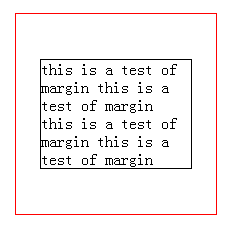
<div class="demo">

     <p>

        this is a test of margin

        this is a test of margin

        this is a test of margin

        this is a test of margin

     </p>

</div>
效果如下:
方法二:若是不想用position:absolute这样的脱离文档流的样式,那就可以尝试模拟表格的方法
设置父元素display:table,设置子元素display:table-cell,并设置vertical-align:middle即可
css代码如下:
.demo{

    width: 200px;

    height: 200px;

    display: table;

    border: 1px solid red;

}

 p{

    display: table-cell;

    vertical-align: middle;

    text-align: center;

    border: 1px solid black;

 }
HTML代码如下:
<div class="demo">

     <p>

        this is a test of margin

        this is a test of margin

        this is a test of margin

        this is a test of margin

    </p>

 </div>
效果如下所示:
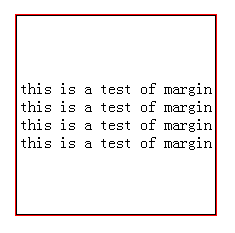
此时子元素设置宽度是没用的,宽度始终和父元素一致;
但是如果子元素设置高度的话,若是高度小于父元素则无效果,若是高度大于父元素则父元素的高度也相应增加到和子元素一样的高度
方法三:
使用css3新增的flex布局完成。
设置父元素display:box; box-pack:center; box-orient:vertical;即可,记得要在前面加上浏览器前缀哦
css代码如下:
.box{

    width: 200px;

    height: 200px;

    border: 1px solid red;

    display: box;

    box-pack:center;

    box-orient:vertical;

    display: -webkit-box;

    -webkit-box-pack:center;

    -webkit-box-orient:vertical;

}
HTML代码如下:
<div class="box">

        <div>

            this is a test

            this is a test

            this is a test

        </div>

        <div>

            this is another test for the second div

        </div>

</div>
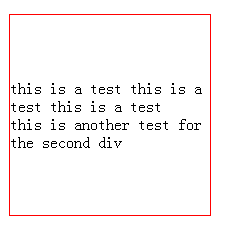
效果显示如下:
(by新手小白的记录)
div中的内容水平垂直居中的更多相关文章
- div中的“内容”水平垂直居中
1. div高度自适应的情况 div在不设置高度的时候,会被里面的内容撑开,内容自动填充在div中,无论是一行内容还是多行内容,此时不需要设置垂直居中,内容自动在中间的, 想要看的更直观些,只需要加上 ...
- 让DIV中的内容水平和垂直居中
让一个层水平垂直居中是一个非常常见的布局方式,但在html中水平居中使用margin:0px auto;可以实现,但垂直居中使用外边距是无法达到效果的.(页面设置height:100%;是无效的),这 ...
- [转]如何让div中的内容垂直居中
转自:http://blog.163.com/yan_1990/blog/static/197805107201211311515454/ 虽然Div布局已经基本上取代了表格布局,但表格布局和Div布 ...
- 如何让div中的内容垂直居中
虽然Div布局已经基本上取代了表格布局,但表格布局和Div布局仍然各有千秋,互有长处.比如表格布局中的垂直居中就是Div布局的一大弱项,不过好在千变万化的CSS可以灵活运用,可以制作出准垂直居中效果, ...
- div中的内容居中
要使div中的内容居中显示,不仅div要设定“text-align:centr" ,内置对象要添加margin:auto;属性才能使其在firefox等其他浏览器中也能居中.
- div中让内容能不换行就尽量不换行.【纯原】
div中让内容能不换行就尽量不换行,部分左对齐,部分右对齐. <html> <head> <title>九歌·少司命</title> <style ...
- 怎样推断DIV中的内容为空
怎样推断DIV中的内容为空 1.问题背景 推断div内部是否为空.假设为空,给出无数据提示:否则显示正常页面 2.设计源代码 <!DOCTYPE html PUBLIC "-//W3C ...
- div中的内容垂直居中的五种方法
一.行高(line-height)法 如果要垂直居中的只有一行或几个文字,那它的制作最为简单,只要让文字的行高和容器的高度相同即可,比如: p { height:30px; line-height:3 ...
- html中div使用CSS实现水平/垂直居中的多种方式
CSS中的居中,在工作中,会经常遇到.它可以分为水平居中和垂直居中,以下是几种实现居中的方式. git 查看源码 配合在线预览,效果更佳 以下例子中,涉及到的CSS属性值. .parent-frame ...
随机推荐
- 返回值是JSON的阿贾克斯方法
<!DOCTYPE html PUBLIC "-//W3C//DTD XHTML 1.0 Transitional//EN" "http://www.w3.org/ ...
- [pyqt4]mark
sip SIP must be installed before building and using PyQt4 必须安装sip首先 https://riverbankcomputing.com/s ...
- SQLServer针对排名函数ROWNUMBER()、RANK()、DENSE_RANK()、NTILE的研究!~
相信大家在软件工程中经常会遇到对某些数据进行排名的问题,尤其是对于电子商务的HR来说“大手笔”是非常具有潜在价值的!~至于都有哪些价值这个超出本文的范畴不予进行说明,但是不得不说的是每一个精明的HR以 ...
- js'中的apply和call和bind的用法
apply:方法能劫持另外一个对象的方法,继承另外一个对象的属性. Function.apply(obj,args)方法能接收两个参数obj:这个对象将代替Function类里this对象args:这 ...
- vs加js引用
今天又有一个同事问我“在VS中如何让一个JS文件智能提示另一个JS文件中的成员”,他说Google了一下,并没有找到答案,然后我把这个小技巧贴出来,希望能被Google到. 有时候会有这种情况:当我的 ...
- Windows Azure Virtual Machine 之用程序控制Azure VM
我们在很多时候可能会需要用程序来控制VM的创建,删除工作. 而在这些工作之中,用程序创建一个VM将会是一个非常复杂的过程,因为他涉及到很多步骤. 具体步骤如下 1 创建一个Hosted cloud s ...
- Azure Web Site 之 利用Azure Web site 发布网站
由于经常混迹于MSDN Azure论坛,少不了和一些外国朋友打交道.有的时候觉得还是有一些东西可以写出来与外国友人们分享下的, 所以就用一个开源项目建了一个英文blog项目. 在发布的时候,首选的就是 ...
- MySQL乱码问题
JSP的request 默认为ISO8859_1,所以在处理中文的时候, 要显示中文的话,必须转成GBK的,如下 String str=new String(request.getParamete ...
- Ubuntu 16.04环境布署小记
本系列文章记录了升级Ubuntu 16.04的布署过程 回到目录 10. 安装Mono, Xsp 当前版本16.04.1的系统源的Mono版本为4.2.1,如需使用最新版本(本文书写时稳定版本为4.6 ...
- Ajax开发中服务端Response的Content-Type
转自http://www.cnblogs.com/hyl8218/archive/2010/03/10/1681484.html ajax开发中在请求服务器端的响应时, 对于每一种返回类型 规范的做法 ...