
初学c# -- 学习笔记(五) winfrom自定义滚动条
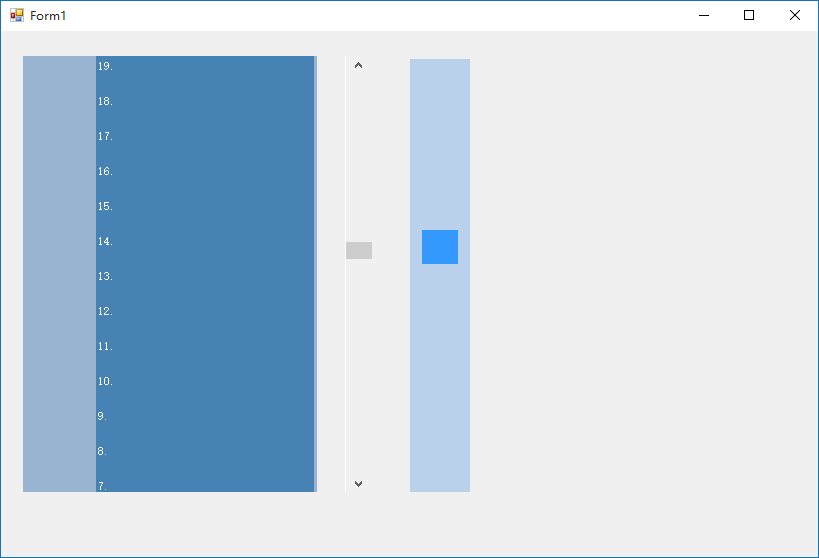
找了些例子,要么庞大、要么搞个安装组件什么的,我要求能用就行了。实在找例子修改麻烦,就做了一个。其实实现挺简单,就是panel或图片什么的跟着鼠标走就行了。
这里panel自己可以加背景图或直接搞个图就行了。为了演示清楚,有个滚动条控件做对比,与自定义的同步。
using System;

using System.Collections.Generic;

using System.ComponentModel;

using System.Data;

using System.Drawing;

using System.Linq;

using System.Text;

using System.Threading.Tasks;

using System.Windows.Forms;

namespace customscroll

{

    public partial class Form1 : Form

    {

        int limt, set_x; //滚动位置最大值和固定的左右的位置

        bool mouse_Press = false; //鼠标按下

        bool mouse_Wheel = false; //滑轮是否滚动

        Point mouseOff; //存放当前鼠标位置

        public Form1()

        {

            InitializeComponent();

            //向panel填充一堆内容

            for (int i = ; i < ; i++)

            {

                Panel num_panel = new Panel();

                Label num = new Label();

                num.Text = i + ".";

                num.ForeColor = Color.FromArgb(, , );

                num.Width = ;

                num.Dock = DockStyle.Left;

                //设置鼠标滑轮事件,需将mouse_Wheel 值为true,在move里置,下面有,这里就不写了

                //num.MouseWheel += new MouseEventHandler(OnMouseWheel);

                num_panel.Name = "Panel_" + i;

                num_panel.Height = ;

                num_panel.Margin = new Padding(, , , );

                num_panel.BackColor = Color.SteelBlue;

                num_panel.BorderStyle = BorderStyle.Fixed3D;

                num_panel.Dock = DockStyle.Top;

                num_panel.BorderStyle = System.Windows.Forms.BorderStyle.None;

                num_panel.Controls.Add(num);

                //设置鼠标滑轮事件,需将mouse_Wheel 值为true,在move里置,下面有,这里就不写了

                //num_panel.MouseWheel += new MouseEventHandler(OnMouseWheel);

                Content_panel.Controls.Add(num_panel); //将内容装入

                //设置鼠标滑轮事件,需将mouse_Wheel 值为true,在move里置,下面有,这里就不写了

                //Content_panel.MouseWheel += new MouseEventHandler(OnMouseWheel);

            }

            //装内容panel自动大小

            Content_panel.AutoSize = true;

            set_x = ScrollHard_panel.Location.X; //固定左右位置为当前位置

            limt = ScrollBar_panel.Height - ScrollHard_panel.Height; //滚动最大高度

            ScrollHard_panel.Location = new Point(set_x,) ; //先将位置设置到最顶

            vScrollBar1.Maximum = limt; //放了个vScrollBar组件,演示用的,和自定义的同步

            //鼠标滑轮事件

            ScrollBar_panel.MouseWheel += new MouseEventHandler(OnMouseWheel);

            ScrollHard_panel.MouseWheel += new MouseEventHandler(OnMouseWheel);

            vScrollBar1.MouseWheel += new MouseEventHandler(OnMouseWheel);

        }

        //鼠标滑轮事件

        private void OnMouseWheel(object sender, System.Windows.Forms.MouseEventArgs e)

        {

            int set_y = ;

            if (mouse_Wheel) //是否判断鼠标滑轮

            {

                if (e.Delta > ) //滑轮向上

                {

                    set_y = ScrollHard_panel.Location.Y - ; //每次移动10

                    if (set_y < ) { set_y = ;  } //超范围

                }

                if (e.Delta < )  //滑轮向下

                {

                    set_y = ScrollHard_panel.Location.Y + ; //每次移动10

                    if (set_y > limt) { set_y = limt; } //超范围

                }

                ScrollHard_panel.Location = new Point(set_x, set_y); //滚动块的定位

                vScrollBar1.Value = set_y; //演示用的滚动条,和自定义的同步

                Content_panel.Top = -set_y; //装内容的panel滚动显示

            }

        }

        //自定义滚动“块”框鼠标按下

        private void ScrollHard_panel_MouseDown(object sender, MouseEventArgs e)

        {

            if (e.Button == MouseButtons.Left) //鼠标左键

            {

                mouseOff.Y = e.Y;  //取当前位置

                mouse_Press = true; //鼠标按下

            }

        }

        //自定义滚动“块”鼠标放开

        private void ScrollHard_panel_MouseUp(object sender, MouseEventArgs e)

        {

            mouse_Press = false; //鼠标放开

        }

        //自定义滚动“块”鼠标离开范围

        private void ScrollHard_panel_MouseLeave(object sender, EventArgs e)

        {

            mouse_Wheel = false; //滑轮不可用

        }

        ////自定义滚动“块”鼠标在范围

        private void ScrollHard_panel_MouseMove(object sender, MouseEventArgs e)

        {

            mouse_Wheel = true; //可以用滑轮

            if (mouse_Press) //鼠标按下状态

            {

                int set_y = ScrollHard_panel.Top + e.Y - mouseOff.Y; //计算当前纵向坐标

                if (set_y < ) { set_y = ; } //超范围

                else if (set_y > limt) { set_y = limt; } //超范围

                else { ScrollHard_panel.Location = new Point(set_x, set_y); } //滚动块的定位

                vScrollBar1.Value = set_y; //演示的滚动条和自定义的同步

                Content_panel.Top = -set_y; //装内容的panel滚动显示

            }

        }

        //在滚动“框”范围内

        private void ScrollBar_panel_MouseMove(object sender, MouseEventArgs e)

        {

            mouse_Wheel = true;  //可以使用滑轮

        }

        //离开滚动“框”

        private void ScrollBar_panel_MouseLeave(object sender, EventArgs e)

        {

            mouse_Wheel = false; //不可使用滑轮

        }

        //自定义滚动“框”鼠标放开

        private void ScrollBar_panel_MouseUp(object sender, MouseEventArgs e)

        {

            if (e.Button == MouseButtons.Left) //鼠标左键

            {

                int set_y = e.Y; //当前纵坐标

                if (set_y > limt) { set_y = limt; } //超范围

                ScrollHard_panel.Location = new Point(set_x, set_y); //滚动块定位

                vScrollBar1.Value = set_y; //演示的滚动条,和自定义的同步

                Content_panel.Top = -set_y;//装内容的panel滚动显示

                mouse_Press = false; //鼠标为放开状态

            }

        }

        //演示用的vScrollBar1组件,也可以控制装内容的panel滚动显示

        private void vScrollBar1_Scroll(object sender, ScrollEventArgs e)

        {

            Content_panel.Top = -vScrollBar1.Value;

        }

    }

}
初学c# -- 学习笔记(五) winfrom自定义滚动条的更多相关文章
- 初学c# -- 学习笔记(一)
初学c# -- 学习笔记(一) 学习C#了,参考许多资料,一步步学习.这一段学习ajax的工作原理,参照其他例子写了web版的群聊小程序,全部文件代码也就不到300行,很简单.使用时先输入用户名,点确 ...
- java之jvm学习笔记五(实践写自己的类装载器)
java之jvm学习笔记五(实践写自己的类装载器) 课程源码:http://download.csdn.net/detail/yfqnihao/4866501 前面第三和第四节我们一直在强调一句话,类 ...
- C#可扩展编程之MEF学习笔记(五):MEF高级进阶
好久没有写博客了,今天抽空继续写MEF系列的文章.有园友提出这种系列的文章要做个目录,看起来方便,所以就抽空做了一个,放到每篇文章的最后. 前面四篇讲了MEF的基础知识,学完了前四篇,MEF中比较常用 ...
- (转)Qt Model/View 学习笔记 (五)——View 类
Qt Model/View 学习笔记 (五) View 类 概念 在model/view架构中,view从model中获得数据项然后显示给用户.数据显示的方式不必与model提供的表示方式相同,可以与 ...
- Learning ROS for Robotics Programming Second Edition学习笔记(五) indigo computer vision
中文译著已经出版,详情请参考:http://blog.csdn.net/ZhangRelay/article/category/6506865 Learning ROS for Robotics Pr ...
- Typescript 学习笔记五:类
中文网:https://www.tslang.cn/ 官网:http://www.typescriptlang.org/ 目录: Typescript 学习笔记一:介绍.安装.编译 Typescrip ...
- ES6学习笔记<五> Module的操作——import、export、as
import export 这两个家伙对应的就是es6自己的 module功能. 我们之前写的Javascript一直都没有模块化的体系,无法将一个庞大的js工程拆分成一个个功能相对独立但相互依赖的小 ...
- muduo网络库学习笔记(五) 链接器Connector与监听器Acceptor
目录 muduo网络库学习笔记(五) 链接器Connector与监听器Acceptor Connector 系统函数connect 处理非阻塞connect的步骤: Connetor时序图 Accep ...
- python3.4学习笔记(五) IDLE显示行号问题,插件安装和其他开发工具介绍
python3.4学习笔记(五) IDLE显示行号问题,插件安装和其他开发工具介绍 IDLE默认不能显示行号,使用ALT+G 跳到对应行号,在右下角有显示光标所在行.列.pycharm免费社区版.Su ...
- Go语言学习笔记五: 条件语句
Go语言学习笔记五: 条件语句 if语句 if 布尔表达式 { /* 在布尔表达式为 true 时执行 */ } 竟然没有括号,和python很像.但是有大括号,与python又不一样. 例子: pa ...
随机推荐
- Java 反射 getDeclareFields getModifiers setAccessible(true)
示例代码: public static Map<String, Object> dtoToMap(Object obj, String pre, String las ...
- java获取配置文件里面的内容
InputStream in = ReadProperties.class.getClassLoader() .getResourceAsStream("test.properties&qu ...
- css的简写规范
css简写有这么几个好处,第一个也是最大的好处就是减少了代码的数量.第二个就是方便自己的编写吧. 下面来介绍几个常见的css属性简写规则. 一.字体(font) font-style:设置字体的样式. ...
- java数据传递例子+内存分析
一.引用传递 1.例子1 package com.jikexueyuan.ref; class Ref1{ int temp = 10; } public class RefDemo01 { publ ...
- 第五届山东ACM大赛汇总
A.angry_birds_again_and_again 简单积分: http://acm.sdut.edu.cn/sdutoj/problem.php?action=showproblem& ...
- 在VS中添加lib的简单方法
1.工程---属性---配置属性---VC++ Directories---General---Include Directories:加上头文件存放目录 2.VC中,切换到"解决方案视图& ...
- matlab的滤波器仿真——低通滤波器与插值滤波器
项目里面有用到插值滤波器的场合,用matlab做了前期的滤波器性能仿真,产生的滤波器系数保存下来输入到FPGA IP中使用即可. 下面是仿真的代码 % clear all close all Nx = ...
- showModalDialog 的重要提示
模态对话框,没有opener,不能用window.opener.location.reload();或window.parent.location.reload();要通过返回值来判断关闭后刷新. f ...
- 腾讯云Centos下Nginx反向代理Apache+Tomcat
1. 安装Apahce, PHP, MySQL以及php连接mysql库的组件#yum -y install httpd php mysql mysql-server php-mysql // ...
- Bash注释
1)单行注释: #!/bin/bash #echo "Martin" echo "Martin" #echo "Martin" 2)多行注释 ...