
iphone/ipad关于size, frame and bounds总结和UIScroll view学习笔记
1. iphone/ipad大小
| Device | Screen dimensions(in points) |
| iphone and ipod | 320 X 480 |
| ipad | 768 X 1024 |
2. UIScreen bounds and applicationFrame
[UISCreen mainScreen].bounds, 永远返回portait模式的width/height, 也就是说width:320 height:480 for iPhone
[UISCreen mainScreen].applicationFrame更加复杂一些,它考虑了status bar的高度。
portait模式, x:0, y:20, width:320, height:460
landscape, x:20, y:0, width:300, height:480
关于frame和bounds的区别,请参考UIView中的frame和bounds属性的区别
3. status bar height: 20, tool bar height: 44, tab bar height:44
4. UIScrollView
- contentSize和contentInSet
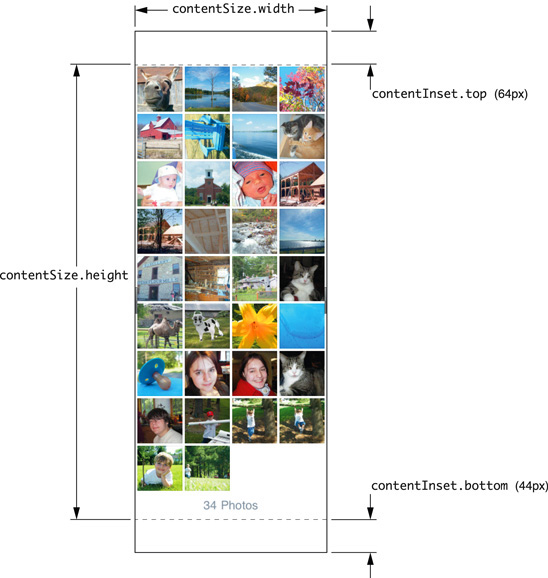
- contentOffSet:

// Called when the UIKeyboardDidShowNotification is sent.

- (void)keyboardWasShown:(NSNotification*)aNotification

{

    NSDictionary* info = [aNotification userInfo];

    CGSize kbSize = [[info objectForKey:UIKeyboardFrameBeginUserInfoKey] CGRectValue].size;

    UIEdgeInsets contentInsets = UIEdgeInsetsMake(0.0, 0.0, kbSize.height, 0.0);

    scrollView.contentInset = contentInsets;

    scrollView.scrollIndicatorInsets = contentInsets;

    // If active text field is hidden by keyboard, scroll it so it's visible

    // Your application might not need or want this behavior.

    CGRect aRect = self.view.frame;

    aRect.size.height -= kbSize.height;

    if (!CGRectContainsPoint(aRect, activeField.frame.origin) ) { //判断该text field是否在可见区域

        CGPoint scrollPoint = CGPointMake(0.0, instance); //这里需要计算需要scroll的长度,假设instance是计算出来的结果。

        [scrollView setContentOffset:scrollPoint animated:YES];

    }

}
- UIScroll view使用翻页模式
原文来自这里, 这里介绍几个关键的内容:
1. pagingMode需要设置为YES
2. contentSize是所有页数的width总和, 例如你需要显示100页,那contentSize的宽度就是100*scroll.frame.size.width
3. showsHorizontalScrollIndicator和showsVerticalScrollIndicator设置为NO
然后需要在scroll view的delegate中实现scrollViewDidScroll:方法,这个方法在scroll view的contentOffSet发生变化的时候被调用。翻页模式的核心思想就是scroll view需要显示下一页的时候,创建一个view, 在这个view上准备好数据,然后把这个view加到scroll view当前显示的位置。
代码如下所示,另外还可以改进的一个地方是需要翻页之前,需要把后面一页的内容也显示出来,否则会有一半黑的屏幕显示。
-(void) loadPageView:(NSUInteger)page

{

    UIView* view = [[UIView alloc] init];

    view.backgroundColor = [UIColor whiteColor];

    CGRect rc = self.view.frame;

    rc.origin.y = 0;

    rc.origin.x = page * self.view.frame.size.width;  //创建一个view,调整x直,因为其他直和scroll view都是一样的

    view.frame = rc;

    UILabel* label = [[UILabel alloc] initWithFrame:CGRectMake(0, 20, rc.size.width, 40)];

    label.text = [NSString stringWithFormat:@"current page is :%d", page];

    [view addSubview:label];

    [(UIScrollView*)self.view addSubview:view];

}

- (void)scrollViewDidScroll:(UIScrollView *)scrollView

{

    if (scrollView.contentOffset.x >= (myCurrentPage+0.5) * self.view.frame.size.width) //需要显示下一页了

    {

        myCurrentPage++;

        [self loadPageView:myCurrentPage];

    }

}
iphone/ipad关于size, frame and bounds总结和UIScroll view学习笔记的更多相关文章
- iOS--------坐标系统(UIView的frame、bounds跟center属性)
1.概要翻开ios官方开发文档,赫然发现上面对这三个属性的解释如下: frame:描述当前视图在其父视图中的位置和大小. bounds:描述当前视图在其自身坐标系统中的位置和大小. center:描述 ...
- ios基础之 view的frame 与 bounds 的区别 (转)
前言: 学习ios开发有一段时间了,项目也做了两个了,今天看视频,突然发现view的frame和bound两个属性,发现bound怎么也想不明白,好像饶你了死胡同里,经过一番尝试和思考,终于弄明白bo ...
- frame和bounds区别
学习ios开发有一段时间了,项目也做了两个了,今天看视频,突然发现view的frame和bound两个属性,发现bound怎么也想不明白,好像饶你了死胡同里,经过一番尝试和思考,终于弄明白bound的 ...
- frame和bounds的区别与联系
首先先看一下下面两个属性的代码实现: -(CGRect)frame{ return CGRectMake(self.frame.origin.x,self.frame.origin.y,self.fr ...
- iOS 中的frame,bounds,center,transform关联
这里有一篇好文章 http://www.winddisk.com/2012/06/07/transform/ 先看几个知识点,UIView 的frame,bounds,center,transform ...
- 《View Programming Guide for iOS》之frame、bounds和center之间的关系
The frame property contains the frame rectangle, which specifies the size and location of the view i ...
- ios view的frame和bounds之区别(位置和大小)
前言: 学习ios开发有一段时间了,项目也做了两个了,今天看视频,突然发现view的frame和bound两个属性,发现bound怎么也想不明白,好像饶你了死胡同里,经过一番尝试和思考,终于弄明白bo ...
- iOS开发——使用OC篇&frame,bounds,center,position,anchorPoint总结
frame,bounds,center,position,anchorPoint总结 图层的 position 属性是一个 CGPoint 的值,它指定图层相当于它父图层的位置, 该值基于父图层的坐标 ...
- 深入探究frame和bounds的区别以及setbounds使用
[转自]http://blog.csdn.net/hherima/article/details/39501857 在iOS开发中经常遇到两个词Frame和bounds,本文主要阐述Frame和bou ...
随机推荐
- cocos2d 3.0自定义事件答疑解惑
疑惑一:在事件分发中修改订阅者 ,对于这个的理解. 事件的分发是可以嵌套的,cocos2dx使用_inDispatch来保存当前嵌套的深度,当调用第一个dispatchEvent的时候,_inDisp ...
- Android数据的四种存储方式
作为一个完成的应用程序,数据存储操作是必不可少的.因此,Android系统一共提供了四种数据存储方式.分别是:SharePreference.SQLite.Content Provider和File. ...
- 浅谈如何使用代码为MP3文件写入ID3Tags
作者:郑童宇 GitHub:https://github.com/CrazyZty 1.前言 做了三年左右的Android开发,一直没写过博客,最近正好打算换工作,算是闲一些,就将以前开发所遇到的一些 ...
- 吉布斯现象( Gibbs)
在连续傅里叶级数(或积分)变换中,信号所对应的离散频谱(或连续频谱)为(或),其频率是无限离散分布的(或频谱的分布范围是无限区间的).很显然,单位时间内,频率较低(简称低频,即较小)的简谐波相对频率较 ...
- SQL基本语句(1)
利用select的结果创建表 可以通过选择一个表的全部内容(无 WHERE 子句)来拷贝一个表,或利用一个总是失败的 WHERE 子句来创建一个空表,如: mysql> CREATE TABLE ...
- socket学习笔记——线程(聊天程序)
server.c #include <stdio.h> #include <pthread.h> #include <semaphore.h> #include & ...
- c语言将2进制数转化为10进制数(栈的初始化,进栈,出栈)
//c语言描述 将2进制转化为10进制 #include <stdio.h> #include <stdlib.h> #include <math.h> #defi ...
- DWR基本配置
DWR——Direct Web Remoter Servlet 供给那些想要以一种简单的方式使用Ajax和XMLHttpRequest的开发者.它具有一套JavaScript功能集,它们把从HTML页 ...
- [drp 3]读取Xml配置文件,连接数据库
导读:之前看一本XML的书,里面说到了对于XML的操作问题,但由于各方面的原因,一直没有总结.这次借着做项目,就总结总结对于XML文件的利用.主要是从配置数据库连接和保存数据这两方面来的.这篇博客介绍 ...
- 解决error C2011: 'fd_set' : 'struct' type redefinition的方法
http://www.cnblogs.com/ark-zhang/archive/2013/06/19/3144383.html 首先说明这个问题由于重复定义引起的编译错误. 先说明解决方法,然后 ...