
iphone/ipad关于size, frame and bounds总结和UIScroll view学习笔记
1. iphone/ipad大小
| Device | Screen dimensions(in points) |
| iphone and ipod | 320 X 480 |
| ipad | 768 X 1024 |
2. UIScreen bounds and applicationFrame
[UISCreen mainScreen].bounds, 永远返回portait模式的width/height, 也就是说width:320 height:480 for iPhone
[UISCreen mainScreen].applicationFrame更加复杂一些,它考虑了status bar的高度。
portait模式, x:0, y:20, width:320, height:460
landscape, x:20, y:0, width:300, height:480
关于frame和bounds的区别,请参考UIView中的frame和bounds属性的区别
3. status bar height: 20, tool bar height: 44, tab bar height:44
4. UIScrollView
- contentSize和contentInSet
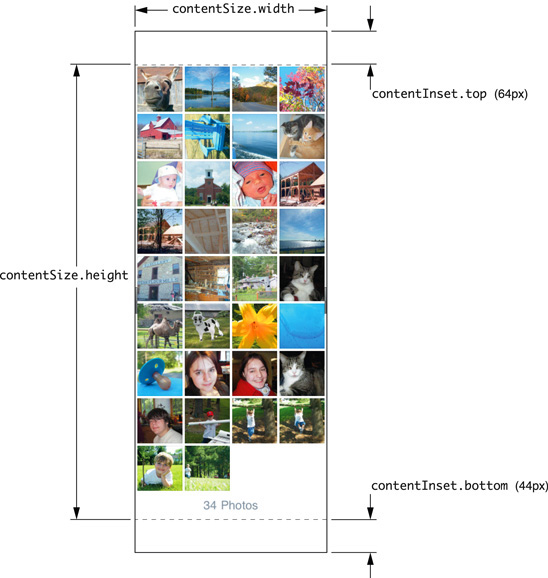
- contentOffSet:

// Called when the UIKeyboardDidShowNotification is sent.

- (void)keyboardWasShown:(NSNotification*)aNotification

{

    NSDictionary* info = [aNotification userInfo];

    CGSize kbSize = [[info objectForKey:UIKeyboardFrameBeginUserInfoKey] CGRectValue].size;

    UIEdgeInsets contentInsets = UIEdgeInsetsMake(0.0, 0.0, kbSize.height, 0.0);

    scrollView.contentInset = contentInsets;

    scrollView.scrollIndicatorInsets = contentInsets;

    // If active text field is hidden by keyboard, scroll it so it's visible

    // Your application might not need or want this behavior.

    CGRect aRect = self.view.frame;

    aRect.size.height -= kbSize.height;

    if (!CGRectContainsPoint(aRect, activeField.frame.origin) ) { //判断该text field是否在可见区域

        CGPoint scrollPoint = CGPointMake(0.0, instance); //这里需要计算需要scroll的长度,假设instance是计算出来的结果。

        [scrollView setContentOffset:scrollPoint animated:YES];

    }

}
- UIScroll view使用翻页模式
原文来自这里, 这里介绍几个关键的内容:
1. pagingMode需要设置为YES
2. contentSize是所有页数的width总和, 例如你需要显示100页,那contentSize的宽度就是100*scroll.frame.size.width
3. showsHorizontalScrollIndicator和showsVerticalScrollIndicator设置为NO
然后需要在scroll view的delegate中实现scrollViewDidScroll:方法,这个方法在scroll view的contentOffSet发生变化的时候被调用。翻页模式的核心思想就是scroll view需要显示下一页的时候,创建一个view, 在这个view上准备好数据,然后把这个view加到scroll view当前显示的位置。
代码如下所示,另外还可以改进的一个地方是需要翻页之前,需要把后面一页的内容也显示出来,否则会有一半黑的屏幕显示。
-(void) loadPageView:(NSUInteger)page

{

    UIView* view = [[UIView alloc] init];

    view.backgroundColor = [UIColor whiteColor];

    CGRect rc = self.view.frame;

    rc.origin.y = 0;

    rc.origin.x = page * self.view.frame.size.width;  //创建一个view,调整x直,因为其他直和scroll view都是一样的

    view.frame = rc;

    UILabel* label = [[UILabel alloc] initWithFrame:CGRectMake(0, 20, rc.size.width, 40)];

    label.text = [NSString stringWithFormat:@"current page is :%d", page];

    [view addSubview:label];

    [(UIScrollView*)self.view addSubview:view];

}

- (void)scrollViewDidScroll:(UIScrollView *)scrollView

{

    if (scrollView.contentOffset.x >= (myCurrentPage+0.5) * self.view.frame.size.width) //需要显示下一页了

    {

        myCurrentPage++;

        [self loadPageView:myCurrentPage];

    }

}
iphone/ipad关于size, frame and bounds总结和UIScroll view学习笔记的更多相关文章
- iOS--------坐标系统(UIView的frame、bounds跟center属性)
1.概要翻开ios官方开发文档,赫然发现上面对这三个属性的解释如下: frame:描述当前视图在其父视图中的位置和大小. bounds:描述当前视图在其自身坐标系统中的位置和大小. center:描述 ...
- ios基础之 view的frame 与 bounds 的区别 (转)
前言: 学习ios开发有一段时间了,项目也做了两个了,今天看视频,突然发现view的frame和bound两个属性,发现bound怎么也想不明白,好像饶你了死胡同里,经过一番尝试和思考,终于弄明白bo ...
- frame和bounds区别
学习ios开发有一段时间了,项目也做了两个了,今天看视频,突然发现view的frame和bound两个属性,发现bound怎么也想不明白,好像饶你了死胡同里,经过一番尝试和思考,终于弄明白bound的 ...
- frame和bounds的区别与联系
首先先看一下下面两个属性的代码实现: -(CGRect)frame{ return CGRectMake(self.frame.origin.x,self.frame.origin.y,self.fr ...
- iOS 中的frame,bounds,center,transform关联
这里有一篇好文章 http://www.winddisk.com/2012/06/07/transform/ 先看几个知识点,UIView 的frame,bounds,center,transform ...
- 《View Programming Guide for iOS》之frame、bounds和center之间的关系
The frame property contains the frame rectangle, which specifies the size and location of the view i ...
- ios view的frame和bounds之区别(位置和大小)
前言: 学习ios开发有一段时间了,项目也做了两个了,今天看视频,突然发现view的frame和bound两个属性,发现bound怎么也想不明白,好像饶你了死胡同里,经过一番尝试和思考,终于弄明白bo ...
- iOS开发——使用OC篇&frame,bounds,center,position,anchorPoint总结
frame,bounds,center,position,anchorPoint总结 图层的 position 属性是一个 CGPoint 的值,它指定图层相当于它父图层的位置, 该值基于父图层的坐标 ...
- 深入探究frame和bounds的区别以及setbounds使用
[转自]http://blog.csdn.net/hherima/article/details/39501857 在iOS开发中经常遇到两个词Frame和bounds,本文主要阐述Frame和bou ...
随机推荐
- struts2下实现的json传递list,object。
必须的jar: java bean: package upload.progress.action; public class music { private String name; private ...
- java基础问题 (转)
原文地址:http://blog.csdn.net/free0sky/article/details/7927275 一.String,StringBuffer, StringBuilder 的区别是 ...
- 003.ASP.NET MVC集中管理Session
原文链接:http://www.codeproject.com/Tips/790387/Session-in-ASP-NET-MVC 1.前言 今天有得有失啊,看到这篇,专心记下里面的精华吧 2.一般 ...
- 天气预报API简单实现
本人小白,觉得好玩,就注册了一个博客.一时也不知道写些什么,就把昨天做的一个简单的网页天气预报写一下吧,希望对各位看官有所帮助. 运行环境:php+mysql+WIN/Linux,框架什么的都无所谓了 ...
- Centos7 install Openstack - (第四节)添加计算服务(Nova)
Centos7 install Openstack - (第四节)添加计算服务(Nova) 我的blog地址:http://www.cnblogs.com/caoguo 该文根据openstack官方 ...
- Swift学习(二)
一.方法 在OC中,函数是C语言的形式,跟方法不一样 函数:int sum (int num1, int num2) { return num1 + num2; } 方法:- (int)sum:( ...
- ctags 文章
http://blog.csdn.net/wuziqi4/article/details/1709722
- 使用Servlet处理请求<http://blog.sina.com.cn/s/blog_5d3fb3cc0100ep9q.html>
一.GET和POST的区别 1.GET提交的是文本内容,规定其数据长度不超过255个字符.在GET方式提交的URL中会显示出提交的查询数据而却提交数据的缓存会在浏览器的URL历史状态中,这样我们往往在 ...
- Duilib扩展《01》— 双击、右键消息扩展
用过duilib的可能会发现,duilib中有些控件没能很好的区分左键.右键等消息.所以根据实际需要,我们需要进行相关区分处理,或者自行扩展. 一. 左键.右键消息区分 我们以CListUI控件来分析 ...
- angular factory Services provider 自定义服务 工厂
转载于 作者:海底苍鹰地址:http://blog.51yip.com/jsjquery/1602.html 1.在app.js 中声明了模块的依赖 var phonecatApp = angular ...