
Android Listener 监听的几种写法
Android中,View的Listener方法,在是否使用匿名类匿名对象时,有各种不同的写法。
OnClickListener和其他Listener方法一样,都是View类的接口,重载实现后就能使用,其接口定义如下:
- public interface OnClickListener {
- /**
- * Called when a view has been clicked.
- *
- * @param v The view that was clicked.
- */
- void onClick(View v);
- }
Android源码路径:framework/core/java/android/view/View.java(Android v2.2)
Listener在使用上有多种写法,了解这些,对编写程序好处比较有限,但对阅读代码却又是很有用的。大约也可以像孔乙已一样拿来炫耀吧,但我认为,这对初涉安卓编程的其他程序员来深入了解JAVA或者安卓编程,具有很重要的意义。
本例使用了六种方法,由于JAVA语法的灵活性,很可能换种思考,一种新的方法就诞生了,所以本文仅做了解,不要让他成为你的灵魂锁链,导致限制了你在安卓领域做更深入更广泛的探索和贡献。当然如果你发现的新的写法或者创造什么新的写法,也可以告诉我,大家一起学习。下面是程序代码:
1、main.xml
- <?xml version="1.0" encoding="utf-8"?>
- <LinearLayout xmlns:android="http://schemas.android.com/apk/res/android"
- android:layout_width="fill_parent"
- android:layout_height="fill_parent"
- android:orientation="vertical" >
- <TextView
- android:id="@+id/tvTitle"
- android:layout_width="fill_parent"
- android:layout_height="30dip"
- android:layout_gravity="center"
- android:gravity="center"
- android:height="24dip"
- android:textColor="#ff0000"
- android:textSize="20sp"
- android:text="显示点击Button"
- android:focusable="true">
- <requestFocus />
- </TextView>
- <Button
- android:id="@+id/button1"
- android:layout_width="match_parent"
- android:layout_height="wrap_content"
- android:text="Button1" />
- <Button
- android:id="@+id/button2"
- android:layout_width="match_parent"
- android:layout_height="wrap_content"
- android:text="Button2" />
- <Button
- android:id="@+id/button3"
- android:layout_width="match_parent"
- android:layout_height="wrap_content"
- android:text="Button3" />
- <Button
- android:id="@+id/button4"
- android:layout_width="match_parent"
- android:layout_height="wrap_content"
- android:text="Button4"
- android:onClick="Btn4OnClick" /> <!-- 绑定方法Btn4OnClick -->
- <Button
- android:id="@+id/button5"
- android:layout_width="match_parent"
- android:layout_height="wrap_content"
- android:text="Button5" />
- <Button
- android:id="@+id/button6"
- android:layout_width="match_parent"
- android:layout_height="wrap_content"
- android:text="Button6" />
- </LinearLayout>
2、Main.java
- public class Main extends Activity implements OnClickListener {
- private Button m_button1, m_button2, m_button3, m_button4, m_button5, m_button6;
- public TextView tv;
- @Override
- public void onCreate(Bundle savedInstanceState) {
- super.onCreate(savedInstanceState);
- setContentView(R.layout.main);
- tv = (TextView) findViewById(R.id.tvTitle);
- m_button1 = (Button) findViewById(R.id.button1);
- m_button2 = (Button) findViewById(R.id.button2);
- m_button3 = (Button) findViewById(R.id.button3);
- // m_button4 = (Button) findViewById(R.id.button4); // xml绑定button,android:onClick="Btn4OnClick"
- m_button5 = (Button) findViewById(R.id.button5);
- m_button6 = (Button) findViewById(R.id.button6);
- /*
- * 方法1,参数this相当于new OnClickListener()对象, 即class Main 对象
- * 用这种方式的话,public void onClick 方法必须写在该Main类中, 且Main类开头实现implements OnClickListener接口, 即this对象可以直接调用接口方法onClick()
- */
- m_button1.setOnClickListener(this);
- m_button2.setOnClickListener(clickListener); //方法2,使用对象clickListener
- m_button3.setOnClickListener(new Button.OnClickListener() { //方法3,使用匿名对象创建监听,同方法2,可以看作另一种写法
- @Override
- public void onClick(View v) {
- String strTmp = "点击Button03";
- tv.setText(strTmp);
- }
- });
- //方法4,使用XML文件创建时绑定方法Btn4OnClick,详见main.xml
- m_button5.setOnClickListener(new clickListener2()); //方法5,自己设计个监听类,监听的方法引用OnClickListener接口中的方法,创建的是匿名对象
- m_button6.setOnClickListener(new callOut(this)); //方法6, 外部类实现事件监听器接口,很少用 ,详看文件callout.java
- }
- @Override
- public void onClick(View v) {
- Log.i("log", "click");
- String strTmp = "点击Button01";
- tv.setText(strTmp);
- }
- public OnClickListener clickListener = new OnClickListener() {
- @Override
- public void onClick(View v) {
- String strTmp = "点击Button02";
- tv.setText(strTmp);
- }
- };
- public void Btn4OnClick(View view) {
- String strTmp = "点击Button04";
- tv.setText(strTmp);
- }
- public class clickListener2 implements View.OnClickListener {
- @Override
- public void onClick(View v) {
- String strTmp = "点击Button05";
- tv.setText(strTmp);
- }
- };
- }
3、callOut 类
- public class callOut implements OnClickListener {
- private Main activity;
- public callOut(Activity activity) {
- this.activity = (Main) activity;
- }
- @Override
- public void onClick(View v) {
- String strTmp = "点击Button06";
- activity.tv.setText(strTmp);
- }
- }
运行效果图:
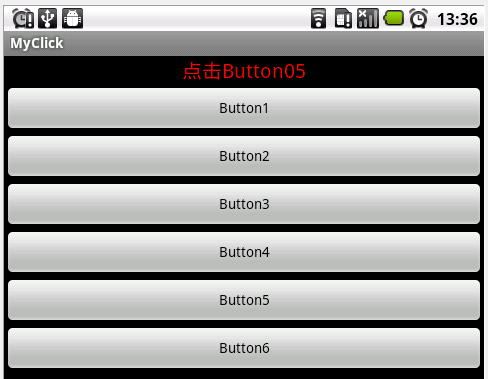
Android Listener 监听的几种写法的更多相关文章
- Android Listener侦听的N种写法
Android中,View的Listener方法,在是否使用匿名类匿名对象时,有各种不同的写法. OnClickListener和其他Listener方法一样,都是View类的接口,重载实现后就能使用 ...
- 【转】Android Listener侦听的N种写法
原文网址:http://blog.csdn.net/ithomer/article/details/7489274 Android中,View的Listener方法,在是否使用匿名类匿名对象时,有各种 ...
- Android编程之Listener侦听的N种写法及实现原理
写下这个题目时突然想起鲁迅笔下的孔乙已,茴香豆的几种写法,颇有些咬文嚼字的味道.虽然从事手机编程多年,但一直使用的是C和C++编程,由于安卓早期只支持JAVA开发,所以对于时下如火如荼的安卓系统,我一 ...
- Android增加监听的三种实现方式
在Android中,为一个按钮增加监听的方式有五种 1.匿名内部类 @Override protected void onCreate(Bundle savedInstanceState) { sup ...
- 王立平--android事件监听的3种方式
第一种通常在activity组件的oncreate事件中直接定义,直接动作. 这样的方式每一个控件都定义一次.通常不方便. Button btn = (Button) findViewById(R.i ...
- Android ScrollView监听滑动到顶部和底部的两种方式(你可能不知道的细节)
Android ScrollView监听滑动到顶部和底部,虽然网上很多资料都有说,但是不全,而且有些细节没说清楚 使用场景: 1. 做一些复杂动画的时候,需要动态判断当前的ScrollView是否滚动 ...
- Android实现监听控件点击事件
Android实现监听控件点击事件 引言 这篇文章主要想写一下Android实现监听点击事件的几种方法,Activity和Fragment实现起来有些方法上会有些不同,这里也略做介绍. 最近一直在忙一 ...
- Android中点击事件的四种写法详解
Android中点击事件的四种写法 使用内部类实现点击事件 使用匿名内部类实现点击事件 让MainActivity实现View.OnClickListener接口 通过布局文件中控件的属性 第一种方法 ...
- Android来电监听和去电监听
我觉得写文章就得写得有用一些的,必须要有自己的思想,关于来电去电监听将按照下面三个问题展开 1.监听来电去电有什么用? 2.怎么监听,来电去电监听方式一样吗? 3.实战,有什么需要特别注意地方? 监听 ...
随机推荐
- MongoDB Replica Set 选举过程
Replica Set 选举过程 心跳检测 假设我们有三个节点的replica sets:X,Y和Z节点.在replica sets结构中,这三个节点每2秒会各自向其它两个节点发送一个心跳检测请求.比 ...
- ANGULARJS 动态编译添加到dom中
在使用angularjs 时,希望通过动态构建angular模版,再通过angular进行展示. 使用 方法如下: <html ng-app="app"> <he ...
- 二分图 最大权匹配 km算法
这个算法的本质还是不断的找增广路: KM算法的正确性基于以下定理:若由二分图中所有满足A[i]+B[j]=w[i,j]的边(i,j)构成的子图(称做相等子图)有完备匹配,那么这个完备匹配就是二分图的最 ...
- 基于Storm的工程中使用log4j
最近使用Storm开发,发现log4j死活打不出debug级别的日志,网上搜到的关于log4j配置的方法都试过了,均无效. 最终发现问题是这样的:最新的storm使用的日志系统已经从log4j切换到了 ...
- 流控panabit的安装及配置
软件: 在panabit的下载页面上,没有最新的版本.刚开始就是从这个地方下载的,但是有一块网卡怎么也找不到.各种加载网卡驱动,最后失败. 之后,从其论坛中发现了最新的2013.05版本,将ISO刻盘 ...
- [js]多个物体的运动
与单个的区别:得知道哪个在动,所以运动函数需要两个参数,出了目标iTarget之外,还要obj.另外需要多个计数器,否则当一个还没运动完就移入另一个物体会发生卡壳 window.onload=func ...
- Oracle连接查询内容整理
--内连接--select t.*,b.bumenmc from T_HQ_RYXX t,t_hq_bm b where t.bum = b.bumenbm--select * from t_hq_r ...
- ASP.NET 学习笔记
1.ASP.NET 服务器控件是可被服务器理解的标签 有三种类型的服务器控件(所有服务器控件必须出现在 <form> 标签内,同时 <form> 标签必须包含 runat=&q ...
- 移动设备和SharePoint 2013 - 第4部分:定位
博客地址:http://blog.csdn.net/foxdave 原文地址 在该系列文章中,作者展示了SharePoint 2013最显著的新功能概观--对移动设备的支持. 该系列文章: 移动设备和 ...
- SharePoint开发 - 使用Session(代码修改webconfig)
博客地址 http://blog.csdn.net/foxdave SharePoint启用Session可以使用Powershell,戳这里:可以修改webconfig. 本篇叙述的重点是通过fea ...