
饶有兴致的用javascript做了个贪食蛇游戏
09年写的东西。一直藏在自己的记事本里头,现在开始整理写博客,所以直接搬过来
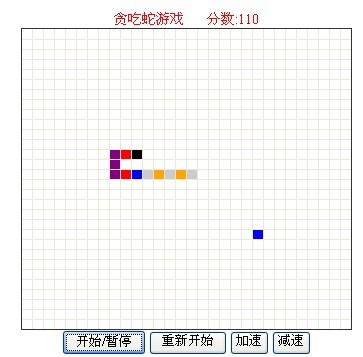
先上效果图
再添代码:
<HTML>
<HEAD>
<TITLE>贪吃蛇 Snake v1.0 版,作者:刚刀飞絮</TITLE>
<STYLE>
body{
font-size:9pt;
}
table{
border-collapse: collapse;
border:solid #333 1px;
}
td{
height: 10px;
width: 10px;
font-size: 0px;
}
.filled{
background-color:blue;
}
</STYLE>
<META http-equiv="Content-Type" content="text/html; charset=utf-8">
</HEAD>
<SCRIPT>
function $(id){return document.getElementById(id);}
/**************************************************************
javascript面向对象
**************************************************************/
//贪吃蛇类
var Snake = {
tbl: null,
/**
* body: 蛇身,数组放蛇的每一节,
* 数据结构{x:x0, y:y0, color:color0},
* x,y表示坐标,color表示颜色
**/
body: [],
//当前移动的方向,取值0,1,2,3, 分别表示向上,右,下,左, 按键盘方向键可以改变它
direction: 0,
//定时器
timer: null,
//速度
speed: 250,
//是否已经暂停
paused: true,
//行数
rowCount: 30,
//列数
colCount: 30,
//初始化 init: function(){
var colors = ['red','orange','yellow','green','blue','purple','#ccc'];
this.tbl = $("main");
//document.getElementById("fen").innerHTML=this.scre(); var x = 0;
var y = 0;
var colorIndex = 0;
//产生初始移动方向
this.direction = Math.floor(Math.random()*4);
//构造table
for(var row=0;row<this.rowCount;row++){
var tr=this.tbl.insertRow(-1);
for(var col=0;col<this.colCount;col++) {
var td=tr.insertCell(-1);
}
}
//根据循环次数产生任意个松散节点
for(var i=0; i<1; i++){
x = Math.floor(Math.random()*this.colCount);
y = Math.floor(Math.random()*this.rowCount);
colorIndex = Math.floor(Math.random()*7);
if(!this.isCellFilled(x,y)){
this.tbl.rows[y].cells[x].style.backgroundColor = colors[colorIndex];
}
}
//产生蛇头
while(true){
x = Math.floor(Math.random()*this.colCount);
y = Math.floor(Math.random()*this.rowCount);
if(!this.isCellFilled(x,y)){
this.tbl.rows[y].cells[x].style.backgroundColor = "black";
this.body.push({x:x,y:y,color:'black'});
break;
}
} this.paused = true;
//添加键盘事件
document.onkeydown= function(e){
if (!e)e=window.event;
switch(e.keyCode | e.which | e.charCode){
case 13: {
if(Snake.paused){
Snake.move();
Snake.paused = false;
}
else{
//如果没有暂停,则停止移动
Snake.pause();
Snake.paused = true;
}
break;
}
case 37:{//left
//阻止蛇倒退走
if(Snake.direction==1){
break;
}
Snake.direction = 3;
break;
}
case 38:{//up
//快捷键在这里起作用
if(event.ctrlKey){
Snake.speedUp(-20);
break;
}
if(Snake.direction==2){//阻止蛇倒退走
break;
}
Snake.direction = 0;
break;
}
case 39:{//right
if(Snake.direction==3){//阻止蛇倒退走
break;
}
Snake.direction = 1;
break;
}
case 40:{//down
if(event.ctrlKey){
Snake.speedUp(20);
break;
}
if(Snake.direction==0){//阻止蛇倒退走
break;
}
Snake.direction = 2;
break;
}
}
}
},
//移动
move: function(){
this.timer = setInterval(function(){
Snake.erase();
Snake.moveOneStep();
Snake.paint();
}, this.speed);
},
//移动一节身体
moveOneStep: function(){
if(this.checkNextStep()==-1){
clearInterval(this.timer);
var result=window.confirm("Game Over ! \n是否要重新玩?")
result?this.restart():"";
return;
}
if(this.checkNextStep()==1){
var _point = this.getNextPos();
var _x = _point.x;
var _y = _point.y;
var _color = this.getColor(_x,_y);
this.body.unshift({x:_x,y:_y,color:_color});
//因为吃了一个食物,所以再产生一个食物
this.generateDood();
return;
}
//window.status = this.toString();
var point = this.getNextPos();
//保留第一节的颜色
var color = this.body[0].color;
//颜色向前移动
for(var i=0; i<this.body.length-1; i++){
this.body[i].color = this.body[i+1].color;
}
//蛇尾减一节, 蛇尾加一节,呈现蛇前进的效果
this.body.pop();
this.body.unshift({x:point.x,y:point.y,color:color});
//window.status = this.toString();
}, //探寻下一步将走到什么地方
pause: function(){
clearInterval(Snake.timer);
this.paint();
},
getNextPos: function(){
var x = this.body[0].x;
var y = this.body[0].y;
var color = this.body[0].color;
//向上
if(this.direction==0){
y--;
}
//向右
else if(this.direction==1){
x++;
}
//向下
else if(this.direction==2){
y++;
}
//向左
else{
x--;
}
//返回一个坐标
return {x:x,y:y};
},
//检查将要移动到的下一步是什么
checkNextStep: function(){
var point = this.getNextPos();
var x = point.x;
var y = point.y;
if(x<0||x>=this.colCount||y<0||y>=this.rowCount){
return -1;//触边界,游戏结束
}
for(var i=0; i<this.body.length; i++){
if(this.body[i].x==x&&this.body[i].y==y){
return -1;//碰到自己的身体,游戏结束
}
}
if(this.isCellFilled(x,y)){
return 1;//有东西
}
return 0;//空地
},
//擦除蛇身
erase: function(){
for(var i=0; i<this.body.length; i++){
this.eraseDot(this.body[i].x, this.body[i].y);
}
},
//绘制蛇身
paint: function(){
for(var i=0; i<this.body.length; i++){
this.paintDot(this.body[i].x, this.body[i].y,this.body[i].color);
}
this.score(this.body.length-1)
},
//计算分数
score: function(score){
$("fen").innerHTML=score*10;
} ,
//擦除一节
eraseDot: function(x,y){
this.tbl.rows[y].cells[x].style.backgroundColor = "";
},
paintDot: function(x,y,color){
this.tbl.rows[y].cells[x].style.backgroundColor = color;
},
//得到一个坐标上的颜色
getColor: function(x,y){
return this.tbl.rows[y].cells[x].style.backgroundColor;
},
//用于调试
toString: function(){
var str = "";
for(var i=0; i<this.body.length; i++){
str += "x:" + this.body[i].x + " y:" + this.body[i].y + " color:" + this.body[i].color + " - ";
}
return str;
},
//检查一个坐标点有没有被填充
isCellFilled: function(x,y){
if(this.tbl.rows[y].cells[x].style.backgroundColor == ""){
return false;
}
return true;
},
//重新开始
restart: function(){
if(this.timer){
clearInterval(this.timer);
}
for(var i=0; i<this.rowCount;i++){
this.tbl.deleteRow(0);
}
this.body = [];
this.init();
this.speed = 250;
},
//加速
speedUp: function(time){
if(!this.paused){
if(this.speed+time<10||this.speed+time>2000){
return;
}
this.speed +=time;
this.pause();
this.move();
}
},
//产生食物。
generateDood: function(){
var colors = ['red','orange','yellow','green','blue','purple','#ccc'];
var x = Math.floor(Math.random()*this.colCount);
var y = Math.floor(Math.random()*this.rowCount);
var colorIndex = Math.floor(Math.random()*7);
if(!this.isCellFilled(x,y)){
this.tbl.rows[y].cells[x].style.backgroundColor = colors[colorIndex];
}
}
}; </SCRIPT> <BODY onLoad="Snake.init();" >
<div align="center" style="font-size:14px; color:#F00" >贪吃蛇游戏 分数:<SPAN id="fen"></SPAN></div>
<TABLE id="main" border="1" cellspacing="0" cellpadding="0" align="center"></TABLE>
<div align="center" style="font-size:12px"><INPUT type="button" id="btn" value="开始/暂停" />
<INPUT type="button" id="reset" value="重新开始" />
<INPUT type="button" id="upSpeed" value="加速" />
<INPUT type="button" id="downSpeed" value="减速" />
</div>
<SCRIPT>
$('btn').onclick = function(){
if(Snake.paused){
Snake.move();
Snake.paused = false;
}
else{
Snake.pause();
Snake.paused = true;
}
};
$("reset").onclick = function(){
Snake.restart();
this.blur();
};
$("upSpeed").onclick = function(){
Snake.speedUp(-20);
};
$("downSpeed").onclick = function(){
Snake.speedUp(20);
};
</SCRIPT>
</BODY>
</HTML>
喜欢的可以直接代码复制另存为,玩玩。
饶有兴致的用javascript做了个贪食蛇游戏的更多相关文章
- JavaScript贪食蛇游戏制作详解
之前闲时开发过一个简单的网页版贪食蛇游戏程序,现在把程序的实现思路写下来,供有兴趣同学参考阅读. 代码的实现比较简单,整个程序由三个类,一组常量和一些游戏逻辑以外的初始化和控制代码组成,总共400多行 ...
- 用javascript做别踩白块游戏1
初学Javascript做的一个别踩白块小游戏,代码简陋,如下: <!DOCTYPE html> <html> <head> <!-- 禁用缩放功能 --&g ...
- 基于javaSwing的贪食蛇游戏
这个项目时,是我好几年前写的了.但对刚入门,或者想瞧瞧java的图形的界面swing的同学,还是有点用处的. 在这推荐给你. 涉及技术点 swing,多线程,文件读写,多媒体文件播放等 游戏简介 该游 ...
- 教你如何用python和pygame制作一个简单的贪食蛇游戏,可自定义
1.效果图 2.完整的代码 #第1步:导出模块 import pygame, sys, random from pygame.locals import * # 第2步:定义颜色变量,在pygame中 ...
- 用javascript做别踩白块游戏2
这一次做一个好一点的,要求黑块自动下落,且速度逐渐加快 <!DOCTYPE html> <html> <head> <!-- 禁用缩放功能 --> &l ...
- 一起来做webgame,《Javascript贪食蛇》
2019-09-22更新: 使用canvas实现:https://github.com/onlyfu/SnakeSir-Javascript 以下为HTML4实现: 今天来个略有意思的,<贪食蛇 ...
- Javascript贪食蛇小游戏
试玩:http://hovertree.com/game/9/ 贪吃蛇是一种风靡全球的小游戏,就是一条小蛇,不停地在屏幕上游走,吃各个方向出现的蛋,越吃越长.只要蛇头碰到屏幕四周,或者碰到自己的身子, ...
- JavaScript强化教程 - 六步实现贪食蛇
1.首先创建div 并且给div加样式 <div id="pannel" style="width: 500px;height: 500px;z-index: 1; ...
- 用JavaScript做精灵图
用JavaScript做精灵图 精灵图可以不用在给每一个小块一 一的修改位置.主要原理是找到整张的背景图与li的下标的数学关系. 这是一大张背景图,这个背景图的位置其实是有规律的,每两张之间间隔一个固 ...
随机推荐
- java 单例模式总结
单例模式的实现方式总结: 第一种方式:同步获取实例的方法,多线程安全,懒汉模式.在调用实例的时刻初始化. public class Singleton1 { private static Single ...
- Nginx初始化过程总结
对于Nginx这样一个模块化的服务器,看代码是最好的理解方式了.再此通过读main() 函数来简述一下Nginx的初始化过程: 这就是整个main函数的执行过程:
- JavaScript高级程序设计之函数
函数实际上是对象,每个函数都是Function类型的实例. 函数是引用类型. 函数名实际上是一个指向函数对象的指针,不会与某个函数绑定. // 这种写法更能表达函数的本质 var sum = func ...
- 从此不再惧怕URI编码:JavaScript及C# URI编码详解
混乱的URI编码 JavaScript中编码有三种方法:escape.encodeURI.encodeURIComponent C#中编码主要方法:HttpUtility.UrlEncode.Serv ...
- 横屏下的ImagePickerController
Try this way.... As per Apple Document, ImagePicker Controller never Rotate in Landscape mode. You h ...
- Couchbase server---Enyim.Caching.dll
本文不打算抄袭官方或者引用他人对Couchbase的各种描述,仅仅是自己对它的一点理解(错误之处,敬请指出),并附上一个入门示例. ASP.NET Web项目(其他web开发平台也一样)应用规模小的时 ...
- MongoDB学习笔记-游标
理解MongoDB的游标有两种维度:客户端和服务器端.下面将从这两方面来说明. 客户端 find方法返回值是一个游标.可以通过游标来对最终结果进行控制.比如限制结果数量,略过某一部分,根据任意键按任意 ...
- [转]rpcndr.h和wtypes.h冲突Bug的解决方案
[转]rpcndr.h和wtypes.h冲突Bug的解决方案 http://blog.csdn.net/tzwh_86/article/details/9495133 rpcndr.h和wtypes. ...
- [转]ubuntu(12.04)下, 命令 ,内核 源代码的获取
[转]ubuntu(12.04)下, 命令 ,内核 源代码的获取 http://blog.chinaunix.net/uid-18905703-id-3446099.html 1.命令:例如:要查看l ...
- 利用LibreOffice转换ppt、doc转化pdf
利用LibreOffice转换ppt.doc转化pdf LibreOffice下载地址: http://www.libreoffice.org/download/libreoffice-fresh/ ...