
window server开发
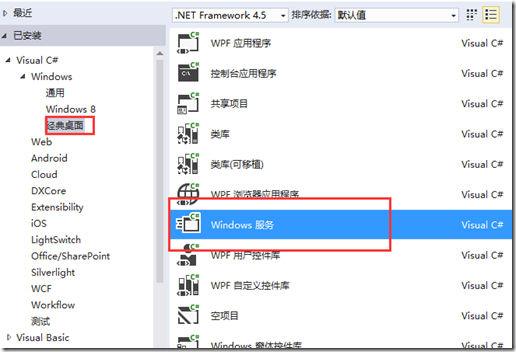
代码部分:
public partial class tv : ServiceBase

    {

        public tv()

        {

            InitializeComponent();

            ServiceName = "HB TV";//设置服务名称

            CanStop = true;//服务是否可以停止

        }

        protected override void OnStart(string[] args)

        {

            ThreadStart m = new ThreadStart(Sart);

            Thread th = new Thread(m);
            th.Start();

        }

        protected override void OnStop()

        {

        }

        int TimerSpan = 1000 * 5;

        private void Sart()

        {

            //MyState s = new MyState();

            //System.Threading.Timer timer = new Timer(time_Tick, s, 0, TimerSpan);

            //s.timer = timer;

            new MyState(time_Tick, 0, TimerSpan);

        }

        private void time_Tick(object sender)

        {

            MyState s = sender as MyState;

            s.timer.Change(System.Threading.Timeout.Infinite, 0);//停止计时器

            //处理自己的事情

            s.timer.Change(TimerSpan, TimerSpan);//开始计时器

        }

    }

    class MyState

    {

        internal System.Threading.Timer timer;

        public MyState()

        {

        }

        /// <summary>

        ///

        /// </summary>

        /// <param name="callback">一个 TimerCallback 委托,表示要执行的方法</param>

        /// <param name="dueTime">调用 callback 之前延迟的时间量(以毫秒为单位)。指定 Timeout.Infinite 以防止计时器开始计时。指定零 (0) 以立即启动计时器</param>

        /// <param name="period">调用 callback 的时间间隔(以毫秒为单位)。指定 Timeout.Infinite 可以禁用定期终止</param>

        public MyState(TimerCallback callback, int dueTime, int period)

        {

            timer = new Timer(callback, this, dueTime, period);

        }

    }
批处理文件内容,和服务位于同一文件夹下
服务添加与启动示例:
%SystemRoot%\Microsoft.NET\Framework\v4.0.30319\installutil.exe %~dp0GZStockServer.exe
net start "GZStockServer"
pause
服务删除示例
%SystemRoot%\Microsoft.NET\Framework\v4.0.30319\installutil.exe /u %~dp0GZStockServer.exe
pause
以下摘自:http://www.cnblogs.com/bluestorm/p/3510398.html
4.回到设计窗口点右键选择-添加安装程序 -生成serviceInstaller1和 serviceProcessInstaller1两个组件
把serviceInstaller1的属性ServiceName改写为你的服务程序名,并把启动模 式设置为AUTOMATIC
把serviceProcessInstaller1的属性account改写为 LocalSystem
5.编译链接生成服务程序
通过从生成菜单中选择生成来生成项目。
6.安装服务
用.net framework工具INSTALLUTIL安装服务程序即可。
用项目的输出作为参数,从命令行运行 InstallUtil.exe。在命令行中输入下列代码:
installutil yourproject.exe
Hint: a windows service must first be installed using installutil.exe and then started with the serviceExplorer, windows Services Administrative tool or the NET START command.
7.卸载服务
用项目的输出作为参数,从命令行运行 InstallUtil.exe。
installutil /u yourproject.exe
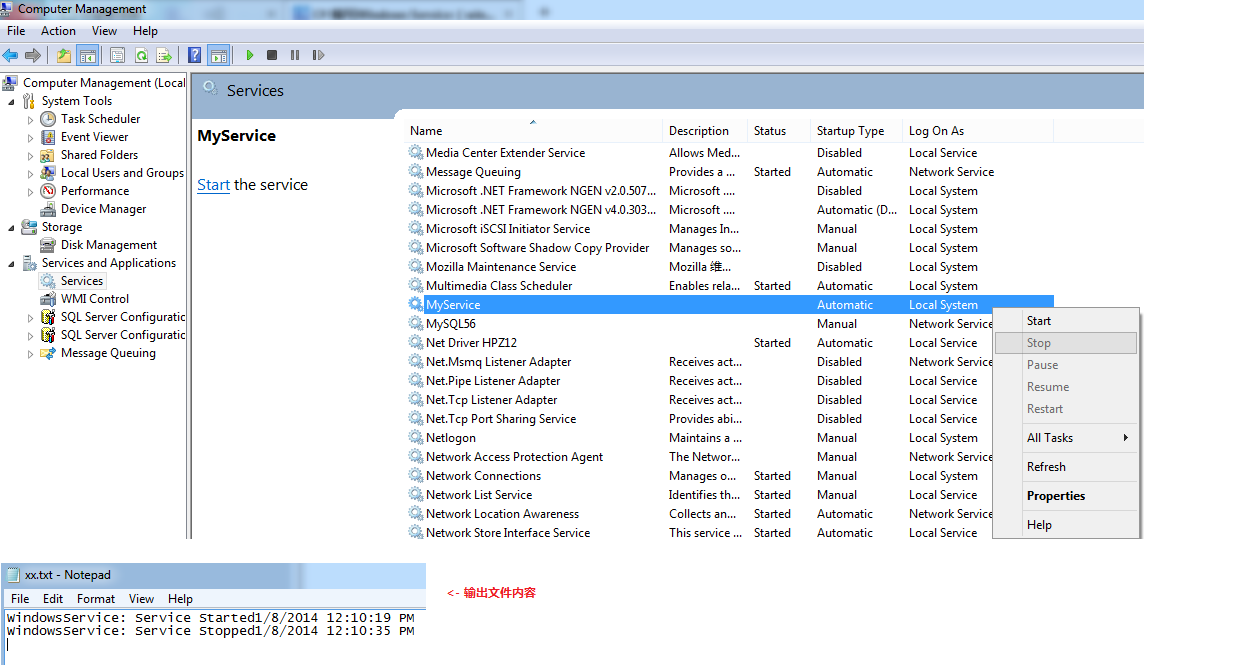
如上服务程序运行结果截图:
- 补充:
1.Service启动属性:
Manual 服务安装后,必须手动启动。
Automatic 每次计算机重新启动时,服务都会自动启动。
Disabled 服务无法启动。
2.新建的Service项目,其中各属性的含义(设计视图->右键属性):
Autolog 是否自动写入系统的日志文件
CanHandlePowerEvent 服务时候接受电源事件
CanPauseAndContinue 服务是否接受暂停或继续运行的请求
CanShutdown 服务是否在运行它的计算机关闭时收到通知,以便能够调用 OnShutDown 过程
CanStop 服务是否接受停止运行的请求
ServiceName 服务名
3. 也可以在系统服务管理器中,设置相应Service的属性或启动方式等
计算机管理 -> 服务和应用程序 -> 服务 -> ...
window server开发的更多相关文章
- Asp.net MVC4.0(net4.5) 部署到window server 2003上的解决方案
Asp.net MVC4.0(net4.5) 部署到window server 2003上的解决方案 最近做了一个Web项目,也没多想就用了Asp.net MVC4.0 ,MVC4.0默认的目标fra ...
- Window Server 2012 R2 没有照片查看器 打开图片都是画板问题怎么解决
新安装了 Window Server 2012 R2 系统,感觉屌屌的样子,加上开机速度蛮快,心里略爽.结果,打开图片一看,发现竟然是画板,而且还没有照片查看器,顿时泪流满面. 后来我利用了强大的百度 ...
- Window Server 2003(IIS6) 安装.net4.0遇到的问题总结
1.Window server 2003系统原本就装了.net1.0..net2.0 ,安装.net 4.0之前,系统已经发不了一些网站,这个时候,我安装.net 4.0返现程序不能访问了,提示ser ...
- Window Server IIS6.0部署webservice请求调用提示请求失败
在一台window server 2003机器上部署了一个webservice,iis为6.0,奇怪的是.在服务器本机调用webservice成功了,可是在其它client调用却反馈失败.详细什么原因 ...
- Restrict each user to a single session in window server 2008 R2 or 2012
Restrict each user to a single session in window server 2008 R2 or 2012 2014-10-31 In window server ...
- 在window server 2008 64位系统上 发布网站的过程中遇到的问题(转)
发布网站的过程如下: 1.安装数据库系统2.建立数据库,执行sql3.安装iis4.在本地机子上发布网站5.把发布好的东西拷贝到IIS上 1.安装数据库系统: 出现错误:必须使用角色管理工具 安装或配 ...
- 在window server 2008 64位系统上 发布网站的过程中遇到的问题
发布网站的过程如下: 1.安装数据库系统2.建立数据库,执行sql3.安装iis4.在本地机子上发布网站5.把发布好的东西拷贝到IIS上 1.安装数据库系统: 出现错误:必须使用角色管理工具 安装或配 ...
- 【转】android 最新 NDK r8 在window下开发环境搭建 安装配置与使用 详细图文讲解,完整实际配置过程记录(原创)
原文网址:http://www.cnblogs.com/zdz8207/archive/2012/11/27/android-ndk-install.html android 最新 NDK r8 在w ...
- 【ArcGIS Server 开发系列】Flyingis六大系列讲座精品PDF奉献
转自:http://www.cnblogs.com/gispeng/archive/2008/07/24/1250116.html [ArcGIS Server 开发系列]Flyingis六大系列讲座 ...
随机推荐
- 在linux中搭建git服务器
个人觉得, 以下搭建git服务器的过程就像是在linux增加了一个用户, 而这个用户的登录shell是 git-shell, 太刨根问底的东西我也说不清楚, 还是看下面的过程吧. 过程参考了网上的文章 ...
- [OrangePi] Installation on internal EMMC
Install the image on SD Card as described above Boot your Orange PI board from SD Card Run: sudo ins ...
- js默认比较第一个数字大小
解决办法:先把数字用Number转化:num=Number(num);然后再比较 和parseInt区别
- HGE游戏引擎之实战篇,渐变的游戏开场
#include <hge.h> #include "menuitem.h" //#include <hgefont.h> #include <hge ...
- Delphi XE的firemonkey获取当前文件所在路径的方法
Delphi XE的firemonkey获取当前文件所在路径的方法 在之前,我们知道有三种方法: ExtractFilePath(ParamStr(0)) ExtractFilePath(Applic ...
- Java局部变量final
局部变量和形参带final. 在一个线程A中开起另一个线程B,如果线程B要使用线程A的局部变量,那么A的局部变量需要定义成final.理由:局部变量是线程内部共享的,每一个线程内的不能访问其他线程的局 ...
- 【jqGrid for ASP.NET MVC Documentation】.学习笔记.6.分层
1 两级分层 每个父 grid 的行,都能有子 grid .这被叫做 层次,它用来显示相关的 表,主信息 –> 明细信息等. } 一旦你为 父子 grid 都定义了 Models ,下一步就是设 ...
- PHP程序中删除字符串最后一个字符的三种方法
常见的语法格式: foreach ($arr as $key => $value) {$arr_str = $arr['x_id'] . ',' . $arr_str;} 假设字符数组 $arr ...
- WPF:MenuItem样式
基础信息 1.MenuItem 样式 <Window.Resources> <Style TargetType="{x:Type MenuItem}"> & ...
- java多线程解决生产者消费者问题
import java.util.ArrayList; import java.util.List; /** * Created by ccc on 16-4-27. */ public class ...