
Spring MVC 之输入验证(六)
Spring MVC 验证主要还是用的是hibernate的验证。so需要添加以下的jar包:
1、 hibernate-validator-5.2.2.Final.jar
2、hibernate-validator-annotation-processor-5.2.2.Final.jar (这个可以不用)
3、 log4j.jar
4 、slf4j-api-1.5.6.jar
5、 slf4j-log4j12-1.5.6.jar
6 、validation-api-1.1.0.Final.jar
以登录验证为例:
在实体属性上配置注解;
package com.cy.springannotation.entity;

import javax.validation.constraints.NotNull;

import javax.validation.constraints.Pattern;

import org.hibernate.validator.constraints.Length;

import org.hibernate.validator.constraints.NotEmpty;

/**

 * 定义一个表单实体类

 * @author acer

 *

 */

public class UserBean {

    //要求属性名必须要和表单的参数名一样的!

    @NotEmpty(message="用户名不能为空!")

    @Pattern(regexp="\\w{6,20}",message="用户名6-20位")

    private String username;

    @NotEmpty(message="密码不能为空")

    @Length(max=20,min=6,message="密码不能小于6位")

    private String password;

    public String getUsername() {

        return username;

    }

    public void setUsername(String username) {

        this.username = username;

    }

    public String getPassword() {

        return password;

    }

    public void setPassword(String password) {

        this.password = password;

    }

}
JSP页面上通过spring标记来获取错误信息:
 <%@ page language="java" import="java.util.*" pageEncoding="utf-8" contentType="text/html; charset=utf-8"%>

 <%

 String path = request.getContextPath();

 String basePath = request.getScheme()+"://"+request.getServerName()+":"+request.getServerPort()+path+"/";

 %>

 <!-- srpingmvc 验证需要使用到spring表单标签 -->

 <%@ taglib prefix="springform" uri="http://www.springframework.org/tags/form" %>

 <!DOCTYPE HTML PUBLIC "-//W3C//DTD HTML 4.01 Transitional//EN">

 <html>

   <head>

     <base href="<%=basePath%>">

     <title>验证页面</title>

     <meta http-equiv="pragma" content="no-cache">

     <meta http-equiv="cache-control" content="no-cache">

     <meta http-equiv="expires" content="0">

     <meta http-equiv="keywords" content="keyword1,keyword2,keyword3">

     <meta http-equiv="description" content="This is my page">

     <!--

     <link rel="stylesheet" type="text/css" href="styles.css">

     -->

   </head>

   <body>

    <!-- commandName用于指定活动的Bean对象,即我可以在页面上,获取对象属性所对应的错误信息,值是对象名称的首字母小写,同modelAttribute一样的意思(modelAttribute="contentModel") -->

   <!--  <springform:form method="post" action="login.do" commandName="userBean"> -->

    <springform:form method="post" action="login.do" modelAttribute="user">

     <table>

        <tr>

            <td>用户名:</td>

            <td><input type="text" name="username"/><springform:errors delimiter="," path="username"></springform:errors></td>

        </tr>

         <tr>

            <td>密码</td>

            <td><input type="text" name="password"/><springform:errors delimiter="," path="password"></springform:errors></td>

        </tr>

        <tr>

            <td colspan="2"> <input type="submit" value="提交"/> </td>

        </tr>

     </table>

 </springform:form>

   </body>

 </html>
delimiter:如果一个属性有多个错误,错误信息的分隔符。默认是换行.
path:验证失败的属性名.
控制器:
 @RequestMapping(value="/login.do")

     //@Valid 通过该注解告知该方法,我的哪个实体Bean需要验证

     //BindingResult 为固定参数,用于接收验证结果

     public String login(@ModelAttribute("user") @Valid UserBean user,BindingResult br) {

         if(br.hasErrors()){

             //验证未通过则

             return "validate1";

         }

         log.info(user.getUsername());

         log.info(user.getPassword());

         return "index";

     }
如果界面上使用了spring标签,那么需要预先启动Spring容器,所以在web.xml中增加配置:
 <!-- 启动spring容器,用于支持springmvc validate -->

   <context-param>

     <param-name>contextConfigLocation</param-name>

     <param-value>/WEB-INF/classes/springAnnotation-servlet.xml</param-value>

 </context-param>

 <!-- 配置在context-param里面文件内的内容,需要通过 ContextLoaderListener添加到上下文里面去-->

   <listener>

     <listener-class>org.springframework.web.context.ContextLoaderListener</listener-class>

   </listener>
到springAnnotation-servlet.xml文件中配置:
 <!-- 开启注解这里需要添加个validator-->

 <!--开启注解  -->

 <mvc:annotation-driven conversion-service="tc" validator="validator" />

 <!-- 验证配置,告知srpingmvc,我使用的是Hibernate验证框架来完成的验证 -->

     <bean id="validator" class="org.springframework.validation.beanvalidation.LocalValidatorFactoryBean">

         <property name="providerClass" value="org.hibernate.validator.HibernateValidator" />

     </bean>
显示测试:
进入登录页面
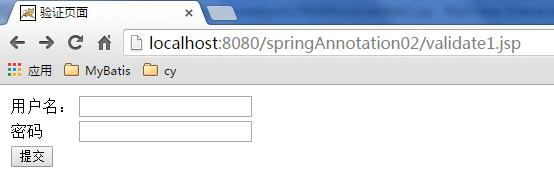
直接点击提交:
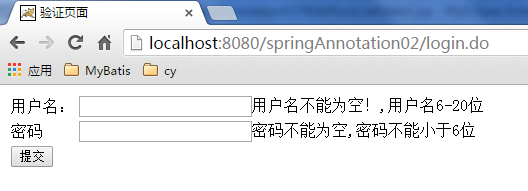
下面是主要的验证注解及说明:
|
注解 |
适用的数据类型 |
说明 |
|
@AssertFalse |
Boolean, boolean |
验证注解的元素值是false |
|
@AssertTrue |
Boolean, boolean |
验证注解的元素值是true |
|
@DecimalMax(value=x) |
BigDecimal, BigInteger, String, byte,short, int, long and the respective wrappers of the primitive types. Additionally supported by HV: any sub-type of Number andCharSequence. |
验证注解的元素值小于等于@ DecimalMax指定的value值 |
|
@DecimalMin(value=x) |
BigDecimal, BigInteger, String, byte,short, int, long and the respective wrappers of the primitive types. Additionally supported by HV: any sub-type of Number andCharSequence. |
验证注解的元素值小于等于@ DecimalMin指定的value值 |
|
@Digits(integer=整数位数, fraction=小数位数) |
BigDecimal, BigInteger, String, byte,short, int, long and the respective wrappers of the primitive types. Additionally supported by HV: any sub-type of Number andCharSequence. |
验证注解的元素值的整数位数和小数位数上限 |
|
@Future |
java.util.Date, java.util.Calendar; Additionally supported by HV, if theJoda Time date/time API is on the class path: any implementations ofReadablePartial andReadableInstant. |
验证注解的元素值(日期类型)比当前时间晚 |
|
@Max(value=x) |
BigDecimal, BigInteger, byte, short,int, long and the respective wrappers of the primitive types. Additionally supported by HV: any sub-type ofCharSequence (the numeric value represented by the character sequence is evaluated), any sub-type of Number. |
验证注解的元素值小于等于@Max指定的value值 |
|
@Min(value=x) |
BigDecimal, BigInteger, byte, short,int, long and the respective wrappers of the primitive types. Additionally supported by HV: any sub-type of CharSequence (the numeric value represented by the char sequence is evaluated), any sub-type of Number. |
验证注解的元素值大于等于@Min指定的value值 |
|
@NotNull |
Any type |
验证注解的元素值不是null |
|
@Null |
Any type |
验证注解的元素值是null |
|
@Past |
java.util.Date, java.util.Calendar; Additionally supported by HV, if theJoda Time date/time API is on the class path: any implementations ofReadablePartial andReadableInstant. |
验证注解的元素值(日期类型)比当前时间早 |
|
@Pattern(regex=正则表达式, flag=) |
String. Additionally supported by HV: any sub-type of CharSequence. |
验证注解的元素值与指定的正则表达式匹配 |
|
@Size(min=最小值, max=最大值) |
String, Collection, Map and arrays. Additionally supported by HV: any sub-type of CharSequence. |
验证注解的元素值的在min和max(包含)指定区间之内,如字符长度、集合大小 |
|
@Valid |
Any non-primitive type(引用类型) |
验证关联的对象,如账户对象里有一个订单对象,指定验证订单对象 |
|
@NotEmpty |
|
验证注解的元素值不为null且不为空(字符串长度不为0、集合大小不为0) |
|
@Range(min=最小值, max=最大值) |
|
验证注解的元素值在最小值和最大值之间 |
|
@NotBlank |
|
验证注解的元素值不为空(不为null、去除首位空格后长度为0),不同于@NotEmpty,@NotBlank只应用于字符串且在比较时会去除字符串的空格 |
|
@Length(min=下限, max=上限) |
|
验证注解的元素值长度在min和max区间内 |
|
|
|
验证注解的元素值是Email,也可以通过正则表达式和flag指定自定义的email格式 |
Spring MVC 之输入验证(六)的更多相关文章
- JSR-303 Bean Validation 介绍及 Spring MVC 服务端验证最佳实践
任何时候,当要处理一个应用程序的业务逻辑,数据校验是你必须要考虑和面对的事情. 应用程序必须通过某种手段来确保输入参数在上下文来说是正确的. 分层的应用在很多时候,同样的数据验证逻辑会出现在不同的层, ...
- Spring MVC 学习总结(六)——Spring+Spring MVC+MyBatis框架集成
与SSH(Struts/Spring/Hibernate/)一样,Spring+SpringMVC+MyBatis也有一个简称SSM,Spring实现业务对象管理,Spring MVC负责请求的转发和 ...
- Spring MVC 使用介绍(六)—— 注解式控制器(二):请求映射与参数绑定
一.概述 注解式控制器支持: 请求的映射和限定 参数的自动绑定 参数的注解绑定 二.请求的映射和限定 http请求信息包含六部分信息: ①请求方法: ②URL: ③协议及版本: ④请求头信息(包括Co ...
- Spring MVC 表单验证
1. 基于 JSR-303(一个数据验证的规范): import javax.validation.constraints.Min; import javax.validation.constrain ...
- Spring MVC 响应视图(六)
完整的项目案例: springmvc.zip 目录 实例 除了依赖spring-webmvc还需要依赖jackson-databind(用于转换json数据格式) <dependency> ...
- spring mvc @Valid 数据验证
//对书的单价校验不能是空,价格在20-100之间 @DecimalMax(value = "100", message = "价格不超过100元") ...
- [Spring MVC] - InitBinder验证
Spring MVC使用InitBinder验证: 使用InitBinder做验证的情况一般会在此Controller中提交的数据需要有一些是业务性质的,也即比较复杂的验证情况下才会使用.大部份简单的 ...
- JSR-303 Bean Validation 介绍及 Spring MVC 服务端参数验证最佳实践
任何时候,当要处理一个应用程序的业务逻辑,数据校验是你必须要考虑和面对的事情. 应用程序必须通过某种手段来确保输入参数在上下文来说是正确的. 分层的应用很多时候同样的数据验证逻辑会出现在不同的层,这样 ...
- [Spring MVC] - Annotation验证
使用Spring MVC的Annotation验证可以直接对view model的简单数据验证,注意,这里是简单的,如果model的数据验证需要有一些比较复杂的业务逻辑性在里头,只是使用annotat ...
随机推荐
- poj3270 Cow Sorting
给定有序数组a[1...n]的一个置换a[σ(1)...σ(n)], 通过交换数组元素把置换后的数组恢复为有序, 定义进行一次交换的代价为两元素之和,试问此过程的最小总代价. 实际上一种置换即定义S ...
- Linux内核同步机制
http://blog.csdn.net/bullbat/article/details/7376424 Linux内核同步控制方法有很多,信号量.锁.原子量.RCU等等,不同的实现方法应用于不同的环 ...
- ReentrantLock的原理学习
转载:https://my.oschina.net/andylucc/blog/651982 摘要 提到JAVA加锁,我们通常会想到synchronized关键字或者是Java Concurrent ...
- 南阳oj 求N!的二进制表示最低位的1的位置(从右向左数)。
N! 时间限制:1000 ms | 内存限制:65535 KB 难度:3 描述 阶乘(Factorial)是一个很有意思的函数,但是不少人都比较怕它.现在这里有一个问题,给定一个N(0< ...
- C#中的异步和同步
同步 同步(英语:Synchronization [ˌsɪŋkrənaɪ'zeɪʃn]),指对在一个系统中所发生的事件(event)之间进行协调,在时间上出现一致性与统一化的现象.说白了就是多个任务一 ...
- MUI 个推
个推 四种消息模板(透传消息模板.点击通知打开网页模板.点击通知打开应用模板.点击通知栏弹框下载模版) 三种推送方式(对单个用户推送接口 | 对指定用户列表推送接口 | 对指定应用群推接口) 四种消息 ...
- zookeeper系列之四—coordinate
http://zookeeper.apache.org/doc/trunk/zookeeperProgrammers.html
- Python3基础 大于一个数的同时小于一个数
镇场诗:---大梦谁觉,水月中建博客.百千磨难,才知世事无常.---今持佛语,技术无量愿学.愿尽所学,铸一良心博客.------------------------------------------ ...
- 【转载】nedmalloc结构分析
原文:nedmalloc结构分析 nedmalloc是一个跨平台的高性能多线程内存分配库,很多库都使用它,例如:OGRE.现在我们来看看nedmalloc的实现 (以WIN32部分为例) 位操作 ...
- Linux红帽认证----I Want
仅此设定一个目标,此证一定搞到手!!!