
IOS UIDevice距离传感器(打开 关闭)
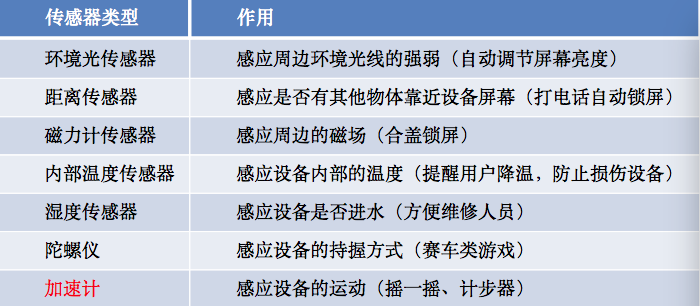
● 运动传感器\加速度传感器\加速计(Motion/Accelerometer Sensor)
● 环境光传感器(Ambient Light Sensor)
● 距离传感器(Proximity Sensor)
● 磁力计传感器(Magnetometer Sensor)
● 内部温度传感器(Internal Temperature Sensor)
● 湿度传感器(Moisture Sensor)
● 陀螺仪(Gyroscope)
[UIDevice currentDevice].proximityMonitoringEnabled = YES;
// 监听距离感应的通知
[[NSNotificationCenter defaultCenter] addObserver:self
selector:@selector(proximityChange:)
name:UIDeviceProximityStateDidChangeNotification
object:nil];
- (void)proximityChange:(NSNotificationCenter *)notification {
if ([UIDevice currentDevice].proximityState == YES) {
NSLog(@"某个物体靠近了设备屏幕"); // 屏幕会自动锁住
} else {
NSLog(@"某个物体远离了设备屏幕"); // 屏幕会自动解锁
}
}
//打开距离感应功能
#import "ViewController.h"

@interface ViewController ()

@end

@implementation ViewController

- (void)viewDidLoad {

    [super viewDidLoad];

    // Do any additional setup after loading the view, typically from a nib.

    // 1.开启距离传感器(注意: 默认情况距离传感器是关闭的)

//    [UIApplication sharedApplication].proximitySensingEnabled = YES;

    // 只要开启之后, 就开始实时监听

    [UIDevice currentDevice].proximityMonitoringEnabled = YES;

    // 2.当监听到有物体靠近设备时系统会发出通知

    [[NSNotificationCenter defaultCenter] addObserver:self selector:@selector(proximityStateDidChange:) name:UIDeviceProximityStateDidChangeNotification object:nil];

}

- (void)dealloc

{

    [[NSNotificationCenter defaultCenter] removeObserver:self];

}

// 当监听到有物体靠近设备时调用

- (void)proximityStateDidChange:(NSNotification *)note

{

//    NSLog(@"%@", note);

   if( [UIDevice currentDevice].proximityState)

   {

       NSLog(@"有物体靠近");

   }else

   {

       NSLog(@"物体离开");

   }

}

@end
IOS UIDevice距离传感器(打开 关闭)的更多相关文章
- IOS研究院之打开照相机与本地相册选择图片(六)
原创文章如需转载请注明:转载自雨松MOMO程序研究院本文链接地址:IOS研究院之打开照相机与本地相册选择图片(六) Hello 大家好 IOS的文章好久都木有更新了,今天更新一篇哈. 这篇文章主要学习 ...
- CentOS7使用firewalld打开关闭防火墙与端口(转载)
1.firewalld的基本使用 启动: systemctl start firewalld 查看状态: systemctl status firewalld 停止: systemctl disabl ...
- fopen(),fclose() 打开/关闭文件
打开/关闭/刷新流 1. fopen() 打开流 功能: 1)fopen()打开由 path指定的一个文件. 2)fdopen()获取一个先有的文件描述符,并使一个标准的I/O流与该描述相结合.此函数 ...
- activity的打开关闭动画
Activity的打开关闭或者说相互跳转之间可以设置动画的.默认的打开关闭直接消失或出现,比较不优美,但是有的手机Rom对这个默认做了修改,比如红米HM1,默认的就是新页面自右向左滑动出现,自左向右滑 ...
- 关于学习CentOS7使用firewalld打开关闭防火墙和端口
1.firewalld简介 firewalld是centos7的一大特点,主要有两个优点:一是支持动态更新,不需要重启服务:二就是加入了防火墙的“zone”概念. firewalld有图形界面和工具界 ...
- XamarinSQLite教程Xamarin.iOS项目中打开数据库文件
XamarinSQLite教程Xamarin.iOS项目中打开数据库文件 以下是打开MyDocuments.db数据库的具体操作步骤: (1)将Mac电脑上的MyDocuments.db数据库移动到W ...
- CentOS7使用httpd apache 和firewalld打开关闭防火墙与端口
Centos7 使用systemctl 工具操作命令 systemctl 是Centos7的服务管理工具中的主要工具 ,它融合之前service和chkconfig的功能于一体 一.httpd的设置 ...
- 根据python上下文管理,写一个在读文件内容前后自动打开关闭文件的程序
利用上下文管理实现读f文件前后自动打开关闭文件#在本目录创建f文件,内容写monkey代码如下 import contextlib #导入模块1 @contextlib.contextmanager# ...
- appium关于当前网络情况测试,实现打开关闭网络(python3.4版)
appium关于当前网络情况测试,实现打开关闭网络(不需要root测试机) # python from appium.webdriver.connectiontype import Connectio ...
随机推荐
- PIE SDK地图显示范围截图
1.1. 功能简介 地图显示范围截图是将当前地图显示的范围进行输出.输出的 格式是png.bmp,主要思路就是通过IActiveView接口下的Output()方法进行输出 1.2. 功能实现说明 2 ...
- PIE SDK矢量数据的修改
1.功能简介 目前PIE SDK支持矢量数据的修改或删除,下面对矢量数据的投影转换功能进行介绍. 2.功能实现说明 2.1. 矢量数据的修改 2.2. 实现思路及原理说明 第一步 获取需要修改的矢量数 ...
- PIE SDK栅格数据的投影转换
1. 功能简介 为了适应不同数据显示分析的需要,数据的投影可以进行相应的转换,目前PIE SDK支持多种数据格式的投影转换,下面对栅格数据格式的投影转换功能进行介绍. 2. 功能实现说明 2.1. 实 ...
- mysql 锁问题 (相同索引键值或同一行或间隙锁的冲突)
1.使用相同索引键值的冲突 由于mysql 的行锁是针对索引加的锁,不是针对记录加的锁,所以虽然是访问不同行的记录,但如果是使用相同的索引键,是会出现锁冲突的.设计时要注意 例如:city表city_ ...
- oracle 备份恢复篇(四)---rman 单个数据文件
一,环境背景
- JetBrains PyCharm(Community版本)的下载、安装和初步使用
不多说,直接上干货! 首先谈及这款软件,博主我用的理由:搞机器学习和深度学习! 想学习Python的同学们,在这里隆重介绍一款 Python 的开发工具 pyCharm IDE.这是我最喜欢的 Pyt ...
- centOS使用.htaccess
首先,你要保证你的Aapche已经开启了.htaccess 可以参考:http://www.veryhuo.com/a/view/21259.html 以下是.htaccess文件中的内容: Rewr ...
- 温故而知新,再探ConcurrentHashMap
这里说的还是1.7的ConcurrentHashMap,在1.8中,ConcurrentHashMap已经不是基于segments实现了. 之前也知道ConcurrentHashMap是通过把锁加载各 ...
- Hashtable元素的遍历
遍历用到DictionaryEntry(字典键/值对) 实例 创建一个Hashtable对象,向其中添加4个元素,然后遍历 static void Main(string[] args) { Hash ...
- Spring定时器——时间设置规则
平时经常有一些写Spring定时器的需求,但是每次要设置定时器的时间的时候,老是既不住,到处找别人的博客又各种不爽,所以就自己记录一份吧,顺便整理一下. org.springframework.sch ...