
40、DrawerLayout使用详情
1、主内容视图一定要是DrawerLayout的第一个子视图
2、主内容视图宽度和高度匹配父视图,即“match_parent”
3、必须显示指定抽屉视图(如ListView)的 android:layout_gravity 属性
1)、 android:layout_gravity=“start”时,从左向右滑出菜单
2)、 android:layout_gravity=“end” 时,从右向左滑出菜单
3)、不推荐使用 “left”和“right”
4、抽屉视图的宽度以dp为单位,请不要超过320dp(为了总能看到一些主内容视图。
【知识点】
1、mDrawerLayout.setDrawerListener(DrawerLayout.DrawerListener);
2、ActionBarDrawerToggle是DrawerLayout.DrawerListener的具体实现类
1)、改变android.R.id.home图标(构造方法)
2)、Drawer拉出、隐藏,带有android.R.id.home动画效果(syncState())
3)、监听Drawer拉出、隐藏事件
3、覆写ActionBarDrawerToggle的onDrawerOpened()和onDrawerClosed()以监 听抽屉拉出或隐藏事件
4、覆写Activity的onPostCreate()和onConfigurationChanged()方法
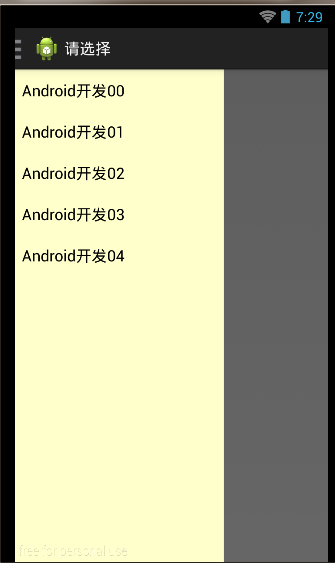
【范例】
activity_main.xml
 <android.support.v4.widget.DrawerLayout

     xmlns:android="http://schemas.android.com/apk/res/android"

     android:id="@+id/drawer_layout"

     android:layout_width="match_parent"

     android:layout_height="match_parent" >

     <!-- The main content view -->

     <FrameLayout

         android:id="@+id/content_frame"

         android:layout_width="match_parent"

         android:layout_height="match_parent" />

     <!-- The navigation view -->

     <ListView

         android:id="@+id/left_drawer"

         android:layout_width="240dp"

         android:layout_height="match_parent"

         android:layout_gravity="start"

         android:background="#ffffcc"

         android:choiceMode="singleChoice"

         android:divider="@android:color/transparent"

         android:dividerHeight="0dp" />

 </android.support.v4.widget.DrawerLayout>
MainActivity.java
 public class MainActivity extends Activity implements OnItemClickListener {

     private DrawerLayout mDrawerLayout;

     private ListView mDrawerList;

     private ArrayList<String> menuLists;

     private ArrayAdapter<String> adapter;

     private ActionBarDrawerToggle mDrawerToggle;

     private String mTitle;

     @Override

     protected void onCreate(Bundle savedInstanceState) {

         super.onCreate(savedInstanceState);

         setContentView(R.layout.activity_main);

         mTitle = (String) getTitle();

         mDrawerLayout = (DrawerLayout) findViewById(R.id.drawer_layout);

         mDrawerList = (ListView) findViewById(R.id.left_drawer);

         menuLists = new ArrayList<String>();

         for (int i = 0; i < 5; i++)

             menuLists.add("Android开发0" + i);

         adapter = new ArrayAdapter<String>(this,

                 android.R.layout.simple_list_item_1, menuLists);

         mDrawerList.setAdapter(adapter);

         mDrawerList.setOnItemClickListener(this);

         mDrawerToggle = new ActionBarDrawerToggle(this, mDrawerLayout,

                 R.drawable.ic_drawer, R.string.drawer_open,

                 R.string.drawer_close) {

             @Override

             public void onDrawerOpened(View drawerView) {

                 super.onDrawerOpened(drawerView);

                 getActionBar().setTitle("请选择");

                 invalidateOptionsMenu(); // Call onPrepareOptionsMenu()

             }

             @Override

             public void onDrawerClosed(View drawerView) {

                 super.onDrawerClosed(drawerView);

                 getActionBar().setTitle(mTitle);

                 invalidateOptionsMenu();

             }

         };

         mDrawerLayout.setDrawerListener(mDrawerToggle);

         //开启ActionBar上APP ICON的功能

         getActionBar().setDisplayHomeAsUpEnabled(true);

         getActionBar().setHomeButtonEnabled(true);

     }

     @Override

     public boolean onPrepareOptionsMenu(Menu menu) {

         boolean isDrawerOpen = mDrawerLayout.isDrawerOpen(mDrawerList);

         menu.findItem(R.id.action_websearch).setVisible(!isDrawerOpen);

         return super.onPrepareOptionsMenu(menu);

     }

     @Override

     public boolean onCreateOptionsMenu(Menu menu) {

         // Inflate the menu; this adds items to the action bar if it is present.

         getMenuInflater().inflate(R.menu.main, menu);

         return true;

     }

     @Override

     public boolean onOptionsItemSelected(MenuItem item) {

         //将ActionBar上的图标与Drawer结合起来

         if (mDrawerToggle.onOptionsItemSelected(item)){

             return true;

         }

         switch (item.getItemId()) {

         case R.id.action_websearch:

             Intent intent = new Intent();

             intent.setAction("android.intent.action.VIEW");

             Uri uri = Uri.parse("http://www.cnblogs.com/androidsj");

             intent.setData(uri);

             startActivity(intent);

             break;

         }

         return super.onOptionsItemSelected(item);

     }

     @Override

     protected void onPostCreate(Bundle savedInstanceState) {

         super.onPostCreate(savedInstanceState);

         //需要将ActionDrawerToggle与DrawerLayout的状态同步

         //将ActionBarDrawerToggle中的drawer图标,设置为ActionBar中的Home-Button的Icon

         mDrawerToggle.syncState();

     }

     @Override

     public void onConfigurationChanged(Configuration newConfig) {

         super.onConfigurationChanged(newConfig);

         mDrawerToggle.onConfigurationChanged(newConfig);

     }

     @Override

     public void onItemClick(AdapterView<?> arg0, View arg1, int position,

             long arg3) {

         // 动态插入一个Fragment到FrameLayout当中

         Fragment contentFragment = new ContentFragment();

         Bundle args = new Bundle();

         args.putString("text", menuLists.get(position));

         contentFragment.setArguments(args);

         FragmentManager fm = getFragmentManager();

         fm.beginTransaction().replace(R.id.content_frame, contentFragment)

                 .commit();

         mDrawerLayout.closeDrawer(mDrawerList);

     }

 }
ContentFragment.java
 public class ContentFragment extends Fragment {

     private TextView textView;

     @Override

     public View onCreateView(LayoutInflater inflater, ViewGroup container,

             Bundle savedInstanceState) {

         View view = inflater.inflate(R.layout.fragment_content, container, false);

         textView = (TextView) view.findViewById(R.id.textView);

         String text = getArguments().getString("text");

         textView.setText(text);

         return view;

     }

 }
 <?xml version="1.0" encoding="utf-8"?>

 <LinearLayout

     xmlns:android="http://schemas.android.com/apk/res/android"

     android:layout_width="match_parent"

     android:layout_height="match_parent"

     android:orientation="vertical" >

     <TextView

         android:id="@+id/textView"

         android:layout_width="match_parent"

         android:layout_height="wrap_content"

         android:textSize="25sp" />

 </LinearLayout>
40、DrawerLayout使用详情的更多相关文章
- 遍历input。select option 选中的值
<label> <input name="Fruit" type="radio" value="0" class=&quo ...
- [转]使用wireshark分析TCP/IP协议中TCP包头的格式
本文简单介绍了TCP面向连接理论知识,详细讲述了TCP报文各个字段含义,并从Wireshark俘获分组中选取TCP连接建立相关报文段进行分析. 一.概述 TCP是面向连接的可靠传输协议,两个进程互发数 ...
- 才一年,H5的发展就成这样了......
关于H5的发展,分享几个最近看到的惊人数据和新闻: 1.截至2015,有80%的App将全部或部分基于HTML5.这意味着大部分App的内容都将是以网页的形式呈现,典型的例子包括微信.Facebook ...
- Linux网络编程--wireshark分析TCP包头的格式
摘要: 本文简介了TCP面向连接理论知识,具体讲述了TCP报文各个字段含义.并从Wireshark俘获分组中选取TCP连接建立相关报文段进行分析. 一.概述 TCP是面向连接的可靠传输 ...
- 迅为IMX6核心板兼容工业级、商业扩展级、Plus版本核心板
IMX6核心板兼容单核.双核.四核.工业级.汽车级.iMX6Q最新Plus版本,可根据用户需求更换,百变定制,高端产品无忧! iMX6Q核心板(四核商业级) iMX6DL核心板(双核商业级) iMX6 ...
- ARM核心板_迅为imx6工控核心板_核心板中的小新潮
ARM核心板_迅为imx6工控核心板_核心板中的小新潮核心板参数 尺寸 51mm*61mm CPU Freescale Cortex-A9 四核 i.MX6Q,主频 1.2 GHz 内存 2GB DD ...
- 结合Wireshark捕获分组深入理解TCP/IP协议栈之TCP协议(TCP报文格式+三次握手实例)
摘要: 本文简单介绍了TCP面向连接理论知识,详细讲述了TCP报文各个字段含义,并从Wireshark俘获分组中选取TCP连接建立相关报文段进行分析. 一.概述 TCP是面向连接的可靠 ...
- Projected Coordinate Systems
Coordinate Systems Projected Coordinate Systems This is an archive of a previous version of the ArcG ...
- 【Python】理想论坛帖子读取爬虫1.04版
1.01-1.03版本都有多线程争抢DB的问题,线程数一多问题就严重了. 这个版本把各线程要添加数据的SQL放到数组里,等最后一次性完成,这样就好些了.但乱码问题和未全部完成即退出现象还在,而且速度上 ...
随机推荐
- linux基础教程---设置文件的主人、组别
我们在操作linux的是要告诉文件是属于哪个主人的,哪个组别的.这样我们就须要知道该怎样设置": 设置文件的主人.组别 chown: change owner >chown 主人 ...
- perl学习笔记——哈希
哈希 哈希是一种数据结构,它和数组的相似之处在于可以容难任意多的值并能按需取用,而他和数组的不同在于索引的方式,数组是以数字为索引而哈希则是以名字为索引. 哈希的键是唯一的,哈希的值可以重复. 哈希的 ...
- JavaScript对象深复制
1.原理 使用JSON,当然需要JSON安全的格式,JSON安全请参考:http://www.cnblogs.com/mengfangui/p/8257269.html 2.示例 <!DOCTY ...
- Oracle安装过程中的几点注意
为追求统一,安装了oracle 11g step 4时需要改一下名称,利于记忆 数据库安装完之后需要取消SCOTT账户的锁定 完成后点击SQL Developer会出现——"应用程序开发&q ...
- C语言-编译
编译的时候只是需要知道函数原型(即只需要 xxx.h 文件即可), 不需要知道函数定义, 在链接阶段可以把 xxx.c 生成的 xxx.o 链接进去, 以知道函数定义 编译时,编译器需要的是语法的正确 ...
- 我也来谈谈使用Zen Coding快速开发html和css原理
zen coding 是一种仿css选择器的语法来快速开发html和css的开源项目.现已更名为Emmet.可以到github上下载拜读.在这个都想偷懒的世界里,此方法可以极大的缩短开发人员的开发时间 ...
- ZOJ 3827 Information Entropy (2014牡丹江区域赛)
题目链接:ZOJ 3827 Information Entropy 依据题目的公式算吧,那个极限是0 AC代码: #include <stdio.h> #include <strin ...
- LuaStudio编辑调试软件
该编辑调试器最大特点就是能够注入到宿主程序内对lua脚本进行调试.还能够设置断点观察变量的值,功能很强大. 如今已有的编辑器有Notepad++, Editplus, luaforwindows, S ...
- LA 5009 (HDU 3714) Error Curves (三分)
Error Curves Time Limit:3000MS Memory Limit:0KB 64bit IO Format:%lld & %llu SubmitStatusPr ...
- Java中有几种类型的流?以及常见的实现类都有哪些?
Java中有几种类型的流?以及常见的实现类都有哪些? 首先应该从两个角度来看: 从输入输出方面来讲: Java中有输入流和输出流 从流的编码方式上来讲: Java中有字节流和字符流 ...