
openstack Neutron分析(3)—— neutron-dhcp-agent源码分析
1.neutron dhcp3个主要部件分别为什么?
2.dhcp模块包含哪些内容?
3.Dnsmasq配置文件是如何创建和更新的?
4.DHCP agent的信息存放在neutron数据库的哪个表中?
扩展: neutron-dhcp-agent在neutron的作用是什么?
一.概述
DHCP agent scheduler:负责DHCP agent与network的调度
DHCP agent:为租户网络提供DHCP的功能,提供metadata request服务。
DHCP driver:即dnsmasq,用于管理DHCP server。
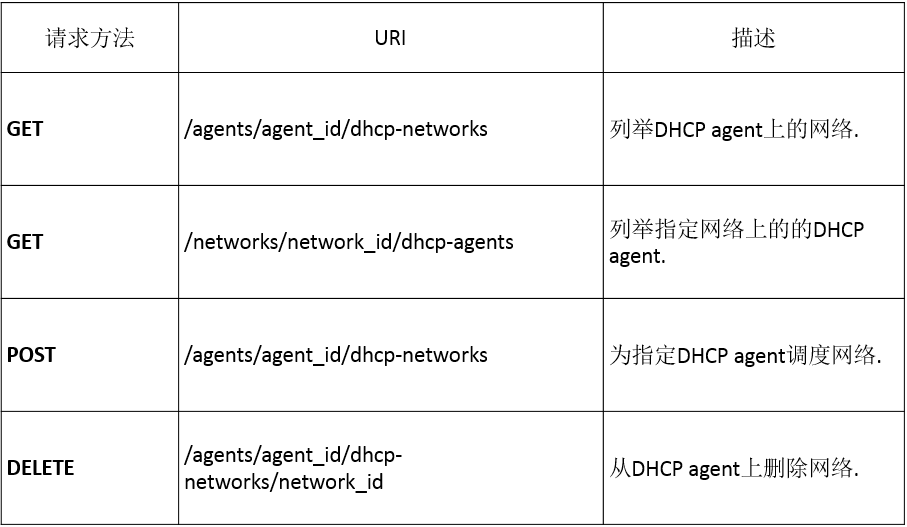
二.REST API

三.总体架构
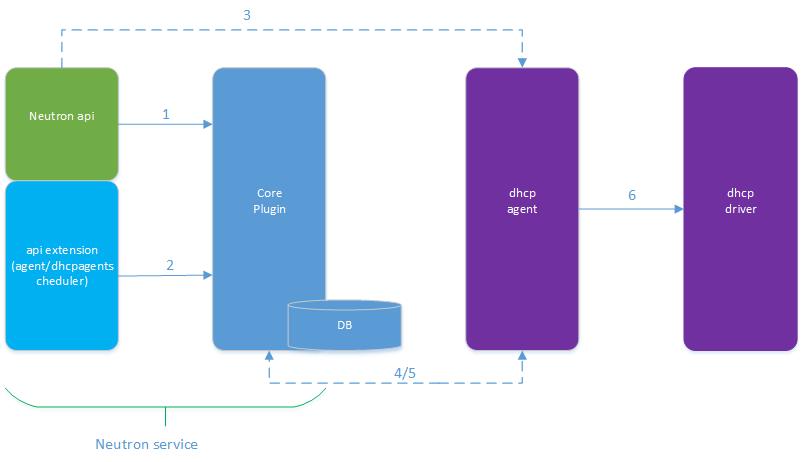
2.agent management/agent scheduler的操作
3.network/subnet/port操作会发送rpc请求到dhcp agent。
4.agentscheduler db发送rpc请求到dhcp agent。
5.dhcp agent通过DhcpPluginApi发送rpc请求到core plugin,操作相应的数据库。
6.dhcp agent调用dhcp driver进行dhcp相关操作。
- def main():
- register_options()
- common_config.init(sys.argv[1:])
- config.setup_logging(cfg.CONF)
- server = neutron_service.Service.create(
- binary='neutron-dhcp-agent',
- topic=topics.DHCP_AGENT,
- report_interval=cfg.CONF.AGENT.report_interval,
- manager='neutron.agent.dhcp_agent.DhcpAgentWithStateReport')
- service.launch(server).wait()
复制代码
DhcpAgentWithStateReport继承自DhcpAgent,用于汇报DHCPAgent的状态
- if report_interval:
- self.heartbeat = loopingcall.FixedIntervalLoopingCall(
- self._report_state)
- self.heartbeat.start(interval=report_interval)
复制代码
下面看下DhcpAgent初始化过程:
- def __init__(self, host=None):
- super(DhcpAgent, self).__init__(host=host)
- self.needs_resync_reasons = []
- self.conf = cfg.CONF
- # Agent cache of the current network state
- self.cache = NetworkCache()
- self.root_helper = config.get_root_helper(self.conf)
- # dhcp_driver currently is neutron.agent.linux.dhcp.Dnsmasq
- self.dhcp_driver_cls = importutils.import_class(self.conf.dhcp_driver)
- ctx = context.get_admin_context_without_session()
- # init plugin rpc
- self.plugin_rpc = DhcpPluginApi(topics.PLUGIN, # topic is q-plugin,提供DHCP相关的创建、查询、更新、删除接口
- ctx, self.conf.use_namespaces)
- # create dhcp dir to store dhcp info: /var/lib/neutron/dhcp/
- # these files are used for Dnsmasq
- dhcp_dir = os.path.dirname("/%s/dhcp/" % self.conf.state_path)
- if not os.path.isdir(dhcp_dir):
- os.makedirs(dhcp_dir, 0o755)
- self.dhcp_version = self.dhcp_driver_cls.check_version()
- # query existing_dhcp_networks from driver and then save them into self.cache
- self._populate_networks_cache()
复制代码
DhcpPluginApi创建了topic为q-plugin的处理方法,dhcp-agent外部可以通过DhcpAgentNotifyAPI来调用这些接口:
- class DhcpAgentNotifyAPI(n_rpc.RpcProxy):
- """API for plugin to notify DHCP agent."""
- BASE_RPC_API_VERSION = '1.0'
- # It seems dhcp agent does not support bulk operation
- VALID_RESOURCES = ['network', 'subnet', 'port']
- VALID_METHOD_NAMES = ['network.create.end',
- 'network.update.end',
- 'network.delete.end',
- 'subnet.create.end',
- 'subnet.update.end',
- 'subnet.delete.end',
- 'port.create.end',
- 'port.update.end',
- 'port.delete.end']
复制代码
neutron.agent.linux.dhcp.Dnsmasq
- def call_driver(self, action, network, **action_kwargs):
- """Invoke an action on a DHCP driver instance."""
- LOG.debug(_('Calling driver for network: %(net)s action: %(action)s'),
- {'net': network.id, 'action': action})
- try:
- # the Driver expects something that is duck typed similar to
- # the base models.
- driver = self.dhcp_driver_cls(self.conf,
- network,
- self.root_helper,
- self.dhcp_version,
- self.plugin_rpc)
- getattr(driver, action)(**action_kwargs)
- return True
复制代码
Dnsmasq会通过/var/lib/neutron/dhcp/目录下的配置文件启动dnsmasq进程,在DHCP更新的时候,更新这些配置文件并reload配置。
- dnsmasq --no-hosts --no-resolv --strict-order
- --bind-interfaces --interface=tap746570b9-2b --except-interface=lo
- --pid-file=/var/lib/quantum/dhcp/3e16cd2f-c693-49b4-91a7-2a65912ec152/pid
- --dhcp-hostsfile=/var/lib/quantum/dhcp/3e16cd2f-c693-49b4-91a7-2a65912ec152/host
- --dhcp-optsfile=/var/lib/quantum/dhcp/3e16cd2f-c693-49b4-91a7-2a65912ec152/opts
- --dhcp-script=/usr/bin/quantum-dhcp-agent-dnsmasq-lease-update --leasefile-ro
- --dhcp-range=set:tag0,12.0.0.192,static,120s
- --conf-file= --domain=openstacklocal
- --bind-interfaces --interface=tap746570b9-2b
- 主要选项:
- --except-interface=lo 使多个dnsmasq实例可以同时运行在同一台主机上并监听不同的interface
- --dhcp-hostsfile=/var/lib/quantum/dhcp/3e16cd2f-c693-49b4-91a7-2a65912ec152/host 读取IP与虚拟机的静态映射关系,该文件改变后dnsmasq会自动重新加载,不需要重启
- --dhcp-optsfile=/var/lib/quantum/dhcp/3e16cd2f-c693-49b4-91a7-2a65912ec152/opts 指定DNS服务器地址等选项
- --dhcp-script=/usr/bin/quantum-dhcp-agent-dnsmasq-lease-update --leasefile-ro lease信息更新与通知
- --dhcp-range=set:tag0,12.0.0.192,static,120s 重点在于static参数,该参数限制dnsmasq只能为dhcp-hostsfile包含的主机提供DHCP服务
复制代码
dhcp agent会调用dhcp_driver.reload_allocations来更新配置文件。reload_allocations会根据新网络配置重新生成配置文件。
dhcp agent会在收到如下4种消息时调用reload_allocations
- port_update_end
- port_delete_end
- subnet_update_end
- subnet_delete_end
- #Controller
- notifier_method = self._resource + '.create.end'
- notifier_method = self._resource + '.delete.end'
- notifier_method = self._resource + '.update.end'
复制代码
dhcp agent scheduler
2)增加性能,多个dhcp agent可以安装在多台机器上,同时服务。
如何调度dhcp agent
调度算法通过network_scheduler_driver配置,默认是neutron.scheduler.dhcp_agent_scheduler.ChanceScheduler
class ChanceScheduler(object):
"""Allocate a DHCP agent for a network in a random way.
More sophisticated scheduler (similar to filter scheduler in nova?)
can be introduced later.
"""
可以看出,这个实现采用了随机分配算法。
如何调用dhcp agent scheduler
通过neutron.api.rpc.agentnotifiers.dhcp_rpc_agent_api.py中
self._notify_agents,有代码
schedule_required = method == 'port_create_end'
if schedule_required:
agents = self._schedule_network(admin_ctx, network, agents)
可以看到当系统中有新的port创建后,会调用dhcp agent scheduler分配dhcp agent。
dhcp服务的启动
- def after_start(self):
- self.run()
- LOG.info(_("DHCP agent started"))
- def run(self):
- """Activate the DHCP agent."""
- # 根据系统中的网络配置,启动dhcp服务器进程(dnsmasq)。
- # sync_state()在dhcp agent启动后运行一次。
- self.sync_state()
- # 周期性调用sync_state()
- # dhcp agent会缓存一些网路的信息,通过该任务和neutron同步网络信息,更新本地缓存。
- self.periodic_resync()
复制代码
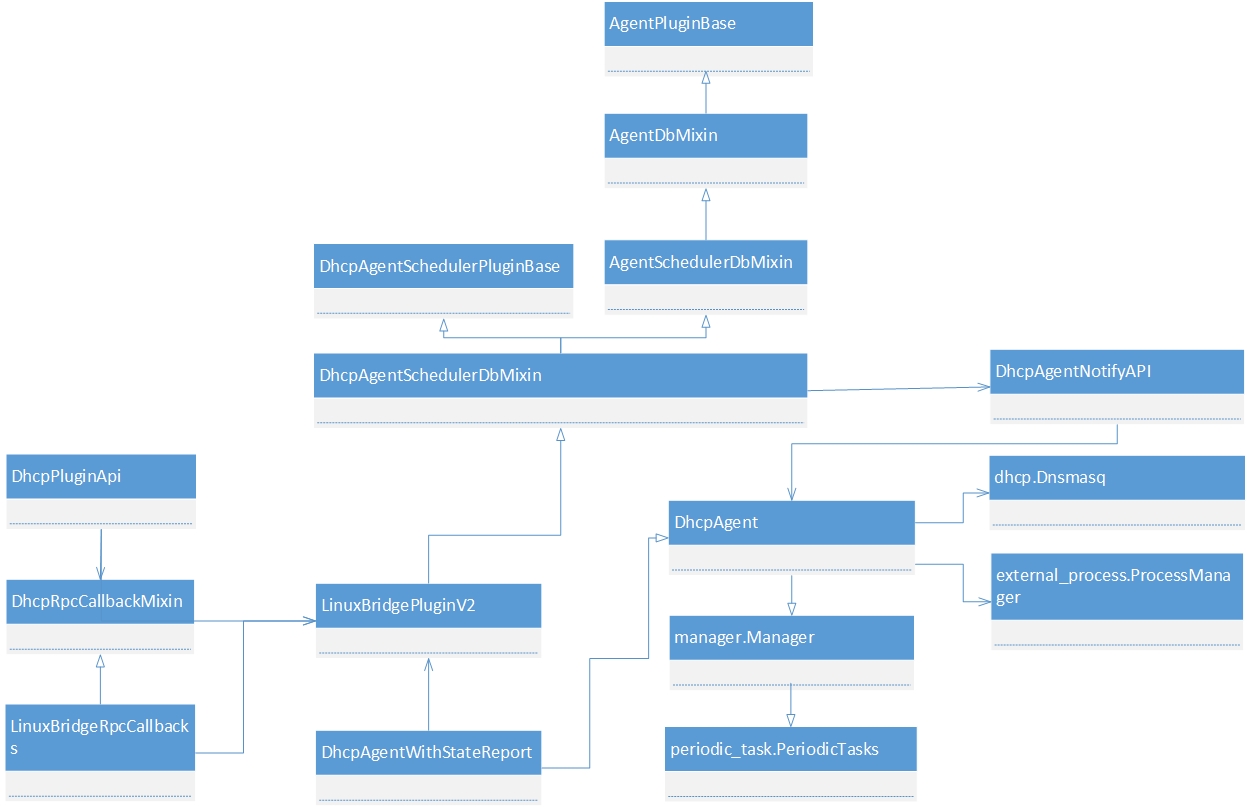
五.类图
DHCP agent的信息会存放在neutron数据库的agents表中:
- mysql> desc agents;
- +---------------------+---------------+------+-----+---------+-------+
- | Field | Type | Null | Key | Default | Extra |
- +---------------------+---------------+------+-----+---------+-------+
- | id | varchar(36) | NO | PRI | NULL | |
- | agent_type | varchar(255) | NO | | NULL | |
- | binary | varchar(255) | NO | | NULL | |
- | topic | varchar(255) | NO | | NULL | |
- | host | varchar(255) | NO | | NULL | |
- | admin_state_up | tinyint(1) | NO | | NULL | |
- | created_at | datetime | NO | | NULL | |
- | started_at | datetime | NO | | NULL | |
- | heartbeat_timestamp | datetime | NO | | NULL | |
- | description | varchar(255) | YES | | NULL | |
- | configurations | varchar(4095) | NO | | NULL | |
- +---------------------+---------------+------+-----+---------+-------+
复制代码
DHCP agent和network绑定关系存储在networkdhcpagentbindings中:
- mysql> desc networkdhcpagentbindings;
- +---------------+-------------+------+-----+---------+-------+
- | Field | Type | Null | Key | Default | Extra |
- +---------------+-------------+------+-----+---------+-------+
- | network_id | varchar(36) | NO | PRI | NULL | |
- | dhcp_agent_id | varchar(36) | NO | PRI | NULL | |
- +---------------+-------------+------+-----+---------+-------+
复制代码
相关文章
openstack Neutron分析(2)—— neutron-l3-agent
openstack Neutron分析(4)—— neutron-l3-agent中的iptables
openstack Neutron分析(5)-- neutron openvswitch agent
http://www.aboutyun.com/thread-9533-1-1.html
openstack Neutron分析(3)—— neutron-dhcp-agent源码分析的更多相关文章
- $Django cbv源码分析 djangorestframework框架之APIView源码分析
1 CBV的源码分析 #视图 class login (View): pass #路由 url(r'^books/$', views.login.as_view()) #阅读源码: #左侧工程栏--- ...
- 第十篇:Spark SQL 源码分析之 In-Memory Columnar Storage源码分析之 query
/** Spark SQL源码分析系列文章*/ 前面讲到了Spark SQL In-Memory Columnar Storage的存储结构是基于列存储的. 那么基于以上存储结构,我们查询cache在 ...
- 第九篇:Spark SQL 源码分析之 In-Memory Columnar Storage源码分析之 cache table
/** Spark SQL源码分析系列文章*/ Spark SQL 可以将数据缓存到内存中,我们可以见到的通过调用cache table tableName即可将一张表缓存到内存中,来极大的提高查询效 ...
- 深度 Mybatis 3 源码分析(一)SqlSessionFactoryBuilder源码分析
MyBatis消除了几乎所有的JDBC代码和参数的手工设置以及对结果集的检索封装.MyBatis可以使用简单的XML或注解用于配置和原始映射,将接口和Java的POJO(Plain Old Java ...
- 源码分析系列1:HashMap源码分析(基于JDK1.8)
1.HashMap的底层实现图示 如上图所示: HashMap底层是由 数组+(链表)+(红黑树) 组成,每个存储在HashMap中的键值对都存放在一个Node节点之中,其中包含了Key-Value ...
- [SPDK/NVMe存储技术分析]012 - 用户态ibv_post_send()源码分析
OFA定义了一组标准的Verbs,并提供了一个标准库libibvers.在用户态实现NVMe over RDMA的Host(i.e. Initiator)和Target, 少不了要跟OFA定义的Ver ...
- 源码分析(一) HashMap 源码分析|JDK8
HashMap是一个普遍应用于各大JAVA平台的最最最常用的数据结构.<K,V>的存储形式使HashMap备受广大java程序员的喜欢.JDK8中HashMap发生了很大的变化,例如:之前 ...
- Ambari Agent 源码分析
一.ambari-agent 启动方式 Ambari-Agent的启动脚本为/etc/init.d/ambari-agent.该脚本主要实现了start,stop,status,restart,res ...
- openfalcon源码分析之agent
本节内容 agent功能 1.1 agent上报数据 1.2 agent与HBS同步 1.3 agent Http服务 agent源码分析 2.1 初始化config配置 2.2 初始化根目录,本地I ...
随机推荐
- ubuntu下MySQL无法启动Couldn't find MySQL server (/usr/bin/mysqld_safe)”
一台虚拟测试机,启动的时候,报上述错误,从这个报错来看,多半是因为读取到了另外的my.cnf导致的 那么,my.cnf放置在什么地方? 可以通过如下指令获取到 root@mysql:~# mysqld ...
- MySQL事件的先后
今天闲聊之时 提及MySQL事件的执行,发现一些自己之前没有注意的细节 如果在执行事件过程中,如果insert的存储过程发生意外 会如何 USE iot2; CREATE TABLE aaaa (ti ...
- vue.js 拦截器
document.cookie = "mylogin=1";//1:登陆成功:保存登录状态 main.js router.beforeEach((to, from, next) = ...
- LeetCode::Sort List 具体分析
Sort a linked list in O(n log n) time using constant space complexity. 这道题目非常简短的一句话.给链表排序,看到nlogn.我们 ...
- eval in Shell
语法:eval cmdLine eval会对后面的cmdLine进行两遍扫描,如果第一遍扫描后,cmdLine是个普通命令,则执行此命令: 如果cmdLine中含有变量的间接引用,则保证间接引用的语义 ...
- MySQL数据库(8)_MySQL数据库总结
sql语句规范 sql是Structured Query Language(结构化查询语言)的缩写.SQL是专为数据库而建立的操作命令集,是一种功能齐全的数据库语言. 在使用它时,只需要发出“做什么” ...
- MapX小试
需MapX 控件 string layerName = "12Q3_new"; string tabFile = string.Format(@"E:\map\地图\现在 ...
- Python 1 的数据类型
Python3 中有六个标准的数据类型: Number(数字)String(字符串)List(列表)Tuple(元组)Sets(集合)Dictionary(字典) 1.Number(数字) pytho ...
- Django 项目补充知识(JSONP,前端瀑布流布局,组合搜索,多级评论)
一.JSONP 1浏览器同源策略 通过Ajax,如果在当前域名去访问其他域名时,浏览器会出现同源策略,从而阻止请求的返回 由于浏览器存在同源策略机制,同源策略阻止从一个源加载的文档或脚本获取或设置另一 ...
- linux 定时任务未执行php脚本
1,对于无法执行php文件,首先你应该考虑的问题是是否php代码有错误,你可以先检查一下你的php代码,或者可以在linux上面执行一下这个文件,看是否能够执行成功:如果成功了,就说明是crontab ...