
iOS 横竖屏适配
关于横竖屏适配 也没做过,今天读别人的源码,遇到了。为了了解清楚,就系统的学习一下。
一 横竖屏方向枚举
关于横竖屏一共有三种枚举 UIInterfaceOrientation UIInterfaceOrientationMask UIDeviceOrientation。
1.1 UIInterfaceOrientation与UIDeviceOrientation
为什么这两个放在一起说,好吧,你看看下面这个枚举定义:
typedef NS_ENUM(NSInteger, UIInterfaceOrientation) {

    UIInterfaceOrientationUnknown            = UIDeviceOrientationUnknown,

    UIInterfaceOrientationPortrait           = UIDeviceOrientationPortrait,

    UIInterfaceOrientationPortraitUpsideDown = UIDeviceOrientationPortraitUpsideDown,

    UIInterfaceOrientationLandscapeLeft      = UIDeviceOrientationLandscapeRight,

    UIInterfaceOrientationLandscapeRight     = UIDeviceOrientationLandscapeLeft

} __TVOS_PROHIBITED;
对于iOS设备来讲,屏幕状态由以上五种状态。上下翻转还是很好区分的,左右旋转可能就不是很好区分。
如果我们仔细看枚举值的话 会发现一些问题
在处于竖屏和上下翻转的状态下这两个枚举值是一样的,而处于横屏时这两个枚举值刚好相反
所以在有时你发现跟你预期的翻转方向不一样的时候,可能你用错了枚举。
UIDeviceOrientation 是设备的当前所处的方向,而且事实上他有六个值
typedef NS_ENUM(NSInteger, UIDeviceOrientation) {

    UIDeviceOrientationUnknown,

    UIDeviceOrientationPortrait,            // Device oriented vertically, home button on the bottom

    UIDeviceOrientationPortraitUpsideDown,  // Device oriented vertically, home button on the top

    UIDeviceOrientationLandscapeLeft,       // Device oriented horizontally, home button on the right

    UIDeviceOrientationLandscapeRight,      // Device oriented horizontally, home button on the left

    UIDeviceOrientationFaceUp,              // Device oriented flat, face up

    UIDeviceOrientationFaceDown             // Device oriented flat, face down

} __TVOS_PROHIBITED;
分别对应iPhone未知方向,竖直,上下反转,向左旋转,向右旋转,屏幕朝上,屏幕朝下 那么如何区分左右呢
UIDeviceOrientationLandscapeLeft,home键在右侧
UIDeviceOrientationLandscapeRight,home键在左侧
所以,UIDevice顾名思义,事实上是用来判断设备方向的。
UIInterfaceOrientation 即当前页面的方向。
在设备进行横屏旋转的时候,为了横屏时上下不翻转,所以当Device处于Left时,界面应该是Right旋转。这样才不会使横屏时内容上下翻转。
所以对于横竖屏适配,使用的枚举大家一定要看好,使用UIInterfaceOrientation。不要搞反。
1.2 UIInterfaceOrientationMask
这是iOS6之后新增的一组枚举值
typedef NS_OPTIONS(NSUInteger, UIInterfaceOrientationMask) {

    UIInterfaceOrientationMaskPortrait = ( << UIInterfaceOrientationPortrait),

    UIInterfaceOrientationMaskLandscapeLeft = ( << UIInterfaceOrientationLandscapeLeft),// home 键 在右

    UIInterfaceOrientationMaskLandscapeRight = ( << UIInterfaceOrientationLandscapeRight),//home键 在左

    UIInterfaceOrientationMaskPortraitUpsideDown = ( << UIInterfaceOrientationPortraitUpsideDown),

    UIInterfaceOrientationMaskLandscape = (UIInterfaceOrientationMaskLandscapeLeft | UIInterfaceOrientationMaskLandscapeRight),

    UIInterfaceOrientationMaskAll = (UIInterfaceOrientationMaskPortrait | UIInterfaceOrientationMaskLandscapeLeft | UIInterfaceOrientationMaskLandscapeRight | UIInterfaceOrientationMaskPortraitUpsideDown),

    UIInterfaceOrientationMaskAllButUpsideDown = (UIInterfaceOrientationMaskPortrait | UIInterfaceOrientationMaskLandscapeLeft | UIInterfaceOrientationMaskLandscapeRight),

} __TVOS_PROHIBITED;
事实上我们在横竖屏适配时,最常用的是这个枚举。这个枚举详细的列举了各种你需要的情况
二 开启横竖屏的权限
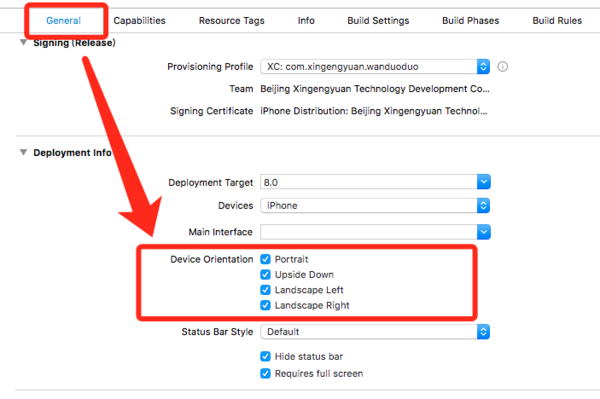
可以看到这种勾选方式允许你进行四个方向的配置,并且这种勾选方式会直接在你的项目plist文件中添加

但是由于在这里配置是对项目启动时lanuch界面产生影响,而往往我们又没有对lanuch进行横竖屏适配,所以在这个时候我们就需要使用第二种方式进行配置。
在项目中的AppDelegate文件中进行配置。
#pragma mark - InterfaceOrientation //应用支持的方向

- (UIInterfaceOrientationMask)application:(UIApplication *)application supportedInterfaceOrientationsForWindow:(UIWindow *)window {

    return UIInterfaceOrientationMaskAllButUpsideDown;

}
搭配UIInterfaceOrientationMask使用,你可以很方便的让你项目开启你所需要的横竖屏权限和限制条件。
三 在VC中如何控制横竖屏
我们都知道MVC架构,那么显而易见,在我们开启了项目的横竖屏的限制之后,需要在ViewController进行相应的配置,才能真正实现横竖屏。
开启横竖屏,我们需要在VC中添加如下代码
// 设备支持方向

- (UIInterfaceOrientationMask)supportedInterfaceOrientations {

    return UIInterfaceOrientationMaskAll;

}

// 默认方向

- (UIInterfaceOrientation)preferredInterfaceOrientationForPresentation {

    return UIInterfaceOrientationPortrait; // 或者其他值 balabala~

}
而对于横竖屏,手机端一般有两种情况,一种是手机没有开启横竖屏锁定,用户将手机横屏时触发的。对于第一种情况,我们只需要在VC中添加:
// 开启自动转屏

- (BOOL)shouldAutorotate {

    return YES;

}
另一种是我们在项目中的某些条件下强行让屏幕横屏,例如大图预览,视频播放,等等。而对于这种情况,我们可以使用下面
iOS 横竖屏适配的更多相关文章
- iOS 横竖屏适配 笔记
研究消息转发机制 已经一周多了,但是 还是没整理出博客, 还是先写一个 项目中遇到的 横竖屏适配问题. // 开启自动转屏 - (BOOL)shouldAutorotate { return YES; ...
- 48 (OC)* 适配iPad和iPhone、以及横竖屏适配。
一:核心方法 1.三个方法 1.1:开始就会触发 - (void)viewWillLayoutSubviews; 1.2:开始就会触发 - (void)viewDidLayoutSubviews; 1 ...
- css横竖屏适配
Css做到横竖屏适配:定义两个样式 { @media screen and (orientation: portrait){ Css[竖向定义样式] } @media screen and (orie ...
- iOS 横竖屏切换(应对特殊需求)
iOS 中横竖屏切换的功能,在开发iOS app中总能遇到.以前看过几次,感觉简单,但是没有敲过代码实现,最近又碰到了,demo尝试了几种情况,这里就做下总结.注意 横屏两种情况是反的你知道吗? UI ...
- iOS横竖屏切换的一些坑(持续更新)
最近在做视频类的App,遇到视频滚动播放的坑,紧接着就是横竖屏问题.之前太过天真不想做横竖屏配置.只是想旋转视频View,但是分享什么的包括AlertView还是竖屏样式,项目着急上线(1周提交一次也 ...
- iOS 横竖屏切换解决方案
iOS要实现横竖屏切换很简单,不需要使用任何第三方,只需要实现几个方法就可以了. 1.设置系统支持横竖屏[General]->[Targets]-> [Deployment info]-& ...
- (一〇八)iPad开发之横竖屏适配
在iPad开发中,横竖屏的视图常常是不同的,例如侧边栏Dock,在横屏时用于屏幕较宽,可以展示足够多的内容,每个按钮都可以展示出标题:而竖屏时Dock应该比较窄,只显示图标不现实按钮标题. iPad比 ...
- ios 横竖屏通知
屏幕切换时,会发送一个通知.只要注册一个通知: [[NSNotificationCenter defaultCenter] addObserver:self selector:@selector(do ...
- IOS横竖屏控制与事件处理
公司App里面有个需求,即所有界面都是竖屏,且不允许横屏切换,唯独有一个图表界面允许横屏.那么,根据此需求处理如下: 首先,确保App本身应该允许转屏切换: 再次,我的App里面都是走UINaviga ...
随机推荐
- 对非正确使用浮点型数据而导致项目BUG的问题探讨
乘法分配律 在上小学的时候就已经学习过乘法分配律,乘法分配律的详细内容是:两个数的和与一个数相乘.能够先把他们分别与这个数相乘,再相加.得数不变.乘法分配律的定义还能够用表达式"(a+b)× ...
- ohasd failed to start: Inappropriate ioctl for device
今天同事在安装GI的时候出现故障.让我帮忙看一下. 以下记录例如以下: 问题现象: 在安装gi的时候运行root.sh报例如以下错误: Finished running generic part of ...
- AIDL调用指南
近期有需求要实现两个apk之间的通信,想到用AIDL来实现,现写一个demo学习下AIDL怎样使用. 这里我要实现一个apk(client端)调用还有一个apk(server端)的方法. 先实现ser ...
- c++ about SLL(Static-Link Library) and DLL(Dynamic-Link Library)
First thing first, Wiki: http://en.wikipedia.org/wiki/Dynamic-link_library http://en.wikipedia.org/w ...
- Python 中,matplotlib绘图无法显示中文的问题
在python中,默认情况下是无法显示中文的,如下代码: import matplotlib.pyplot as plt # 定义文本框和箭头格式 decisionNode = dict(boxsty ...
- java & c sharp 的关联
第一.java是真正的与平台无关,c sharp不是,他只是口头上的与平台无关,最后,却要靠别人来实现非微软平台的类库. 第二.java中的类名.class 和c#的 typeof(类名)或者getT ...
- UI-2-UILabel&UIImageView-补充
课程要点: 控件之间的继承关系. UILabel UIImageView 利用UIImageView实现帧动画 补充 试图之间的继承关系 昨天学习UIView的时候,了解到UIView里面有以下几个常 ...
- eclipse 建立maven项目 显示红叉的解决方法
1.建立好之后就会发现项目有红叉. 这时发现查查在main处,打开项目>属性>Java Build Path>source,发现里边有红叉(如下图),这是由于我们的src/main下 ...
- JQuery IN ACTION读书笔记之一: JQuery选择器
本章关注两个通过$()使用的常用功能: 通过选择器选择DOM元素,创建新DOM元素. 2.1 选择操作元素 JQuery采用了CSS的语法,而CSS的语法你可能已经很熟悉了.当然,JQuery也做了扩 ...
- gcc使用备忘
本文为原创文章,转载请指明该文链接 Options Controling the kind of Output -x language 明确说明输入文件的编码语言,没有该选项的话, gcc 会根据输入 ...