
在Centos7中安装elasticsearch5.5
在Centos7中安装elasticsearch5.5
第一步:必须要有jre支持
elasticsearch是用Java实现的,跑elasticsearch必须要有jre支持,所以必须先安装jre
可以参考 http://www.cnblogs.com/morgana/p/8688775.html
第二步:下载elasticsearch
进入官方下载 https://www.elastic.co/downloads/elasticsearch
因为是centos中运行 所以我们选 tar.gz压缩包;
下载后 用ftp上传到centos里 我们把这个文件上传到 /home/data/下
第三步:安装和配置elasticsearch
进入data目录 解压
[root@bogon ~]# cd /home/data/
[root@bogon data]# tar -zxvf elasticsearch-5.5.2.tar.gz
新建目录 剪切文件到新目录
[root@bogon data]# cd
[root@bogon ~]# mkdir /home/es/
[root@bogon ~]# mv /home/data/elasticsearch-5.5.2 /home/es/
我们执行,来启动 elasticsearch
[root@bogon ~]# sh /home/es/elasticsearch-5.5.2/bin/elasticsearch
报错了:
[2017-09-07T19:43:10,628][WARN ][o.e.b.ElasticsearchUncaughtExceptionHandler] [] uncaught exception in thread [main]
org.elasticsearch.bootstrap.StartupException: java.lang.RuntimeException: can not run elasticsearch as root
at org.elasticsearch.bootstrap.Elasticsearch.init(Elasticsearch.java:127) ~[elasticsearch-5.5.2.jar:5.5.2]
at org.elasticsearch.bootstrap.Elasticsearch.execute(Elasticsearch.java:114) ~[elasticsearch-5.5.2.jar:5.5.2]
at org.elasticsearch.cli.EnvironmentAwareCommand.execute(EnvironmentAwareCommand.java:67) ~[elasticsearch-5.5.2.jar:5.5.2]
at org.elasticsearch.cli.Command.mainWithoutErrorHandling(Command.java:122) ~[elasticsearch-5.5.2.jar:5.5.2]
at org.elasticsearch.cli.Command.main(Command.java:88) ~[elasticsearch-5.5.2.jar:5.5.2]
at org.elasticsearch.bootstrap.Elasticsearch.main(Elasticsearch.java:91) ~[elasticsearch-5.5.2.jar:5.5.2]
at org.elasticsearch.bootstrap.Elasticsearch.main(Elasticsearch.java:84) ~[elasticsearch-5.5.2.jar:5.5.2]
Caused by: java.lang.RuntimeException: can not run elasticsearch as root
at org.elasticsearch.bootstrap.Bootstrap.initializeNatives(Bootstrap.java:106) ~[elasticsearch-5.5.2.jar:5.5.2]
at org.elasticsearch.bootstrap.Bootstrap.setup(Bootstrap.java:194) ~[elasticsearch-5.5.2.jar:5.5.2]
at org.elasticsearch.bootstrap.Bootstrap.init(Bootstrap.java:351) ~[elasticsearch-5.5.2.jar:5.5.2]
at org.elasticsearch.bootstrap.Elasticsearch.init(Elasticsearch.java:123) ~[elasticsearch-5.5.2.jar:5.5.2]
... 6 more
意思是不能用root用户来启动,那我们新建一个用户来启动
[root@bogon ~]# useradd elastic
[root@bogon ~]# chown -R elastic:elastic /home/es/elasticsearch-5.5.2/
新建elastic用户 并且把目录权限赋予给elastic
我们切换成elastic用户,然后执行
[root@bogon ~]# su elastic
[elastic@bogon root]$ sh /home/es/elasticsearch-5.5.2/bin/elasticsearch
出来一大串info 说明成功了,但是这种方式是前台运行,不方便我们操作其他的 我们加下 -d 后台运行
先ctrl+c退出执行;
[elastic@bogon root]$ sh /home/es/elasticsearch-5.5.2/bin/elasticsearch -d
我们来检查下是否启动成功
[elastic@bogon root]$ ps -ef | grep elasticsearch
elastic 2962 1 23 19:48 pts/1 00:00:02 /home/java/jdk1.8.0_144/bin/java -Xms2g -Xmx2g -XX:+UseConcMarkSweepGC -XX:CMSInitiatingOccupancyFraction=75 -XX:+UseCMSInitiatingOccupancyOnly -XX:+AlwaysPreTouch -server -Xss1m -Djava.awt.headless=true -Dfile.encoding=UTF-8 -Djna.nosys=true -Djdk.io.permissionsUseCanonicalPath=true -Dio.netty.noUnsafe=true -Dio.netty.noKeySetOptimization=true -Dio.netty.recycler.maxCapacityPerThread=0 -Dlog4j.shutdownHookEnabled=false -Dlog4j2.disable.jmx=true -Dlog4j.skipJansi=true -XX:+HeapDumpOnOutOfMemoryError -Des.path.home=/home/es/elasticsearch-5.5.2 -cp /home/es/elasticsearch-5.5.2/lib/* org.elasticsearch.bootstrap.Elasticsearch -d
elastic 2977 2849 0 19:48 pts/1 00:00:00 grep --color=auto elasticsearch
注意 有朋友经常出现 如下错误
ERROR: [2] bootstrap checks failed
[1]: max file descriptors [4096] for elasticsearch process is too low, increase to at least [65536]
[2]: max virtual memory areas vm.max_map_count [65530] is too low, increase to at least [262144]
可以参考:http://www.cnblogs.com/morgana/p/8688793.html
我们来验证下服务是否正常运行 curl http://localhost:9200
[elastic@bogon root]$ curl http://localhost:9200
{
"name" : "K22mJd5",
"cluster_name" : "elasticsearch",
"cluster_uuid" : "R2qfXKtrQl2PwKdJMmPuMA",
"version" : {
"number" : "5.5.2",
"build_hash" : "b2f0c09",
"build_date" : "2017-08-14T12:33:14.154Z",
"build_snapshot" : false,
"lucene_version" : "6.6.0"
},
"tagline" : "You Know, for Search"
}
出来这个 说明配置OK。
第四步:允许外网连接配置
前面我们配置的仅仅是本机使用 但是我们比如集群以及其他机器连接 ,则需要配置下。
可以修改 /home/es/elasticsearch/config/elasticsearch.yml 文件
把 network.host 和 http.port 前面的 备注去掉 然后Host改成你的局域网IP即可
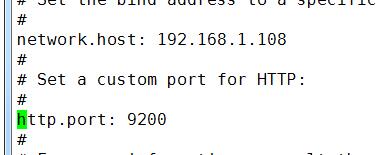
修改后 保存退出
然后我们把防火墙也关了
systemctl stop firewalld.service
systemctl disable firewalld.service 禁止防火墙开机启动
最后我们重启下elasticsearch服务
ps -ef | grep elasticsearch 找到进程号
然后kill -9 进程号
再启动下elasticsearch
我们用谷歌浏览器请求下 http://192.168.1.108:9200/
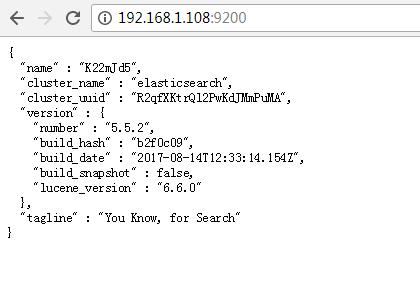
OK 出现这东西 才算配置完成;
在Centos7中安装elasticsearch5.5的更多相关文章
- 在centos7中安装Robot Framework
安装前景介绍: 最初,我们是在Windows环境下搭建Robot Framework来对我们的服务进行接口测试的(想知道如何在Windows下安装Robot Framework,可以参考我同事的博客h ...
- centos7中安装、配置、验证、卸载redis
本文介绍在centos7中安装.配置.验证.卸载redis等操作,以及在使用redis中的一些注意事项. 一 安装redis 1 创建redis的安装目录 利用以下命令,切换到/usr/local路径 ...
- centos7中安装mongodb3.6
centos7中安装mongodb3.6 首先更新系统 yum -y update 1.安装Mongodb 编辑Mongodb安装源 vim /etc/yum.repos.d/mongodb-org- ...
- centos7中安装mysql
centos7中安装mysql网上已经很多资源了,我就不在赘述了.我这里只是记录下我安装的时候出现的一些问题. 原文:https://www.cnblogs.com/bigbrotherer/p/72 ...
- CentOS7中安装MySQL(简便)及 网站的搭建
一.首先,我们需要配置CentOS7中网络环境的搭建,物理机IP为192.168.100.39,虚拟机IP为192.168.100.139,网络模式设置为桥接模式 ,再进入系统挂载光盘.输入命令 ...
- CentOS7中安装redis5.0
1. 环境介绍 CentOS7 (未安装Development Tools) 2. 下载Redis5.0-rc3 wget -O redis-5.0-rc3.tar.gz https://github ...
- CentOS7 中安装 MySQL
0. 说明 参考 centos7.2安装MySQL CentOS 7 下 Yum 安装 MySQL 5.7 两种方式安装 MySQL 安装 MySQL(yum) & 安装 MySQL(yum) ...
- 在Centos7中安装Docker并实例化Mysql
首先 本文是一篇安装流程,从初始的Centos7安装Docker后实例化一个Mysql的整个流程,其中会包含一些需要注意的疑点和坑. 实例化的Mysql是将数据和配置保存在宿主机. 注意,在安装Doc ...
- Docker(一) - CentOS7中安装Docker - (视频教程)
Docker的使用越来越多,安装也相对简单.本文使用视频的方式展示在CentOS7系统中安装Docker,本文更适合于准备入门学习Docker的童靴. 以下视频,请带上耳机开始聆听 (双击全屏播放) ...
随机推荐
- <mvc:default-servlet-handler/>的作用
优雅REST风格的资源URL不希望带 .html 或 .do 等后缀.由于早期的Spring MVC不能很好地处理静态资源,所以在web.xml中配置DispatcherServlet的请求映射,往往 ...
- [转载]JAVA获取word表格中数据的方案
上一个项目的开发中需要实现从word中读取表格数据的功能,在JAVA社区搜索了很多资料,终于找到了两个相对最佳的方案,因为也得到了不少网友们的帮助,所以不敢独自享用,在此做一个分享. 两个方案分别是: ...
- java中商业数据计算时用到的类BigDecimal和DecimalFormat
1.引言 借用<Effactive Java>这本书中的话,float和double类型的主要设计目标是为了科学计算和工程计算.他们执行二进制浮点运算,这是为了在广域数值范围上提供较为精确 ...
- OC-通知+Block
=================================== 一.通知(NSNotification) NSNotification 通知类,这个类中有 NSNotificationCent ...
- react-redux: counter
store: import {createStore,applyMiddleware, compose} from "redux"; import thunk from " ...
- css两列自适应宽度布局(左定宽,右自适应)
1.利用BFC: <div id="root"> <div class="left">左</div> <div cla ...
- 如何在PostgreSQL中建只读账号
转: 如何在PostgreSQL中建只读账号 Posted on 2014-01-21 22:00:15 by osdba 在PostgreSQL中并没有CREATE TABLE权限名称,这是与其它数 ...
- [Mvel]Mvel2.0使用指南一 基础
MVEL在很大程度上受到Java语法的启发,作为一个表达式语言,也有一些根本的区别,旨在更高的效率,例如:直接支持集合.数组和字符串匹配等操作以及正则表达式. MVEL用于执行使用Java语法编写的表 ...
- cursor光标类型
今天早上在网上看到一篇关于光标类型的总结代码,很好,特定拿来: 最终结果: 代码: <!DOCTYPE html> <html lang="zh-cn"> ...
- MySQL auto_increment介绍 以及 查询和修改auto_increment的方法
一.auto_increment使用方法 .创建table时设置auto_increment属性和初始值100 create table nonove ( id bigint unsigned not ...