
phpmailer绑定邮箱
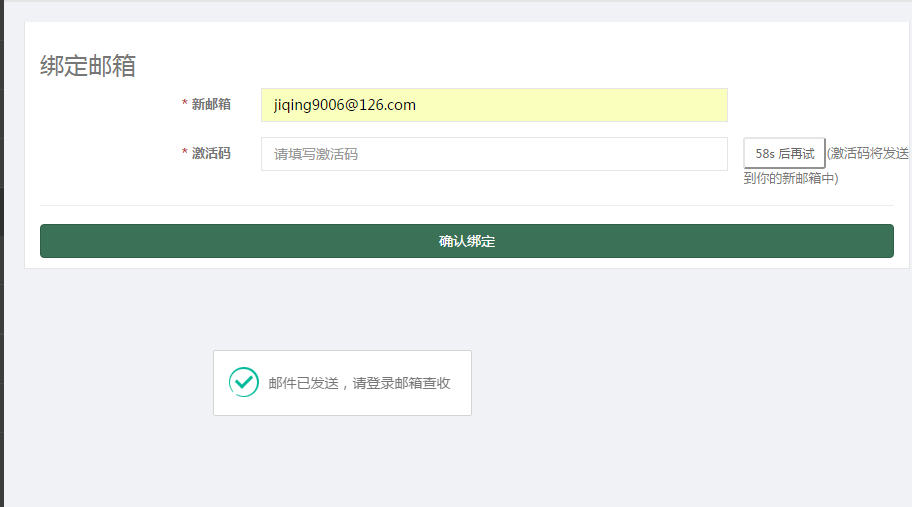
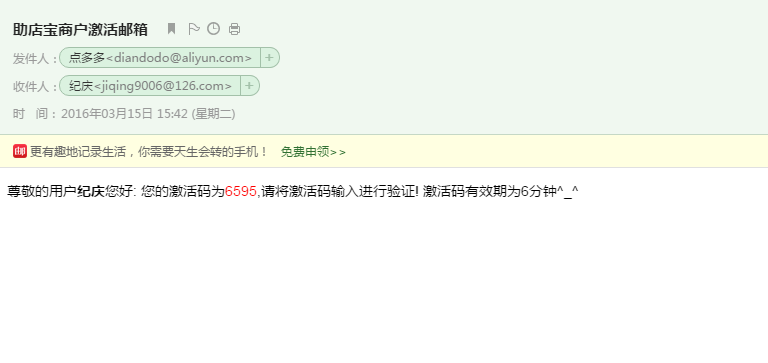
1.配置
<?php

return array (

  'email_host' => 'smtp.aliyun.com',

  'email_port' => '25',

  'email_username' => 'diandodo@aliyun.com',

  'email_password' => 'xxxxxx',

  'email_from' => 'diandodo@aliyun.com',

  'email_fromname' => '点多多',

  'email_subject' => '助店宝商户激活邮箱',

  'email_body' => "尊敬的用户{$username}您好:

       您的激活码为<font color='red'>{$code}</font>,请将激活码输入进行验证! 激活码有效期为6分钟^_^",

);
2.发送函数
// 发送邮件

    private function _sendEmail($email,$code,$username = '') {

        import('@.ORG.phpmailer');

        $mail = new PHPMailer(); //建立邮件发送类,类名不一定与引入的文件名相同

        $mail->CharSet = "UTF-8";

        $mail->IsSMTP(); // 使用SMTP方式发送

        $mail->Host = C('email_host'); // 您的企业邮局域名

        $mail->SMTPAuth = true; // 启用SMTP验证功能

        $mail->Username = C('email_username'); // 邮局用户名(请填写完整的email地址)

        $mail->Password = C('email_password'); // 邮局密码

        $mail->Port=C('email_port');

        $mail->From = C('email_from'); //邮件发送者email地址

        $mail->FromName = C('email_fromname');

        $mail->AddAddress("$email", "$username");

        $mail->IsHTML(true); // set email format to HTML //是否使用HTML格式

        $mail->Subject = C('email_subject'); //邮件标题

        $email_body = "尊敬的用户<strong>{$username}</strong>您好:

       您的激活码为<font color='red'>{$code}</font>,请将激活码输入进行验证! 激活码有效期为6分钟^_^";

        $mail->Body = $email_body; //邮件内容,上面设置HTML,则可以是HTML

        if(!$mail->Send())

        {

            return array('status'=>2,'info'=>$mail->ErrorInfo);

        } else {

            return array('status'=>1,'info'=>'发送成功');;

        }

    }
3.生成验证码保存到session中,并发送
// 发送邮箱激活码

    public function sendActivationcode() {

        session($this->activationtime, null);

        $activationtime = session($this->activationtime);

        $email = $this->_post('email', 'trim');

        if (IS_AJAX && (!$activationtime || time() > $activationtime)) {

            $activationcode = rand(1000, 9999);

            $res = $this->_sendEmail($email,$activationcode,$this->user['username']);

            if($res['status'] == 1) {

                //设置发送限制时间

                session($this->activationtime, time() + 50);

                session($this->activationcode, array('code' => $activationcode, 'time' => time() + 600));

                $this->ajaxReturn(array('result' => true));

            } else {

                //发送失败写入日志文件

                $log = date('Y-m-d H:i:s') . " 发送失败:{$res['info']}" . PHP_EOL;

                file_put_contents(RUNTIME_PATH . 'Log/activationcode.log', $log, FILE_APPEND);

                $this->ajaxReturn(array('result' => false, 'error' => $res['info']));

            }

        } else {

            $this->ajaxReturn(array('result' => false, 'error' => '错误的请求'));

        }

    }
4.验证并绑定
// 绑定邮箱

    public function bind_email() {

        if (IS_POST) {

            // 获取验证码

            $activationcode = $this->_post('activationcode','trim');

            $email = $this->_post('email','trim');

            $session_activationcode = session($this->activationcode);

            if (time() > $session_activationcode['time']  || $activationcode != $session_activationcode['code']) {

                $this->error('验证码有误');

            } else {

                M('User')->where(array('id'=>$this->user['id']))->save(array('email'=>$email));

                $this->success('绑定成功',U('Account/my'));

            }

        } else {

            $this->display();

        }

    }
小结:
1.这是一种思路,跟发送手机验证码差不多。
2.区别在于一个是发送短信,一个是发送邮件。
3.二一个,一个发送主体是阿里大鱼,一个发送主体是公司申请的邮箱。
4.三一个,发送短信收费,发送邮件免费。
phpmailer绑定邮箱的更多相关文章
- AspNetCore-MVC实战系列(二)之通过绑定邮箱找回密码
AspNetCore - MVC实战系列目录 . 爱留图网站诞生 . AspNetCore - MVC实战系列(一)之Sqlserver表映射实体模型 . AspNetCore-MVC实战系列(二)之 ...
- PHPMailer发送邮箱(ThinkPHP实战篇)
1.下载phpmailer文件库 2.引用文件,此处将代码放到 :函数库中,function.php function sendConsultantMessage($sendData){ Vendor ...
- PHPMailer发送邮箱
1.可以参考的链接.http://www.helloweba.com/view-blog-205.html 2.下载最新的PHPMailer文件库 3.主要代码 class.phpmailer.php ...
- PHP(ThinkPHP5.0) + PHPMailer 进行邮箱发送验证码
GitHub下载最新版第三方类库PHPMailer: 第一步: 打开网址https://github.com/PHPMailer/PHPMailer/ 下载PHPMailer,PHPMailer 需要 ...
- JIRA绑定邮箱
[管理-系统-外发邮件] 之前配置QQ邮箱没有成功,后来使用阿里邮箱一次就成功了 [保存]成功后可以测试一下
- Java案例-用户注册邮箱绑定激活功能实现
<–start–> 需求描述:当客户打开收到邮箱激活码的邮件,点击激活链接,正确填写激活码后就会完成邮箱激活的步骤. 在后台编程代码编写中,有以下几个要点: ① 接收客户的手机号码和邮箱激 ...
- outlook2016用Exchange轻松绑定腾讯企业邮箱
系统版本:Win10 X64 1709 英文版 邮箱:Outlook2016 背景知识: 1.发送邮件均使用SMTP协议(SMTP 全称“Simple Mail Transfer Protocol”, ...
- Django商城项目笔记No.14用户部分-用户中心邮箱绑定
保存邮箱界面如下 接口设计如下 视图逻辑: 因为url是不接受pk参数的,所以UpdateApiView无法确定要更新哪个模型类,所以要重写get_object,告诉他更新哪个模型类.这里更新的是us ...
- thinkphp phpmailer邮箱验证
thinkphp 关于phpmailer的邮箱验证 一 . 登陆自己的邮箱,例如:qq邮箱.登陆qq邮箱在账户设置中开启smtp服务: 之后回发送一个授权码 , 这个授权码先保存下来,这个授权码在后 ...
随机推荐
- git常用操作 配置用户信息、拉取项目、提交代码、分支操作、版本回退...
git常用操作 配置用户信息.拉取项目.提交代码.分支操作.版本回退... /********git 配置用户信息************/ git config --global user.name ...
- JavaScript 兼容各大浏览器阻止冒泡事件
JavaScript 兼容各大浏览器阻止冒泡事件 function stopEvent(event) { //阻止冒泡事件 //取消事件冒泡 var e = arguments.callee.call ...
- 谈谈你对Glide和Picasso他们的对比的优缺点
1.Picasso和Glide的withi后面的参数不同 Picasso.with(这里只能传入上下文) . Glide.with,后面可以传入上下文,activity实例,FragmentA ...
- 进入root权限操作
su:authentication failure的解决办法 $ su - rootPassword:su: Authentication failureSorry. 这时候输入 $ sudo pas ...
- 用WebClient在异步下载或上传时每次只进行一个任务 C#
当在每次上传或者下载的时候,我只想进行一个任务的,我用的是WebClient类,但是我又不想用同步的方法UploadFile.DownloadFile,因为WebClient这个类的同步方法没有Upl ...
- 配置Nginx作为反向代理服务器
最近在实习公司的开发一个项目,项目是前后端彻底分离的项目,前端项目和后端项目各监听着特定的端口号,显然不是80的通用端口,为了不在地址栏上输入IP+端口号的形式,我们可以使用Nginx作为反向代理服务 ...
- 八 web爬虫讲解2—urllib库爬虫—ip代理—用户代理和ip代理结合应用
使用IP代理 ProxyHandler()格式化IP,第一个参数,请求目标可能是http或者https,对应设置build_opener()初始化IPinstall_opener()将代理IP设置成全 ...
- shiro源码解析--------欢迎指出错误地方,还有一起讨论一下ShiroFilterFactoryBean配置过滤URL规则
啦啦啦啦 啦啦啦啦啦 啦啦啦啦啦 啦啦啦啦啦 啦啦啦啦啦 啦啦啦啦啦 啦啦啦啦啦 啦啦啦啦啦 啦啦啦啦啦 啦啦啦啦啦 啦啦啦啦啦 啦啦啦啦啦 啦啦啦啦啦 啦啦啦啦啦 啦啦啦啦啦 啦啦啦啦啦 啦啦啦啦啦 ...
- 通过使用scrapy爬取某学校全网
通过遍历全网url 实现爬取全网内容 忽略“.doc"等文件网页暂不处理,只爬取整个页面,不做清洗 spider.py # -*- coding: utf-8 -*- import scra ...
- markdown 语法汇总
Markdown是什么? Markdown是一种轻量级标记语言,它以纯文本形式(_易读.易写.易更改_)编写文档,并最终以HTML格式发布. Markdown也可以理解为将以MARKDOWN语言编写的 ...